https://github.com/roy-radhakanta/vscode-color-preview
Enhance your development workflow with a feature that previews colors alongside their codes,
https://github.com/roy-radhakanta/vscode-color-preview
color css html javascript js json scss typescript vscode vscode-extension
Last synced: 5 months ago
JSON representation
Enhance your development workflow with a feature that previews colors alongside their codes,
- Host: GitHub
- URL: https://github.com/roy-radhakanta/vscode-color-preview
- Owner: roy-radhakanta
- License: mit
- Created: 2024-09-06T16:23:05.000Z (almost 2 years ago)
- Default Branch: main
- Last Pushed: 2024-10-12T18:11:56.000Z (over 1 year ago)
- Last Synced: 2025-04-19T17:58:56.744Z (about 1 year ago)
- Topics: color, css, html, javascript, js, json, scss, typescript, vscode, vscode-extension
- Language: JavaScript
- Homepage:
- Size: 240 KB
- Stars: 1
- Watchers: 1
- Forks: 1
- Open Issues: 2
-
Metadata Files:
- Readme: README.md
- Changelog: CHANGELOG.md
- License: LICENSE
Awesome Lists containing this project
README

# Color Preview (color-preview)
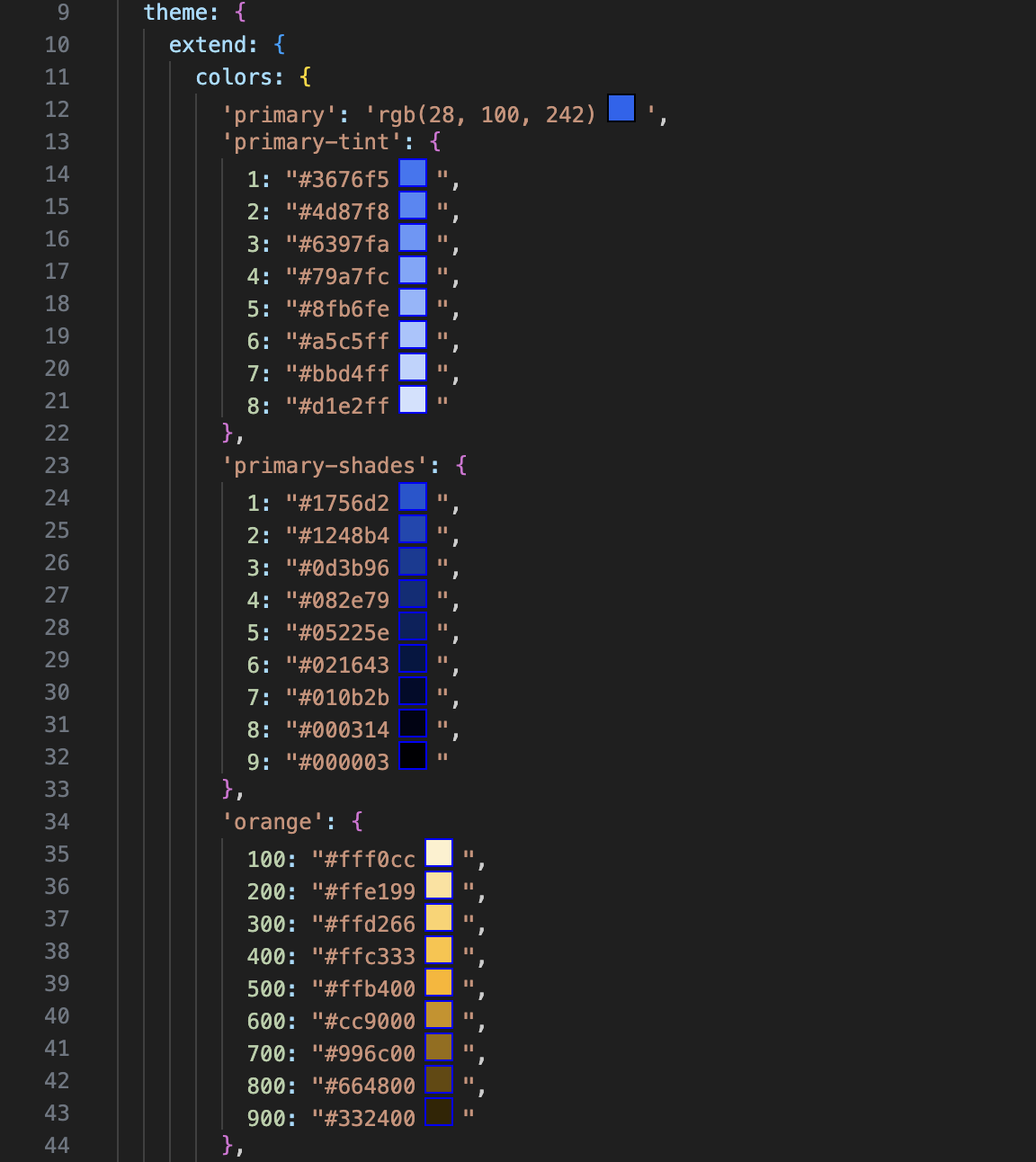
Enhance your development workflow with a feature that previews colors alongside their codes, whether they are in HEX, HSL, RGB, or RGBA formats. This functionality supports a range of file types and frameworks. It allows you to view color previews directly within your files, improving accuracy and efficiency in your design and development processes.
### Supported Languages
```
1. TypeScript (TS)
2. JavaScript (JS)
3. CSS
4. SCSS
5. HTML
6. JSON
7. SASS
```
### Supported Frameworks
```
1. React
2. NextJS
3. Vue
```
### Preview
### Features
Enhance your development workflow with our advanced Color Preview Extension for Visual Studio Code. This extension provides real-time color previews, making it easier than ever to work with color codes in your codebase. Key features include:
- **Instant Previews**: Automatically displays a color preview box next to color values as you open, save, or switch between files.
- **Tailwind Integration**: Effortlessly detects and previews colors defined in your `tailwind.config.js`, enhancing your experience with Tailwind CSS.
Elevate your coding efficiency and accuracy with dynamic, intelligent color previews tailored for professional and modern development environments.
### How to activate it on a project ?
To activate the extension in the project, follow these steps:
⚠️ It does not save any state; you need to activate it again after closing VS Code.
Mac
```command + shift + p``` >>>
select ```Color Preview```
Windows
```control + shift + p``` >>>
```select``` >>> ```Color Preview```
Ubuntu
```control + shift + p``` >>>
```select``` >>> ```Color Preview```
### License 🔓
This extension is licensed under [MIT License](https://github.com/roy-radhakanta/VsCode-color-preview/blob/main/LICENSE).