https://github.com/royashbrook/crispy-adventure
variant of laughing-barnacle that pulls an item from O365 list
https://github.com/royashbrook/crispy-adventure
Last synced: 2 months ago
JSON representation
variant of laughing-barnacle that pulls an item from O365 list
- Host: GitHub
- URL: https://github.com/royashbrook/crispy-adventure
- Owner: royashbrook
- License: mit
- Created: 2022-04-28T20:19:52.000Z (about 4 years ago)
- Default Branch: main
- Last Pushed: 2023-03-06T04:08:13.000Z (over 3 years ago)
- Last Synced: 2024-05-28T17:57:57.679Z (about 2 years ago)
- Language: JavaScript
- Homepage: crispy-adventure.vercel.app
- Size: 527 KB
- Stars: 0
- Watchers: 2
- Forks: 0
- Open Issues: 5
-
Metadata Files:
- Readme: README.md
- License: LICENSE
Awesome Lists containing this project
README
# New Project
✨ Project template using:
- [Svelte](https://svelte.dev)
- [Snowpack](https://snowpack.dev/)
- [Simple.css](https://simplecss.org/)
- [svelte-spa-router](https://github.com/ItalyPaleAle/svelte-spa-router)
- [Microsoft MSAL.js](https://docs.microsoft.com/en-us/azure/active-directory/develop/msal-overview)
- [Microsoft Graph API](https://docs.microsoft.com/en-us/azure/active-directory/develop/microsoft-graph-intro)
- [Office 365](https://www.office.com/)
This project is based on [laughing-barnacle](https://github.com/royashbrook/laughing-barnacle).
It provides an example of:
- A SPA application that
- Auto authenticates using MSAL.js upon startup
- Automatically gets a token for Microsoft Graph API upon successful authenication
- Provides a button to pull a value from a O365 site list by id and display it
Since CORS is not supported for SPA apps directly to a Azure Key Vault, this is showing how you could store that data in a sharepoint list and pull it.
While lack of CORS support with the Key Vault was the inspiration for creating this, everything here would work the same way if you wanted to pull list items from O365 for any other reason.
# Install
See [laughing-barnacle](https://github.com/royashbrook/laughing-barnacle) as the major steps are the same with a couple of notable differences:
1. The app registration must have permissions of `Sites.Read.All`
2. You need a sharepoint list
Below, I'll include details on how I added the site and the list.
## Create sharepoint site to hold the secret list

_note: this is a private site with only one list on it to hold the 'secret' data. this could also be a secured list on an existing site, but i figured i would include the process i used to test this._
## Create a new list to hold the secret data

## Add a secret item to the secret list
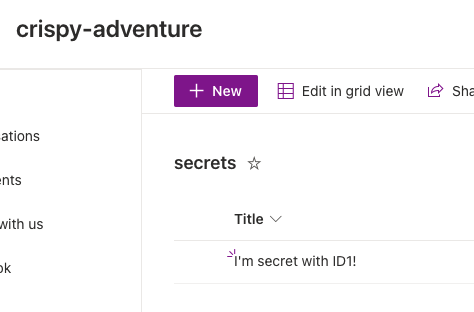
We are going to pull it by the record ID in this example, so we don't need another field to put the data in. Sinced this is the first record, the ID will be 1. You could modify the graph query to pull multiple items, or search by name or use other fields, etc etc. But for the sake of this example this will do the trick.
## Get the path to use for the query using Microsoft Graph Explorer
I want to simply query this one record, so off to graph explorer to find all of my ids again. Let's search for my site:

So our site id is appears to be `ashbrookio.sharepoint.com,5d8c920c-cd55-4c5e-be46-784c50e0dded,591d0d2c-7744-45e9-ab45-053a32a8df87`
We can view lists on that site with:
https://graph.microsoft.com/v1.0/sites/ashbrookio.sharepoint.com,5d8c920c-cd55-4c5e-be46-784c50e0dded,591d0d2c-7744-45e9-ab45-053a32a8df87/lists
We can enumerate the items on that list with:
https://graph.microsoft.com/v1.0/sites/ashbrookio.sharepoint.com,5d8c920c-cd55-4c5e-be46-784c50e0dded,591d0d2c-7744-45e9-ab45-053a32a8df87/lists/secrets/items
We can reduce the data returned by adding some query parameters like:
https://graph.microsoft.com/v1.0/sites/ashbrookio.sharepoint.com,5d8c920c-cd55-4c5e-be46-784c50e0dded,591d0d2c-7744-45e9-ab45-053a32a8df87/lists/secrets/items/1?expand=fields(select=title)&$select=id
And, finally, we can remove all of the odata metadata by adding this header:
`headers.append("Accept", "application/json;odata.metadata=none");`
This will leave you with a nice clean'ish response like:
```
{
"id": "1",
"fields": {
"Title": "I'm secret with ID1!"
}
}
```
Unfortunately, there doesn't appear to be a way (that I could find) to *just* get one of the fields values in the response. I don't really need the ID, and would be perfectly happy with just getting the text value back for the property I want, but this does the trick. If anyone sees this and knows how to just get the text, please reach out. Everything would be the same, but I imagine we'd just update the query parameters above.
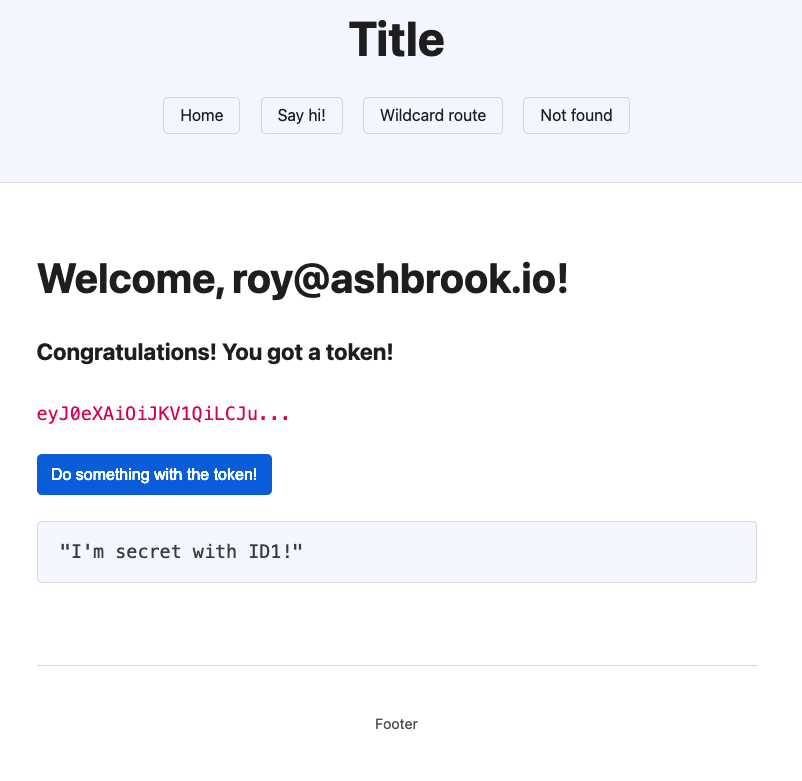
In my case, I just pulled the `Title` property out to display, and it looked like this after hitting the button: