https://github.com/royosherove/repo-swarm
RepoSwarm is an AI powered multi-repo architecture discovery platform that generates its output in a specialized output repository that you can use for agent context.
https://github.com/royosherove/repo-swarm
agentic ai architecture
Last synced: 5 months ago
JSON representation
RepoSwarm is an AI powered multi-repo architecture discovery platform that generates its output in a specialized output repository that you can use for agent context.
- Host: GitHub
- URL: https://github.com/royosherove/repo-swarm
- Owner: royosherove
- License: apache-2.0
- Created: 2025-09-06T13:19:54.000Z (10 months ago)
- Default Branch: main
- Last Pushed: 2026-01-10T13:51:14.000Z (6 months ago)
- Last Synced: 2026-02-12T11:25:18.102Z (5 months ago)
- Topics: agentic, ai, architecture
- Language: Python
- Homepage:
- Size: 859 KB
- Stars: 198
- Watchers: 6
- Forks: 44
- Open Issues: 8
-
Metadata Files:
- Readme: README.md
- License: LICENSE
Awesome Lists containing this project
README
# RepoSwarm🤖

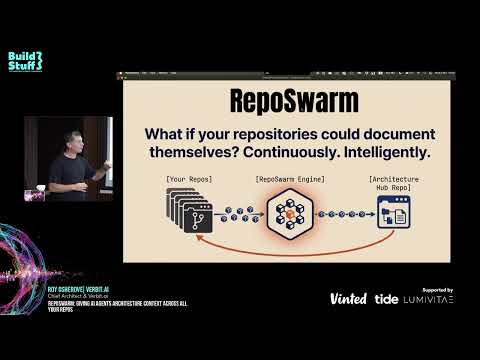
🎬 **Architecture Overview (click to play)**
[](https://www.youtube.com/watch?v=rOMf9xvpgtc)
RepoSwarm is an AI powered multi-repo architecture discovery platform that generates its output in a specialized output repository that you can use for agent context.
see example results repo at [repo-swarm-sample-results-hub](https://github.com/royosherove/repo-swarm-sample-results-hub).
## Credits
RepoSwarm was born out of a hackathon we ran at Verbit, in which our team, comprised of [Moshe](https://github.com/mosher), [Idan](https://github.com/Idandos) and [Roy](https://github.com/royosherove) created this project together.
## What's This For?
RepoSwarm is an intelligent agentic-like engine that:
- 🔍 Analyzes GitHub repositories using Claude Code SDK
- 📝 Generates standardized `.arch.md` architecture files
- 🔄 Runs daily via Temporal workflows on repos with new commits
- 💾 Caches results to avoid redundant analysis
- Writes the results into a results repository that you configure
📋 **See it in action**: Check out [RepoSwarm's self-analysis report](https://github.com/royosherove/repo-swarm-sample-results-hub/blob/main/repo-swarm.arch.md) - an example of RepoSwarm investigating its own codebase!
## How It Works
RepoSwarm runs as a Temporal workflow that automatically processes repositories and feeds a configured targer repository.
```mermaid
graph TB
A[Your Repositories] -->|New commits detected| B[repo-swarm]
B -->|Temporal Workflow
Daily execution| C[Clone & Analyze]
C -->|AI Analysis
using Claude| D[Generate .arch.md]
D -->|Cache in DynamoDB or file system| E[Store Results]
E -->|Auto-commit| F[Results Repository]
F -->|Query with AI| G[Reports & Insights]
style A fill:#e1f5fe,color:#000
style B fill:#fff3e0,color:#000
style F fill:#f3e5f5,color:#000
style G fill:#e8f5e8,color:#000
```
🔗 **Analysis prompts**: [prompts/shared](prompts/shared) - The AI prompts used to understand your codebases
🏗️ **Generated docs**: [repo-swarm-sample-results-hub](https://github.com/royosherove/repo-swarm-sample-results-hub) - Where the `.arch.md` files end up
## Quick Start
### Prerequisites
- Python 3.12+
- Claude API key
### Installation
**Install mise** (tool version manager):
```bash
# macOS
brew install mise
# Linux/WSL
curl https://mise.run | sh
```
**🚀 Run the setup wizard** (recommended):
```bash
# Interactive setup wizard - sets up everything automatically
mise get-started
```
This wizard will:
- ✅ Create your `.env.local` file
- ✅ Configure your Claude API key
- ✅ Set up GitHub integration (optional)
- ✅ Configure Architecture Hub repository
- ✅ Set up git user details
**Manual setup** (alternative):
```bash
# Copy local environment template
cp env.local.example .env.local
# Edit .env.local with your Claude API key
# ANTHROPIC_API_KEY=your_key_here
```
**Install dependencies**:
```bash
mise install
mise run dev-dependencies
```
### Running RepoSwarm
#### Recommended: Full Local Testing
```bash
# Analyze repositories and generate .arch.md files
# Uses file-based storage (no AWS required)
mise investigate-all
```
This command:
- ✅ Loads configuration from `.env.local`
- ✅ Uses file-based storage (no DynamoDB required)
- ✅ Automatically starts Temporal server and worker
- ✅ Analyzes repositories from `src/prompts/repos.json`
- ✅ Stores `.arch.md` files in `temp/` directory
#### Test Single Repository
```bash
# Test a specific repository
mise investigate-one https://github.com/user/repo
# Or use predefined repos
mise investigate-one hello-world
```
## Configuration
### Adding Repositories
Edit `prompts/repos.json` to add repositories for analysis:
```json
{
"repositories": {
"my-backend": {
"url": "https://github.com/org/my-backend",
"type": "backend",
"description": "Main API service"
},
"my-frontend": {
"url": "https://github.com/org/my-frontend",
"type": "frontend",
"description": "React web app"
}
}
}
```
### Customizing Analysis Prompts
RepoSwarm uses specialized prompts for different repository types:
- 🔧 **Backend**: APIs, databases, services → [prompts/backend/](prompts/backend/)
- 🎨 **Frontend**: Components, routing, state → [prompts/frontend/](prompts/frontend/)
- 📱 **Mobile**: UI, device features, offline → [prompts/mobile/](prompts/mobile/)
- 📚 **Libraries**: API surface, internals → [prompts/libraries/](prompts/libraries/)
- ☁️ **Infrastructure**: Resources, deployments → [prompts/infra-as-code/](prompts/infra-as-code/)
- 🔗 **Shared**: Security, auth, monitoring → [prompts/shared/](prompts/shared/)
Each type has a `prompts.json` that defines which analysis steps to run.
## Mise Task Organization
RepoSwarm uses a logical naming convention for all mise tasks:
### Development Tasks (`dev-*`)
```bash
mise dev-server # Start Temporal server
mise dev-dependencies # Install Python dependencies
mise dev-worker # Start Temporal worker
mise dev-client # Run workflow client
mise dev-hello # Test basic workflow
mise kill # Stop all Temporal processes
mise dev-repos-list # List available repositories
mise dev-repos-update # Update repository list from GitHub
```
### Investigation Tasks (`investigate-*`)
```bash
mise investigate-all # Analyze all repositories locally
mise investigate-one # Analyze single repository locally
mise investigate-public # Analyze public repository
mise investigate-debug # Analyze with detailed logging
```
### Testing Tasks (`test-*`)
```bash
mise verify-config # Validate configuration and test repository access
mise test-all # Run complete test suite
mise test-units # Run unit tests only
mise test-integration # Run integration tests
mise test-dynamodb # Test DynamoDB functionality
```
### Docker Tasks (`docker-*`)
```bash
mise docker-dev # Build and run for development
mise docker-debug # Debug with verbose logging
mise docker-test-build # Test Docker build process
```
### Maintenance Tasks
```bash
mise cleanup-temp # Clean temporary files
mise monitor-workflow # Check workflow status
```
## Testing
```bash
# Run all tests
mise test-all
# Run unit tests only
mise test-units
# Run integration tests
mise test-integration
```
## Related Projects
- 🏗️ [**repo-swarm-sample-results-hub**](https://github.com/royosherove/repo-swarm-sample-results-hub) - The centralized repository where generated `.arch.md` files are stored and queried
- 📝 [Analysis prompts](prompts/shared/) - The AI prompts used to understand different types of codebases
## Understanding the Codebase
### Key Directories
```text
repo-swarm/
├── prompts/ # AI analysis prompts by repo type
│ ├── backend/ # API, database, service prompts
│ ├── frontend/ # UI, component, routing prompts
│ ├── mobile/ # Mobile app specific prompts
│ ├── libraries/ # Library/API prompts
│ ├── infra-as-code/ # Infrastructure prompts
│ ├── shared/ # Cross-cutting concerns (auth, security, etc)
│ └── repos.json # Repository configuration
│
├── src/
│ ├── investigator/ # Core analysis engine
│ │ ├── core/ # Main analysis logic
│ │ └── investigator.py # Main investigator class
│ │
│ ├── workflows/ # Temporal workflow definitions
│ ├── activities/ # Temporal activity implementations
│ ├── models/ # Data models and schemas
│ └── utils/ # Storage adapters and utilities
│
├── tests/ # Unit and integration tests
├── temp/ # Generated .arch.md files (local development)
└── scripts/ # Development and deployment scripts
```
### Getting Started with Development
1. **Explore the codebase**: Start with `src/investigator/core/` to understand the analysis engine
2. **Check existing prompts**: Look at `prompts/shared/` for examples of analysis prompts
3. **Run tests**: Use `mise test-all` to ensure everything works
4. **Try investigations**: Use `mise investigate-one hello-world` to see the system in action
### Need Help?
- Check existing issues and pull requests
- Look at the test files for usage examples
- Review the prompts in `prompts/` for analysis patterns
## Production Deployment
For production deployments, you need to deploy Temporal workers that can run on company servers or your local machine. The worker connects to a Temporal server (either locally or remotely) and processes workflow tasks.
### Temporal Worker Deployment
**Key Concepts:**
- **Worker**: A process that hosts workflow and activity implementations
- **Task Queue**: Named queue where workers poll for tasks
- **Temporal Server**: Orchestrates workflow execution and task distribution
**Deployment Options:**
1. **Local Development**: Run workers on your development machine
2. **Company Servers**: Deploy workers to internal infrastructure
3. **Cloud Infrastructure**: Deploy to any cloud provider (AWS, GCP, Azure, etc.)
4. **Containerized**: Run workers in Docker containers or Kubernetes
### Getting Started with Worker Deployment
```bash
# Start Temporal server (local development)
mise dev-server
# Run worker in background
mise dev-worker &
# Trigger workflow via client
mise dev-client
# Monitor workflow status
mise monitor-workflow investigate-repos-workflow
```
### Production Worker Setup
For production environments:
1. **Deploy Worker Image**: Containerize your worker application
2. **Connect to Temporal Server**: Configure connection to your Temporal server
3. **Set Task Queue**: Workers listen on specific task queues
4. **Trigger via API**: Use Temporal client to start workflows
**Example Worker Deployment:**
```bash
# Run worker connecting to remote Temporal server
TEMPORAL_SERVER_URL=your-temporal-server:7233 mise dev-worker
```
### Client Integration
Clients trigger workflows by connecting to the Temporal server and specifying the task queue:
```python
# Example client integration
from temporalio.client import Client
async def trigger_investigation():
client = await Client.connect("your-temporal-server:7233")
await client.execute_workflow(
"investigate_repos_workflow",
args=["repo-url"],
id="workflow-id",
task_queue="investigation-queue"
)
```
For detailed worker deployment strategies, see the [Temporal Worker Deployments documentation](https://docs.temporal.io/production-deployment/worker-deployments).
### Monitoring
```bash
# Check workflow status
mise monitor-workflow investigate-repos-workflow
# Check Temporal server status
mise monitor-temporal
# View logs (local)
tail -f temp/investigation.log
```
## Advanced: System Architecture
### Workflow Orchestration
The system uses Temporal for reliable workflow orchestration:
1. **Cache Check**: Query DynamoDB to see if repo was already analyzed
2. **Clone**: Clone the repository to temporary storage
3. **Type Detection**: Determine if it's backend, frontend, mobile, etc.
4. **Structure Analysis**: Build a tree of files and directories
5. **Prompt Selection**: Choose appropriate analysis prompts based on repo type
6. **AI Analysis**: Send prompts + code context to Claude for analysis
7. **Result Storage**: Save results to DynamoDB and generate markdown files
8. **Cleanup**: Remove temporary files
### DynamoDB Caching
Cache invalidation happens when:
- Repository has new commits
- Branch has changed
- TTL expires (30 days)
- Manual cache clear requested
### Troubleshooting
#### Common Development Issues
**Temporal Server Connection**
```bash
# Check if Temporal server is running
mise monitor-temporal
# Start Temporal server if needed
mise dev-server
```
**Claude API Errors**
- Verify API key: `echo $ANTHROPIC_API_KEY | head -c 10` (should show first 10 chars)
- Check rate limits in your Anthropic dashboard
- Ensure you're using a valid Claude model name
**Test Failures**
```bash
# Run specific test suites
mise test-units # Unit tests only
mise test-integration # Integration tests only
mise test-dynamodb # DynamoDB tests
```
**Clean Development Environment**
```bash
# Stop all processes
mise kill
# Clean temporary files
mise cleanup-temp
# Reset everything
mise cleanup-temp && mise dev-dependencies
```
## Contributing
1. Fork the repository
2. Create a feature branch
3. Make changes and add tests
4. Ensure tests pass: `mise test-all`
5. Submit a pull request
### Development Workflow
```bash
# Set up development environment
mise dev-dependencies
mise dev-server
# Run tests before committing
mise test-all
# Clean up when done
mise kill
mise cleanup-temp
```
---
*Twin project: [repo-swarm-sample-results-hub](https://github.com/royosherove/repo-swarm-sample-results-hub) - Query and analyze the generated architecture documentation*
# License
This project is licensed under the Polyform Noncommercial License 1.0.0.
You may use, copy, and modify the code for non-commercial purposes only.
For commercial licensing, please contact roy at osherove dot_com.