https://github.com/roysadaka/lpd
A Fast, Extensible Trainer and Extensions for Pytorch
https://github.com/roysadaka/lpd
callbacks decay dense earlystopping extensions metrics modelcheckpoint monitor pytorch tensorboard trainer
Last synced: about 1 year ago
JSON representation
A Fast, Extensible Trainer and Extensions for Pytorch
- Host: GitHub
- URL: https://github.com/roysadaka/lpd
- Owner: RoySadaka
- License: mit
- Created: 2020-10-01T07:20:03.000Z (almost 6 years ago)
- Default Branch: master
- Last Pushed: 2023-03-28T11:55:50.000Z (over 3 years ago)
- Last Synced: 2025-05-03T05:55:24.016Z (about 1 year ago)
- Topics: callbacks, decay, dense, earlystopping, extensions, metrics, modelcheckpoint, monitor, pytorch, tensorboard, trainer
- Language: Python
- Homepage:
- Size: 288 KB
- Stars: 7
- Watchers: 1
- Forks: 1
- Open Issues: 0
-
Metadata Files:
- Readme: README.md
- Changelog: CHANGELOG.txt
- License: LICENSE.txt
Awesome Lists containing this project
README

# lpd
A Fast, Flexible Trainer with Callbacks and Extensions for PyTorch
``lpd`` derives from the Hebrew word *lapid* (לפיד) which means "torch".
## For latest PyPI stable release
[](https://badge.fury.io/py/lpd)
[](https://pepy.tech/project/lpd)

There are 2 types of ``lpd`` packages available
* ``lpd`` which brings dependencies for pytorch, numpy and tensorboard
```sh
pip install lpd
```
* ``lpd-nodeps`` which **you provide** your own dependencies for pytorch, numpy and tensorboard
```sh
pip install lpd-nodeps
```
[v0.4.12-beta](https://github.com/RoySadaka/lpd/releases) Release - contains the following:
* ``ThresholdChecker`` is updated to compute improvement according to last improved step and not to the best received metric
* Some minor cosmetic changes
Previously on lpd:
* ``Dense`` custom layer to support apply norm (configurable to before or after activation)
* ``StatsPrint`` callback to support printing best confusion matrix when at least one of the metrics is of type ``MetricConfusionMatrixBase``
* ``TransformerEncoderStack`` to support activation as input
* ``PositionalEncoding`` to support more than 3 dimensions input
* Updated Pipfile
* Fixed confusion matrix cpu/gpu device error
* Better handling on callbacks where apply_on_states=None (apply on all states)
* Bug fix in case validation samples are empty
## Usage
``lpd`` intended to properly structure your PyTorch model training.
The main usages are given below.
### Training your model
```python
from lpd.trainer import Trainer
from lpd.enums import Phase, State, MonitorType, MonitorMode, StatsType
from lpd.callbacks import LossOptimizerHandler, StatsPrint, ModelCheckPoint, Tensorboard, EarlyStopping, SchedulerStep, CallbackMonitor
from lpd.extensions.custom_schedulers import KerasDecay
from lpd.metrics import BinaryAccuracyWithLogits, FalsePositives
from lpd.utils.torch_utils import get_gpu_device_if_available
from lpd.utils.general_utils import seed_all
from lpd.utils.threshold_checker import AbsoluteThresholdChecker
seed_all(seed=42) # because its the answer to life and the universe
device = get_gpu_device_if_available() # with fallback to CPU if GPU not available
model = MyModel().to(device) # this is your model class, and its being sent to the relevant device
optimizer = torch.optim.SGD(params=model.parameters())
scheduler = KerasDecay(optimizer, decay=0.01, last_step=-1) # decay scheduler using keras formula
loss_func = torch.nn.BCEWithLogitsLoss().to(device) # this is your loss class, already sent to the relevant device
metrics = [BinaryAccuracyWithLogits(name='Accuracy'), FalsePositives(name='FP', num_class=2, threshold=0)] # define your metrics
# you can use some of the defined callbacks, or you can create your own
callbacks = [
LossOptimizerHandler(),
SchedulerStep(apply_on_phase=Phase.BATCH_END, apply_on_states=State.TRAIN),
ModelCheckPoint(checkpoint_dir,
checkpoint_file_name,
CallbackMonitor(monitor_type=MonitorType.LOSS,
stats_type=StatsType.VAL,
monitor_mode=MonitorMode.MIN),
save_best_only=True),
Tensorboard(summary_writer_dir=summary_writer_dir),
EarlyStopping(CallbackMonitor(monitor_type=MonitorType.METRIC,
stats_type=StatsType.VAL,
monitor_mode=MonitorMode.MAX,
patience=10,
metric_name='Accuracy'),
threshold_checker=AbsoluteThresholdChecker(monitor_mode=MonitorMode.MAX, threshold=0.01)),
StatsPrint(train_metrics_monitors=[CallbackMonitor(monitor_type=MonitorType.METRIC,
stats_type=StatsType.TRAIN,
monitor_mode=MonitorMode.MAX, # <-- notice MAX
metric_name='Accuracy'),
CallbackMonitor(monitor_type=MonitorType.METRIC,
stats_type=StatsType.TRAIN,
monitor_mode=MonitorMode.MIN, # <-- notice MIN
metric_name='FP')],
print_confusion_matrix=True) # since one of the metric (FalsePositives) is confusion matrix based, lets print the whole confusion matrix
]
trainer = Trainer(model,
device,
loss_func,
optimizer,
scheduler,
metrics,
train_data_loader, # DataLoader, Iterable or Generator
val_data_loader, # DataLoader, Iterable or Generator
train_steps,
val_steps,
callbacks,
name='Readme-Example')
trainer.train(num_epochs)
```
### Evaluating your model
``trainer.evaluate`` will return ``StatsResult`` that stores the loss and metrics results for the test set
```python
evaluation_result = trainer.evaluate(test_data_loader, test_steps)
```
### Making predictions
``Predictor`` class will generate output predictions from input samples.
``Predictor`` class can be created from ``Trainer``
```python
predictor_from_trainer = Predictor.from_trainer(trainer)
predictions = predictor_from_trainer.predict_batch(batch)
```
``Predictor`` class can also be created from saved checkpoint
```python
predictor_from_checkpoint = Predictor.from_checkpoint(checkpoint_dir,
checkpoint_file_name,
model, # nn.Module, weights will be loaded from checkpoint
device)
prediction = predictor_from_checkpoint.predict_sample(sample)
```
Lastly, ``Predictor`` class can be initialized explicitly
```python
predictor = Predictor(model,
device,
callbacks, # relevant only for prediction callbacks (see callbacks Phases and States)
name='lpd predictor')
predictions = predictor.predict_data_loader(data_loader, steps)
```
Just to be fair, you can also predict directly from ``Trainer`` class
```python
# On single sample:
prediction = trainer.predict_sample(sample)
# On batch:
predictions = trainer.predict_batch(batch)
# On Dataloader/Iterable/Generator:
predictions = trainer.predict_data_loader(data_loader, steps)
```
## TrainerStats
``Trainer`` tracks stats for `train/validate/test` and you can access them in your custom callbacks
or any other place that has access to your trainer.
Here are some examples
```python
train_loss = trainer.train_stats.get_loss() # the mean of the last epoch's train losses
val_loss = trainer.val_stats.get_loss() # the mean of the last epoch's validation losses
test_loss = trainer.test_stats.get_loss() # the mean of the test losses (available only after calling evaluate)
train_metrics = trainer.train_stats.get_metrics() # dict(metric_name, MetricMethod(values)) of the current epoch in train state
val_metrics = trainer.val_stats.get_metrics() # dict(metric_name, MetricMethod(values)) of the current epoch in validation state
test_metrics = trainer.test_stats.get_metrics() # dict(metric_name, MetricMethod(values)) of the test (available only after calling evaluate)
```
## Callbacks
Will be used to perform actions at various stages.
Some common callbacks are available under ``lpd.callbacks``, and you can also create your own, more details below.
In a callback, ``apply_on_phase`` (``lpd.enums.Phase``) will determine the execution phase,
and ``apply_on_states`` (``lpd.enums.State`` or ``list(lpd.enums.State)``) will determine the execution states
These are the current available phases and states, more might be added in future releases
### Training and Validation phases and states will behave as follow
```python
State.EXTERNAL
Phase.TRAIN_BEGIN
# train loop:
Phase.EPOCH_BEGIN
State.TRAIN
# batches loop:
Phase.BATCH_BEGIN
# batch
Phase.BATCH_END
State.VAL
# batches loop:
Phase.BATCH_BEGIN
# batch
Phase.BATCH_END
State.EXTERNAL
Phase.EPOCH_END
Phase.TRAIN_END
```
### Evaluation phases and states will behave as follow
```python
State.EXTERNAL
Phase.TEST_BEGIN
State.TEST
# batches loop:
Phase.BATCH_BEGIN
# batch
Phase.BATCH_END
State.EXTERNAL
Phase.TEST_END
```
### Predict phases and states will behave as follow
```python
State.EXTERNAL
Phase.PREDICT_BEGIN
State.PREDICT
# batches loop:
Phase.BATCH_BEGIN
# batch
Phase.BATCH_END
State.EXTERNAL
Phase.PREDICT_END
```
Callbacks will be executed under the relevant phase and state, and by their order.
With phases and states, you have full control over the timing of your callbacks.
Let's take a look at some of the callbacks ``lpd`` provides:
### LossOptimizerHandler Callback
Derives from ``LossOptimizerHandlerBase``, probably the most important callback during training 😎
Use ``LossOptimizerHandler`` to determine when to call:
```python
loss.backward(...)
optimizer.step(...)
optimizer.zero_grad(...)
```
Or, you may choose to create your own ``AwesomeLossOptimizerHandler`` class by deriving from ``LossOptimizerHandlerBase``.
``Trainer.train(...)`` will validate that at least one ``LossOptimizerHandlerBase`` callback was provided.
### LossOptimizerHandlerAccumulateBatches Callback
As well as ``LossOptimizerHandlerAccumulateSamples`` will call loss.backward() every batch, but invoke optimizer.step() and optimizer.zero_grad()
only after the defined num of batches (or samples) were accumulated
### StatsPrint Callback
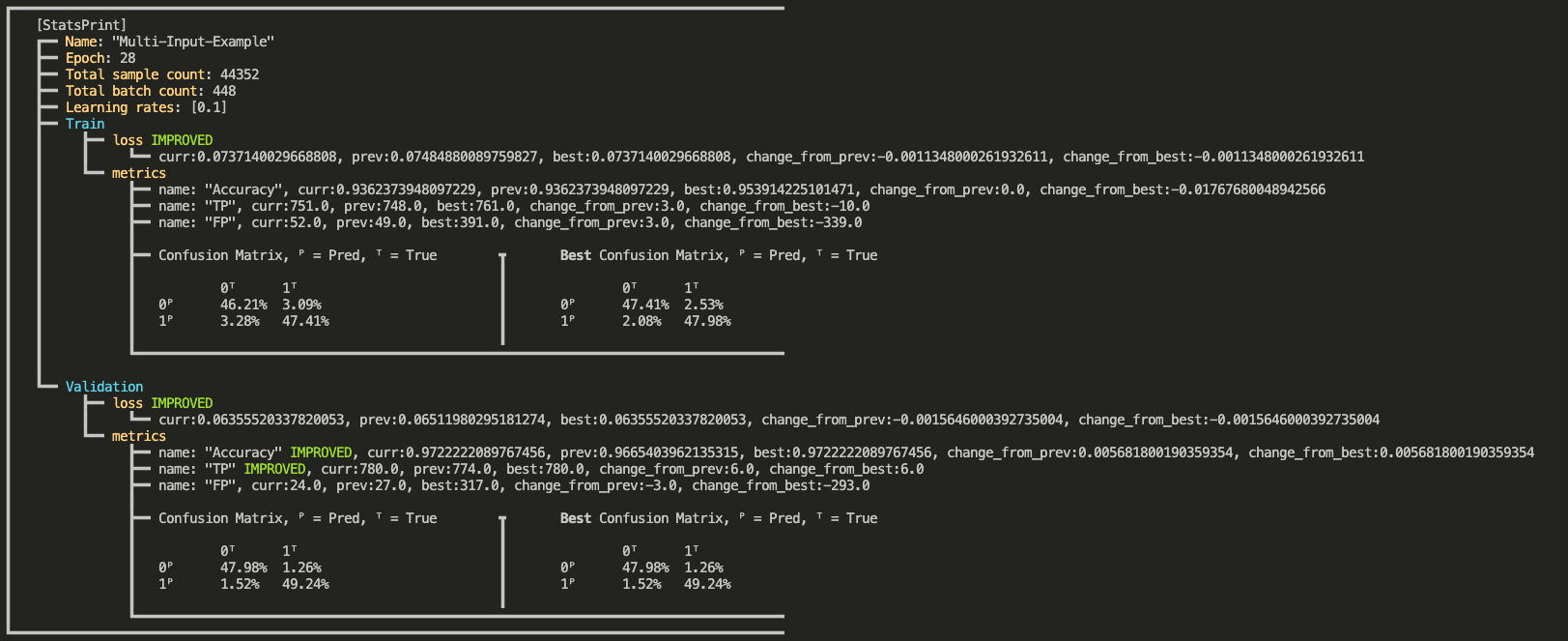
``StatsPrint`` callback prints informative summary of the trainer stats including loss and metrics.
* ``CallbackMonitor`` can add nicer look with ``IMPROVED`` indication on improved loss or metric, see output example below.
* Loss (for all states) will be monitored as ``MonitorMode.MIN``
* For train metrics, provide your own monitors via ``train_metrics_monitors`` argument
* Validation metrics monitors will be added automatically according to ``train_metrics_monitors`` argument
```python
from lpd.enums import Phase, State, MonitorType, StatsType, MonitorMode
StatsPrint(apply_on_phase=Phase.EPOCH_END,
apply_on_states=State.EXTERNAL,
train_metrics_monitors=CallbackMonitor(monitor_type=MonitorType.METRIC,
stats_type=StatsType.TRAIN,
monitor_mode=MonitorMode.MAX,
metric_name='TruePositives'),
print_confusion_matrix_normalized=True) # in case you use one of the ConfusionMatrix metrics (e.g. TruePositives), you may also print the confusion matrix
```
Output example:
### ModelCheckPoint Callback
Saving a checkpoint when a monitored loss/metric has improved.
The callback will save the model, optimizer, scheduler, and epoch number.
You can also configure it to save Full Trainer.
For example, ``ModelCheckPoint`` that will save a new *full trainer checkpoint* every time the validation metric_name ``my_metric``
is getting higher than the highest value so far.
```python
ModelCheckPoint(Phase.EPOCH_END,
State.EXTERNAL,
checkpoint_dir,
checkpoint_file_name,
CallbackMonitor(monitor_type=MonitorType.METRIC, # It's a Metric and not a Loss
stats_type=StatsType.VAL, # check the value on the Validation set
monitor_mode=MonitorMode.MAX, # MAX indicates higher is better
metric_name='my_metric'), # since it's a Metric, mention its name
save_best_only=False,
save_full_trainer=True)
```
### EarlyStopping Callback
Stops the trainer when a monitored loss/metric has stopped improving.
For example, EarlyStopping that will monitor at the end of every epoch, and stop the trainer if the validation loss didn't improve (decrease) for the last 10 epochs.
```python
EarlyStopping(Phase.EPOCH_END,
State.EXTERNAL,
CallbackMonitor(monitor_type=MonitorType.LOSS,
stats_type=StatsType.VAL,
monitor_mode=MonitorMode.MIN,
patience=10))
```
### SchedulerStep Callback
Will invoke ``step()`` on your scheduler in the desired phase and state.
For example, SchedulerStep callback to invoke ``scheduler.step()`` at the end of every batch, in train state (as opposed to validation and test):
```python
from lpd.callbacks import SchedulerStep
from lpd.enums import Phase, State
SchedulerStep(apply_on_phase=Phase.BATCH_END, apply_on_states=State.TRAIN)
```
### Tensorboard Callback
Will export the loss and the metrics at a given phase and state, in a format that can be viewed on Tensorboard
```python
from lpd.callbacks import Tensorboard
Tensorboard(apply_on_phase=Phase.EPOCH_END,
apply_on_states=State.EXTERNAL,
summary_writer_dir=dir_path)
```
### TensorboardImage Callback
Will export images, in a format that can be viewed on Tensorboard.
For example, a TensorboardImage callback that will output all the images generated in validation
```python
from lpd.callbacks import TensorboardImage
TensorboardImage(apply_on_phase=Phase.BATCH_END,
apply_on_states=State.VAL,
summary_writer_dir=dir_path,
description='Generated Images',
outputs_parser=None)
```
Lets pass outputs_parser that will change the range of the outputs from [-1,1] to [0,255]
```python
from lpd.callbacks import TensorboardImage
def outputs_parser(input_output_label: InputOutputLabel):
outputs_scaled = (input_output_label.outputs + 1.0) / 2.0 * 255
outputs_scaled = torchvision.utils.make_grid(input_output_label.output)
return outputs_scaled
TensorboardImage(apply_on_phase=Phase.BATCH_END,
apply_on_states=State.VAL,
summary_writer_dir=dir_path,
description='Generated Images',
outputs_parser=outputs_parser)
```
### CollectOutputs Callback
Will collect model's outputs for the defined states.
CollectOutputs is automatically used by ``Trainer`` to collect the predictions when calling one of the ``predict`` methods.
```python
CollectOutputs(apply_on_phase=Phase.BATCH_END, apply_on_states=State.VAL)
```
### Create your custom callbacks
```python
from lpd.enums import Phase, State
from lpd.callbacks import CallbackBase
class MyAwesomeCallback(CallbackBase):
def __init__(self, apply_on_phase=Phase.BATCH_END, apply_on_states=[State.TRAIN, State.VAL]):
# make sure to call init parent class
super(MyAwesomeCallback, self).__init__(apply_on_phase, apply_on_states)
def __call__(self, callback_context): # <=== implement this method!
# your implementation here
# using callback_context, you can access anything in your trainer
# below are some examples to get the hang of it
val_loss = callback_context.val_stats.get_loss()
train_loss = callback_context.train_stats.get_loss()
train_metrics = callback_context.train_stats.get_metrics()
val_metrics = callback_context.val_stats.get_metrics()
optimizer = callback_context.optimizer
scheduler = callback_context.scheduler
trainer = callback_context.trainer
if val_loss < 0.0001:
# you can also mark the trainer to STOP training by calling stop()
trainer.stop()
```
Lets expand ``MyAwesomeCallback`` with ``CallbackMonitor`` to track if our validation loss is getting better
```python
from lpd.callbacks import CallbackBase, CallbackMonitor # <== CallbackMonitor added
from lpd.enums import Phase, State, MonitorType, StatsType, MonitorMode # <== added few needed enums to configure CallbackMonitor
class MyAwesomeCallback(CallbackBase):
def __init__(self, apply_on_phase=Phase.BATCH_END, apply_on_states=[State.TRAIN, State.VAL]):
super(MyAwesomeCallback, self).__init__(apply_on_phase, apply_on_states)
# adding CallbackMonitor to track VAL LOSS with regards to MIN (lower is better) and patience of 20 epochs
self.val_loss_monitor = CallbackMonitor(MonitorType.LOSS, StatsType.VAL, MonitorMode.MIN, patience=20)
def __call__(self, callback_context: CallbackContext): # <=== implement this method!
# same as before, using callback_context, you can access anything in your trainer
train_metrics = callback_context.train_stats.get_metrics()
val_metrics = callback_context.val_stats.get_metrics()
# invoke track() method on your monitor and pass callback_context as parameter
# since you configured your val_loss_monitor, it will get the relevant parameters from callback_context
monitor_result = self.val_loss_monitor.track(callback_context)
# monitor_result (lpd.callbacks.CallbackMonitorResult) contains informative properties
# for example lets check the status of the patience countdown
if monitor_result.has_patience():
print(f'[MyAwesomeCallback] - patience left: {monitor_result.patience_left}')
# Or, let's stop the trainer, by calling the trainer.stop()
# if our monitored value did not improve
if not monitor_result.has_improved():
print(f'[MyAwesomeCallback] - {monitor_result.description} has stopped improving')
callback_context.trainer.stop()
```
### CallbackMonitor, AbsoluteThresholdChecker and RelativeThresholdChecker
When using callbacks such as ``EarlyStopping``, a ``CallbackMonitor`` is provided to track
a certain metric and reset/trigger the stopping event (or any event in other callbacks).
``CallbackMonitor`` will internally use ``ThresholdChecker`` when comparing new value to old value
for the tracked metric, and ``AbsoluteThresholdChecker`` or ``RelativeThresholdChecker`` will be used
to check if the criteria was met.
The following example creates a ``CallbackMonitor`` that will track if the metric 'accuracy'
has increased with more then 1% using ``RelativeThresholdChecker``
```python
from lpd.utils.threshold_checker import RelativeThresholdChecker
relative_threshold_checker_1_percent = RelativeThresholdChecker(monitor_mode=MonitorMode.MAX, threshold=0.01)
CallbackMonitor(monitor_type=MonitorType.METRIC, # It's a Metric and not a Loss
stats_type=StatsType.VAL, # check the value on the Validation set
monitor_mode=MonitorMode.MAX, # MAX indicates higher is better
metric_name='accuracy', # since it's a Metric, mention its name
threshold_checker=relative_threshold_checker_1_percent) # track 1% increase from last highest value
```
## Metrics
``lpd.metrics`` provides metrics to check the accuracy of your model.
Let's create a custom metric using ``MetricBase`` and also show the use of ``BinaryAccuracyWithLogits`` in this example
```python
from lpd.metrics import BinaryAccuracyWithLogits, MetricBase
from lpd.enums import MetricMethod
# our custom metric
class InaccuracyWithLogits(MetricBase):
def __init__(self):
super(InaccuracyWithLogits, self).__init__(MetricMethod.MEAN) # use mean over the batches
self.bawl = BinaryAccuracyWithLogits() # we exploit BinaryAccuracyWithLogits for the computation
def __call__(self, y_pred, y_true): # <=== implement this method!
# your implementation here
acc = self.bawl(y_pred, y_true)
return 1 - acc # return the inaccuracy
# we can now define our metrics and pass them to the trainer
metrics = [BinaryAccuracyWithLogits(name='accuracy'), InaccuracyWithLogits(name='inaccuracy')]
```
Let's do another example, a custom metric ``Truthfulness`` based on confusion matrix using ``MetricConfusionMatrixBase``
```python
from lpd.metrics import MetricConfusionMatrixBase, TruePositives, TrueNegatives
from lpd.enums import ConfusionMatrixBasedMetric
# our custom metric
class Truthfulness(MetricConfusionMatrixBase):
def __init__(self, num_classes, labels=None, predictions_to_classes_convertor=None, threshold=0.5):
super(Truthfulness, self).__init__(num_classes, labels, predictions_to_classes_convertor, threshold)
self.tp = TruePositives(num_classes, labels, predictions_to_classes_convertor, threshold) # we exploit TruePositives for the computation
self.tn = TrueNegatives(num_classes, labels, predictions_to_classes_convertor, threshold) # we exploit TrueNegatives for the computation
def __call__(self, y_pred, y_true): # <=== implement this method!
tp_per_class = self.tp(y_pred, y_true)
tn_per_class = self.tn(y_pred, y_true)
# you can also access more confusion matrix metrics such as
f1score = self.get_stats(ConfusionMatrixBasedMetric.F1SCORE)
precision = self.get_stats(ConfusionMatrixBasedMetric.PRECISION)
recall = self.get_stats(ConfusionMatrixBasedMetric.RECALL)
# see ConfusionMatrixBasedMetric enum for more
return tp_per_class + tn_per_class
```
## Save and Load full Trainer
Sometimes you just want to save everything so you can continue training where you left off.
To do so, you may use ``ModelCheckPoint`` for saving full trainer by setting parameter
```python
save_full_trainer=True
```
Or, you can invoke it directly from your trainer
```python
your_trainer.save_trainer(dir_path, file_name)
```
Loading a trainer from checkpoint is as simple as:
```python
loaded_trainer = Trainer.load_trainer(dir_path, # the folder where the saved trainer file exists
trainer_file_name, # the saved trainer file name
model, # state_dict will be loaded
device,
loss_func, # state_dict will be loaded
optimizer, # state_dict will be loaded
scheduler, # state_dict will be loaded
train_data_loader, # provide new/previous data_loader
val_data_loader, # provide new/previous data_loader
train_steps,
val_steps)
```
### Utils
``lpd.utils`` provides ``torch_utils``, ``file_utils`` and ``general_utils``
For example, a good practice is to use ``seed_all`` as early as possible in your code, to make sure that results are reproducible:
```python
import lpd.utils.general_utils as gu
gu.seed_all(seed=42) # because its the answer to life and the universe
```
### Extensions
``lpd.extensions`` provides some custom PyTorch layers, and schedulers, these are just some stuff we like using when we create our models, to gain better flexibility.
So you can use them at your own will, more extensions are added from time to time.
## Something is missing?! please share with us
You can open an issue, but also feel free to email us at torch.lpd@gmail.com