https://github.com/rpgeeganage/ots-share-app
A self-hosting app to share secrets only one-time.
https://github.com/rpgeeganage/ots-share-app
app application nodejs otp otp-applications otp-generator otp-s otp-share password-sharing secret-shares secret-sharing security-hardening security-tools self-hosted side-project side-projects typescript
Last synced: over 1 year ago
JSON representation
A self-hosting app to share secrets only one-time.
- Host: GitHub
- URL: https://github.com/rpgeeganage/ots-share-app
- Owner: rpgeeganage
- License: mit
- Created: 2023-02-11T20:17:07.000Z (over 3 years ago)
- Default Branch: main
- Last Pushed: 2024-01-11T16:10:38.000Z (over 2 years ago)
- Last Synced: 2025-02-28T23:21:17.214Z (over 1 year ago)
- Topics: app, application, nodejs, otp, otp-applications, otp-generator, otp-s, otp-share, password-sharing, secret-shares, secret-sharing, security-hardening, security-tools, self-hosted, side-project, side-projects, typescript
- Language: TypeScript
- Homepage:
- Size: 780 KB
- Stars: 62
- Watchers: 4
- Forks: 3
- Open Issues: 5
-
Metadata Files:
- Readme: README.md
- License: LICENSE
Awesome Lists containing this project
- awesome-starred - rpgeeganage/ots-share-app - A self-hosting app to share secrets only one-time. (nodejs)
README
#  OTS-Share (One-Time Secret Share)
A self-hosting app to share secrets only one-time.
### Content
- [ **Features** ](#features)
- [ **How to run** ](#how-to-run)
- [ **With the default database**](#with-the-default-database)
- [ **Without the default database**](#without-the-default-database)
- [ **Access UI**](#access-ui)
- [ **Request and response** ](#request-and-response)
- [ **Request** ](#request)
- [ **Response** ](#response)
- [ **How to use** ](#how-to-use)
- [ **For text** ](#for-text)
- [ **For files** ](#for-files)
- [ **View secret content in the shared link** ](#view-secret-content-in-the-shared-link)
- [ **Errors** ](#errors)
- [ **CLI usage**](#cli-usage)
- [ **Change configurations** ](#change-configurations)
- [ **Change database server** ](#change-database-server)
- [ **Change the default server port** ](#change-the-default-server-port)
- [ **Change the purge process interval** ](#change-the-purge-process-interval)
- [ **Tech stack** ](#tech-stack)
- [ **Using with deploy tools**](#using-with-deploy-tools)
- [ **With https://www.portainer.io/**](#with-httpswwwportainerio)
- [ **Format of the generated URL** ](#format-of-the-generated-url)
- [ **Road map**](#road-map)
- [ **Todo** ](#todo)
## Features
- Support both **texts** and **small files (maximum `1MB`)**.
- Creates shareable links which valid for a maximum of **24 hours**.
- The contents are encrypted with `AES` in `CBC` mode, with a `256-bit` key.
(Using [Crypto-js](https://cryptojs.gitbook.io/docs/#the-cipher-algorithms))
- Passwords are **NOT** sent to the backend server.
- The app periodically deletes encrypted content after it expires, and the encrypted content gets deleted once the web UI fetches it.
- CLI support.
- Multiple database connectivity support.
- `Mongo`
- `Postgres`
- `MySQL`
## How to run
### With the default database
This application is entirely run in Docker and comes with `Mongo 4.2` image. (view the `docker-compose.yml` for further reference.)
To execute this app, simply run following command.
```bash
make start
```
### Without the default database
This application can connect to a external database.
(Currently support **`Postgres`** and **`Mysql`**).
To execute this app, simply run following command.
```bash
# Set the connection string to your database.
export DB_URL=mysql://root:root@host.docker.internal:3306/ots_share
make start-no-db
```
**OR**
Change the modify the `DB_URL` variable under `ots-share-run-no-db` service in `docker-compose.yml`,
and then run
```bash
make start-no-db
```
### Access UI
After that, the application is accessible via [http://localhost:8282](http://localhost:8282)
## Request and Response
### Request
### Create record request body
A sample request body is as follows.
```json
{
"content": "U2FsdGVkX1+XUedzb2748LeKmf9UpN9hVWjBDUwJfXs=",
"expireIn": {
"value": 10,
"unit": "minutes"
}
}
```
| Property | type | is required | purpose |
| ------------------ | ---------------------------- | ----------- | --------------------------------------- |
| `content` | `string` | yes | Encrypted content |
| `expireIn` | `object` | yes | Expiration configurations |
| `expireIn`.`value` | `number` | yes | numerical value of expiration. E,g 1, 2 |
| `expireIn`.`unit` | `enum` (`'days'`, `'hours'`) | yes | Unit of expiration. |
- ### Sample `Create` request.
```sh
curl 'http://localhost:8282/api/record' -H 'Content-Type: application/json' \
--data-raw \
'{
"content" : "U2FsdGVkX1+bozD8VjexiUeHJ3BfdxrXCmRyai8V0hY=",
"expireIn": {
"value": 1,
"unit": "minutes"
}
}'
--compressed
```
- ### Sample `GET` request.
```sh
curl 'http://localhost:8282/api/record/b2nC422huavXfMs2DWZ2Z9' -H 'Content-Type: application/json'
```
### Response
A sample record body is as follows.
```json
{
"id": "iN2jS3y1pstio7JVXs1zLF",
"slug": "iN2jS3y1pstio7JVXs1zLF",
"content": "U2FsdGVkX1+XUedzb2748LeKmf9UpN9hVWjBDUwJfXs=",
"expiary": "2023-02-12T14:55:41.510Z",
"status": "avaiable",
"created_at": "2023-02-12T14:45:41.521Z"
}
```
| Property | type | is required | purpose |
| ------------ | ------------------------------------- | ----------- | ------------------------------------------ |
| `id` | `string` | yes | Primary key of the record |
| `slug` | `string` | yes | For future use (Primary key of the record) |
| `content` | `string` | yes | Encrypted content |
| `expiary` | `string` (`Date`) | yes | Expiration date and time |
| `status` | `enum` (`'avaiable'`, `'unavaiable'`) | yes | For future use. |
| `created_at` | `string` (`Date`) | yes | Record created date |
## How to use
# (Please don't lose the generated URL. There is no way to retrieve the content or regenerate the URL !!!)
### For text
1. Visit the landing page and select `Text` from top menu.
2. Add your secret content to the `Secret content` text box.

3. Click the `Create` Button.
4. Copy the `URL` in the text box. (Click the `Copy Icon`).

- (Please don't lose the generated URL. There is no way to retrieve the content or regenerate the URL !!!)
5. Send the copied URL to the other party via a secure channel.
### For files
1. Visit the landing page and select `File` from top menu.
2. Click on the `"Drag 'n' drop"` area or drag and drop a file.
- (Pleas refer to screen regarding the file size limits).

3. Upload a file.

4. Click the `Create` Button.
5. Copy the `URL` in the text box. (Click the `Copy Icon`).

- (Please don't lose the generated URL. There is no way to retrieve the content or regenerate the URL !!!)
5. Send the copied URL to the other party via a secure channel.
### View secret content in the shared link.
1. Visit the shared link using a browser.
2. You will see the following screen.

3. Click `Fetch Content`.
#### For text
4. You'll see the following screen.

5. Click the `"Click there to view the content"`.
6. You will see the content as follows.

#### For files
4. You'll see the following screen.

5. Click the `"Click here to download the file"` button to download the file.
### Errors.
In case of an error, the following screen will appear.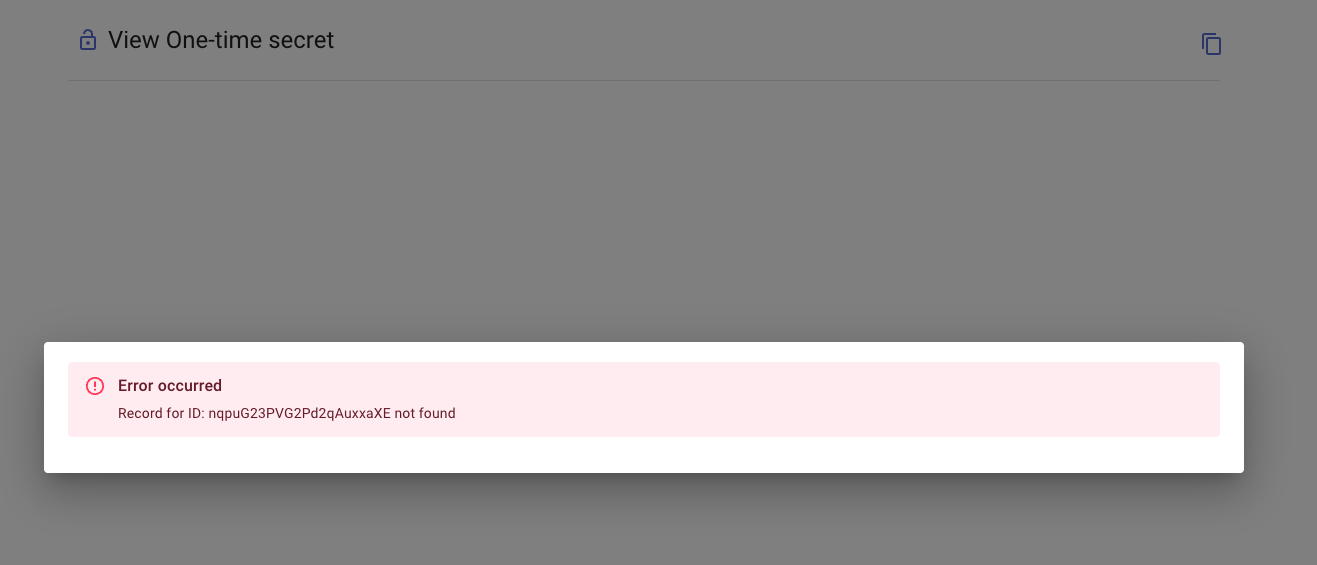
## CLI usage
- Support only for `texts`.
- You can use the `CLI` to utilize `APIs`.
- Encryption using CLI
Sample CLI to use encryption
```sh
#!/bin/bash
# Configs
PASSWORD="pass-key"
OTS_SHARE_DOMIN="http://host.docker.internal:8282"
OTS_SHARE_API="$OTS_SHARE_DOMIN/api/record"
OPENSSL_PARAMETERS_PASSWORD="-pass pass:$PASSWORD"
OPENSSL_PARAMETERS_ALGORITHM="-base64 -aes-256-cbc -pbkdf2"
text_to_encrypt="test string to encrypt"
################
## Encryption ##
################
# Record expiration value. A numerical value
RECORD_EXPIRATION_VALUE=10
# Record expiration unit. It can be "minutes" or "hours"
RECORD_EXPIRATION_UNIT="minutes"
# 1. Generate encrypted string
encrypted_content=$(echo $text_to_encrypt | openssl enc -e $OPENSSL_PARAMETERS_ALGORITHM $OPENSSL_PARAMETERS_PASSWORD)
# 2. Make API call OTS-Share and retrieve the Id
# We need this id for encryption
record_id=$(\
curl -s "$OTS_SHARE_API" \
-H 'Content-Type: application/json' \
--data-raw \
'{ "content" : "'$encrypted_content'", "expireIn": { "value": '$RECORD_EXPIRATION_VALUE', "unit": "'$RECORD_EXPIRATION_UNIT'" }}' \
--compressed \
| jq '.id' \
| tr -d '"' \
)
#### Encryption results
echo "!!! Keep these safe !!!"
echo "-----------------------------------"
echo "Record id: $record_id"
echo "Password: $PASSWORD"
echo "-----------------------------------"
echo "(This record will expires in: $RECORD_EXPIRATION_VALUE $RECORD_EXPIRATION_UNIT)"
```
Output encryption
```sh
!!! Keep these safe !!!
-----------------------------------
Record id: b2nC422huavXfMs2DWZ2Z9
Password: pass-key
-----------------------------------
(This record will expires in: 10 minutes)
```
- Decryption using CLI
Sample CLI to use Decryption
```sh
#!/bin/bash
# Configs
PASSWORD="pass-key"
OTS_SHARE_DOMIN="http://host.docker.internal:8282"
OTS_SHARE_API="$OTS_SHARE_DOMIN/api/record"
OPENSSL_PARAMETERS_PASSWORD="-pass pass:$PASSWORD"
OPENSSL_PARAMETERS_ALGORITHM="-base64 -aes-256-cbc -pbkdf2"
$record_id="b2nC422huavXfMs2DWZ2Z9" # ID from previous encryption operation
################
## DECRYPTION ##
################
# 1. Fetch content
content=$(\
curl "$OTS_SHARE_API/$record_id" \
-s -H 'Content-Type: application/json' \
--compressed \
| jq '.content' \
| tr -d '"' \
)
# 2. Decrypt
decrypted_content=$(echo $content | openssl enc -d $OPENSSL_PARAMETERS_ALGORITHM $OPENSSL_PARAMETERS_PASSWORD)
echo "-----------------------------------"
echo "Content: $decrypted_content"
echo "-----------------------------------"
```
Output decryption
```sh
-----------------------------------
Content: test string to encrypt
-----------------------------------
```
###
## Change configurations
### All the configurations are mentioned in the `docker-compose.yml` under or `ots-share-run-no-db` service.
- Change default port to access the application are available in `docker-compose.yml` under `ots-share-run` or `ots-share-run-no-db` service.
- You can modify the `mongo-local` service in `docker-compose.yml` to keep the data persistent.
#### Change database server.
- Please change the `DEV_PORT` variable the `docker-compose.yml` under `ots-share-run` or `ots-share-run-no-db` service.
- Please change the `DEV_PORT` variable the `docker-compose.yml` under `ots-share-run-no-db` service to connect to external database.
- `DB_URL` must be a connection string.
- The app parse the `DB_URL` as an `URL` and use the `protocol` to identify the `database` driver.
- sample connection strings:
- `mongodb://mongo-local/ots-share` - for `Mongo`
- `postgres://db:db@host.docker.internal:5432/ots_share` - for `Postgres`
- `mysql://root:root@host.docker.internal:3306/ots_share` - for `MySQL`
#### Change the default server port.
- Please change `SERVER_PORT` variable in the in `docker-compose.yml` under `ots-share-run` or `ots-share-run-no-db` service.
#### Change the purge process interval.
- Default value is 1 minute.
- Please set `PURGE_TRIGGER_INTERVAL` variable in the in `docker-compose.yml` under `ots-share-run` or `ots-share-run-no-db` service.
- The `PURGE_TRIGGER_INTERVAL` value must be in `milliseconds`.
## Tech stack
- **UI:**
- React
- Material UI
- **Server:**
- Typescript
- Node
- Express
- **DB support:**
- `MongoDB` - (`default DB`)
- `Postgres`
- `MySQL`
## Using with deploy tools
### With **https://www.portainer.io/**
- Step 1 & 2.

- Step 3.

- Press **Deploy the stack** to deploy.
## Format of the generated URL
The URL format, which required sending to the other party, is as follows. The `id` received from the backend API gets concatenated with the password. After that, the contaminated string gets encoded into `Base 58`.
The format is as follows.
- `/r/Base58Encoded(id-from-api : password : type : file-name)`
- Possible values for `type` is `'text'` or `'file'`.
- `type` and `file-name` is optional.
- `type` is default to `text` if not mentioned.
- `file-name` is available for file.
- It supports `Base 64` encoding.
## Road map
- A Chrome extension
- A Slack app
## Todo
- Add `Contribution` instructions.
- Learn more ReactJs. :smile:
- Fix any bugs. :smile: