https://github.com/rryam/meshingkit
Ultimate framework to add mesh gradients to your iOS/macOS/visionOS/tvOS and watchOS apps!
https://github.com/rryam/meshingkit
ios ios-sdk macos mesh-gradient mesh-gradients swift-library swift-package tvos visionos watchos
Last synced: 4 months ago
JSON representation
Ultimate framework to add mesh gradients to your iOS/macOS/visionOS/tvOS and watchOS apps!
- Host: GitHub
- URL: https://github.com/rryam/meshingkit
- Owner: rryam
- License: mit
- Created: 2024-10-14T05:06:09.000Z (almost 2 years ago)
- Default Branch: main
- Last Pushed: 2025-02-25T11:34:43.000Z (over 1 year ago)
- Last Synced: 2025-04-23T03:49:25.054Z (over 1 year ago)
- Topics: ios, ios-sdk, macos, mesh-gradient, mesh-gradients, swift-library, swift-package, tvos, visionos, watchos
- Language: Swift
- Homepage:
- Size: 390 KB
- Stars: 55
- Watchers: 2
- Forks: 1
- Open Issues: 0
-
Metadata Files:
- Readme: README.md
- Funding: .github/FUNDING.yml
- License: LICENSE
Awesome Lists containing this project
README
# MeshingKit





MeshingKit provides an easy way to create mesh gradients in SwiftUI with predefined gradient templates to directly render beautiful, gorgeous gradients!
## Support
Love this project? Check out my books to explore more of AI and iOS development:
- [Exploring AI for iOS Development](https://academy.rudrank.com/product/ai)
- [Exploring AI-Assisted Coding for iOS Development](https://academy.rudrank.com/product/ai-assisted-coding)
Your support helps to keep this project growing!
## Meshing
MeshingKit is based on [Meshing](https://apps.apple.com/in/app/ai-mesh-gradient-tool-meshing/id6567933550), an AI Mesh Gradient Tool.
## Features
- Create beautiful mesh gradients with customizable control points and colors
- Animate gradients with smooth, configurable transitions
- 68 predefined gradient templates:
- 35 templates with 2x2 grid size
- 22 templates with 3x3 grid size
- 11 templates with 4x4 grid size
- Easily extendable for custom gradients
- Works across all Apple platforms (iOS, macOS, tvOS, watchOS, visionOS)
## Requirements
- iOS 18.0+, macOS 15.0+, tvOS 18.0+, watchOS 11.0+, visionOS 2.0+
- Swift 6.2+
- Xcode 16.0+
## Installation
### Swift Package Manager
Add MeshingKit to your project using Swift Package Manager. In Xcode, go to File > Swift Packages > Add Package Dependency and enter the following URL:
```swift
dependencies: [
.package(url: "https://github.com/rryam/MeshingKit.git", from: "2.4.0")
]
```
## Usage
To use a predefined gradient template:
```swift
import SwiftUI
import MeshingKit
struct ContentView: View {
var body: some View {
// Using PredefinedTemplate enum (recommended)
MeshingKit.gradient(template: .size3(.cosmicAurora))
.frame(width: 300, height: 300)
// Or using specific size methods
MeshingKit.gradientSize3(template: .cosmicAurora)
.frame(width: 300, height: 300)
}
}
```
### Using PredefinedTemplate Enum
The `PredefinedTemplate` enum provides a unified way to access all gradient templates:
```swift
let gradient = MeshingKit.gradient(template: .size2(.mysticTwilight))
let gradient3 = MeshingKit.gradient(template: .size3(.auroraBorealis))
let gradient4 = MeshingKit.gradient(template: .size4(.cosmicNebula))
```
## Animated Gradient Views
To create an animated gradient view:
```swift
import SwiftUI
import MeshingKit
struct AnimatedGradientView: View {
@State private var showAnimation = true
var body: some View {
MeshingKit.animatedGradient(
.size3(.cosmicAurora),
showAnimation: $showAnimation,
animationSpeed: 1.5
)
.frame(width: 300, height: 300)
.padding()
// Toggle animation
Toggle("Animate Gradient", isOn: $showAnimation)
.padding()
}
}
```
> **Note:** Animation is only available for 3x3 and 4x4 grid templates. 2x2 templates cannot be animated because all four points are corner points that must remain fixed at the edges of the gradient.
## Custom Animation Patterns
MeshingKit provides advanced animation control through `AnimationPattern` and `PointAnimation` structures:
```swift
import SwiftUI
import MeshingKit
struct CustomAnimationView: View {
@State private var showAnimation = true
var body: some View {
// Use default animation pattern
MeshingKit.animatedGradient(
.size3(.cosmicAurora),
showAnimation: $showAnimation,
animationSpeed: 1.0
)
.frame(width: 300, height: 300)
}
}
```
### Creating Custom Animation Patterns
You can create custom animations by defining specific point movements:
```swift
// Create custom point animations
let pointAnimations = [
PointAnimation(pointIndex: 1, axis: .x, amplitude: 0.3, frequency: 1.2),
PointAnimation(pointIndex: 4, axis: .both, amplitude: 0.2, frequency: 0.8),
PointAnimation(pointIndex: 7, axis: .y, amplitude: -0.4, frequency: 1.5)
]
let customPattern = AnimationPattern(animations: pointAnimations)
// Apply the pattern to an animated gradient
MeshingKit.animatedGradient(
.size3(.cosmicAurora),
showAnimation: $showAnimation,
animationSpeed: 1.0,
animationPattern: customPattern
)
```
**Animation Parameters:**
- `pointIndex`: Index of the point to animate in the gradient's position array
- `axis`: Which axis to animate (`.x`, `.y`, or `.both`)
- `amplitude`: How far the point moves from its original position
- `frequency`: Speed multiplier for the animation (default: 1.0)
## Noise Effect with Gradients
You can add a noise effect to your gradients using the ParameterizedNoiseView:
```swift
import SwiftUI
import MeshingKit
struct NoiseEffectGradientView: View {
@State private var intensity: Float = 0.5
@State private var frequency: Float = 0.2
@State private var opacity: Float = 0.9
var body: some View {
ParameterizedNoiseView(intensity: $intensity, frequency: $frequency, opacity: $opacity) {
MeshingKit.gradientSize3(template: .cosmicAurora)
}
.frame(width: 300, height: 300)
// Controls for adjusting the noise effect
VStack {
Slider(value: $intensity, in: 0...1) {
Text("Intensity")
}
.padding()
Slider(value: $frequency, in: 0...1) {
Text("Frequency")
}
.padding()
Slider(value: $opacity, in: 0...1) {
Text("Opacity")
}
.padding()
}
}
}
```
## Available Gradient Templates
MeshingKit provides 68 predefined gradient templates organized by grid size:
### Exploring Templates Programmatically
You can explore all available templates using the `CaseIterable` conformance:
```swift
// List all 3x3 templates
for template in GradientTemplateSize3.allCases {
print(template.name)
}
// Get total count of templates for each size
let size2Count = GradientTemplateSize2.allCases.count
let size3Count = GradientTemplateSize3.allCases.count
let size4Count = GradientTemplateSize4.allCases.count
```
### Searching Templates
You can search across template names, tags, and moods using `PredefinedTemplate.find(by:)`:
```swift
// Find templates by keyword
let matches = PredefinedTemplate.find(by: "aurora")
// Inspect metadata
if let first = matches.first {
print(first.tags)
print(first.moods)
print(first.palette)
}
```
### Popular Template Examples
**2x2 Grid Templates (35 total):**
- mysticTwilight, tropicalParadise, cherryBlossom, arcticFrost
- goldenSunrise, emeraldForest, desertMirage, midnightGalaxy
- autumnHarvest
**3x3 Grid Templates (22 total):**
- intelligence, auroraBorealis, sunsetGlow, oceanDepths
- neonNight, autumnLeaves, cosmicAurora, lavaFlow
- etherealMist, tropicalParadise, midnightGalaxy, desertMirage
- frostedCrystal, enchantedForest, rubyFusion, goldenSunrise
- cosmicNebula, arcticAurora, volcanicEmber, mintBreeze
- twilightSerenade, saharaDunes
**4x4 Grid Templates (11 total):**
- auroraBorealis, sunsetHorizon, mysticForest, cosmicNebula
- coralReef, etherealTwilight, volcanicOasis, arcticFrost
- jungleMist, desertMirage, neonMetropolis
### Finding Templates by Name
Since templates follow `camelCase` naming, you can easily find them:
```swift
// Create a gradient from any template name
let template = GradientTemplateSize3.auroraBorealis
let gradient = MeshingKit.gradient(template: template)
```
## Custom Gradients
Create custom gradients by defining your own `GradientTemplate`:
```swift
let customTemplate = CustomGradientTemplate(
name: "Custom Gradient",
size: 3,
points: [
.init(x: 0.0, y: 0.0), .init(x: 0.5, y: 0.0), .init(x: 1.0, y: 0.0),
.init(x: 0.0, y: 0.5), .init(x: 0.5, y: 0.5), .init(x: 1.0, y: 0.5),
.init(x: 0.0, y: 1.0), .init(x: 0.5, y: 1.0), .init(x: 1.0, y: 1.0)
],
colors: [
Color.red, Color.orange, Color.yellow,
Color.green, Color.blue, Color.indigo,
Color.purple, Color.pink, Color.white
],
background: Color.black
)
let customGradient = MeshingKit.gradient(template: customTemplate)
```
## Advanced Animation Examples
### Speed Control and Pausing
```swift
struct AdvancedAnimationView: View {
@State private var showAnimation = true
@State private var animationSpeed: Double = 1.0
var body: some View {
VStack {
MeshingKit.animatedGradient(
.size4(.cosmicNebula),
showAnimation: $showAnimation,
animationSpeed: animationSpeed
)
.frame(width: 400, height: 400)
// Animation controls
VStack {
Toggle("Enable Animation", isOn: $showAnimation)
Slider(value: $animationSpeed, in: 0.1...3.0) {
Text("Animation Speed: \(animationSpeed, specifier: "%.1f")x")
}
}
.padding()
}
}
}
```
### Combining Animation with Noise Effects
```swift
struct AnimatedNoiseGradientView: View {
@State private var showAnimation = true
@State private var intensity: Float = 0.3
@State private var frequency: Float = 0.2
var body: some View {
ParameterizedNoiseView(
intensity: $intensity,
frequency: $frequency,
opacity: .constant(0.8)
) {
MeshingKit.animatedGradient(
.size3(.auroraBorealis),
showAnimation: $showAnimation,
animationSpeed: 1.2
)
}
.frame(width: 300, height: 300)
}
}
```
## Hex Color Initialization
There is an extension on `Color` that allows to initialise colors using hexadecimal strings:
```swift
let color = Color(hex: "#FF5733")
```
This extension supports various hex formats:
- "#RGB" (12-bit)
- "#RRGGBB" (24-bit)
- "#AARRGGBB" (32-bit with alpha)
## Export Helpers
MeshingKit includes helpers to export previews and snippets for design tools:
```swift
// Snapshot a mesh gradient (CGImage)
let image = MeshingKit.snapshotCGImage(
template: GradientTemplateSize3.auroraBorealis,
size: CGSize(width: 600, height: 600)
)
// Generate SwiftUI Gradient.Stop snippet
let swiftUIStops = MeshingKit.swiftUIStopsSnippet(
template: GradientTemplateSize3.auroraBorealis
)
// Generate CSS linear-gradient preview
let css = MeshingKit.cssLinearGradientSnippet(
template: GradientTemplateSize3.auroraBorealis
)
```
## Video Export
Export animated mesh gradients to MP4 files with quality controls:
```swift
let config = VideoExportConfiguration(
size: CGSize(width: 1080, height: 1080),
duration: 5.0,
frameRate: 30,
blurRadius: 0,
showDots: false,
animate: true,
smoothsColors: true,
renderScale: 2.0
)
let url = try await MeshingKit.exportVideo(
template: .size3(.auroraBorealis),
configuration: config
)
```
You can also use the parameter overload:
```swift
let url = try await MeshingKit.exportVideo(
template: .size3(.auroraBorealis),
size: CGSize(width: 1080, height: 1080),
duration: 5.0,
frameRate: 30,
renderScale: 2.0
)
```
### Video Export Configuration
| Setting | Description | Notes |
| --- | --- | --- |
| `size` | Output view size in points. | Required. |
| `duration` | Video length in seconds. | Default: 5.0 |
| `frameRate` | Frames per second. | Default: 30 |
| `blurRadius` | Blur applied to each frame. | Default: 0 |
| `showDots` | Show control points as dots. | Default: false |
| `animate` | Animate control points. | Default: true |
| `smoothsColors` | Smooth color transitions. | Default: true |
| `renderScale` | Render scale multiplier for output resolution. | Default: 1.0 |
> Tip: Increase `renderScale` for sharper output without changing layout size.
## Contributing
Contributions to MeshingKit are welcome! Please feel free to submit a Pull Request.
## License
MeshingKit is available under the MIT license. See the LICENSE file for more info.
[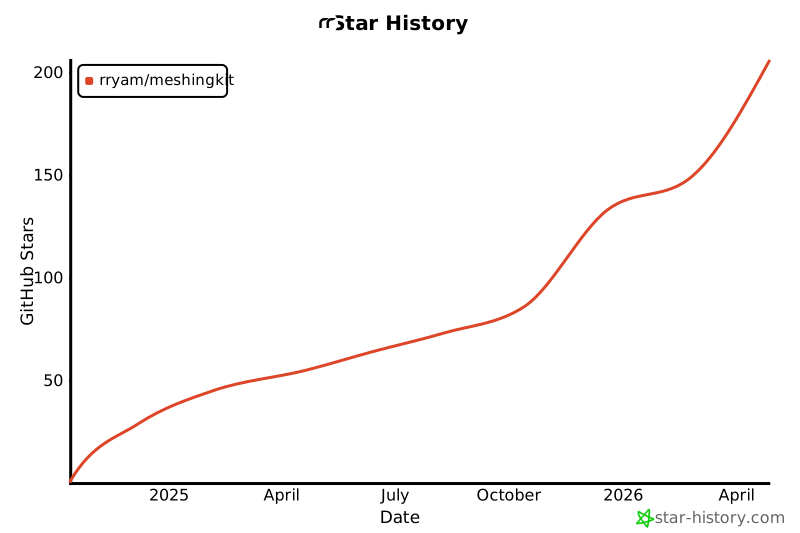](https://star-history.com/#rryam/MeshingKit&Date)