https://github.com/rsms/scrup
Take a screenshot (in OS X) — paste the URL somewhere a second later
https://github.com/rsms/scrup
Last synced: 11 months ago
JSON representation
Take a screenshot (in OS X) — paste the URL somewhere a second later
- Host: GitHub
- URL: https://github.com/rsms/scrup
- Owner: rsms
- License: mit
- Created: 2009-11-21T02:15:48.000Z (over 16 years ago)
- Default Branch: master
- Last Pushed: 2014-01-23T18:14:33.000Z (over 12 years ago)
- Last Synced: 2025-07-09T13:22:11.403Z (12 months ago)
- Language: Objective-C
- Homepage:
- Size: 1.68 MB
- Stars: 404
- Watchers: 17
- Forks: 44
- Open Issues: 23
-
Metadata Files:
- Readme: README.md
- License: LICENSE
Awesome Lists containing this project
README
# Scrup
> **Stale** — Scrup is no longer being developed. It's left here for the sake of the codez. For a great and secure (encrypted) screenshot service that's as free as Scrup, I'd recommend [the screenshot feature of Dropbox](https://www.dropbox.com/help/1964).
[ ](http://data.hunch.se/scrup/Scrup-1.3.3-bd23160.zip)
  [
[ ](http://farm5.static.flickr.com/4058/4311662638_00be0d79d3_o.png)
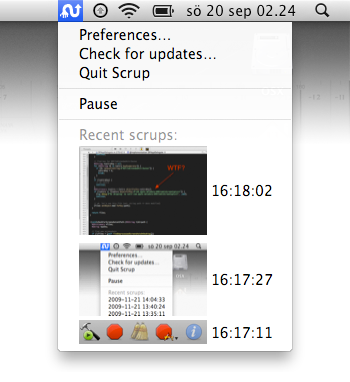
Take a screenshot in OS X and have a URL to the picture in your pasteboard a second later.
*A free and open source version of the different commercial variants (GrabUp, Tiny Grab, etc).*
For Mac OS X 10.6-10.8.
## Download & install
- [Download Scrup](http://data.hunch.se/scrup/Scrup-1.3.3-bd23160.zip)
- Move Scrup to your Applications folder and double-click the bastard.
- Scrup appears in the top right corner of your screen and looks like a twirly hand with and arrow. Click it and select "Preferences..."
- In the "Receiver URL" text field, enter the URL to something which receives files. For instance a copy of [`recv.php`](http://github.com/rsms/scrup/blob/master/recv.php) which you have uploaded to your server.
- Please note that the recv.php requires php5 to work, since it's using the PHP5-only stream_copy_to_stream() function to grab the image data stream.
- Take a screenshot and you should see the Scrup icon turning into a check mark, indicating success. (If you see a red badge something failed. Open Console.app and look what Scrup says.)
## Receivers & extensions
- **[django-scrup](http://github.com/idangazit/django-scrup/)** is a Django-based web receiver which stores screen captures on Amazon S3.
- **[Indexr](http://code.google.com/p/indexr/)** is a "small footprint image/file lister" written in PHP which provides a sort of browser/gallery. [Live demo here](http://firedev.com/indexr/)
- **[scrup-node-receiver](https://github.com/benmills/scrup-node-receiver)** is a simple Scrup receiver for Node.js which keeps a backlog of images in memory rather than writing them to disk.
## Alternate versions
There are a few forks (alternate versions) of Scrup (e.g. adding Growl support, playing sounds, etc) which might be interesting. Check out [the fork network](http://github.com/rsms/scrup/network) for a list of these variants.
## Details
- Lives in the menu bar (up there to your right, where the clock is).
- When a screenshot is taken, Scrup simply performs a `HTTP POST`, sending the image.
- After the screenshot has been sent, the server replies with the URL to the newly uploaded file.
- The URL is placed in the pasteboard, ready for you to ⌘V somewhere.
There is an example PHP implementation called [`recv.php`](http://github.com/rsms/scrup/blob/master/recv.php) which you can use and/or modify to setup your receiver. Make sure to set your URL in the preferences.
## Building
You'll need libpngcrush to build Scrup. libpngcrush is an external submodule of Scrup which you'll need to update after you've checked out the scrup source:
cd scrup-source
git submodule update --init pngcrush SCEvents
You only need to do this once. Now, build the "Scrup" target in Xcode.
## License
Open source licensed under MIT (see _LICENSE_ file for details).