https://github.com/rsms/tspkg
Create small, fast and easily-distributable packages from TypeScript projects
https://github.com/rsms/tspkg
Last synced: about 1 year ago
JSON representation
Create small, fast and easily-distributable packages from TypeScript projects
- Host: GitHub
- URL: https://github.com/rsms/tspkg
- Owner: rsms
- License: mit
- Created: 2017-01-23T17:39:24.000Z (over 9 years ago)
- Default Branch: master
- Last Pushed: 2017-12-26T19:49:53.000Z (over 8 years ago)
- Last Synced: 2025-03-15T21:17:06.572Z (over 1 year ago)
- Language: JavaScript
- Size: 237 KB
- Stars: 34
- Watchers: 3
- Forks: 0
- Open Issues: 0
-
Metadata Files:
- Readme: README.md
- License: LICENSE
Awesome Lists containing this project
README
# tspkg
Creates small, fast and easily-distributable packages from TypeScript projects.
- Produces a single JavaScript file along with a source map and optional TypeScript declaration file
- Conventions over configuration — "just works" with existing TypeScript projects
- [Advanced dead-code elimination and constant folding](#constant-substitution-cf-and-dce)
- Import/export elimination
- Eliding or elimination of package-internal modules
- Product JS file can be loaded in any JS environment:
- CommonJS (Nodejs et al) through `exports` and with `require`
- AMD through `define`
- Any other environment through `this[] = `
- Incremental compilation (similar to `tsc --watch`)
- [Circular dependency detection](#acyclic-dependency-graph)
[Have a look at the output from tspkg -O](https://gist.github.com/rsms/ffc0f7b8ef9eb814fe1bceab6127c24b) run on the [example project](example-project)
## Constant substitution, CF and DCE
input.ts:
```ts
const DEBUG = false
const assert = DEBUG ? equal : require('assert')
function a(x :any) {
assert(x > 0,1)
return 1 / x
}
```
output.js from `tspkg -O`: (simplified for readability)
```js
function a(x) {
return 1 / x;
}
```
output.js from `tspkg -g`: (simplified for readability)
```js
const assert = require('assert')
function a(x) {
assert(x > 0,1)
return 1 / x;
}
```
You can provide replacement expressions for module-level constants. Say we have this:
```js
const VERSION = 0
```
Running `tspkg -DVERSION=5`, the output will look like this:
```js
const VERSION = 5
```
This can be used to control what code is included when the -O flag is provided:
```js
import {parser as parser_4} from './parser-v4'
import {parser as parser_compat} from './parser'
const VERSION = 0
const parser = VERSION > 3 ? parser_4 : parser_compat
```
Running `tspkg -O -DVERSION=5`, the output will look like this:
```js
import {parser as parser_4} from './parser-v4'
const VERSION = 5
const parser = parser_4
```
If we instead run `tspkg -O -DVERSION=2`, the output will look like this:
```js
import {parser as parser_compat} from './parser'
const VERSION = 2
const parser = parser_compat
```
Note: In reality, dead-code elimination will remove the `VERSION` const above, along with `const parser` unless we export it or use it in something that's exported.
The expression provided as the value for `-D` can be any JavaScript:
```js
export const FOO = null
```
We run `tspkg '-DFOO=function(){ return [1, 2, 3] }'` which produces results equivalent to:
```js
export const FOO = function() {
return [1, 2, 3]
}
```
## Acyclic dependency graph
tspkg enforces [dependency graphs](https://en.wikipedia.org/wiki/Dependency_graph) to be [acyclic](https://en.wikipedia.org/wiki/Directed_acyclic_graph).
[Circular dependencies](https://en.wikipedia.org/wiki/Circular_dependency#Problems_of_circular_dependencies) leads to error-prone and indeterministic programs, and makes code reuse harder.
Say we have the following dependency graph for an imaginary project that receives
some messages over the network and autmatically replies to them, sometimes via email (SMTP):
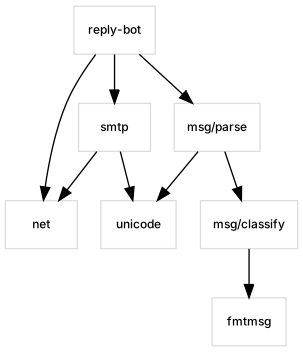
Now, say we're working on `fmtmsg` and we realize that by using functionality in `msg/parse` we can save ourselves some code-writing. Perhaps `msg/parse` provides a helpful function for folding HTML into plain text. Not knowing that `msg/parse` depends on `msg/classify` which in turn depends on `fmtmsg`, we import `msg/parse` and suddenly Weird Things™ starts happening, like sometimes when we run our program the module-constant "foo" is "1", but sometimes it's "2".
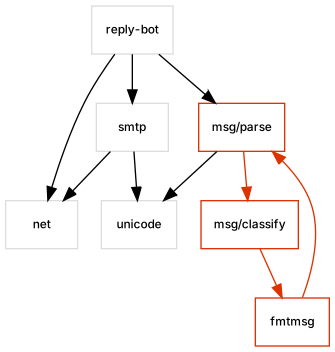
tspkg will detect these situations and stop you from building Weird Packages™. Trying to build a package with the above configuration would make tspkg stop with an error:
```txt
error TSPKG1: Circular dependency: msg/parse -> msg/classify -> fmtmsg -> msg/parse
```
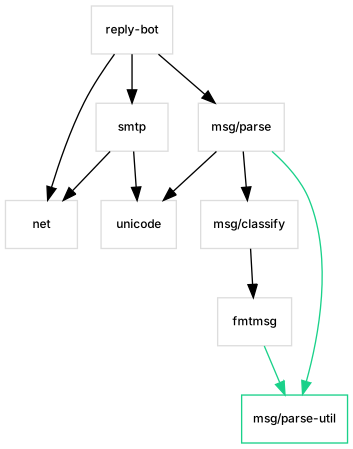
We can fix this by moving the helpful function found in `msg/parse` to a separate module/file:
## CLI synopsis
```txt
Usage: ./tspkg [options] []
options:
-h[elp] Show description and detailed help for this program.
-o[output]= Filename prefix for output(s). E.g. 'a/b' => 'a/b.js'.
If not provided, "/" is used when
is a directory. Otherwise the file extension
of is replaced with ".o".
-p[kg]= Name to be used for package when exported globally
(i.e. when there's no package management.) If not
provided, is inferred from .
-O Produce optimized output. See -help for details.
-g Produce debuggable output. See -help for details.
-i[ncr], -w[atch] Incremental compilation (watches source for changes).
-compress= Explicitly enable or disable compression of generated
code. Defaults to "true" if -O is provided, otherwise
defaults to "false".
-ts-disable Do not attempt to interpret the package as a
TypeScript project.
-ts-options= Apply to TypeScript "compilerOptions" object on
top of options from tsconfig file.
-map-root= Source map "sourceRoot" value. Inferred from
and by default.
-no-maps Do not read nor write any source maps.
-no-incr-cache Disable caching for incremental builds.
-v[erbose] Print details to stdout.
-debug Print lots of details to stdout. Implies -v.
-dry Just print the configuration and exit.
Either a single javascript file or the path to a directory containing
package source. If omitted, the current working directory is used.
A filename prefix that is joined by type suffix for each output file
produced. For a TypeScript project with declaration files, -o=a/b would
create the following files:
a/b.js Code
a/b.js.map Source map
a/b.d.ts Type declarations
-g
When provided:
• Compression is disabled by default (pass -compress=true to explicitly
enable).
• All instances of `const DEBUG = ` are changed to replace
`` with `true`. This can be used to gate debugging code.
-O
When provided:
• Enables optimizations (dead-code elimination, constant folding, etc.)
• Enables compression (pass -compress=false to explicitly disable.)
• Unless -g is provided, all instances of `const DEBUG = ` are
changed to replace `` with `false`. This can be used to have
debugging code stripped from the generated code, since constant folding
together with dead-code elimination should remove code gated on "DEBUG".
When neither -g or -O is provided, the goal of tspkg is to generate output
as quickly as possible.
Example of DEBUG elimination; in.js:
const DEBUG = 0
const assert = DEBUG ? require('assert') : function(){}
export function bob(x) {
assert(x > 0)
return 4 / x
}
tspkg -g in.js # => out.js:
const DEBUG = 1
const assert = DEBUG ? require('assert') : function(){}
exports.bob = function bob(x) {
return 4 / x
}
tspkg -O in.js # => out.js:
exports.bob=function(x){return 4/x};
Note: Not providing -g or -O would yield code that's functionally identical
to the in.js example above.
```