https://github.com/rtk-ai/rtk
CLI proxy that reduces LLM token consumption by 60-90% on common dev commands. Single Rust binary, zero dependencies
https://github.com/rtk-ai/rtk
agentic-coding ai-coding anthropic claude-code cli command-line-tool cost-reduction developer-tools llm open-source productivity rust token-optimization
Last synced: 19 days ago
JSON representation
CLI proxy that reduces LLM token consumption by 60-90% on common dev commands. Single Rust binary, zero dependencies
- Host: GitHub
- URL: https://github.com/rtk-ai/rtk
- Owner: rtk-ai
- License: apache-2.0
- Created: 2026-01-22T16:54:16.000Z (6 months ago)
- Default Branch: develop
- Last Pushed: 2026-06-26T18:06:49.000Z (29 days ago)
- Last Synced: 2026-06-27T22:53:41.944Z (28 days ago)
- Topics: agentic-coding, ai-coding, anthropic, claude-code, cli, command-line-tool, cost-reduction, developer-tools, llm, open-source, productivity, rust, token-optimization
- Language: Rust
- Homepage: https://www.rtk-ai.app
- Size: 5.17 MB
- Stars: 66,579
- Watchers: 161
- Forks: 4,118
- Open Issues: 1,391
-
Metadata Files:
- Readme: README.md
- Changelog: CHANGELOG.md
- Contributing: CONTRIBUTING.md
- License: LICENSE
- Security: SECURITY.md
Awesome Lists containing this project
- awesome-claude-code - rtk-ai/rtk - ai/rtk?style=flat-square&logo=github) | CLI proxy reducing LLM token consumption by 60-90% (single Rust binary) | (Proxy & Customization)
- fucking-awesome-rust - rtk-ai/rtk - High-performance CLI proxy that reduces LLM token consumption by 60-90% for AI coding assistants. Filters and compresses command outputs for Claude Code, Copilot, Cursor, Gemini CLI, Codex, and more. [](https://github.com/rtk-ai/rtk/actions) (Applications / Productivity)
- awesome-rust - rtk-ai/rtk - High-performance CLI proxy that reduces LLM token consumption by 60-90% for AI coding assistants. Filters and compresses command outputs for Claude Code, Copilot, Cursor, Gemini CLI, Codex, and more. [](https://github.com/rtk-ai/rtk/actions) (Applications / Productivity)
- awesome-claude-code - rtk - ai/rtk?style=flat) | High-performance CLI proxy that reduces LLM token consumption by 60-90% on developer commands, shipped as a single Rust binary | (⭐ Performance Champions)
- AiTreasureBox - rtk-ai/rtk - 05-24_53539_346](https://img.shields.io/github/stars/rtk-ai/rtk.svg)|CLI proxy that reduces LLM token consumption by 60-90% on common dev commands. Single Rust binary, zero dependencies| (Repos)
- awesome - rtk-ai/rtk - CLI proxy that reduces LLM token consumption by 60-90% on common dev commands. Single Rust binary, zero dependencies (<a name="Rust"></a>Rust)
- awesome-local-llms - rtk - 90% on common dev commands. Single Rust binary, zero dependencies | 68,825 | 4,268 | 744 | 0 | 235 | Apache License 2.0 | 0 days, 3 hrs, 28 mins | (Open-Source LLM & Agent Projects)
- StarryDivineSky - rtk-ai/rtk - 90%。该项目精准击中了当前AI辅助开发工具的核心痛点——随着GPT-4等模型API按token计费的高成本问题,开发者往往因频繁交互产生巨额开销,而RTK就像给API流量安装了"节流阀",在不显著影响功能的前提下大幅降低使用门槛。 该项目最突出的三大亮点在于其极简架构、无损压缩能力和场景优化设计。首先,整个系统被浓缩为单个Rust编写的二进制文件,零依赖的特性使其在任何环境都能即装即用,这相较于需要复杂依赖链的同类工具堪称"瑞士军刀"式的优雅。其次,其采用的上下文感知压缩算法并非简单截断文本,而是像高级翻译官那样,既能提炼bash命令的语法骨架,又能保留关键参数语义,使得10行长的docker命令可能被压缩为3行等效表达。更独特的是其对开发者工作流的深度适配——通过分析数百个真实场景的CLI交互模式,项目内置了针对git、npm、docker等高频工具的专用优化器,就像为不同乐器定制消音器,实现精准降噪。 其技术内核运作方式类似于"语义传真机":当用户在终端输入命令时,RTK会先启动一个轻量级语法解析器,将命令分解为结构模板(如git push的固定框架)和可变参数(如分支名)。接着通过预训练的权重模型,对可变部分进行熵值评估,保留高信息量片段而剔除冗余修饰词。最巧妙的是其动态缓存机制——频繁使用的命令模式会被转化为哈希指纹,后续相似请求会直接调用缓存而非重新计算,这种"记忆式服务"使得重复操作的token消耗趋近于零。整个处理流程发生在毫秒级延迟内,用户几乎感知不到代理层的存在,却享受着显著的用量优化。这种在工程效率和经济效益间取得的平衡,正是RTK在开发者社区快速流行的关键所在。 (A01_文本生成_文本对话 / 大语言对话模型及数据)
- awesome-rust-with-stars - rtk-ai/rtk - performance CLI proxy that reduces LLM token consumption by 60-90% for AI coding assistants. Filters and compresses command outputs for Claude Code, Copilot, Cursor, Gemini CLI, Codex, and more. | 2026-05-06 | (Applications / Productivity)
- awesome-ai-tools - RTK - High-performance CLI proxy that compresses command outputs by 60-90% to reduce LLM token consumption. Supports 100+ commands across git, build tools, and more. (AI Terminals / MCP Servers)
- awesome-ai-coding - RTK - CLI proxy that compresses developer tool output before sending to LLMs, reducing token consumption by 60-90%. (⌨️ Shell & CLI Assistants / By Deployment Model)
- my-awesome - rtk-ai/rtk - coding,ai-coding,anthropic,claude-code,cli,command-line-tool,cost-reduction,developer-tools,llm,open-source,productivity,rust,token-optimization pushed_at:2026-07 star:71.1k fork:4.4k CLI proxy that reduces LLM token consumption by 60-90% on common dev commands. Single Rust binary, zero dependencies (Rust)
- awesome-ccamel - rtk-ai/rtk - CLI proxy that reduces LLM token consumption by 60-90% on common dev commands. Single Rust binary, zero dependencies (Rust)
- awesome-starred - rtk-ai/rtk - CLI proxy that reduces LLM token consumption by 60-90% on common dev commands. Single Rust binary, zero dependencies (Rust)
- awesome-github-projects - rtk - CLI proxy that reduces LLM token consumption by 60-90% on common dev commands. Single Rust binary, zero dependencies ⭐68,736 `Rust` 🔥 (🤖 AI & Machine Learning)
- awesome-AI-driven-development - rtk - Rust Token Killer - CLI proxy that reduces LLM token consumption by 60-90% on common dev commands. Single Rust binary, zero dependencies (Frameworks & Libraries / Copilot Extensions & Alternatives)
- awesome-ai-200 - rtk-ai/rtk - 90% في أوامر التطوير الشائعة. ثنائي Rust واحد بلا أي اعتماديات | (🔥 الرائج الآن)
- awesome-llm-token-reduction - rtk - CLI proxy that cuts LLM token use 60-90% on common dev commands, single Rust binary.  (Coding-Assistant Token Savers)
- awesome-starz - rtk-ai/rtk - CLI proxy that reduces LLM token consumption by 60-90% on common dev commands. Single Rust binary, zero dependencies (Rust)
README

High-performance CLI proxy that reduces LLM token consumption by 60-90%





Website •
Install •
Troubleshooting •
Architecture •
Discord
English •
Francais •
中文 •
日本語 •
한국어 •
Espanol
---
rtk filters and compresses command outputs before they reach your LLM context. Single Rust binary, 100+ supported commands, <10ms overhead.
## Token Savings (30-min Claude Code Session)
| Operation | Frequency | Standard | rtk | Savings |
|-----------|-----------|----------|-----|---------|
| `ls` / `tree` | 10x | 2,000 | 400 | -80% |
| `cat` / `read` | 20x | 40,000 | 12,000 | -70% |
| `grep` / `rg` | 8x | 16,000 | 3,200 | -80% |
| `git status` | 10x | 3,000 | 600 | -80% |
| `git diff` | 5x | 10,000 | 2,500 | -75% |
| `git log` | 5x | 2,500 | 500 | -80% |
| `git add/commit/push` | 8x | 1,600 | 120 | -92% |
| `cargo test` / `npm test` | 5x | 25,000 | 2,500 | -90% |
| `ruff check` | 3x | 3,000 | 600 | -80% |
| `pytest` | 4x | 8,000 | 800 | -90% |
| `go test` | 3x | 6,000 | 600 | -90% |
| `docker ps` | 3x | 900 | 180 | -80% |
| **Total** | | **~118,000** | **~23,900** | **-80%** |
> Estimates based on medium-sized TypeScript/Rust projects. Actual savings vary by project size.
## Installation
### Homebrew (recommended)
```bash
brew install rtk
```
### Quick Install (Linux/macOS)
```bash
curl -fsSL https://raw.githubusercontent.com/rtk-ai/rtk/refs/heads/master/install.sh | sh
```
> Installs to `~/.local/bin`. Add to PATH if needed:
> ```bash
> echo 'export PATH="$HOME/.local/bin:$PATH"' >> ~/.bashrc # or ~/.zshrc
> ```
### Cargo
```bash
cargo install --git https://github.com/rtk-ai/rtk
```
### Pre-built Binaries
Download from [releases](https://github.com/rtk-ai/rtk/releases):
- macOS: `rtk-x86_64-apple-darwin.tar.gz` / `rtk-aarch64-apple-darwin.tar.gz`
- Linux: `rtk-x86_64-unknown-linux-musl.tar.gz` / `rtk-aarch64-unknown-linux-gnu.tar.gz`
- Windows: `rtk-x86_64-pc-windows-msvc.zip`
> **Windows users**: Extract the zip and place `rtk.exe` somewhere in your PATH (e.g. `C:\Users\\.local\bin`). Run RTK from **Command Prompt**, **PowerShell**, or **Windows Terminal** — do not double-click the `.exe` (it will flash and close). For the best experience, use [WSL](https://learn.microsoft.com/en-us/windows/wsl/install) where the full hook system works natively. See [Windows setup](#windows) below for details.
### Verify Installation
```bash
rtk --version # Should show "rtk 0.28.2"
rtk gain # Should show token savings stats
```
> **Name collision warning**: Another project named "rtk" (Rust Type Kit) exists on crates.io. If `rtk gain` fails, you have the wrong package. Use `cargo install --git` above instead.
## Quick Start
```bash
# 1. Install for your AI tool
rtk init -g # Claude Code / Copilot (default)
rtk init -g --gemini # Gemini CLI
rtk init -g --codex # Codex (OpenAI)
rtk init -g --agent cursor # Cursor
rtk init --agent windsurf # Windsurf
rtk init --agent cline # Cline / Roo Code
rtk init --agent kilocode # Kilo Code
rtk init --agent antigravity # Google Antigravity
# 2. Restart your AI tool, then test
git status # Automatically rewritten to rtk git status
```
The hook transparently rewrites Bash commands (e.g., `git status` -> `rtk git status`) before execution. Claude never sees the rewrite, it just gets compressed output.
**Important:** the hook only runs on Bash tool calls. Claude Code built-in tools like `Read`, `Grep`, and `Glob` do not pass through the Bash hook, so they are not auto-rewritten. To get RTK's compact output for those workflows, use shell commands (`cat`/`head`/`tail`, `rg`/`grep`, `find`) or call `rtk read`, `rtk grep`, or `rtk find` directly.
## How It Works
```
Without rtk: With rtk:
Claude --git status--> shell --> git Claude --git status--> RTK --> git
^ | ^ | |
| ~2,000 tokens (raw) | | ~200 tokens | filter |
+-----------------------------------+ +------- (filtered) ---+----------+
```
Four strategies applied per command type:
1. **Smart Filtering** - Removes noise (comments, whitespace, boilerplate)
2. **Grouping** - Aggregates similar items (files by directory, errors by type)
3. **Truncation** - Keeps relevant context, cuts redundancy
4. **Deduplication** - Collapses repeated log lines with counts
## Commands
### Files
```bash
rtk ls . # Token-optimized directory tree
rtk read file.rs # Smart file reading
rtk read file.rs -l aggressive # Signatures only (strips bodies)
rtk smart file.rs # 2-line heuristic code summary
rtk find "*.rs" . # Compact find results
rtk grep "pattern" . # Grouped search results
rtk diff file1 file2 # Condensed diff
```
### Git
```bash
rtk git status # Compact status
rtk git log -n 10 # One-line commits
rtk git diff # Condensed diff
rtk git add # -> "ok"
rtk git commit -m "msg" # -> "ok abc1234"
rtk git push # -> "ok main"
rtk git pull # -> "ok 3 files +10 -2"
```
### GitHub CLI
```bash
rtk gh pr list # Compact PR listing
rtk gh pr view 42 # PR details + checks
rtk gh issue list # Compact issue listing
rtk gh run list # Workflow run status
```
### Test Runners
```bash
rtk jest # Jest compact (failures only)
rtk vitest # Vitest compact (failures only)
rtk playwright test # E2E results (failures only)
rtk pytest # Python tests (-90%)
rtk go test # Go tests (NDJSON, -90%)
rtk cargo test # Cargo tests (-90%)
rtk rake test # Ruby minitest (-90%)
rtk rspec # RSpec tests (JSON, -60%+)
rtk err # Filter errors only from any command
rtk test # Generic test wrapper - failures only (-90%)
```
### Build & Lint
```bash
rtk lint # ESLint grouped by rule/file
rtk lint biome # Supports other linters
rtk tsc # TypeScript errors grouped by file
rtk next build # Next.js build compact
rtk prettier --check . # Files needing formatting
rtk cargo build # Cargo build (-80%)
rtk cargo clippy # Cargo clippy (-80%)
rtk ruff check # Python linting (JSON, -80%)
rtk golangci-lint run # Go linting (JSON, -85%)
rtk rubocop # Ruby linting (JSON, -60%+)
```
### Package Managers
```bash
rtk pnpm list # Compact dependency tree
rtk pip list # Python packages (auto-detect uv)
rtk pip outdated # Outdated packages
rtk bundle install # Ruby gems (strip Using lines)
rtk prisma generate # Schema generation (no ASCII art)
```
### AWS
```bash
rtk aws sts get-caller-identity # One-line identity
rtk aws ec2 describe-instances # Compact instance list
rtk aws lambda list-functions # Name/runtime/memory (strips secrets)
rtk aws logs get-log-events # Timestamped messages only
rtk aws cloudformation describe-stack-events # Failures first
rtk aws dynamodb scan # Unwraps type annotations
rtk aws iam list-roles # Strips policy documents
rtk aws s3 ls # Truncated with tee recovery
```
### Containers
```bash
rtk docker ps # Compact container list
rtk docker images # Compact image list
rtk docker logs # Deduplicated logs
rtk docker compose ps # Compose services
rtk kubectl pods # Compact pod list
rtk kubectl logs # Deduplicated logs
rtk kubectl services # Compact service list
```
### Data & Analytics
```bash
rtk json config.json # Structure without values
rtk deps # Dependencies summary
rtk env -f AWS # Filtered env vars
rtk log app.log # Deduplicated logs
rtk curl # Truncate + save full output
rtk wget # Download, strip progress bars
rtk summary # Heuristic summary
rtk proxy # Raw passthrough + tracking
```
### Token Savings Analytics
```bash
rtk gain # Summary stats
rtk gain --graph # ASCII graph (last 30 days)
rtk gain --history # Recent command history
rtk gain --daily # Day-by-day breakdown
rtk gain --all --format json # JSON export for dashboards
rtk discover # Find missed savings opportunities
rtk discover --all --since 7 # All projects, last 7 days
rtk session # Show RTK adoption across recent sessions
```
## Global Flags
```bash
-u, --ultra-compact # ASCII icons, inline format (extra token savings)
-v, --verbose # Increase verbosity (-v, -vv, -vvv)
```
## Examples
**Directory listing:**
```
# ls -la (45 lines, ~800 tokens) # rtk ls (12 lines, ~150 tokens)
drwxr-xr-x 15 user staff 480 ... my-project/
-rw-r--r-- 1 user staff 1234 ... +-- src/ (8 files)
... | +-- main.rs
+-- Cargo.toml
```
**Git operations:**
```
# git push (15 lines, ~200 tokens) # rtk git push (1 line, ~10 tokens)
Enumerating objects: 5, done. ok main
Counting objects: 100% (5/5), done.
Delta compression using up to 8 threads
...
```
**Test output:**
```
# cargo test (200+ lines on failure) # rtk test cargo test (~20 lines)
running 15 tests FAILED: 2/15 tests
test utils::test_parse ... ok test_edge_case: assertion failed
test utils::test_format ... ok test_overflow: panic at utils.rs:18
...
```
## Auto-Rewrite Hook
The most effective way to use rtk. The hook transparently intercepts Bash commands and rewrites them to rtk equivalents before execution.
**Result**: 100% rtk adoption across all conversations and subagents, zero token overhead.
**Scope note:** this only applies to Bash tool calls. Claude Code built-in tools such as `Read`, `Grep`, and `Glob` bypass the hook, so use shell commands or explicit `rtk` commands when you want RTK filtering there.
### Setup
```bash
rtk init -g # Install hook + RTK.md (recommended)
rtk init -g --opencode # OpenCode plugin (instead of Claude Code)
rtk init -g --auto-patch # Non-interactive (CI/CD)
rtk init -g --hook-only # Hook only, no RTK.md
rtk init --show # Verify installation
```
After install, **restart Claude Code**.
## Windows
RTK works on Windows with some limitations. The auto-rewrite hook (`rtk-rewrite.sh`) requires a Unix shell, so on native Windows RTK falls back to **CLAUDE.md injection mode** — your AI assistant receives RTK instructions but commands are not rewritten automatically.
### Recommended: WSL (full support)
For the best experience, use [WSL](https://learn.microsoft.com/en-us/windows/wsl/install) (Windows Subsystem for Linux). Inside WSL, RTK works exactly like Linux — full hook support, auto-rewrite, everything:
```bash
# Inside WSL
curl -fsSL https://raw.githubusercontent.com/rtk-ai/rtk/refs/heads/master/install.sh | sh
rtk init -g
```
### Native Windows (limited support)
On native Windows (cmd.exe / PowerShell), RTK filters work but the hook does not auto-rewrite commands:
```powershell
# 1. Download and extract rtk-x86_64-pc-windows-msvc.zip from releases
# 2. Add rtk.exe to your PATH
# 3. Initialize (falls back to CLAUDE.md injection)
rtk init -g
# 4. Use rtk explicitly
rtk cargo test
rtk git status
```
**Important**: Do not double-click `rtk.exe` — it is a CLI tool that prints usage and exits immediately. Always run it from a terminal (Command Prompt, PowerShell, or Windows Terminal).
| Feature | WSL | Native Windows |
|---------|-----|----------------|
| Filters (cargo, git, etc.) | Full | Full |
| Auto-rewrite hook | Yes | No (CLAUDE.md fallback) |
| `rtk init -g` | Hook mode | CLAUDE.md mode |
| `rtk gain` / analytics | Full | Full |
## Supported AI Tools
RTK supports 12 AI coding tools. Each integration transparently rewrites shell commands to `rtk` equivalents for 60-90% token savings.
| Tool | Install | Method |
|------|---------|--------|
| **Claude Code** | `rtk init -g` | PreToolUse hook (bash) |
| **GitHub Copilot (VS Code)** | `rtk init -g --copilot` | PreToolUse hook — transparent rewrite |
| **GitHub Copilot CLI** | `rtk init -g --copilot` | PreToolUse deny-with-suggestion (CLI limitation) |
| **Cursor** | `rtk init -g --agent cursor` | preToolUse hook (hooks.json) |
| **Gemini CLI** | `rtk init -g --gemini` | BeforeTool hook |
| **Codex** | `rtk init -g --codex` | AGENTS.md + RTK.md instructions |
| **Windsurf** | `rtk init --agent windsurf` | .windsurfrules (project-scoped) |
| **Cline / Roo Code** | `rtk init --agent cline` | .clinerules (project-scoped) |
| **OpenCode** | `rtk init -g --opencode` | Plugin TS (tool.execute.before) |
| **OpenClaw** | `openclaw plugins install ./openclaw` | Plugin TS (before_tool_call) |
| **Mistral Vibe** | Planned ([#800](https://github.com/rtk-ai/rtk/issues/800)) | Blocked on upstream |
| **Kilo Code** | `rtk init --agent kilocode` | .kilocode/rules/rtk-rules.md (project-scoped) |
| **Google Antigravity** | `rtk init --agent antigravity` | .agents/rules/antigravity-rtk-rules.md (project-scoped) |
For per-agent setup details, override controls, and graceful degradation, see the [Supported Agents guide](https://www.rtk-ai.app/guide/getting-started/supported-agents).
## Configuration
`~/.config/rtk/config.toml` (macOS: `~/Library/Application Support/rtk/config.toml`):
```toml
[hooks]
exclude_commands = ["curl", "playwright"] # skip rewrite for these
[tee]
enabled = true # save raw output on failure (default: true)
mode = "failures" # "failures", "always", or "never"
```
When a command fails, RTK saves the full unfiltered output so the LLM can read it without re-executing:
```
FAILED: 2/15 tests
[full output: ~/.local/share/rtk/tee/1707753600_cargo_test.log]
```
For the full config reference (all sections, env vars, per-project filters), see the [Configuration guide](https://www.rtk-ai.app/guide/getting-started/configuration).
### Uninstall
```bash
rtk init -g --uninstall # Remove hook, RTK.md, settings.json entry
cargo uninstall rtk # Remove binary
brew uninstall rtk # If installed via Homebrew
```
## Documentation
- **[rtk-ai.app/guide](https://www.rtk-ai.app/guide)** — full user guide (installation, supported agents, what gets optimized, analytics, configuration, troubleshooting)
- **[INSTALL.md](INSTALL.md)** — detailed installation reference
- **[ARCHITECTURE.md](ARCHITECTURE.md)** — system design and technical decisions
- **[CONTRIBUTING.md](CONTRIBUTING.md)** — contribution guide
- **[SECURITY.md](SECURITY.md)** — security policy
## Privacy & Telemetry
RTK can collect **anonymous, aggregate usage metrics** once per day. Telemetry is **disabled by default** and requires **explicit opt-in consent** (GDPR Art. 6, 7) during `rtk init` or via `rtk telemetry enable`. This data helps us build a better product: identifying which commands need filters, which filters need improvement, and how much value RTK delivers. For the full list of fields, data handling, and contributor guidelines, see **[docs/TELEMETRY.md](docs/TELEMETRY.md)**.
**What is collected and why:**
| Category | Data | Why |
|----------|------|-----|
| Identity | Salted device hash (SHA-256, not reversible) | Count unique installations without tracking individuals |
| Environment | RTK version, OS, architecture, install method | Know which platforms to support and test |
| Usage volume | Command count (24h), total commands, tokens saved (24h/30d/total) | Measure adoption and value delivered |
| Quality | Top 5 passthrough commands (0% savings), parse failure count, commands with <30% savings | Identify missing filters and weak ones to improve |
| Ecosystem | Command category distribution (e.g. git 45%, cargo 20%, js 15%) | Prioritize filter development for popular ecosystems |
| Retention | Days since first use, active days in last 30 | Understand engagement and detect churn |
| Adoption | AI agent hook type (claude/gemini/codex), custom TOML filter count | Track integration coverage and DSL adoption |
| Configuration | Whether config.toml exists, number of excluded commands, project count | Understand user maturity and customization patterns |
| Features | Usage counts for meta-commands (gain, discover, proxy, verify) | Know which RTK features are valued vs unused |
| Economics | Estimated USD savings (based on API token pricing) | Quantify the value RTK provides to users |
All data is **aggregate counts or anonymized command names** (first 3 words, no arguments). Top commands report only tool names (e.g. "git", "cargo"), never full command lines.
**What is NOT collected:** source code, file paths, command arguments, secrets, environment variables, personal data, or repository contents.
**Manage telemetry:**
```bash
rtk telemetry status # Check current consent state
rtk telemetry enable # Give consent (interactive prompt)
rtk telemetry disable # Withdraw consent — stops all collection immediately
rtk telemetry forget # Withdraw consent + delete all local data + request server-side erasure
```
**Override via environment:**
```bash
export RTK_TELEMETRY_DISABLED=1 # Blocks telemetry regardless of consent
```
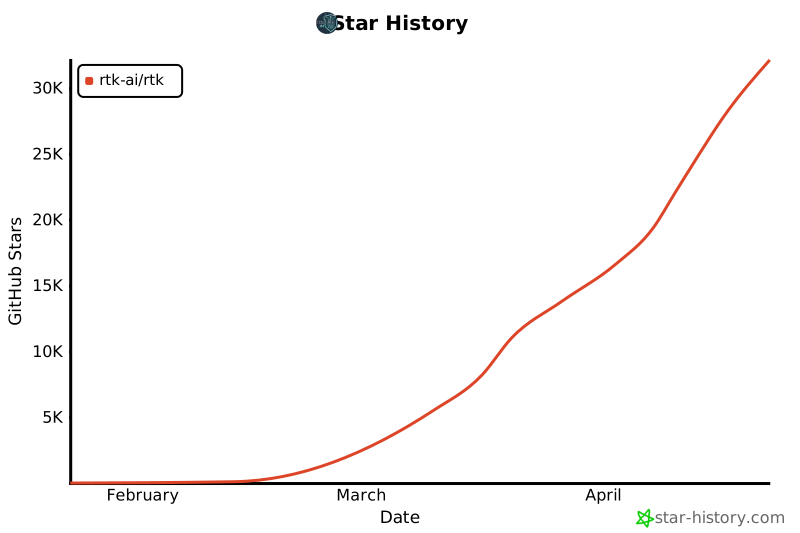
## Star History
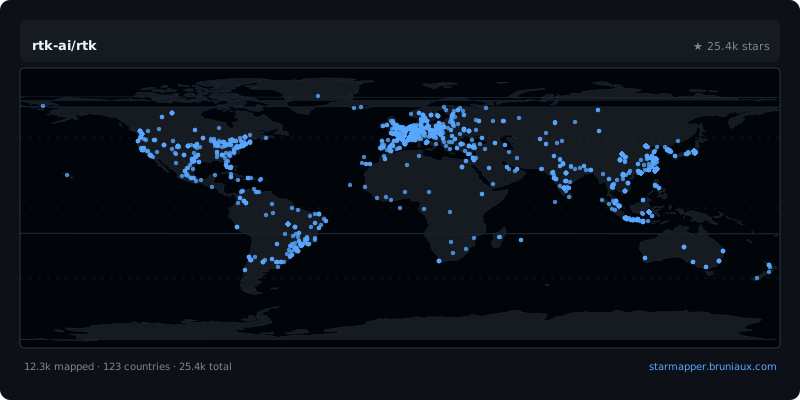
## StarMapper
## Core team
- **Patrick Szymkowiak** — Founder
[GitHub](https://github.com/pszymkowiak) · [LinkedIn](https://www.linkedin.com/in/patrick-szymkowiak/)
- **Florian Bruniaux** — Core contributor
[GitHub](https://github.com/FlorianBruniaux) · [LinkedIn](https://www.linkedin.com/in/florian-bruniaux-43408b83/)
- **Adrien Eppling** — Core contributor
[GitHub](https://github.com/aeppling) · [LinkedIn](https://www.linkedin.com/in/adrien-eppling/)
## Contributing
Contributions welcome! Please open an issue or PR on [GitHub](https://github.com/rtk-ai/rtk).
Join the community on [Discord](https://discord.gg/RySmvNF5kF).
## License
MIT License - see [LICENSE](LICENSE) for details.
## Disclaimer
See [DISCLAIMER.md](DISCLAIMER.md).