https://github.com/rubyonworld/slack-ruby-block-kit
A collection of ruby objects that represent Slack's block kit.
https://github.com/rubyonworld/slack-ruby-block-kit
block ruby slack
Last synced: 3 months ago
JSON representation
A collection of ruby objects that represent Slack's block kit.
- Host: GitHub
- URL: https://github.com/rubyonworld/slack-ruby-block-kit
- Owner: RubyOnWorld
- License: mit
- Created: 2022-09-27T15:46:53.000Z (almost 4 years ago)
- Default Branch: master
- Last Pushed: 2023-02-16T02:57:59.000Z (over 3 years ago)
- Last Synced: 2025-05-19T20:32:19.434Z (about 1 year ago)
- Topics: block, ruby, slack
- Language: Ruby
- Homepage:
- Size: 237 KB
- Stars: 1
- Watchers: 1
- Forks: 0
- Open Issues: 5
-
Metadata Files:
- Readme: README.md
- Changelog: CHANGELOG.md
- License: LICENSE.txt
Awesome Lists containing this project
README
[](https://badge.fury.io/rb/slack-ruby-block-kit)
[](https://codecov.io/gh/CGA1123/slack-ruby-block-kit)
[](https://deepsource.io/gh/CGA1123/slack-ruby-block-kit/?ref=repository-badge)
[](https://deepsource.io/gh/CGA1123/slack-ruby-block-kit/?ref=repository-badge)
# Slack::BlockKit
A collection of ruby objects that represent Slack's block kit.
You can play around with the block kit using [Slack's block kit builder!](https://api.slack.com/tools/block-kit-builder)
The 'blocks' availables are split in line with how Slack documents them, that is:
- `Slack::BlockKit::Layout` contains the [Layout blocks](https://api.slack.com/reference/messaging/blocks)
- `Slack::BlockKit::Element` contains the [Block elements](https://api.slack.com/reference/messaging/block-elements)
- `Slack::BlockKit::Composition` contains the [Message composition objects](https://api.slack.com/reference/messaging/composition-objects)
## Installation
Add this line to your application's Gemfile:
```ruby
gem 'slack-ruby-block-kit'
```
And then execute:
$ bundle
Or install it yourself as:
$ gem install slack-ruby-block-kit
Finally, require this:
```ruby
require 'slack-ruby-block-kit'
```
## Examples
Here are a few examples that might help you get started!
```ruby
require 'faraday'
require 'slack-ruby-block-kit'
require 'json'
a_prebuilt_block = Slack::BlockKit::Layout::Section.new
text = Slack::BlockKit::Composition::Mrkdwn.new(text: ':wave: *hello*')
an_image = Slack::BlockKit::Element::Image.new(image_url: 'https://git.io/fjDW8', alt_text: 'a picture')
a_prebuilt_block.accessorise(an_image)
a_prebuilt_block.text = text
blocks = Slack::BlockKit.blocks do |b|
b.section do |s|
s.plain_text(text: 'Some plain text message!')
s.button(text: 'A button that is important', style: 'primary', action_id: 'id')
end
b.divider
b.context do |c|
c.mrkdwn(text: '_some italicised text for context_')
end
b.append(a_prebuilt_block)
end
webhook_url = 'https://hooks.slack.com/services/your/webhook/url'
body = { blocks: blocks.as_json, text: 'New block message!' }
response = Faraday.post(
webhook_url,
body.to_json,
'Content-Type' => 'application/json'
)
```
This will create a message like this:
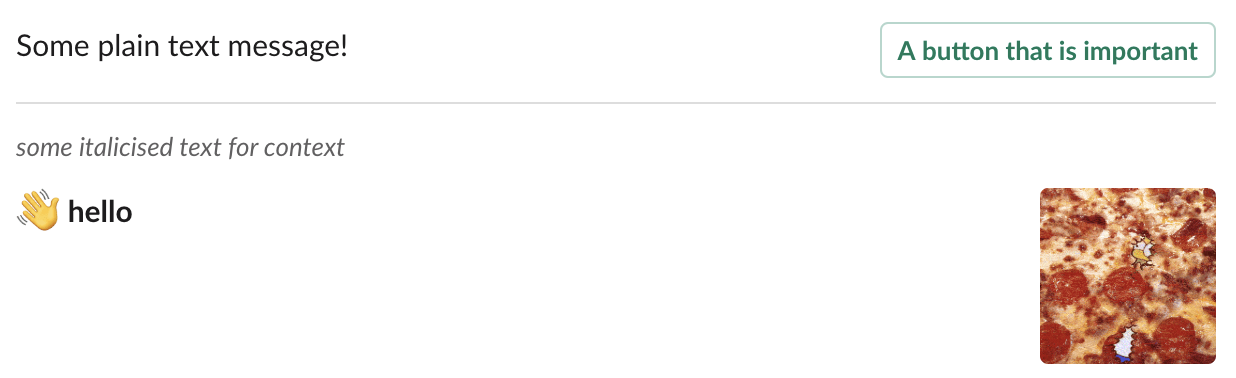
You can also check out the [`slackerduty`](https://github.com/CGA1123/slackerduty) project for some example,
[`Slackerduty::Alert`](https://github.com/CGA1123/slackerduty/blob/b33d708124ddf36d1432080ba7e16e66fefa6993/lib/slackerduty/alert.rb#L28-L34) and [`Slackerduty::Blocks`](https://github.com/CGA1123/slackerduty/blob/master/lib/slackerduty/blocks) may be helpful places to start.
## Contributing
Bug reports and pull requests are welcome on GitHub at https://github.com/CGA1123/slack-ruby-block-kit
See [issues](https://github.com/CGA1123/slack-ruby-block-kit/issues) if you want any inspiration as to what to help with!
## License
The gem is available as open source under the terms of the [MIT License](https://opensource.org/licenses/MIT).
## Releasing
Releasing is automated via the `.github/workflows/release.yml` which allows for
an OTP code to be passed in to authorize the release with MFA. If GitHub
Actions is running slow it might take another attempt to make sure the OTP code
is still valid when the workflow tries to push.
- Update `CHANGELOG` for the latest version (remember to update the comparison links + add in an `Unreleased` section again)
- Update `lib/slack/block_kit/version.rb` and run `bundle` to update the `Gemfile.lock`
- Push that!
- Run the `Release` workflow