https://github.com/rudy2steiner/jsonhome
JSON format, validate, compare toolset.
https://github.com/rudy2steiner/jsonhome
diff formatter json json-editor json-formatter json-validator json-viewer validator viewer
Last synced: 2 months ago
JSON representation
JSON format, validate, compare toolset.
- Host: GitHub
- URL: https://github.com/rudy2steiner/jsonhome
- Owner: rudy2steiner
- Created: 2022-04-10T08:53:12.000Z (about 4 years ago)
- Default Branch: main
- Last Pushed: 2026-03-27T16:46:20.000Z (3 months ago)
- Last Synced: 2026-03-28T01:19:12.021Z (3 months ago)
- Topics: diff, formatter, json, json-editor, json-formatter, json-validator, json-viewer, validator, viewer
- Language: TypeScript
- Homepage: https://www.jsonhome.com
- Size: 14.2 MB
- Stars: 0
- Watchers: 1
- Forks: 0
- Open Issues: 0
-
Metadata Files:
- Readme: README.ja-JP.md
Awesome Lists containing this project
README
# SoraWebui
SoraWebui は、ユーザーがテキストを使って OpenAI の Sora モデルでオンラインビデオを生成できるようにすることで、ビデオ作成を簡素化するオープンソースプロジェクトです。
👉 [SoraWebui](https://sorawebui.com)
[English](https://github.com/SoraWebui/SoraWebui/blob/main/README.md) | [简体中文](https://github.com/SoraWebui/SoraWebui/blob/main/README.zh-CN.md) | 日本語
# プロジェクトプラン
- ✅ 単語で動画を生成 ([FakeSoraAPI](https://github.com/SoraWebui/FakeSoraAPI) を使用):
この機能は、👉 [main](https://github.com/SoraWebui/SoraWebui/tree/main) または 👉 [version-0.1](https://github.com/SoraWebui/SoraWebui/tree/version-0.1) で見ることができます
- ✅ Google でログイン:
この機能は、👉 [login](https://github.com/SoraWebui/SoraWebui/tree/login) または 👉 [version-0.2](https://github.com/SoraWebui/SoraWebui/tree/version-0.2) で見ることができます
- ✅ Google ワンクリックログイン:
この機能は、👉 [login](https://github.com/SoraWebui/SoraWebui/tree/login) または 👉 [version-0.3](https://github.com/SoraWebui/SoraWebui/tree/version-0.3) で見ることができます
- [ ] Stripe 決済:
準備中
- [ ] OpenAI の Sora API を追加する:
OpenAI が Sora の API を起動するのを待ってから、この機能を起動します。
## クイックスタート
### Vercel でデプロイ
[](https://vercel.com/new/clone?repository-url=https%3A%2F%2Fgithub.com%2FSoraWebui%2FSoraWebui&project-name=SoraWebui&repository-name=SoraWebui&external-id=https%3A%2F%2Fgithub.com%2FSoraWebui%2FSoraWebui%2Ftree%2Fmain)
### 1. プロジェクトをクローン
```bash
git clone git@github.com:SoraWebui/SoraWebui.git
```
### 2. 依存関係をインストール
```bash
cd SoraWebui && yarn
#もしくは
cd SoraWebui && npm install
#もしくは
cd SoraWebui && pnpm install
```
### 3. .env.example をコピーし、.env.local にリネームする
```bash
# web サイト URL
NEXT_PUBLIC_SITE_URL=http://localhost
# openai 設定
OPENAI_API_KEY=sk-XXXXXX
OPENAI_API_BASE_URL=http://localhost:8081
OPENAI_API_MODEL=sora-1.0-turbo
```
### 4. 実行
```bash
yarn dev
#もしくは
npm run dev
#もしくは
pnpm dev
```
### 5. [http://localhost](http://localhost) をブラウザで開いてご覧ください。

# 重要
SoraWebui が正しく機能するには [FakeSoraAPI](https://github.com/SoraWebui/FakeSoraAPI) が必要です。
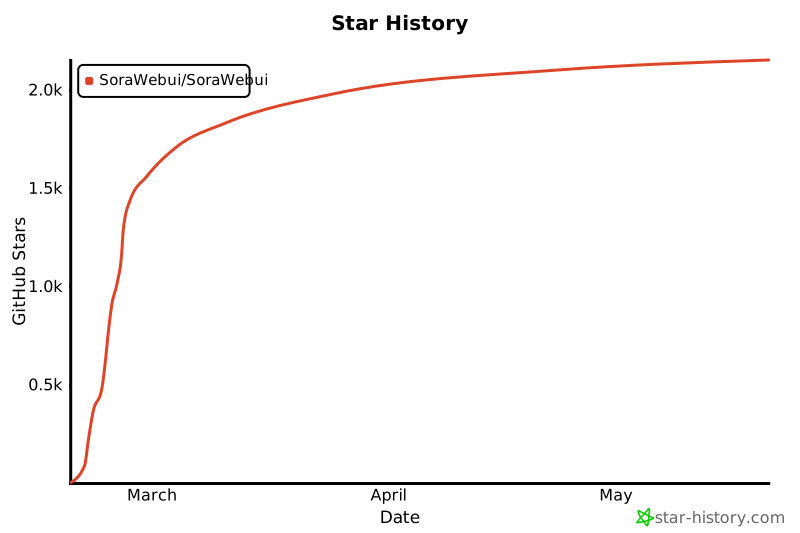
## Star History
[](https://star-history.com/#SoraWebui/SoraWebui&Date)