https://github.com/ruettenm/jira-activity
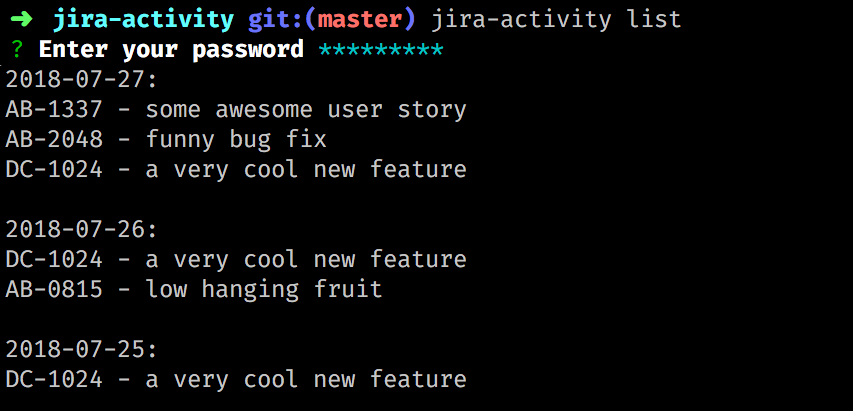
This tool parses your JIRA activity stream and returns a list of your workitems grouped by day.
https://github.com/ruettenm/jira-activity
activity activity-stream jira
Last synced: about 1 year ago
JSON representation
This tool parses your JIRA activity stream and returns a list of your workitems grouped by day.
- Host: GitHub
- URL: https://github.com/ruettenm/jira-activity
- Owner: ruettenm
- License: mit
- Created: 2018-07-27T11:56:29.000Z (almost 8 years ago)
- Default Branch: master
- Last Pushed: 2023-03-04T04:11:57.000Z (over 3 years ago)
- Last Synced: 2025-05-23T20:08:59.197Z (about 1 year ago)
- Topics: activity, activity-stream, jira
- Language: TypeScript
- Size: 220 KB
- Stars: 6
- Watchers: 1
- Forks: 2
- Open Issues: 4
-
Metadata Files:
- Readme: README.md
- License: LICENSE
Awesome Lists containing this project
README
# JIRA activity
This tool parses your jira activity stream and returns a list of your work items grouped by day.
The official atlassian documentation for the jira activity stream can be found [here](https://developer.atlassian.com/server/framework/atlassian-sdk/consuming-an-activity-streams-feed).
## How to use
### Initial setup
```bash
# installation
npm i -g jira-activity
# setup your defaults
jira-activity hostname some.hostname
jira-activity username your@username.com
```
### Show your activity
```bash
# if you have set your defaults
jira-activity list
# if you do not have defaults or wants to override them
jira-activity list -u your@username.com -h some.hostname
# if you only want to see your activities for the current week or month
jira-activity list -f week
jira-activity list -f month
```
## How to develop
### Initial setup
```bash
nvm use
# install yarn
npm i -g yarn
# install dependencies
yarn
```
### How to call the library
```bash
yarn dev [command]
# e.g. >>
yarn dev list
yarn dev defaults
```
### How to release a new version
1. commit all your changes
2. execute the `release` (with npm NOT yarn) command. The command will automatically do a version bump.
```
npm run release
Versioning package...
Pushing new release tag to GitHub...
Creating a new GitHub release...
v1.5.0 released to GitHub - https://github.com/ruettenm/jira-activity/releases/tag/v1.5.0
v1.5.0 released to npm - https://www.npmjs.com/package/jira-activity
```