https://github.com/runlevel5/gpu-screen-recorder-gtk
Mirror of https://repo.dec05eba.com/gpu-screen-recorder-gtk
https://github.com/runlevel5/gpu-screen-recorder-gtk
Last synced: about 1 month ago
JSON representation
Mirror of https://repo.dec05eba.com/gpu-screen-recorder-gtk
- Host: GitHub
- URL: https://github.com/runlevel5/gpu-screen-recorder-gtk
- Owner: runlevel5
- License: gpl-3.0
- Created: 2026-05-16T12:57:45.000Z (2 months ago)
- Default Branch: master
- Last Pushed: 2026-05-17T07:05:46.000Z (2 months ago)
- Last Synced: 2026-05-17T09:07:35.935Z (2 months ago)
- Language: C++
- Size: 567 KB
- Stars: 0
- Watchers: 0
- Forks: 0
- Open Issues: 0
-
Metadata Files:
- Readme: README.md
- License: LICENSE
Awesome Lists containing this project
README

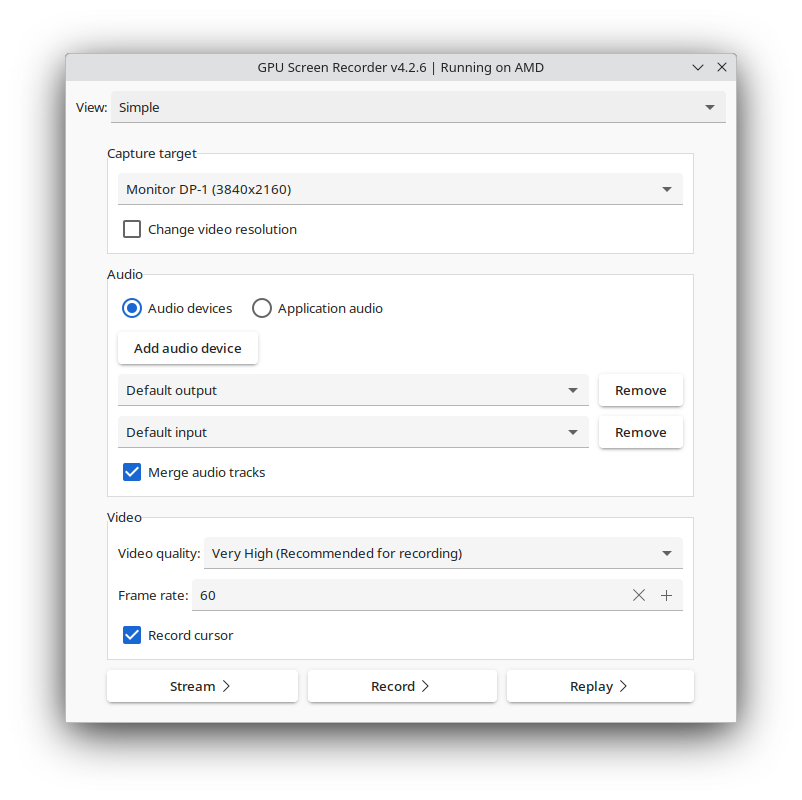
# GPU Screen Recorder GTK
GTK frontend for [GPU Screen Recorder](https://git.dec05eba.com/gpu-screen-recorder/about/).\
There is a new alternative UI for GPU Screen Recorder in the style of ShadowPlay available here: [GPU Screen Recorder UI](https://git.dec05eba.com/gpu-screen-recorder-ui/).
## Notes
The program has to be launched from your application launcher or hotkeys may not work properly in your Wayland compositor (this is the case with GNOME).
## Deprecation
This project is no longer being developed as it has been superseded by [GPU Screen Recorder UI](https://git.dec05eba.com/gpu-screen-recorder-ui/) which has more features. This project will remain available until GPU Screen Recorder UI can run as a regular window, just like GPU Screen Recorder GTK does.\
The `com.dec05eba.gpu_screen_recorder.appdata.xml` file has been moved to the [AppData](https://git.dec05eba.com/gpu-screen-recorder-appdata/) repository.
# Installation
If you are using an Arch Linux based distro then you can find gpu screen recorder gtk on aur under the name gpu-screen-recorder-gtk (`yay -S gpu-screen-recorder-gtk`).\
If you are running another distro then you can run `sudo ./install.sh`, but you need to manually install the dependencies, as described below.\
You can also install gpu screen recorder from [flathub](https://flathub.org/apps/details/com.dec05eba.gpu_screen_recorder) which includes this UI.
# Dependencies
GPU Screen Recorder GTK uses meson build system so you need to install `meson` to build GPU Screen Recorder GTK.
## Build dependencies
These are the dependencies needed to build GPU Screen Recorder GTK:
* gtk3
* libx11
* ayatana-appindicator3-0.1
* desktop-file-utils
## Runtime dependencies
There are also additional dependencies needed at runtime:
* [GPU Screen Recorder](https://git.dec05eba.com/gpu-screen-recorder/)
# Reporting bugs, contributing patches, questions or donation
See [https://git.dec05eba.com/?p=about](https://git.dec05eba.com/?p=about).
# Screenshots