https://github.com/runloopai/rl-cli
An interactive CLI for interacting with the Runloop.ai platform. Use it as an interactive command-line application with rich UI components, or as a traditional CLI for scripting and automation.
https://github.com/runloopai/rl-cli
ai cli sandbox tool
Last synced: 4 months ago
JSON representation
An interactive CLI for interacting with the Runloop.ai platform. Use it as an interactive command-line application with rich UI components, or as a traditional CLI for scripting and automation.
- Host: GitHub
- URL: https://github.com/runloopai/rl-cli
- Owner: runloopai
- License: mit
- Created: 2025-10-01T00:29:04.000Z (10 months ago)
- Default Branch: main
- Last Pushed: 2026-02-06T01:03:55.000Z (5 months ago)
- Last Synced: 2026-02-06T04:00:04.842Z (5 months ago)
- Topics: ai, cli, sandbox, tool
- Language: TypeScript
- Homepage: https://runloop.ai
- Size: 17.4 MB
- Stars: 15
- Watchers: 0
- Forks: 0
- Open Issues: 7
-
Metadata Files:
- Readme: README.md
- Changelog: CHANGELOG.md
- Contributing: CONTRIBUTING.md
- License: LICENSE
- Code of conduct: CODE_OF_CONDUCT.md
- Security: SECURITY.md
Awesome Lists containing this project
README
# Runloop CLI
[](https://www.npmjs.com/package/@runloop/rl-cli)
[](https://github.com/runloopai/rl-cli/actions/workflows/ci.yml)
[](LICENSE)
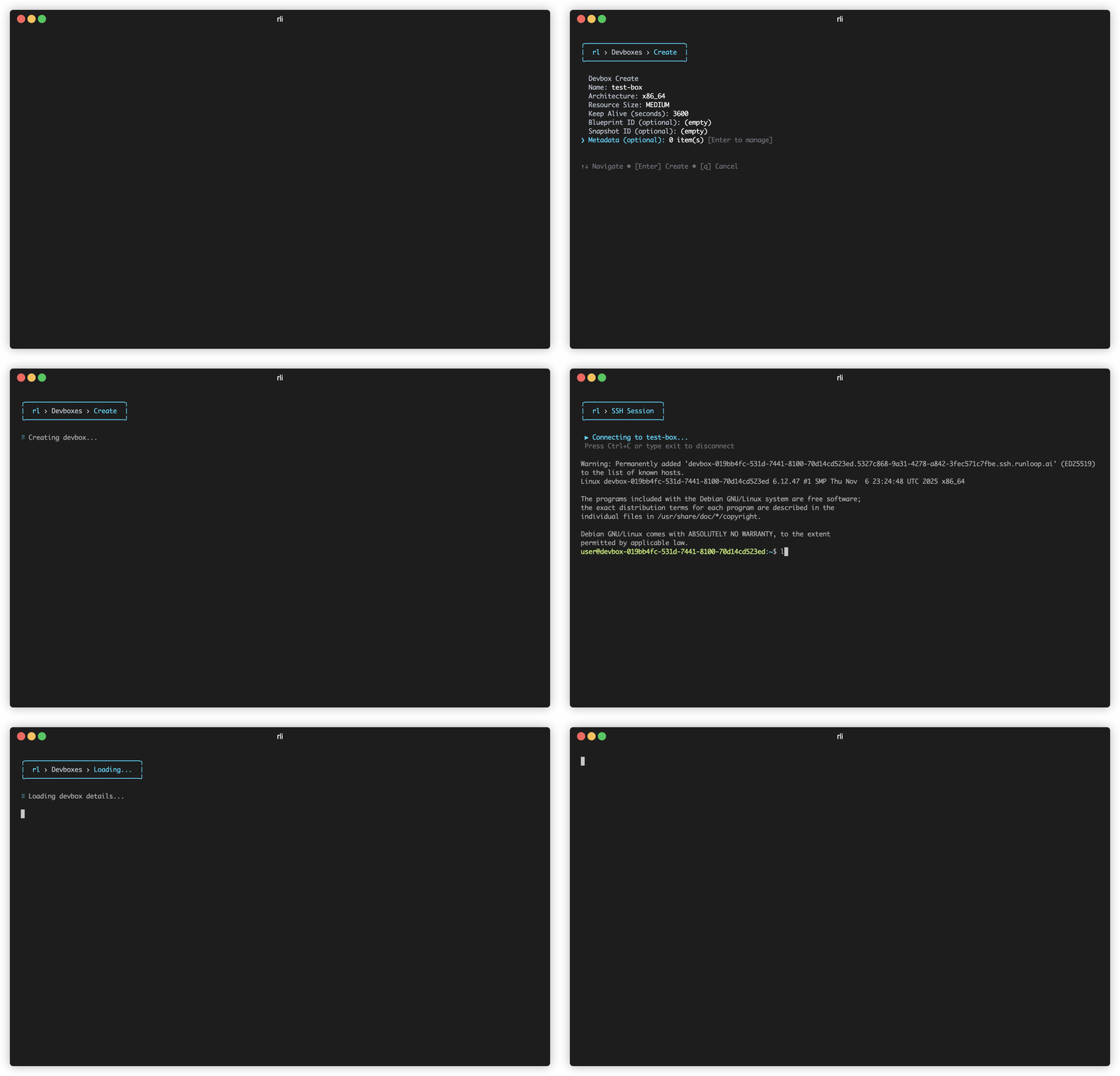
A **TUI + CLI** for the [Runloop.ai](https://runloop.ai) platform. Use it as an **interactive TUI** (Terminal User Interface) with rich UI components, or as a **traditional CLI** for scripting and automation.
📖 **[Full Documentation](https://docs.runloop.ai/docs/tools/rl-cli)**
## Quick Example
```bash
# TUI mode - launches an interactive terminal UI
rli
# CLI mode - perfect for scripts and automation
rli devbox list # Outputs JSON/text
rli devbox create --name my-devbox
rli devbox exec echo "Hello World"
rli devbox delete
```
## Features
- 🖥️ **TUI mode** — Interactive terminal UI with menus, tables, and real-time updates
- 🎯 **CLI mode** — Traditional commands with text, JSON, and YAML output for scripting
- ⚡ Fast and responsive with pagination
- 📦 Manage devboxes, snapshots, and blueprints
- 🚀 Execute commands, SSH, view logs in devboxes
- 🤖 **Model Context Protocol (MCP) server for AI integration**
## Installation
Install globally via npm or pnpm:
```bash
npm install -g @runloop/rl-cli
# or
pnpm add -g @runloop/rl-cli
```
## Setup
Configure your API key:
```bash
export RUNLOOP_API_KEY=your_api_key_here
```
Get your API key from [https://runloop.ai/settings](https://runloop.ai/settings)
## Usage
### TUI (Interactive Mode)
```bash
rli # Launch the interactive TUI
rli --help # See help information
```
### CLI (Scripting Mode)
All commands support `--output` (`-o`) for format control:
```bash
rli devbox list # Default text output
rli devbox list -o json # JSON output
rli devbox list -o yaml # YAML output
```
## Command Structure
The CLI is organized into command buckets:
### Devbox Commands (alias: `d`)
```bash
rli devbox create # Create a new devbox
rli devbox list # List all devboxes
rli devbox delete # Shutdown a devbox
rli devbox exec # Execute a command in a devbox
rli devbox exec-async # Execute a command asynchronously on a...
rli devbox upload # Upload a file to a devbox
rli devbox get # Get devbox details
rli devbox get-async # Get status of an async execution
rli devbox suspend # Suspend a devbox
rli devbox resume # Resume a suspended devbox
rli devbox shutdown # Shutdown a devbox
rli devbox ssh # SSH into a devbox
rli devbox scp # Copy files to/from a devbox using scp...
rli devbox rsync # Sync files to/from a devbox using rsy...
rli devbox tunnel # Create a port-forwarding tunnel to a ...
rli devbox read # Read a file from a devbox using the API
rli devbox write # Write a file to a devbox using the API
rli devbox download # Download a file from a devbox
rli devbox send-stdin # Send stdin to a running async execution
rli devbox logs # View devbox logs
```
### Snapshot Commands (alias: `snap`)
```bash
rli snapshot list # List all snapshots
rli snapshot create # Create a snapshot of a devbox
rli snapshot delete # Delete a snapshot
rli snapshot get # Get snapshot details
rli snapshot prune # Delete old snapshots for a devbox, ke...
rli snapshot status # Get snapshot operation status
```
### Blueprint Commands (alias: `bp`)
```bash
rli blueprint list # List all blueprints
rli blueprint create # Create a new blueprint
rli blueprint get # Get blueprint details by name or ID (...
rli blueprint logs # Get blueprint build logs by name or I...
rli blueprint delete # Delete a blueprint by ID
rli blueprint prune # Delete old blueprint builds, keeping ...
rli blueprint from-dockerfile # Create a blueprint from a Dockerfile ...
```
### Object Commands (alias: `obj`)
```bash
rli object list # List objects
rli object get # Get object details
rli object download # Download object to local file
rli object upload # Upload a file as an object
rli object delete # Delete an object (irreversible)
```
### Network-policy Commands (alias: `np`)
```bash
rli network-policy list # List network policies
rli network-policy get # Get network policy details
rli network-policy create # Create a new network policy
rli network-policy delete # Delete a network policy
```
### Secret Commands (alias: `s`)
```bash
rli secret create # Create a new secret. Value can be pip...
rli secret list # List all secrets
rli secret get # Get secret metadata by name
rli secret update # Update a secret value (value from std...
rli secret delete # Delete a secret
```
### Gateway-config Commands (alias: `gwc`)
```bash
rli gateway-config list # List gateway configurations
rli gateway-config create # Create a new gateway configuration
rli gateway-config get # Get gateway configuration details
rli gateway-config update # Update a gateway configuration
rli gateway-config delete # Delete a gateway configuration
```
### Mcp-config Commands (alias: `mcpc`)
```bash
rli mcp-config list # List MCP configurations
rli mcp-config create # Create a new MCP configuration
rli mcp-config get # Get MCP configuration details
rli mcp-config update # Update an MCP configuration
rli mcp-config delete # Delete an MCP configuration
```
### Mcp Commands
```bash
rli mcp start # Start the MCP server
rli mcp install # Install Runloop MCP server configurat...
```
### Benchmark-job Commands (alias: `bmj`)
```bash
rli benchmark-job run # Run a benchmark job with one or more ...
rli benchmark-job summary # Get benchmark job summary and results
rli benchmark-job watch # Watch benchmark job progress in real-...
rli benchmark-job list # List benchmark jobs
```
## MCP Server (AI Integration)
Runloop includes a Model Context Protocol (MCP) server that allows AI assistants like Claude to interact with your devboxes.
### Quick Setup for Claude Desktop
```bash
# Install MCP configuration
rli mcp install
# Restart Claude Desktop, then ask Claude:
# "List my devboxes" or "Create a new devbox"
```
### Starting the Server
```bash
# Stdio mode (for Claude Desktop)
rli mcp start
# HTTP mode (for web/remote access)
rli mcp start --http
rli mcp start --http --port 8080
```
**Documentation:**
- [CLAUDE_SETUP.md](./CLAUDE_SETUP.md) - Complete setup guide for Claude Desktop
- [MCP_README.md](./MCP_README.md) - Full MCP documentation
- [MCP_COMMANDS.md](./MCP_COMMANDS.md) - Quick command reference
## Theme Configuration
The TUI supports both light and dark terminal themes and will automatically select the appropriate theme.
## Development
```bash
# Install dependencies
pnpm install
# Build
pnpm run build
# Watch mode
pnpm run dev
## Contributing
We welcome contributions! Please see [CONTRIBUTING.md](./CONTRIBUTING.md) for guidelines on how to contribute to this project.
## License
MIT