https://github.com/ryuhiro/choices-vue3
A lightweight and flexible Vue 2 & Vue 3 wrapper for Choices.js, fully compatible with Bootstrap 5 and written in TypeScript. Supports CDN and bundled usage, v-model binding, custom events, async search, and multiple selection modes — all without relying on jQuery.
https://github.com/ryuhiro/choices-vue3
choice choices choices-js vite vue vue3 vuex
Last synced: 10 days ago
JSON representation
A lightweight and flexible Vue 2 & Vue 3 wrapper for Choices.js, fully compatible with Bootstrap 5 and written in TypeScript. Supports CDN and bundled usage, v-model binding, custom events, async search, and multiple selection modes — all without relying on jQuery.
- Host: GitHub
- URL: https://github.com/ryuhiro/choices-vue3
- Owner: ryuhiro
- License: mit
- Created: 2025-07-13T17:40:11.000Z (about 1 year ago)
- Default Branch: master
- Last Pushed: 2025-07-13T17:42:19.000Z (about 1 year ago)
- Last Synced: 2026-07-14T12:59:55.655Z (10 days ago)
- Topics: choice, choices, choices-js, vite, vue, vue3, vuex
- Homepage:
- Size: 63.5 KB
- Stars: 0
- Watchers: 0
- Forks: 0
- Open Issues: 0
-
Metadata Files:
- Readme: README.md
- License: LICENSE
Awesome Lists containing this project
README
# Choices-Vue3
[](https://www.npmjs.com/package/choices-vue3) [](https://www.npmjs.com/package/choices-vue3) [](https://vuejs.org/) [](https://www.npmjs.com/package/choices-vue3) [](https://www.jsdelivr.com/package/npm/choices-vue3)
💡 A lightweight and flexible Vue 2 & Vue 3 wrapper for Choices.js, fully compatible with Bootstrap 5 and written in TypeScript.
Supports CDN and bundled usage, v-model binding, custom events, async search, and multiple selection modes — all without relying on jQuery.
---
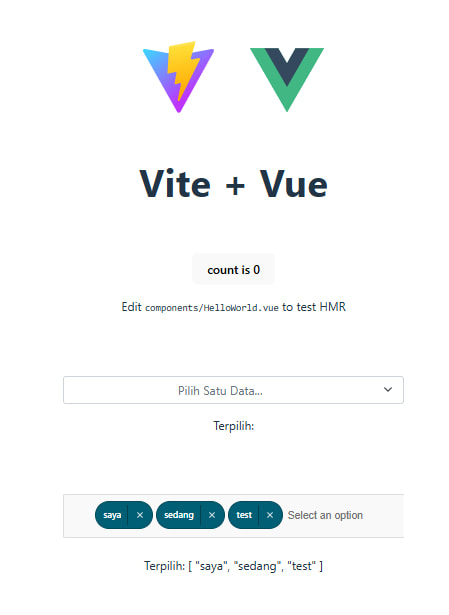
## 🖼️ Preview
---
## 🧪 Demo & Playground
🔗 [Try at JSFiddle](https://jsfiddle.net/ryuhiro/xq82L7mn/7/)
## 🚀 Install
### With npm (recommended)
```bash
npm install choices-vue3
```
### With CDN
```bash
```
## 🧩 Usage
### Basic usage (npm / bundler)
```bash
import { createApp } from 'vue'
import './style.css'
import App from './App.vue'
import { useChoices } from 'choices-vue3'
import 'choices-vue3/dist/vue3/choices-vue3.css'
const app = createApp(App)
app.use(useChoices)
app.mount('#app')
```
as a component? Or for TypeScript when build (Tested in Vite when using `npm run build`):
```bash
import { createApp } from 'vue'
import './style.css'
import App from './App.vue'
import { ChoicesVue3 } from 'choices-vue3/vue3' or import ChoicesVue3 from 'choices-vue3/vue3'
import 'choices-vue3/dist/vue3/choices-vue3.css'
const app = createApp(App)
app.component('choices-vue3', ChoicesVue3)
app.mount('#app')
```
Now use in your any components:
## As Single Select (Default)
```bash
import { ref } from 'vue'
const selectedValue = ref(null)
const selectOptions = ref([
{ value: '1a2b3c4d', label: 'Admin - Budi Santoso' },
{ value: '2b3c4d5e', label: 'Marketing - Siti Aminah' },
{ value: '3c4d5e6f', label: 'Developer - Agus Wijaya' },
{ value: '4d5e6f7g', label: 'HR - Indah Permata' },
{ value: '5e6f7g8h', label: 'Finance - Rudi Hartono' },
{ value: '6f7g8h9i', label: 'QA - Tono Supriyadi' },
{ value: '7g8h9i0j', label: 'Design - Sarah Maharani' },
{ value: '8h9i0j1k', label: 'Support - Dimas Ananta' },
{ value: '9i0j1k2l', label: 'PM - Citra Larasati' },
{ value: '0j1k2l3m', label: 'Intern - Yoga Pranata' },
])
```
Or you can use TypeScript:
```bash
/>
import { defineComponent, ref } from 'vue'
export default defineComponent({
name: 'HelloWorld',
setup() {
const selectedValue = ref('')
const selectOptions = ref([
{ value: '1a2b3c4d', label: 'Admin - Budi Santoso' },
{ value: '2b3c4d5e', label: 'Marketing - Siti Aminah' },
{ value: '3c4d5e6f', label: 'Developer - Agus Wijaya' },
{ value: '4d5e6f7g', label: 'HR - Indah Permata' },
{ value: '5e6f7g8h', label: 'Finance - Rudi Hartono' },
{ value: '6f7g8h9i', label: 'QA - Tono Supriyadi' },
{ value: '7g8h9i0j', label: 'Design - Sarah Maharani' },
{ value: '8h9i0j1k', label: 'Support - Dimas Ananta' },
{ value: '9i0j1k2l', label: 'PM - Citra Larasati' },
{ value: '0j1k2l3m', label: 'Intern - Yoga Pranata' },
])
return {
selectedValue,
selectOptions,
}
}
})
```
## As Multiple Select
```bash
import { ref } from 'vue'
const selectedValue = ref(null)
const selectOptions = ref([
{ value: '1a2b3c4d', label: 'Admin - Budi Santoso' },
{ value: '2b3c4d5e', label: 'Marketing - Siti Aminah' },
{ value: '3c4d5e6f', label: 'Developer - Agus Wijaya' },
{ value: '4d5e6f7g', label: 'HR - Indah Permata' },
{ value: '5e6f7g8h', label: 'Finance - Rudi Hartono' },
{ value: '6f7g8h9i', label: 'QA - Tono Supriyadi' },
{ value: '7g8h9i0j', label: 'Design - Sarah Maharani' },
{ value: '8h9i0j1k', label: 'Support - Dimas Ananta' },
{ value: '9i0j1k2l', label: 'PM - Citra Larasati' },
{ value: '0j1k2l3m', label: 'Intern - Yoga Pranata' },
])
```
Or you can use TypeScript:
```bash
/>
import { defineComponent, ref } from 'vue'
export default defineComponent({
name: 'HelloWorld',
setup() {
const selectedValue = ref('')
const selectOptions = ref([
{ value: '1a2b3c4d', label: 'Admin - Budi Santoso' },
{ value: '2b3c4d5e', label: 'Marketing - Siti Aminah' },
{ value: '3c4d5e6f', label: 'Developer - Agus Wijaya' },
{ value: '4d5e6f7g', label: 'HR - Indah Permata' },
{ value: '5e6f7g8h', label: 'Finance - Rudi Hartono' },
{ value: '6f7g8h9i', label: 'QA - Tono Supriyadi' },
{ value: '7g8h9i0j', label: 'Design - Sarah Maharani' },
{ value: '8h9i0j1k', label: 'Support - Dimas Ananta' },
{ value: '9i0j1k2l', label: 'PM - Citra Larasati' },
{ value: '0j1k2l3m', label: 'Intern - Yoga Pranata' },
])
return {
selectedValue,
selectOptions,
}
}
})
```
## As Tagging
```bash
import { ref } from 'vue'
const selectedValue = ref(null)
const selectOptions = ref([])
```
Or you can use TypeScript:
```bash
/>
import { defineComponent, ref } from 'vue'
export default defineComponent({
name: 'HelloWorld',
setup() {
const selectedValue = ref(null)
const selectOptions = ref([])
return {
selectedValue,
selectOptions,
}
}
})
```
# How to use the props?
| Prop | Type | Default | Required | Description |
|-----------------|---------------------------------|-----------------------|----------|------------------------------------------------------|
| `id` | `String` | `'choices'` | ✘ | The ID attribute for the main element |
| `name` | `String` | `'choices'` | ✘ | The name attribute for form input |
| `options` | `Array` | — | ✔ | List of available options |
| `modelValue` | `String` \| `Number` \| `Array` | `null` | ✘ | Selected value (used with `v-model`) |
| `placeholder` | `String` | `'Select an option'` | ✘ | Placeholder text when no option is selected |
| `multiple` | `Boolean` | `false` | ✘ | Enables multiple selection |
| `disabled` | `Boolean` | `false` | ✘ | Disables the component |
| `required` | `Boolean` | `false` | ✘ | Marks the field as required |
| `valueKey` | `String` | `'value'` | ✘ | Key used to extract value from option object |
| `textKey` | `String` | `'label'` | ✘ | Key used to extract display text from option object |
| `config` | `Object` | `() => ({})` | ✘ | Additional configuration options |
| `fetchOnSearch` | `Boolean` | `false` | ✘ | Emits `search` event on user input |
| `loadingSelect` | `Boolean` | `undefined` | ✘ | Shows loading indicator when true |
# Emits
| Event | Payload | Description |
|----------------------|------------------------------------|-----------------------------------------------------------|
| `update:modelValue` | `String` \| `Number` \| `Array` | Emitted when the selected value changes |
| `change` | Selected option(s) | Emitted when an option is selected |
| `search` | `String` | Emitted when the user types in the input field |
| `loadMore` | — | Emitted to load more data (e.g., for infinite scrolling) |
### 📘 Configuration Notes
The `config` prop allows you to customize the behavior of the select component. Below are the guidelines for using it in different modes:
---
#### 🔹 Single Select
- You do **not** need to set `multiple`.
- The `config` prop is **optional**.
- Example (with optional features enabled):
```bash
```
---
#### 🔸 Multiple Select
- You **must** set `multiple` to `true`.
- You **must** provide a valid `config` with `mode` set to either `'multiple'` or `'tagging'`.
##### Example – Mode: `'multiple'`
```bash
```
##### Example – Mode: `'tagging'`
```bash
```
---
### ⚙️ About `returnObject`
Inside `config.setting`, the `returnObject` option controls what value gets emitted and bound via `v-model`:
| Setting | Behavior |
|------------------------|--------------------------------------------------------------------------|
| `returnObject: false` | Emits only the `value` from the selected item (based on `valueKey`). |
| `returnObject: true` | Emits the **entire object** of the selected item. Useful when you need access to more fields. |
##### Example
```js
// Given options:
[
{ label: 'Apple', value: 'apple', category: 'fruit' },
{ label: 'Carrot', value: 'carrot', category: 'vegetable' }
]
// With returnObject: false
modelValue === 'apple'
// With returnObject: true
modelValue === { label: 'Apple', value: 'apple', category: 'fruit' }
```
Make sure you choose the `returnObject` behavior based on whether your app needs only the value or the entire item object.
---
## 🚀 About Me
I'm a full stack developer...
## Authors
- [@ryuhiro](https://www.github.com/ryuhiro)