https://github.com/sahar-dev/django_basics
This tutorial explains how to create a simple CRUD app using django framework
https://github.com/sahar-dev/django_basics
backend django tutorial
Last synced: 3 months ago
JSON representation
This tutorial explains how to create a simple CRUD app using django framework
- Host: GitHub
- URL: https://github.com/sahar-dev/django_basics
- Owner: Sahar-dev
- License: mit
- Created: 2024-11-27T10:14:18.000Z (over 1 year ago)
- Default Branch: main
- Last Pushed: 2025-01-14T22:16:37.000Z (over 1 year ago)
- Last Synced: 2025-03-24T00:29:43.477Z (over 1 year ago)
- Topics: backend, django, tutorial
- Language: Python
- Homepage:
- Size: 42 KB
- Stars: 0
- Watchers: 1
- Forks: 0
- Open Issues: 3
-
Metadata Files:
- Readme: README.md
- License: LICENSE
Awesome Lists containing this project
README

📄 Django Subscription App Guide for Interns 🚀
========================================
Welcome to the **Subscription App Guide**! 🎉 This document is crafted especially for interns and beginners to help you grasp how Django works by exploring the simple **Subscription App** we developed together. Through this guide, you'll gain insights into the essential steps involved in building a Django project, common pitfalls to avoid, and best practices to follow. Whether you're new to web development or looking to strengthen your Django skills, this guide will provide a clear and structured path to mastering Django through our Subscription App example.
📚 Table of Contents
--------------------
1. [Introduction to Django](#introduction-to-django)
2. [Project Overview](#project-overview)
3. [Timeline of Development](#timeline-of-development)
- [1\. Setting Up the Development Environment](#1-setting-up-the-development-environment)
- [2\. Creating the Django Project and App](#2-creating-the-django-project-and-app)
- [3\. Designing the Database Model](#3-designing-the-database-model)
- [4\. Building Views and Templates](#4-building-views-and-templates)
- [5\. Handling Forms and User Input](#5-handling-forms-and-user-input)
- [6\. Generating PDF Downloads](#6-generating-pdf-downloads)
- [7\. Configuring URLs and Navigation](#7-configuring-urls-and-navigation)
- [8\. Testing the Application](#8-testing-the-application)
4. [Common Mistakes and How to Avoid Them](#common-mistakes-and-how-to-avoid-them)
5. [Best Practices](#best-practices)
6. [Conclusion](#conclusion)
7. [Additional Resources](#additional-resources)
* * * * *
🧐 Introduction to Django
-------------------------
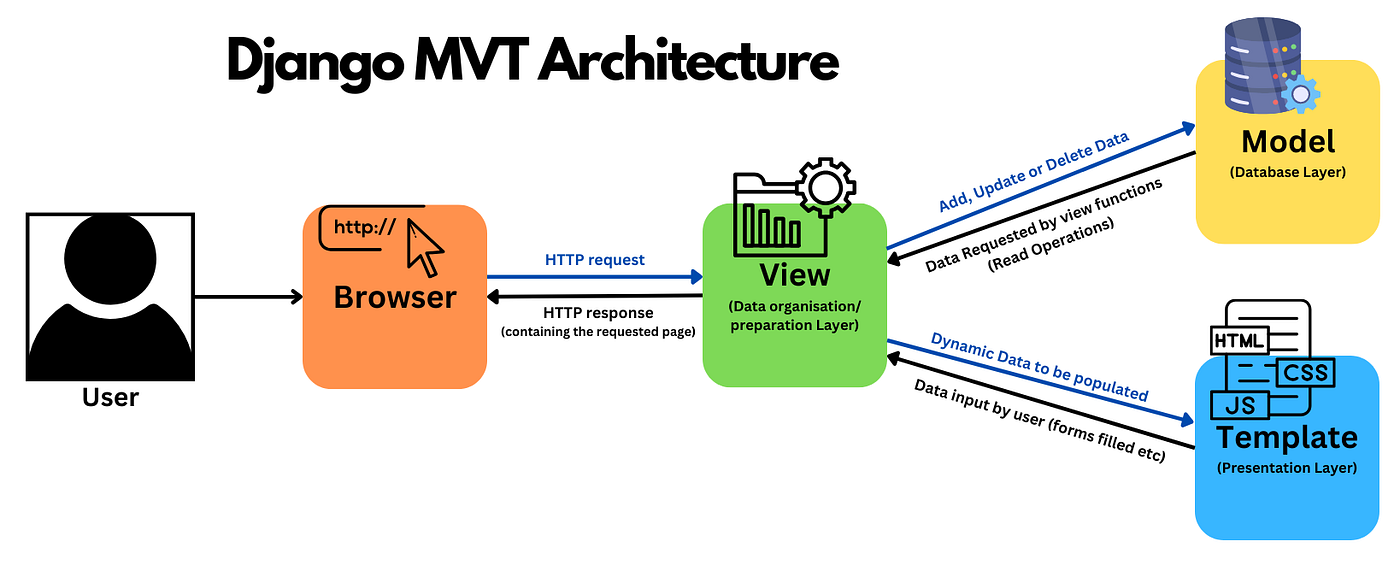
**Django** is a high-level Python web framework that encourages rapid development and clean, pragmatic design. 🐍 It handles much of the hassle of web development, allowing you to focus on writing your app without needing to reinvent the wheel. Django follows the **Model-View-Template (MVT)** architectural pattern, which helps in organizing your code efficiently.
### 🌟 Why Choose Django?
- **Batteries-Included:** Comes with a wide range of built-in features like an ORM, authentication system, and an admin panel. 🔧
- **Security:** Helps developers avoid common security mistakes. 🔒
- **Scalability:** Suitable for both small and large-scale projects. 📈
- **Community Support:** Large and active community with extensive documentation. 🌐
* * * * *
📋 Project Overview
-------------------
The **Subscription App** is a straightforward web application that allows users to enter their name and email address and download a PDF containing this information. 📄 This project serves as a practical example to understand how Django operates, covering key aspects like database design, form handling, view creation, template rendering, and PDF generation.
### 🔑 Key Features
- **User Input:** Users can submit their name and email through a form. 📝
- **PDF Generation:** After submission, users can download a PDF containing their submitted information. 📥
- **Admin Panel:** Administrators can view all submissions through Django's built-in admin interface. 🛠️
* * * * *
🕒 Timeline of Development
--------------------------
Building a Django project involves several sequential steps. Below is a timeline that outlines the critical phases of developing our Subscription App, highlighting essential tasks and common oversights to help you navigate each stage effectively.
### 1\. 🛠️ Setting Up the Development Environment
**Objectives:**
- Install Python and Django.
- Create a virtual environment.
- Install necessary dependencies.
**Steps:**
1. **Install Python:** Ensure Python 3.6+ is installed on your machine. You can download it from [python.org](https://www.python.org/downloads/). 🐍
2. **Set Up Virtual Environment:** Use `venv` to create an isolated environment. This keeps your project dependencies separate from other projects.
3. **Install Django:** Within the virtual environment, install Django using `pip`.
**Common Oversights:**
- **Skipping Virtual Environments:** Always use virtual environments to manage dependencies and avoid conflicts.
- **Ignoring Dependency Management:** Keep track of installed packages, preferably using a `requirements.txt` file.
### 2\. 🏗️ Creating the Django Project and App
**Objectives:**
- Initialize a new Django project.
- Create a dedicated app within the project.
**Steps:**
1. **Start a Django Project:** Use `django-admin startproject` to create the project structure.
2. **Create an App:** Within the project, create an app (e.g., `subscriptions`) using `python manage.py startapp`.
**Common Oversights:**
- **Misnaming Apps:** Choose clear and descriptive names for your apps to reflect their functionality.
- **Forgetting to Register Apps:** Ensure each new app is added to the `INSTALLED_APPS` list in `settings.py`.
### 3\. 🗄️ Designing the Database Model
**Objectives:**
- Define the data structure for storing user information.
- Utilize Django's ORM to interact with the database.
**Steps:**
1. **Create Models:** In `models.py`, define a `Subscriber` model with `name` and `email` fields.
2. **Apply Migrations:** Run `makemigrations` and `migrate` to create database tables.
**Common Oversights:**
- **Poor Model Design:** Plan your models carefully to avoid redundancy and ensure scalability.
- **Skipping Migrations:** Always apply migrations after modifying models to keep the database schema in sync.
### 4\. 👀 Building Views and Templates
**Objectives:**
- Handle user requests and render appropriate responses.
- Create HTML templates for different pages.
**Steps:**
1. **Develop Views:** In `views.py`, create functions to handle form display, submission, and PDF generation.
2. **Design Templates:** Use Django's templating language to create HTML files that display forms and success messages.
**Common Oversights:**
- **Mixing Logic and Presentation:** Keep business logic within views and use templates solely for presentation.
- **Ignoring Template Inheritance:** Utilize base templates to maintain consistency and reduce duplication.
### 5\. 📝 Handling Forms and User Input
**Objectives:**
- Create forms for users to input their data.
- Validate and process user input securely.
**Steps:**
1. **Create Forms:** Use Django's `forms` module to create a `SubscriberForm`.
2. **Process Forms in Views:** Handle form submission, validate data, and save it to the database.
**Common Oversights:**
- **Lack of Validation:** Always validate user input to prevent erroneous or malicious data.
- **Not Providing Feedback:** Inform users about the success or failure of their submissions.
### 6\. 📄 Generating PDF Downloads
**Objectives:**
- Allow users to download a PDF containing their submitted information.
- Integrate a PDF generation library with Django.
**Steps:**
1. **Choose a PDF Library:** Use libraries like [WeasyPrint](https://weasyprint.org/) or [ReportLab](https://www.reportlab.com/) to generate PDFs.
2. **Implement PDF Generation:** Create a view that generates and serves the PDF based on user data.
**Common Oversights:**
- **Performance Issues:** Ensure PDF generation is optimized to prevent slow response times.
- **Error Handling:** Handle potential errors during PDF creation gracefully.
### 7\. 🔗 Configuring URLs and Navigation
**Objectives:**
- Map URLs to corresponding views.
- Ensure intuitive navigation throughout the app.
**Steps:**
1. **Define URL Patterns:** In `urls.py`, route URLs to views using Django's `path` function.
2. **Create Navigation Links:** Add links in templates to facilitate easy movement between pages (e.g., home, submit form).
**Common Oversights:**
- **URL Conflicts:** Avoid overlapping URL patterns that can lead to unexpected behavior.
- **Broken Links:** Regularly test navigation to ensure all links function correctly.
### 8\. 🧪 Testing the Application
**Objectives:**
- Verify that all features work as intended.
- Ensure the app is free of bugs and errors.
**Steps:**
1. **Manual Testing:** Interact with the app to ensure forms submit correctly and PDFs download as expected.
2. **Automated Testing:** Write basic tests to check model creation and view responses.
**Common Oversights:**
- **Inadequate Test Coverage:** Aim to cover as many scenarios as possible to catch potential issues.
- **Ignoring Edge Cases:** Consider and test for unusual or unexpected user behaviors.
* * * * *
⚠️ Common Mistakes and How to Avoid Them
----------------------------------------
1. **🚫 Skipping Virtual Environments:**
- **Issue:** Leads to dependency conflicts and difficulties in managing packages.
- **Solution:** Always create and activate a virtual environment for each project.
2. **🔀 Poor Model Design:**
- **Issue:** Results in redundant data and complex queries.
- **Solution:** Plan your models thoughtfully, utilizing Django's field types appropriately.
3. **🛑 Ignoring Migrations:**
- **Issue:** Causes discrepancies between models and the database schema.
- **Solution:** After any model change, always run `makemigrations` and `migrate`.
4. **💥 Mixing Logic and Presentation:**
- **Issue:** Makes the codebase hard to maintain and debug.
- **Solution:** Keep business logic within views and use templates only for rendering HTML.
5. **🔓 Not Securing Sensitive Views:**
- **Issue:** Unauthorized access to user data.
- **Solution:** Use Django's authentication system to protect views that handle sensitive information.
6. **🔗 Overlooking URL Configuration:**
- **Issue:** Leads to inaccessible pages and navigation issues.
- **Solution:** Carefully plan and test your URL patterns to ensure all views are reachable and correctly routed.
7. **🧩 Insufficient Testing:**
- **Issue:** Bugs and issues go unnoticed, affecting user experience.
- **Solution:** Write comprehensive tests covering models, views, and forms.
8. **🔍 Deploying with Debug Mode:**
- **Issue:** Exposes sensitive information and can be exploited.
- **Solution:** Always set `DEBUG=False` in production and properly manage your `ALLOWED_HOSTS`.
* * * * *
🌟 Best Practices
-----------------
1. **📛 Follow Django's Naming Conventions:**
- Use clear and descriptive names for models, views, and templates to enhance readability.
2. **🧱 Utilize Template Inheritance:**
- Create a base template (`base.html`) that other templates extend to maintain consistency and reduce redundancy.
3. **🔐 Keep Secrets Secure:**
- Store sensitive information like `SECRET_KEY` and database credentials in environment variables, not in source code.
4. **⚡ Implement Proper Error Handling:**
- Use Django's messaging framework to provide user-friendly feedback and handle exceptions gracefully.
5. **🔍 Optimize Database Queries:**
- Use Django's ORM features to minimize database hits and improve performance.
6. **🧹 Maintain a Clean Codebase:**
- Regularly refactor code to adhere to the DRY (Don't Repeat Yourself) principle and ensure maintainability.
7. **📝 Document Your Code:**
- Write clear comments and docstrings to explain complex logic and improve code understandability for future developers.
* * * * *
🎯 Conclusion
-------------
Building the **Subscription App** provided a hands-on introduction to Django's core components and best practices. By following this guide, you've learned how to set up a Django project, design a simple database model, handle user input through forms, generate PDFs, configure URLs, and test your application. Remember, mastering Django takes time and practice, so continue experimenting with new features and refining your skills. Keep building, stay curious, and happy coding! 💻✨
* * * * *
📚 Additional Resources
-----------------------
To further enhance your Django knowledge and skills, explore the following resources:
- **Django Official Documentation:**
- **Django Tutorials:**
- [Official Tutorial](https://docs.djangoproject.com/en/stable/intro/tutorial01/)
- [Django Girls Tutorial](https://tutorial.djangogirls.org/)
- **Frontend Frameworks:**
- [Bootstrap Documentation](https://getbootstrap.com/docs/)
- **PDF Generation Libraries:**
- [WeasyPrint](https://weasyprint.org/)
- [ReportLab](https://www.reportlab.com/)
- **Testing in Django:**
- [Writing and Running Tests](https://docs.djangoproject.com/en/stable/topics/testing/)
- **Deployment Guides:**
- Deploying Django on Heroku
- [Django Deployment Checklist](https://docs.djangoproject.com/en/stable/howto/deployment/checklist/)
- **Community and Support:**
- [Django Forum](https://forum.djangoproject.com/)
- [Stack Overflow Django Questions](https://stackoverflow.com/questions/tagged/django)
Feel free to reach out to your team members or mentors with any questions or for further assistance as you continue to develop your Django projects. Happy coding! 🎉👩💻👨💻