https://github.com/sahil87/fab-kit
Structured, spec-driven development workflow for AI coding agents.
https://github.com/sahil87/fab-kit
agents ai-coding claude-code cli codex cursor developer-tools fab-kit prompt-engineering spec-driven-development windsurf worktrees
Last synced: about 1 month ago
JSON representation
Structured, spec-driven development workflow for AI coding agents.
- Host: GitHub
- URL: https://github.com/sahil87/fab-kit
- Owner: sahil87
- License: mit
- Created: 2026-02-05T11:19:47.000Z (5 months ago)
- Default Branch: main
- Last Pushed: 2026-06-07T17:50:11.000Z (about 1 month ago)
- Last Synced: 2026-06-07T18:16:21.877Z (about 1 month ago)
- Topics: agents, ai-coding, claude-code, cli, codex, cursor, developer-tools, fab-kit, prompt-engineering, spec-driven-development, windsurf, worktrees
- Language: Go
- Homepage: https://shll.ai/fab-kit
- Size: 11.6 MB
- Stars: 20
- Watchers: 0
- Forks: 5
- Open Issues: 1
-
Metadata Files:
- Readme: README.md
- Contributing: CONTRIBUTING.md
- License: LICENSE
Awesome Lists containing this project
README
# Fab Kit
> Part of [@sahil87's open source toolkit](https://shll.ai) — see all projects there.
[](https://github.com/sahil87/fab-kit/releases) [](https://github.com/sahil87/fab-kit/releases) [](https://github.com/sahil87/fab-kit/stargazers)
A development toolkit for AI-assisted coding. It includes a 6-stage pipeline (intake → apply → review → hydrate → ship → review-PR), standalone CLI tools for [git worktree management](https://github.com/sahil87/fab-kit/blob/main/docs/specs/companions.md) (`wt`) and [idea backlogs](https://github.com/sahil87/fab-kit/blob/main/docs/specs/companions.md) (`idea`), and batch orchestration for running multiple AI agents in parallel. Plain markdown prompts, no SDK, no vendor lock-in. Works with Claude Code, Codex, Cursor, and Windsurf.
AI agents write code fast. The bottleneck is now your clarity: did you define the problem well enough? Fab Kit sits at that bottleneck — it forces structured thinking before implementation, grounds every session in your project's actual context, and gets cheaper to run as agents improve.
> **[Try it now](#quick-start)** | **[Understand the concepts](#why-fab-kit)** | **[Install guide](docs/site/install.md)** | **[Workflows guide](docs/site/workflows.md)** | **[Glossary](https://github.com/sahil87/fab-kit/blob/main/docs/specs/glossary.md)** (new to Fab terminology?)
**Contents:** [The 6 Stages](#the-6-stages) · [Prerequisites](#prerequisites) · [Quick Start](#quick-start) · [Why Fab Kit](#why-fab-kit) · [The 5 Cs](#the-5-cs-of-quality) · [Commands](#command-quick-reference)
## The 6 Stages
Every change (a self-contained feature or fix with its own folder) moves through six stages:
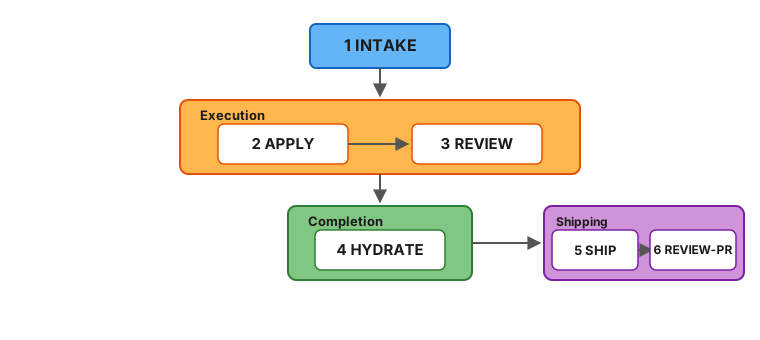
Mermaid source
```mermaid
flowchart TD
B["1 INTAKE"]
subgraph execution ["Execution"]
direction LR
A["2 APPLY"] --> V["3 REVIEW"]
end
subgraph completion ["Completion"]
direction LR
AR["4 HYDRATE"]
end
subgraph shipping ["Shipping"]
direction LR
SH["5 SHIP"] --> RPR["6 REVIEW-PR"]
end
B --> A
V --> AR
AR --> SH
style B fill:#64b5f6,stroke:#1565C0,color:#1a1a1a
style execution fill:#ffb74d,stroke:#E65100,color:#1a1a1a
style completion fill:#81c784,stroke:#2E7D32,color:#1a1a1a
style shipping fill:#ce93d8,stroke:#7B1FA2,color:#1a1a1a
```
| # | Stage | Purpose | Artifact |
|---|-------|---------|----------|
| 1 | **Intake** | Capture intent, scope, approach | `intake.md` |
| 2 | **Apply** | Co-generate `plan.md` (requirements + tasks + acceptance) from intake, then execute the tasks | `plan.md` + code changes |
| 3 | **Review** | Sub-agent validates against the plan's requirements and [constitution](#code-quality-as-a-guardrail) (your project's architectural rules) | Prioritized findings report |
| 4 | **Hydrate** | Save learnings into project memory (`docs/memory/`) | Memory updates |
| 5 | **Ship** | Commit, push, and create a GitHub PR | Pull request |
| 6 | **Review-PR** | Triage and fix PR review comments from humans or automated reviewers | Comments addressed |
Each stage produces a persistent artifact or state update. Interrupt anything — re-run the same command to resume. All pipeline skills are idempotent.
Review is performed by a **sub-agent** running in a separate context - a fresh perspective that validates against both the plan's requirements and your [project constitution](#code-quality-as-a-guardrail). Findings are prioritized (must-fix, should-fix, nice-to-have) and the agent triages them, looping back for automatic rework on the issues that matter most.
A change folder looks like this:
```
fab/changes/260101-abcd-add-spinner/
├── intake.md # What you want and why
├── plan.md # Requirements + tasks + acceptance (generated at apply entry)
└── .status.yaml # Pipeline state (symlinked as .fab-status.yaml at repo root while this change is active)
```
## Prerequisites
> 📦 For the full, tool-specific install walkthrough — companion utilities, shell completion, and the new-project / existing-repo / upgrade flows — see the **[Install guide](docs/site/install.md)**.
### Using Fab Kit
Install with [Homebrew](https://brew.sh/) (macOS and Linux):
```bash
brew tap sahil87/tap
brew install fab-kit
# Other utilities fab depends on
brew install yq jq gh direnv
```
This installs the `fab` CLI (router), `fab-kit` (workspace lifecycle), and standalone tools `wt` (worktree manager) and `idea` (backlog manager).
* After installing `gh`, authenticate with `gh auth login`.
* After installing `direnv`, add the hook [to your shell](https://direnv.net/docs/hook.html).
* Optional — activate shell completion in your shell's rc file:
```bash
eval "$(fab shell-init zsh)" # or bash / fish
```
Works from any directory (no fab project required). Prefer saving the script to disk? Use `fab completion ` instead.
| Tool | Purpose |
|------|---------|
| [fab-kit](https://github.com/sahil87/fab-kit) | The `fab` CLI router, workspace lifecycle (`init`/`upgrade-repo`/`sync`), `wt`, and `idea` |
| [yq](https://github.com/mikefarah/yq) | YAML processing for status files and schemas |
| [jq](https://jqlang.github.io/jq/) | JSON processing for settings merge during sync |
| [gh](https://cli.github.com/) | GitHub CLI - used for releases and PR workflows |
| [direnv](https://direnv.net/) | Auto-loads `.envrc` to set workspace environment variables |
### Developing Fab Kit
In addition to the above:
```bash
brew install go just
```
| Tool | Purpose |
|------|---------|
| [Go](https://go.dev/) | Required for building binaries from source (`src/go/`) |
| [just](https://just.systems/) | Task runner for build, test, and release recipes |
## Quick Start
### 1. Install
#### New project
```bash
fab init
```
This downloads the latest release to the system cache, sets `fab_version` in `fab/project/config.yaml`, and runs `fab sync` to deploy skills — all in one step. No curl scripts or manual downloads.
**Then in your AI agent:**
```
/fab-setup # Claude Code
$fab-setup # Codex
```
This generates `fab/project/constitution.md` and other project configuration files. Run `fab doctor` to verify your setup.
Once setup completes, run `/fab-discuss` to load project context and orient before your first change.
#### Onboarding an existing repo with prior docs
If your project already has documentation (Notion pages, Linear specs, READMEs, design docs), bootstrap memory from them before your first change:
1. **Initialize the repo:**
```bash
fab init # new to Fab Kit
fab sync # cloning a repo that already uses Fab Kit
```
2. **In your AI agent — set up project config:**
```
/fab-setup
```
3. **Hydrate memory from your existing docs** (or from the codebase itself):
```
/docs-hydrate-memory ./README.md ./docs/
/docs-hydrate-memory # no args → generate from codebase analysis
```
Accepts Notion/Linear URLs, local `.md` files, or folder paths. Safe to re-run — content is merged, not overwritten.
4. **Propagate memory into structured specs:**
```
/docs-hydrate-specs
```
This flows memory → specs (the reverse of `hydrate`), surfacing gaps where memory covers a topic that specs don't. Top gaps are previewed for confirmation.
5. **Orient before your first change:**
```
/fab-discuss
```
#### Updating from a previous version
Two steps — one in the terminal, one in your AI agent:
1. **In your terminal** — bump the kit version and re-sync:
```bash
fab upgrade-repo # upgrades to latest version
fab upgrade-repo 0.44.0 # upgrades to a specific version
```
2. **In your AI agent** — apply any data migrations:
```
/fab-setup migrations # Claude Code
$fab-setup migrations # Codex
```
Safe to re-run — no-op if no migrations are pending.
To re-deploy skills, scaffold structure, and sync hooks without changing the pinned version (useful after cloning):
```bash
fab sync
```
> **Note:** `fab sync` runs automatically in every new worktree created by [`wt create`](https://github.com/sahil87/fab-kit/blob/main/docs/specs/companions.md#wt--worktree-isolation).
### 2. Your first change
> 🛠️ For a task-oriented walkthrough of driving the pipeline — the per-stage command sequence, the apply⇄review auto-rework loop, `/fab-ff` vs `/fab-fff` vs `/fab-proceed`, and going parallel with worktrees — see the **[Workflows guide](docs/site/workflows.md)**.
Fab Kit skills are slash commands you type into an AI agent's chat, not the terminal. Open a session in your project directory:
- **Claude Code:** `claude` in terminal
- **Codex:** `codex` in terminal
- **Cursor / Windsurf:** open the project, use the chat panel
Then type the commands below in the agent's prompt. Each command runs one pipeline stage — the AI generates output in real time, so wait for it to finish before running the next.
```bash
# In your AI agent:
# Creation - creates change folder, writes intake.md, activates the change, creates git branch
/fab-new Add a loading spinner to the submit button
# Apply - generates plan.md (requirements + tasks + acceptance) and implements the code, checking off tasks as it goes
/fab-continue
# Review - reviews implementation against the plan's requirements + constitution
/fab-continue
# Hydrate - saves learnings into docs/memory/
/fab-continue
# Ship - commit, push, and create a GitHub PR
/git-pr
# Review-PR - triage and fix PR review comments
/git-pr-review
# Archive - move the change folder out of active changes
/fab-archive
```
At any point, run `/fab-status` to see where you are.
For small changes, `/fab-ff` (fast-forward) runs the pipeline through hydrate in one shot - gated by a single intake [confidence score](#structured-autonomy-not-guesswork) that ensures ambiguity is low enough for safe execution. Both `/fab-ff` and `/fab-fff` (full fast-forward) auto-loop between apply and sub-agent review, fixing issues automatically before escalating to you.
### 3. Going parallel
While AI works on one change, start another in a separate [git worktree](https://git-scm.com/docs/git-worktree) (an isolated copy of your repo):
```bash
# In your terminal:
wt create # creates an isolated worktree with a random name
# In a new AI agent session in that worktree:
/fab-new Add error toast for failed submissions
```
Each change is a self-contained folder - multiple AI sessions run in parallel without conflicts. `/fab-new` auto-activates, so you can start working immediately. Use `/fab-draft` to queue a change without switching to it. [How the assembly line works →](https://github.com/sahil87/fab-kit/blob/main/docs/specs/assembly-line.md)
### Troubleshooting
Run `fab doctor` to check all prerequisites (git, yq, direnv hook, etc.) and diagnose common setup issues.
- `direnv allow` doesn't work - reload your shell or run `eval "$(direnv export zsh)"`
- `/fab-setup` not recognized - re-run `fab sync` to deploy skills
- **After cloning a repo that uses Fab Kit** - run `fab sync` once. Agent skills and hooks live in `.claude/` which is gitignored by default, so each developer needs to deploy them locally.
- **A stage fails mid-way** - run `/fab-continue` to resume from the last checkpoint. All stage artifacts are persisted, so no progress is lost.
- **AI produces bad code** - the review sub-agent catches it. `/fab-ff` and `/fab-fff` auto-loop between apply and review (up to 3 cycles) before escalating to you.
- **Abandon a change** - delete the change folder, or run `/fab-archive` to move it to the archive.
## Why Fab Kit
AI coding tools give you speed but leave you to manage quality and knowledge yourself. Fab Kit gives you all four:
| [**Speed**](#parallel-by-default) | [**Knowledge**](#shared-memory-that-grows-with-your-project) | [**Quality**](#code-quality-as-a-guardrail) | [**Autonomy**](#structured-autonomy-not-guesswork) |
|:---:|:---:|:---:|:---:|
| Parallel changes - never idle | Compounds with every change | Constitution + self-correcting review | Confidence-scored - assumes or asks based on context |
### Parallel by Default
```
██ = working ░░ = idle
One at a time
─────────────
You ██░░░░░░░░██░░░░░░░░██░░░░░░░░██░░░░░░░░
AI ░░████████░░████████░░████████░░████████
Create, wait, review. Create, wait, review.
More waiting than working.
Assembly line
─────────────
You ██████░░█████████░██░█████████░██░░░░░░░
AI ░░░░░░██████████░████████████░░████████░
Create a batch, hand off, create the next batch.
Both always working.
```
Without Fab, you describe a task, wait while AI works, review, repeat. With Fab, you batch structured changes - each in its own folder and worktree - and create the next batch while AI executes the current one.
Three properties make this work:
- **Self-contained change folders** - Each change has its own intake, plan, and status. No shared state - parallel changes don't interfere during development.
- **Git worktree isolation** - Each change runs in its own [worktree](https://git-scm.com/docs/git-worktree). Parallel AI sessions can't step on each other.
- **Resumable pipeline** - Every stage produces a persistent artifact. Interrupt anything, resume later.
### Shared Memory That Grows With Your Project
Most AI tools give each session a private memory that disappears when the session ends. Fab saves learnings from every completed change into `docs/memory/` - a domain-organized knowledge base committed to git and shared with the entire team.
```
┌──────────┐ hydrate ┌──────────────┐
│ plan.md │ ─────────────▶ │ docs/memory/ │
└──────────┘ └──────┬───────┘
▲ │
│ context for next │
└──────── change ─────────────┘
```
This creates a self-reinforcing cycle:
- **Every change makes the next one better** - Design decisions from `plan.md` merge into memory. Future changes load those files as context, so AI starts with real knowledge of your system instead of guessing.
- **Team knowledge, not personal notes** - Memory lives in git. Every developer and every AI session reads the same source of truth. Onboarding means cloning the repo.
- **Bootstrap from existing docs** - `/docs-hydrate-memory` ingests documentation from Notion, Linear, or local files. The pipeline keeps it current from there.
- **Structured, not append-only** - Memory is organized by domain (`auth/`, `payments/`, `users/`). `/docs-reorg-memory` restructures as it grows. `/docs-hydrate-specs` updates spec files with relevant details from memory.
### Code Quality as a Guardrail
AI writes code fast. Without structure, it also skips requirements, ignores architectural conventions, and ships the first thing that works. Fab enforces quality through structure, a constitution, and self-correcting review.
```
┌───────────────────────────────┐
│ fab/project/constitution.md │
│ MUST · SHOULD · MUST NOT │
└───────────────┬───────────────┘
│
intake → apply ⇄ review → hydrate
↑ ↗
└───────┘
sub-agent review
with prioritized
findings
```
- **Stages that can't be skipped** - The pipeline requires intake before any code is written. The AI can't jump straight to implementation. Before code is written, the [SRAD framework](#structured-autonomy-not-guesswork) ensures planning decisions are grounded in context - not silently guessed.
- **Project constitution** - `fab/project/constitution.md` defines your architectural rules using MUST/SHOULD/MUST NOT. Every plan and review checks against it - not just the change's requirements.
- **Review that fixes, not just flags** - A **sub-agent** reviews in a fresh context, returning prioritized findings. The applying agent triages by severity and loops back to the right stage:
| Review finds | Priority | Loops back to | What happens |
|-------------|----------|---------------|--------------|
| Requirement mismatch, failing tests | Must-fix | → apply | Unchecks failed tasks in `plan.md`, re-runs them |
| Missing/wrong tasks | Must-fix | → apply | Regenerates `plan.md`, re-applies |
| Requirements were wrong | Must-fix | → apply | Updates `plan.md`'s `## Requirements`, regenerates tasks |
| Code quality issue | Should-fix | → apply | Addressed when clear and low-effort |
| Style suggestion | Nice-to-have | - | May be skipped |
`/fab-fff` and `/fab-ff` auto-loop between apply and review (up to 3 cycles) - each re-review uses a fresh sub-agent. `/fab-ff` falls back to interactive rework after exhausting auto-retries. A typical `/fab-fff` run uses 2-4 agent turns per stage; the sub-agent review spawns a separate context.
#### The 5 Cs of Quality
Five configuration files shape how AI works in your project. Each answers a different question:
| C | File | Question |
|---|------|----------|
| **Constitution** | `fab/project/constitution.md` | What are our non-negotiable principles? |
| **Context** | `fab/project/context.md` | What are we working with? |
| **Code Quality** | `fab/project/code-quality.md` | How should code look when we write it? |
| **Code Review** | `fab/project/code-review.md` | What should we look for when we validate? |
| **Config** | `fab/project/config.yaml` | What are the project's factual settings? |
Notice the author-vs-critic split: `code-quality.md` guides the **writing** agent during apply - coding standards, anti-patterns, test strategy. `code-review.md` guides the **reviewing** sub-agent during review - severity definitions, scope boundaries, rework budget. Different cognitive modes, different concerns, different files.
All five are optional except `constitution.md` and `config.yaml`. They live in `fab/project/`. Run `/fab-setup` to generate them from scaffolds with sensible defaults.
### Structured Autonomy, Not Guesswork
AI tools either ask too many questions or silently assume. Fab uses **SRAD** - a 4-dimension framework - to decide which to do for each decision point during planning.
**S**ignal strength · **R**eversibility · **A**gent competence · **D**isambiguation type
Each dimension scores how safe it is to assume. The scores aggregate into a confidence grade:
| Grade | What happens |
|-------|-------------|
| **Certain** | Proceeds silently - deterministic from config/codebase |
| **Confident** | Proceeds, noted in assumptions summary |
| **Tentative** | Proceeds with marker - resolvable via `/fab-clarify` |
| **Unresolved** | Blocks and asks - too ambiguous to guess |
Grades aggregate into a **confidence score** that gates `/fab-ff`. If ambiguity is too high, the pipeline refuses to run and tells you what to clarify - no silent guesswork, no unnecessary interruption. [How SRAD works →](https://github.com/sahil87/fab-kit/blob/main/docs/specs/srad.md)
## Command Quick Reference
> **Prefix:** Use `/fab-*` in Claude Code, `$fab-*` in Codex.
> 📖 The tables below are a quick reference. For the full, auto-generated command reference — every subcommand, flag, and usage string — see **[shll.ai/tools/fab-kit/commands](https://shll.ai/tools/fab-kit/commands/)**.
### Pipeline
| Command | Purpose |
|---------|---------|
| `/fab-new ` | Start a new change — creates the intake, activates it, and creates the git branch |
| `/fab-draft ` | Create a change intake without activating it (queue for later) |
| `/fab-continue` | Advance to the next stage (or reset to a specific stage) |
| `/fab-ff` | Fast-forward through hydrate — confidence-gated, auto-rework loop |
| `/fab-fff` | Fast-forward further through ship + PR review — same gates as ff |
| `/fab-clarify` | Refine the current artifact — resolve gaps without advancing |
| `/fab-archive` | Archive a completed change (or restore an archived one) |
| `/fab-proceed` | Context-aware orchestrator — detects state, runs setup steps, then delegates to `/fab-fff` |
### Setup & Status
| Command | Purpose |
|---------|---------|
| `/fab-setup` | Bootstrap fab/ structure, manage config/constitution, apply migrations |
| `/fab-status` | Show current change state — name, branch, stage, checklist, next command |
| `/fab-switch` | Switch active change (or list available changes) |
| `/fab-help` | Show workflow overview and command summary |
| `/fab-discuss` | Load project context for an exploratory discussion session |
### Git
| Command | Purpose |
|---------|---------|
| `/git-branch` | Create or switch to the git branch matching the active change |
| `/git-pr` | Commit, push, and create a GitHub PR |
| `/git-pr-review` | Process PR review comments — triage and fix feedback |
### Documentation
| Command | Purpose |
|---------|---------|
| `/docs-hydrate-memory [sources...]` | Ingest external docs or generate memory from codebase analysis |
| `/docs-hydrate-specs` | Detect gaps between memory and specs, propose additions |
| `/docs-reorg-memory` | Analyze memory files for themes, suggest reorganization |
| `/docs-reorg-specs` | Analyze spec files for themes, suggest reorganization |
### Multi-Agent Coordination
The operator (`/fab-operator`) is a long-running coordination layer that sits in its own tmux pane, observing and directing agents across other panes. It is optional and useful when running multiple agent sessions simultaneously.
| Command | Purpose |
|---------|---------|
| `/fab-operator` | Multi-agent coordination — monitoring, auto-answering, autopilot queues, dependency-aware spawning |
[Operator version history →](https://github.com/sahil87/fab-kit/blob/main/docs/specs/operator.md)
### CLI Subcommands
| Command | Purpose |
|---------|---------|
| `fab sync` | Repair symlinks, scaffold structure, deploy skills |
| `fab doctor` | Diagnose common setup issues |
| `fab fab-help` | Print workflow overview to terminal |
| `fab operator` | Launch operator in a dedicated tmux tab |
| `fab batch new` | Create worktree tabs from backlog items |
| `fab batch switch` | Open tmux tabs in worktrees for one or more changes |
| `fab batch archive` | Archive multiple completed changes in one session |
## Stage Coverage by Command
Which pipeline stages each command covers. Taller bars = more automation. Read left-to-right from most manual to most automated. **▶** marks typical entry points — start with `/fab-discuss` (exploratory) or `/fab-new` (ready to build). Arrows show the typical path from idea to PR. Dashed borders indicate optional/utility stages. Empty cells = not covered by that command.
| Color | Category | Commands |
|-------|----------|----------|
| 🟦 Cyan | Explore (read-only) | `/fab-discuss` |
| 🟧 Amber | Manual (single action) | `/fab-draft`, `/fab-switch`, `/fab-continue` |
| ⬜ Blue-grey (dashed) | Git utilities | `/git-branch`, `/git-pr`, `/git-pr-review` |
| 🟩 Green | Automated pipeline (multi-stage) | `/fab-new`, `/fab-ff`, `/fab-fff`, `/fab-proceed` |
| ◻️ Grey | Fab pipeline stage (row label) | intake, change active, apply, review, hydrate |
| ▶ | Typical entry point | `/fab-discuss`, `/fab-new` |
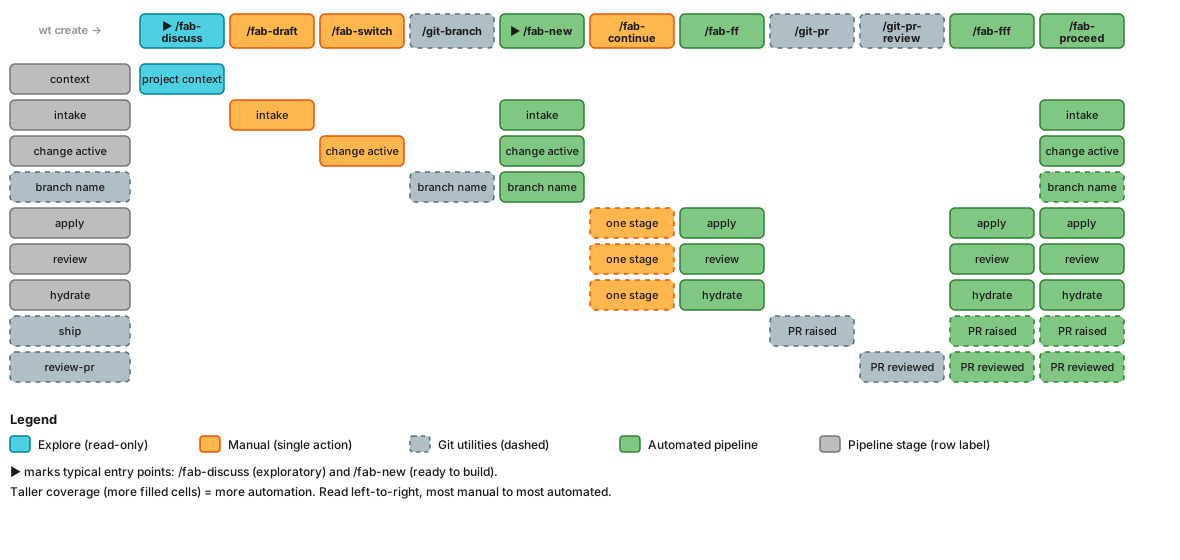
Mermaid source
```mermaid
block-beta
columns 13
hdr_label["wt create →"]:1 hdr_discuss["▶ /fab-discuss"] hdr_draft["/fab-draft"] hdr_switch["/fab-switch"] hdr_branch["/git-branch"] hdr_new["▶ /fab-new"] hdr_continue["/fab-continue"] hdr_ff["/fab-ff"] hdr_gitpr["/git-pr"] hdr_gitprreview["/git-pr-review"] hdr_fff["/fab-fff"] hdr_proceed["/fab-proceed"] space:1
space:13
row_ctx["context"]:1 discuss_ctx["project context"]:1 space:11
row_intake["intake"]:1 space:1 draft_intake["intake"]:1 space:2 new_intake["intake"]:1 space:5 proceed_intake["intake"]:1 space:1
row_active["change active"]:1 space:2 switch_active["change active"]:1 space:1 new_active["change active"]:1 space:5 proceed_active["change active"]:1 space:1
row_branch["branch name"]:1 space:3 branch_branch["branch name"]:1 new_branch["branch name"]:1 space:5 proceed_branch["branch name"]:1 space:1
row_apply["apply"]:1 space:5 cont_apply["one stage"]:1 ff_apply["apply"]:1 space:2 fff_apply["apply"]:1 proceed_apply["apply"]:1 space:1
row_review["review"]:1 space:5 cont_review["one stage"]:1 ff_review["review"]:1 space:2 fff_review["review"]:1 proceed_review["review"]:1 space:1
row_hydrate["hydrate"]:1 space:5 cont_hydrate["one stage"]:1 ff_hydrate["hydrate"]:1 space:2 fff_hydrate["hydrate"]:1 proceed_hydrate["hydrate"]:1 space:1
row_ship["ship"]:1 space:5 space:1 space:1 gitpr_ship["PR raised"]:1 space:1 fff_ship["PR raised"]:1 proceed_ship["PR raised"]:1 space:1
row_prreview["review-pr"]:1 space:5 space:1 space:1 space:1 gitprreview_prreview["PR reviewed"]:1 fff_prreview["PR reviewed"]:1 proceed_prreview["PR reviewed"]:1 space:1
%% Arrows — multiple paths from top-left to bottom-right
discuss_ctx --> draft_intake
discuss_ctx --> new_intake
discuss_ctx --> proceed_intake
draft_intake --> switch_active
switch_active --> branch_branch
new_branch --> cont_apply
new_branch --> ff_apply
new_branch --> fff_apply
ff_hydrate --> gitpr_ship
%% Header styles
style hdr_label fill:none,stroke:none,color:#999
style hdr_discuss fill:#4dd0e1,stroke:#00838f,color:#1a1a1a
style hdr_draft fill:#ffb74d,stroke:#E65100,color:#1a1a1a
style hdr_switch fill:#ffb74d,stroke:#E65100,color:#1a1a1a
style hdr_new fill:#81c784,stroke:#2E7D32,color:#1a1a1a
style hdr_branch fill:#b0bec5,stroke:#546e7a,color:#1a1a1a,stroke-dasharray: 5 5
style hdr_continue fill:#ffb74d,stroke:#E65100,color:#1a1a1a
style hdr_ff fill:#81c784,stroke:#2E7D32,color:#1a1a1a
style hdr_gitpr fill:#b0bec5,stroke:#546e7a,color:#1a1a1a,stroke-dasharray: 5 5
style hdr_gitprreview fill:#b0bec5,stroke:#546e7a,color:#1a1a1a,stroke-dasharray: 5 5
style hdr_fff fill:#81c784,stroke:#2E7D32,color:#1a1a1a
style hdr_proceed fill:#81c784,stroke:#2E7D32,color:#1a1a1a
%% Row labels — grey for fab pipeline stages, blue-grey dashed for git stages
style row_ctx fill:#bdbdbd,stroke:#757575,color:#1a1a1a
style row_intake fill:#bdbdbd,stroke:#757575,color:#1a1a1a
style row_active fill:#bdbdbd,stroke:#757575,color:#1a1a1a
style row_branch fill:#b0bec5,stroke:#546e7a,color:#1a1a1a,stroke-dasharray: 5 5
style row_apply fill:#bdbdbd,stroke:#757575,color:#1a1a1a
style row_review fill:#bdbdbd,stroke:#757575,color:#1a1a1a
style row_hydrate fill:#bdbdbd,stroke:#757575,color:#1a1a1a
style row_ship fill:#b0bec5,stroke:#546e7a,color:#1a1a1a,stroke-dasharray: 5 5
style row_prreview fill:#b0bec5,stroke:#546e7a,color:#1a1a1a,stroke-dasharray: 5 5
%% fab-discuss (Explore — teal)
style discuss_ctx fill:#4dd0e1,stroke:#00838f,color:#1a1a1a
%% fab-draft (Manual — amber)
style draft_intake fill:#ffb74d,stroke:#E65100,color:#1a1a1a
%% fab-switch (Manual — amber)
style switch_active fill:#ffb74d,stroke:#E65100,color:#1a1a1a
%% fab-new (Automation — green, creates intake + activates + branches)
style new_intake fill:#81c784,stroke:#2E7D32,color:#1a1a1a
style new_active fill:#81c784,stroke:#2E7D32,color:#1a1a1a
style new_branch fill:#81c784,stroke:#2E7D32,color:#1a1a1a
%% git-branch (Git utilities — blue-grey)
style branch_branch fill:#b0bec5,stroke:#546e7a,color:#1a1a1a,stroke-dasharray: 5 5
%% fab-continue (Stage advance — amber)
style cont_apply fill:#ffb74d,stroke:#E65100,color:#1a1a1a,stroke-dasharray: 5 5
style cont_review fill:#ffb74d,stroke:#E65100,color:#1a1a1a,stroke-dasharray: 5 5
style cont_hydrate fill:#ffb74d,stroke:#E65100,color:#1a1a1a,stroke-dasharray: 5 5
%% fab-ff (Automation — green)
style ff_apply fill:#81c784,stroke:#2E7D32,color:#1a1a1a
style ff_review fill:#81c784,stroke:#2E7D32,color:#1a1a1a
style ff_hydrate fill:#81c784,stroke:#2E7D32,color:#1a1a1a
%% git-pr (Git utilities — blue-grey)
style gitpr_ship fill:#b0bec5,stroke:#546e7a,color:#1a1a1a,stroke-dasharray: 5 5
%% git-pr-review (Git utilities — blue-grey)
style gitprreview_prreview fill:#b0bec5,stroke:#546e7a,color:#1a1a1a,stroke-dasharray: 5 5
%% fab-fff (Automation — green)
style fff_apply fill:#81c784,stroke:#2E7D32,color:#1a1a1a
style fff_review fill:#81c784,stroke:#2E7D32,color:#1a1a1a
style fff_hydrate fill:#81c784,stroke:#2E7D32,color:#1a1a1a
style fff_ship fill:#81c784,stroke:#2E7D32,color:#1a1a1a,stroke-dasharray: 5 5
style fff_prreview fill:#81c784,stroke:#2E7D32,color:#1a1a1a,stroke-dasharray: 5 5
%% fab-proceed (Automation — green)
style proceed_active fill:#81c784,stroke:#2E7D32,color:#1a1a1a
style proceed_intake fill:#81c784,stroke:#2E7D32,color:#1a1a1a
style proceed_branch fill:#81c784,stroke:#2E7D32,color:#1a1a1a,stroke-dasharray: 5 5
style proceed_apply fill:#81c784,stroke:#2E7D32,color:#1a1a1a
style proceed_review fill:#81c784,stroke:#2E7D32,color:#1a1a1a
style proceed_hydrate fill:#81c784,stroke:#2E7D32,color:#1a1a1a
style proceed_ship fill:#81c784,stroke:#2E7D32,color:#1a1a1a,stroke-dasharray: 5 5
style proceed_prreview fill:#81c784,stroke:#2E7D32,color:#1a1a1a,stroke-dasharray: 5 5
```
**Quick reference** — which stages does each command cover?
| Stage | `/fab-discuss` | `/fab-draft` | `/fab-switch` | `/git-branch` | `/fab-new` | `/fab-continue` | `/fab-ff` | `/git-pr` | `/git-pr-review` | `/fab-fff` | `/fab-proceed` |
|-------|:-:|:-:|:-:|:-:|:-:|:-:|:-:|:-:|:-:|:-:|:-:|
| context | ✅ | | | | | | | | | | |
| intake | | ✅ | | | ✅ | | | | | | ✅ |
| change active | | | ✅ | | ✅ | | | | | | ✅ |
| branch name | | | | ✅ | ✅ | | | | | | ✅ |
| apply | | | | | | ✅ | ✅ | | | ✅ | ✅ |
| review | | | | | | ✅ | ✅ | | | ✅ | ✅ |
| hydrate | | | | | | ✅ | ✅ | | | ✅ | ✅ |
| ship | | | | | | | | ✅ | | ✅ | ✅ |
| review-pr | | | | | | | | | ✅ | ✅ | ✅ |
## Companion tools
fab-kit's Homebrew formula declares **wt** and **idea** as dependencies, so `brew install sahil87/tap/fab-kit` installs all four CLIs (`fab`, `fab-kit`, `wt`, `idea`) on PATH transitively. They're independent projects with their own release cadences:
| Tool | Role in the fab workflow | Repo |
|------|--------------------------|------|
| **wt** | Worktree isolation — each change runs in its own worktree (the foundation of [parallel changes](#parallel-by-default)). Used by `fab batch new` and `fab batch switch`. | [sahil87/wt](https://github.com/sahil87/wt) |
| **idea** | Per-repo backlog (`fab/backlog.md`) that feeds `/fab-new`. `fab batch new` reads open ideas and creates a worktree per item. | [sahil87/idea](https://github.com/sahil87/idea) |
See [companions.md](docs/specs/companions.md) for the integration architecture.
## Learn More
- **[The Assembly Line](docs/specs/assembly-line.md)** - batch scripts, Gantt charts, and the full numbers behind parallel development
- **[Design & Workflow Details](docs/specs/overview.md)** - principles, detailed stage descriptions, example workflows
- **[User Flow Diagrams](docs/specs/user-flow.md)** - visual maps of the full pipeline, shortcuts, rework paths, and state machine
- **[Full Command Reference](docs/specs/skills.md)** - detailed behavior for every `/fab-*` skill
- **[SRAD Autonomy Framework](docs/specs/srad.md)** - how the pipeline handles ambiguity, confidence scoring, and autonomous execution gates
- **[Glossary](docs/specs/glossary.md)** - all Fab terminology defined
- **[Contributing](CONTRIBUTING.md)** - developing, extending, and releasing Fab Kit
## Development
Building Fab Kit from source requires Go and `just` (see [Developing Fab Kit](#developing-fab-kit) above).
```bash
just test # run all Go tests (fab + fab-kit)
just build # build binaries for your platform → dist/bin/
release.sh [patch|minor|major] # cut a release (bumps VERSION, tags, pushes, creates GitHub Release)
```
Full contributor guide: [CONTRIBUTING.md](CONTRIBUTING.md).