https://github.com/sahilumraniya/gituserinfo
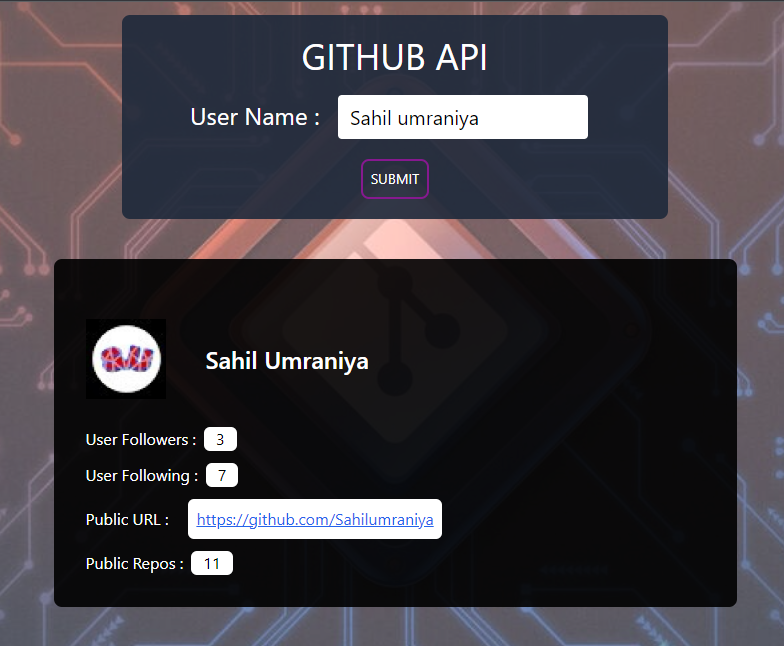
Explore GitHub user data with this web application. Fetch and display user information, including name, username, followers, following, public repositories, and avatar using XMLHttpRequest and JavaScript
https://github.com/sahilumraniya/gituserinfo
html5 javascript tailwindcss xmlhttprequest
Last synced: 10 months ago
JSON representation
Explore GitHub user data with this web application. Fetch and display user information, including name, username, followers, following, public repositories, and avatar using XMLHttpRequest and JavaScript
- Host: GitHub
- URL: https://github.com/sahilumraniya/gituserinfo
- Owner: Sahilumraniya
- Created: 2023-10-15T15:55:34.000Z (about 2 years ago)
- Default Branch: master
- Last Pushed: 2023-10-15T16:01:47.000Z (about 2 years ago)
- Last Synced: 2025-02-04T22:29:45.643Z (11 months ago)
- Topics: html5, javascript, tailwindcss, xmlhttprequest
- Language: CSS
- Homepage: https://sahilumraniya.github.io/GitUserInfo/
- Size: 351 KB
- Stars: 0
- Watchers: 1
- Forks: 0
- Open Issues: 0
-
Metadata Files:
- Readme: readme.md
Awesome Lists containing this project
README
# GitHub User Info
This is a simple web application that allows you to search for a GitHub user by their username and display their information.
## Usage
1. Open the [GitHub User Info](sahilumraniya.github.io/GitUserInfo) in your web browser.
2. Enter the GitHub username you want to look up in the input field.
3. Click the "Submit" button.
The application uses **XMLHttpRequest** to fetch data from the GitHub API and display information about the user, including their name, username, followers, following, public repositories, and their GitHub avatar.
## Technologies Used
- HTML
- CSS (with **Tailwind CSS** for styling)
- JavaScript
- **XMLHttpRequest** for making HTTP requests
### XMLHttpRequest ReadyState Values
- **0 (UNSENT)**: The client has been created, but `open()` has not been called yet.
- **1 (OPENED)**: `open()` has been called.
- **2 (HEADERS_RECEIVED)**: `send()` has been called, and headers and status are available.
- **3 (LOADING)**: Data is being downloaded; `responseText` holds partial data.
- **4 (DONE)**: The operation is complete.
## Screenshots
## Development
To set up this project locally, follow these steps:
1. Clone the repository to your local machine: