https://github.com/saihon/remove-element
Remove HTML elements in the context menu.
https://github.com/saihon/remove-element
chrome-extension firefox-addon html-element javascript
Last synced: 4 months ago
JSON representation
Remove HTML elements in the context menu.
- Host: GitHub
- URL: https://github.com/saihon/remove-element
- Owner: saihon
- License: mpl-2.0
- Created: 2019-04-16T21:15:34.000Z (about 7 years ago)
- Default Branch: master
- Last Pushed: 2024-07-12T23:33:57.000Z (about 2 years ago)
- Last Synced: 2024-07-13T00:43:17.815Z (about 2 years ago)
- Topics: chrome-extension, firefox-addon, html-element, javascript
- Language: JavaScript
- Homepage:
- Size: 265 KB
- Stars: 5
- Watchers: 0
- Forks: 3
- Open Issues: 0
-
Metadata Files:
- Readme: README.md
- License: LICENSE
Awesome Lists containing this project
README
## remove-element
Remove HTML elements more easily without opening the Developer Tools.
Usage:
* Right-click on the HTML element you what to remove
and click on the menu item for this extension that appears.
Feature:
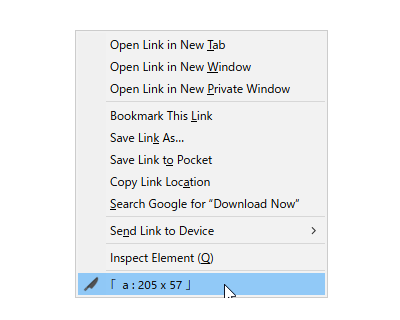
* Appears in the context menu items displays the HTML element name and it's size.
* Removed HTML elements will be restored by reloading the page. Data is never saved in storage.
If you want to hide HTML elements permanently, it is recommended to use like a AD-BLOCKER.
## Installation
* FireFox: install via [addons.mozilla.org](https://addons.mozilla.org/en-US/firefox/addon/remove-element/)
* Google Chrome: install via [Chrome web store](https://chrome.google.com/webstore/detail/removeelement/jjhnenbbbbgojdbealmpdkmbkbnmeimf)