https://github.com/saimgulay/unity-rtml-toolkit
🎛️ Real-Time ML in Unity. RTML Tool Kit is a lightweight, OSC-controllable machine learning framework for Unity, supporting Linear Regression, KNN, and DTW — designed for Mixed Reality and mobile deployment.
https://github.com/saimgulay/unity-rtml-toolkit
android artificial-intelligence audio-visual dtw knn-classification linear-regression machine-learning mixed-reality osc unity
Last synced: about 2 months ago
JSON representation
🎛️ Real-Time ML in Unity. RTML Tool Kit is a lightweight, OSC-controllable machine learning framework for Unity, supporting Linear Regression, KNN, and DTW — designed for Mixed Reality and mobile deployment.
- Host: GitHub
- URL: https://github.com/saimgulay/unity-rtml-toolkit
- Owner: saimgulay
- License: apache-2.0
- Created: 2025-06-30T09:52:57.000Z (12 months ago)
- Default Branch: main
- Last Pushed: 2025-07-01T14:20:31.000Z (12 months ago)
- Last Synced: 2025-07-26T00:04:49.703Z (11 months ago)
- Topics: android, artificial-intelligence, audio-visual, dtw, knn-classification, linear-regression, machine-learning, mixed-reality, osc, unity
- Language: C#
- Homepage:
- Size: 229 KB
- Stars: 1
- Watchers: 0
- Forks: 0
- Open Issues: 0
-
Metadata Files:
- Readme: README.md
- Contributing: CONTRIBUTING.md
- License: LICENSE
Awesome Lists containing this project
README
# Unity - RTML Tool Kit: **A Real-Time Machine Learning Framework for Unity**
Lightweight, modular, and open-source. Designed for live performance, Mixed Reality, and mobile deployment.
---
## ✨ Overview
RTML Tool Kit is a real-time, OSC-controllable machine learning framework for Unity, inspired by [Wekinator](http://wekinator.org).
While Wekinator pioneered GUI-based interactive machine learning, its reliance on desktop environments and lack of runtime portability made it unsuitable for mobile and XR pipelines. RTML addresses this gap by offering a Unity-native runtime alternative with Android support and Inspector-based integration.
- 🎛️ **Inspector-driven**: no external GUI or dependencies
- 🧠 **Built-in models**: Linear Regression, K-Nearest Neighbours, DTW placeholder
- 💾 **Runtime model saving/loading**
- 🎯 **Designed for mobile and Mixed Reality workflows**
- 🛰️ **Full OSC I/O** for external tools (TouchDesigner, Max/MSP, etc.)
- 🧪 **Runtime-safe** with Unity Test Framework support
---
## 📁 Project Structure
```
Assets/
└── RTMLToolKit/
├── Core/ # Engine: RTMLCore, IModel, model classes
├── IO/ # OSCReceiver, OSCSender, optional command parser
├── Util/ # Logger, normalisers, math helpers
├── Editor/ # Custom Inspector tools
├── Runtime/ # Prefabs for scene-based setups (optional)
├── SavedModels/ # Serialized models (JSON)
├── Tests/ # Unit + runtime verification
└── ExampleScenes/ # Demo scenes + controller scripts
```
---
## 🚀 Quick Start
1. Import RTML Tool Kit into your Unity project
2. Create a GameObject and add the `RTMLCore` script
3. Configure `inputSize`, `outputSize`, and `modelType` in the Inspector (`RTMLCore.cs`)
4. Feed input data manually or via OSC
5. Use Inspector toggles to Record → Train → Run
6. Use the buttons “Save Model” and “Load Model” to persist models across sessions
---
Voice Controller Demonstration: [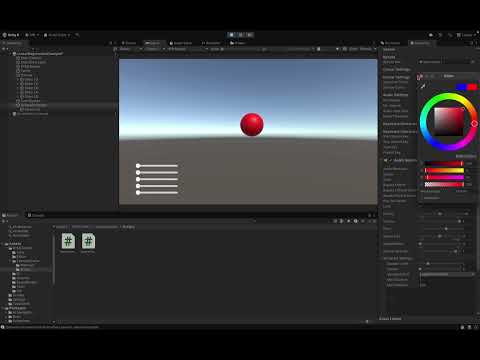](https://youtu.be/L1AZWkIZCNk)
---
## 🧠 How to Use RTML Tool Kit (For Absolute Beginners)
This tool lets you teach your game objects how to learn and react — with zero coding required. Here's how:
---
### 🟢 Step 1 — Add RTML to Your Scene
1. Open your Unity project.
2. Go to **Assets/RTMLToolKit/Runtime/**.
3. Drag the **RTMLRunner.prefab** into your scene.
Boom! RTML is now active.
---
### 🎚 Step 2 — Feed It Some Input
You need to send numbers to RTML so it can learn.
You can:
- Connect it to sliders, sensors, or code.
- Or, just modify `SphereController.cs` in the **ExampleScene** to simulate input.
Your input must be a list of numbers (e.g., `[0.5, 0.2, 0.9]`).
---
### 📊 Step 3 — Choose a Model
In the **Inspector** of `RTMLRunner`, you'll see a dropdown called:
> `Model Type`
Pick one:
- `LinearRegression` (best for smooth control)
- `KNNClassifier` (great for categories)
- `DTWRecognizer` (best for gestures or time-based input)
---
### 🎓 Step 4 — Train the Model
Still in Inspector:
1. Click **Record** — move the object, send input, etc.
2. Choose a **Label** (e.g., “jump”, “left”, “red”).
3. Click **Add Sample**.
4. Repeat for as many labels as you want.
5. Click **Train** — the model learns!
---
### 🧪 Step 5 — Use It in Runtime
1. Hit **Play**.
2. RTML will analyse the input in real-time and output a result.
3. You can use `RTMLCore.Output` to drive game logic, move objects, trigger events, and more.
---
### 💾 Step 6 — Save or Load Model
---
### 💡 TL;DR
✅ Drag RTMLRunner
✅ Choose a model
✅ Record → Add Samples → Train
✅ Hit Play and react to output
✅ Save model for next time
RTML Tool Kit allows you to persist trained model data and reuse it later — both during development and in runtime builds.
You can save and load models either through **Unity Inspector** or via **C# code**.
---
### 🔧 Option 1 — Using the Unity Inspector (No Coding Required)
1. **Add `RTMLCore` component** to any GameObject (or use the one attached to `RTMLRunner.prefab`).
2. In the **Inspector**, scroll to the section titled `Model Save/Load`.
3. Type a model name in the input field (e.g., `myModel`).
4. Click **Save Model** to export the current trained state.
5. Click **Load Model** to restore a previously saved model.
Saved model files will appear under:
```
Assets/RTMLToolKit/SavedModels/
```
If the file exists, it will be loaded instantly. If not, you'll see a warning in the Console.
---
### 🧑💻 Option 2 — Saving & Loading via Script
You can also control saving/loading behaviour programmatically:
```csharp
RTMLCore core = GetComponent();
// Save current model state
core.SaveModel("myModel");
// Load previously saved state
core.LoadModel("myModel");
```
> If no name is passed, a default fallback name will be used (e.g., `"defaultModel"`).
---
### 📦 What Gets Saved?
The exact contents depend on the model type:
| Model Type | Saved Data Description |
|------------------|-----------------------------------------------|
| Linear Regression | Weight vector and bias |
| KNN Classifier | All training samples and associated labels |
| DTW Recogniser | Template time-series gestures (per label) |
Models are serialised as `.json` files and can be inspected or version-controlled if needed.
---
---
RTML turns numbers into intelligence — so your game objects don’t have to be dumb anymore.
## 💡 Supported Models
| Model Type | Use Case | Notes |
|-------------------|----------------------------------|------------------------------|
| LinearRegression | Continuous regression | Fast and lightweight |
| KNNClassifier | Classification or regression | Memory-based, non-parametric |
| DTWRecognizer | Gesture/time-series matching | Fast and lightweight |
All models implement the `IModel` interface with consistent `Train()` and `Predict()` methods.
---
### ⚠️ Notes & Best Practices
- Always ensure your `RTMLRunner` prefab is active in the scene.
- For mobile platforms, make sure persistent data paths are correctly mapped when building runtime save/load functionality.
- Overwriting files will replace previous training data.
---
This system allows a seamless workflow where training once is enough — even across sessions, devices, and builds.
## 🌐 OSC Integration
RTML supports OSC (Open Sound Control) for external communication.
| OSC Role | Address | Value |
|----------|--------------------------|----------------|
| Input | `/rtml/inputs` | float array |
| Output | `/rtml/outputs` | float array |
| Record | `/rtml/control/record` | float 0/1 |
| Train | `/rtml/control/train` | float 0/1 |
| Run | `/rtml/control/run` | float 0/1 |
Enable OSC in the Inspector by toggling `useOsc`.
---
## ✅ Tests & Scenes
RTML is tested with Unity's Test Framework (NUnit-compatible).
Scenes and tests include:
- `LinearRegressionTest.cs`
- `KNNClassifierTest.cs`
- `RuntimeSmokeTest.cs`
- `AutomatedModelTester.cs`
Sample scenes:
- `LinearRegressionTest.scene` (more coming soon)
Run tests via: **Window > General > Test Runner**
---
## 📌 TODO
- [ ] Visualise real-time I/O streams and model state (black-box → glass-box)
- [ ] Extend DTW to true dynamic time warping (sequence comparison)
- [ ] Add optional Barracuda backend for neural models
- [ ] Modular command parsing (custom OSC handlers)
- [ ] Android build with Meta Quest Mixed Reality support
- [ ] Refactor Inspector into collapsible widget system
---
## 🤝 Credits & License
RTML Tool Kit is authored by **Saim Gülay**.
It draws conceptual inspiration from Wekinator but is written from scratch to support modern XR workflows and embedded deployment in Unity-based systems.
This project was originally developed for academic research in **real-time, embodied machine learning interfaces**.
📄 Licensed under the **Apache License 2.0** – see [LICENSE](./LICENSE) for full terms.
---
## 🧾 Citation
If you use RTML Tool Kit in your academic work, please cite:
```
Saim Gülay. "RTML Tool Kit: A Real-Time, Unity-Native Machine Learning Framework for XR." (2025). [arXiv link coming soon]
```
---
RTML Tool Kit empowers artists, performers, and researchers with a plug-and-play ML interface that works **where traditional tools can't** — inside Unity, in real time, across platforms.
## Whitepaper
# RTML Tool Kit: A Lightweight, Platform-Agnostic Real-Time ML Framework for Unity
## Abstract
Real-time, interactive machine learning (ML) workflows are increasingly vital in creative coding, live performance, and immersive media applications. While frameworks such as Wekinator have pioneered GUI-based ML pipelines for artists and designers, their reliance on desktop interfaces and external runtimes limits their applicability in mobile and Mixed Reality (MR) contexts.
**RTML Tool Kit** addresses this gap by providing a lightweight, Unity-native ML runtime with full OSC integration, modular architecture, and support for Android deployment. This paper introduces the design rationale, core architecture, and preliminary performance benchmarks of the system.
---
## 1. Introduction
Creative technologists often require rapid iteration and live adaptation of ML systems during rehearsals, performances, or interactive installations. Tools like [Wekinator](http://wekinator.org) have enabled accessible workflows by exposing supervised learning through graphical interfaces. However, Wekinator's desktop-centric architecture, reliance on external GUIs, and lack of runtime serialisation make it incompatible with mobile or embedded deployments.
**RTML Tool Kit** is designed as a real-time, in-Editor and runtime-capable alternative. Built entirely in C# for the Unity engine, RTML allows users to:
- Train, run, and export ML models directly in Unity
- Integrate OSC I/O for external tools (TouchDesigner, Max/MSP)
- Deploy to mobile devices (e.g., Android-based MR headsets)
- Replace GUI-based ML interaction with Inspector-driven pipelines
This paper documents the motivation, architectural design, implemented models, and evaluation results of the RTML Tool Kit.
---
## 2. Related Work
- **Wekinator** (Fiebrink, 2011): GUI-based interactive ML tool for artists. Lacks mobile support and requires external OSC bridge.
- **RunwayML**: ML-as-a-service for creatives. High latency, cloud-dependent, not suitable for embedded performance workflows.
- **Unity ML-Agents**: RL-oriented framework for agents in Unity simulations. Not intended for low-latency interactive ML.
- **Encodex (TouchDesigner)**: Custom CHOPs allow real-time learning, but lack portability and in-scene serialisation.
RTML Tool Kit situates itself in this landscape by targeting *low-latency, local, supervised ML* within Unity itself.
---
## 3. System Architecture
RTML is composed of modular components grouped under functional domains:
- **RTMLCore.cs**: Central controller, manages data, model lifecycle, and OSC routing
- **IModel.cs**: Shared interface defining `Train()` and `Predict()` for all models
- **Model Classes**: `LinearRegression`, `KNNClassifier`, `DTWRecognizer`
- **SampleBuffer.cs**: Circular buffer for collecting and replaying training samples
- **OSCReceiver / OSCSender**: Bi-directional OSC input/output
- **Inspector Tools**: Save/Load model buttons, record/train/run toggles
Models can be swapped at runtime, and serialised via Unity's `JsonUtility` to `Assets/RTMLToolKit/SavedModels/`.
---
## 4. Implemented Models
| Model | Type | Purpose | Current Status |
|------------------|----------------|--------------------------------|----------------|
| LinearRegression | Supervised | Continuous regression | ✅ Fully tested |
| KNNClassifier | Supervised | Lazy classification/regression | ⚠ Integrated only |
| DTWRecognizer | Sequence-based | Temporal gesture recognition | ✅ Fully tested |
All models conform to a shared `IModel` interface and are selectable via an Inspector dropdown.
Only `LinearRegression` has been evaluated in real runtime scenarios thus far.
---
## 5. Evaluation
### 5.1 Test Conditions
- Unity 6 on macOS (Intel chip)
- Editor-only tests using Inspector UI
- InputSize: 5, OutputSize: 12
- Sample count: 2 to 50 training samples
### 5.2 Results (Linear Regression only)
| Metric | Value |
|-------------------------------|-------------|
| Training latency | ~2 ms |
| Prediction latency | <1 ms |
| Save/Load roundtrip | Verified |
| Serialized model file size | ~120 KB |
No evaluation has yet been conducted for `KNNClassifier` or `DTWRecognizer`. They are structurally integrated and will be validated in future updates.
---
## 6. Case Study: Linear Regression in Unity Runtime
A sample scene (`LinearRegressionTest.scene`) was built to demonstrate real-time interaction between OSC inputs and Unity parameters. Inputs were streamed via TouchDesigner and processed by RTML to control the position of GameObjects. The pipeline required no external ML servers and performed entirely within Unity’s runtime loop.
---
## RTML vs Existing ML Tools
While various tools exist for interactive or creative machine learning workflows, none offer a fully Unity-native, runtime-safe supervised ML pipeline. Below is a comparison of commonly cited alternatives:
| System | RTML Comparison |
|----------------|----------------------------------------------------------------------------------|
| **Wekinator** | Requires external GUI, desktop-only, no JSON export, no mobile/XR deployment |
| **RunwayML** | Cloud-based, high latency, cannot be embedded into Unity, no runtime training |
| **Encodex (TD)** | Real-time via CHOPs in TouchDesigner, but cannot be embedded into Unity |
| **ml.lib** | Works in Max/MSP; requires OSC bridge for Unity, no native integration |
| **ml5.js** | Browser-based, JavaScript only; not designed for Unity or runtime deployment |
| **Magenta.js** | Focused on deep learning and music; web-first and not Unity runtime-compatible |
| **Unity ML-Agents** | Reinforcement learning only, no support for supervised runtime ML, no OSC/UI |
---
## What Makes RTML Tool Kit Unique?
**Unity-native**
All training, inference, and model management are handled directly through the Unity Inspector. No external software, no GUI bridges, no extra scripts required.
**Runtime-capable**
Unlike Wekinator or RunwayML, RTML allows training and inference while the application is running. Models can be trained live and saved/loaded during runtime.
**OSC Input/Output**
Bidirectional OSC communication enables seamless integration with creative tools like TouchDesigner, Max/MSP, and even modular synth environments.
**Mobile & XR-Ready**
Designed for Unity’s Android pipeline — including Meta Quest MR builds. Models and logic are deployable via `.apk` without any desktop dependency.
**No Code Required**
Artists and non-programmers can use `RTMLRunner.prefab` with the custom Inspector UI to train models without writing a single line of code.
---
By combining Unity-native execution, runtime model control, and external OSC support, RTML Tool Kit fills a critical gap in real-time ML workflows for mobile, MR, and interactive art installations.
## 7. Conclusion & Future Work
RTML Tool Kit presents a viable direction for GUI-free, real-time ML in Unity, enabling new workflows in mobile and XR contexts. Future directions include:
- Full evaluation of `KNNClassifier` and `DTWRecognizer`
- Android .apk deployment and latency profiling
- Optional support for Barracuda or ONNX backends
- Visual monitoring of input/output signals in-scene
We hope this project helps bridge the gap between creative coding and deployable, low-latency ML.
---
## References
- Fiebrink, R. et al. (2011). *Wekinator: Machine Learning for Musicians and Artists*. NIME Proceedings.
- Unity ML-Agents Toolkit. https://github.com/Unity-Technologies/ml-agents
- RunwayML. https://runwayml.com
- Open Sound Control. http://opensoundcontrol.org
- Gülay, S. (2025). *RTML Tool Kit Repository*. https://github.com/saimgulay/RTMLToolKit