https://github.com/saimn/doit-report
Show ASCII or HTML report for doit task execution status
https://github.com/saimn/doit-report
doit python task-runner
Last synced: 11 months ago
JSON representation
Show ASCII or HTML report for doit task execution status
- Host: GitHub
- URL: https://github.com/saimn/doit-report
- Owner: saimn
- License: mit
- Created: 2018-03-19T09:14:26.000Z (over 8 years ago)
- Default Branch: master
- Last Pushed: 2018-03-19T10:32:09.000Z (over 8 years ago)
- Last Synced: 2025-06-24T21:19:04.752Z (12 months ago)
- Topics: doit, python, task-runner
- Language: Python
- Size: 5.86 KB
- Stars: 2
- Watchers: 3
- Forks: 1
- Open Issues: 1
-
Metadata Files:
- Readme: README.md
- License: LICENSE
Awesome Lists containing this project
README
# Report command for [doit](https://github.com/pydoit/doit).
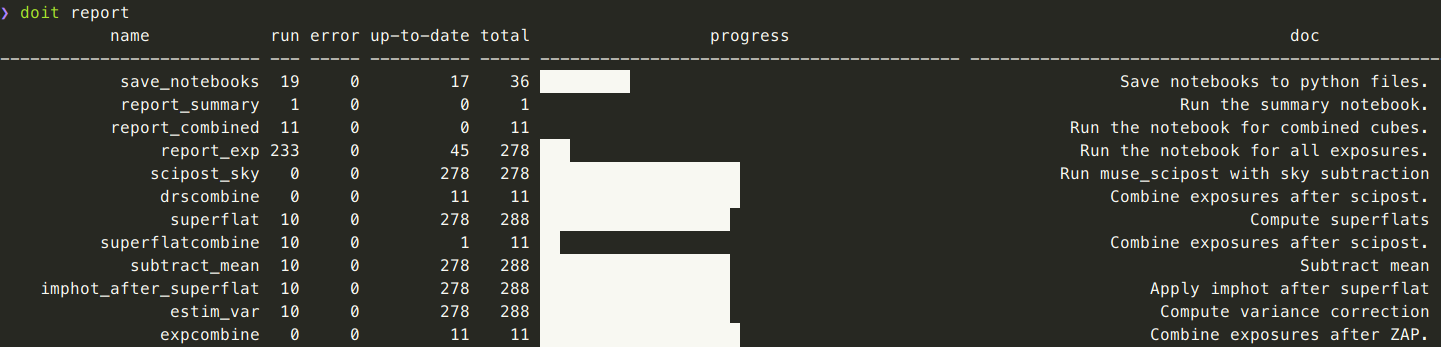
This plugin for [doit](https://github.com/pydoit/doit) add a new `report`
command, which shows an ASCII or HTML report with the task execution status.
Install:
```
$ pip install doit-report
```
Usage:
```
$ doit report
$ doit report --html=out.html
```
This plugin uses [Astropy](https://github.com/astropy/astropy/)'s
[Table](http://docs.astropy.org/en/latest/table/index.html) class to create
a table and print it either to the console in ASCII format or to an HTML page.
Astropy is an heavy dependency (it requires Numpy) for this small plugin, but it
was the easiest way to go for now and I didn't find similar features in
a lighter package.
Note that doit does not save the execution status after each task ends, but only
when `doit run` exits. This is an issue for long-running tasks, and would need
either something like [#228](https://github.com/pydoit/doit/pull/228) or
a [better backend](https://github.com/saimn/doit-redis).
Example console output:
And HTML:
