https://github.com/sakaki-/bcmrpi3-kernel
Automated weekly build of the default branch 64-bit bcmrpi3_defconfig Linux kernel for the Raspberry Pi 3 model B and B+
https://github.com/sakaki-/bcmrpi3-kernel
64-bit bcmrpi3-kernel kernel kernel-tarball raspberry-pi rpi3 rpi3b rpi3b-plus
Last synced: about 1 year ago
JSON representation
Automated weekly build of the default branch 64-bit bcmrpi3_defconfig Linux kernel for the Raspberry Pi 3 model B and B+
- Host: GitHub
- URL: https://github.com/sakaki-/bcmrpi3-kernel
- Owner: sakaki-
- License: gpl-2.0
- Created: 2017-06-01T14:19:15.000Z (about 9 years ago)
- Default Branch: master
- Last Pushed: 2020-10-06T16:42:17.000Z (over 5 years ago)
- Last Synced: 2025-04-23T16:09:28.995Z (about 1 year ago)
- Topics: 64-bit, bcmrpi3-kernel, kernel, kernel-tarball, raspberry-pi, rpi3, rpi3b, rpi3b-plus
- Homepage:
- Size: 258 KB
- Stars: 40
- Watchers: 6
- Forks: 5
- Open Issues: 0
-
Metadata Files:
- Readme: README.md
- License: LICENSE
Awesome Lists containing this project
README
# bcmrpi3-kernel
Automated build of the latest 64-bit `bcmrpi3_defconfig` Linux kernel for the Raspberry Pi 3 model B and B+, updated weekly.
## Description
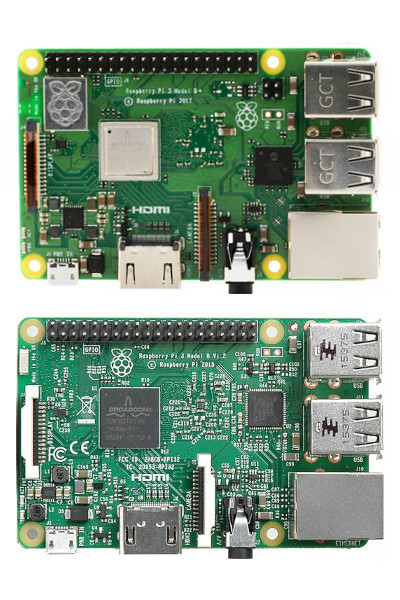
This project contains a weekly autobuild of the default branch (currently, `rpi-5.4.y`) of the [official Raspberry Pi Linux source tree](https://github.com/raspberrypi/linux), for the [64-bit Raspberry Pi 3 Model B](https://www.raspberrypi.org/products/raspberry-pi-3-model-b/) and [B+](https://www.raspberrypi.org/products/raspberry-pi-3-model-b-plus/).
> NB: (8 June 2020) the transition from `rpi-4.19.y` to `rpi-5.4.y` has not yet happened upstream, but as it will do shortly, I have elected to pre-emptively migrate.
Builds are performed with the standard `bcmrpi3_defconfig`, with the only change being that the first 12 hex digits of the tip commit SHA1 hash are appended to `CONFIG_LOCALVERSION` (with a separating hyphen) before building.
> Please note that as the purpose of this project is to provide a 'vanilla' build of the upstream `bcmrpi3_defconfig`, PRs requesting config changes will be rejected. Instead, please see the sister [`bcmrpi3-kernel-bis`](https://github.com/sakaki-/bcmrpi3-kernel-bis) project, which has a weekly autobuild (with versions mirroring this one, using a tweaked `bcmrpi3_defconfig`), and where such PRs *will* be accepted for review.
A new build tarball is automatically created and uploaded as a release asset each week (unless the tip of the default branch is unchanged from the prior week, or an error occurs during the build process).
> The default branch is used, as that is generally given most attention for e.g. VC4 backports.
As an (historical) example, on 1 June 2017, the default branch was `rpi-4.9.y` (NB, it is `rpi-5.4.y` now) and the latest commit was `e5bd734340e6871e4e9ef5ff66e61197eb8ece30` (the short form of which is `e5bd734340e6`). The created release was [4.9.30.20170601](https://github.com/sakaki-/bcmrpi3-kernel/releases/4.9.30.20170601), within which the kernel tarball was `bcmrpi3-kernel-4.9.30.20170601.tar.xz`, and the corresponding kernel release name was `4.9.30-v8-e5bd734340e6+`.
Each kernel release tarball currently provides the following files:
* `/boot/kernel8.img` (this is the bootable 64-bit kernel);
* `/boot/COPYING.linux` (the kernel's license file);
* `/boot/config` (the configuration used to build the kernel);
* `/boot/Module.symvers.xz` (a table mapping exported symbols to provider, compressed);
* `/boot/System.map.xz` (the kernel's symbol table, compressed);
* `/boot/bcm-2710-rpi-3-b.dtb`, `/boot/bcm-2710-rpi-3-b-plus.dtb` and `/boot/bcm-2837-rpi-3-b.dtb` (and, from `5.4.69.20201006` onwards, `/boot/bcm2710-rpi-cm3.dtb`) (the device tree blobs);
* `/boot/overlays/...` (the device tree blob overlays) (from `5.4.69.20201006`);
* `/lib/modules//...` (the module set for the kernel);
* `/lib/firmware/...` (the kernel-built firmware, for [< 4.14 only](http://lkml.iu.edu/hypermail/linux/kernel/1709.1/04650.html)).
> The `/boot/bcm-2710-rpi-3-b-plus.dtb` file is only included in more recent builds.
> The `/boot/Module.symvers.xz` file is only included in more recent builds. The `/boot/System.map.xz` is supplied in compressed form only in recent builds.
The current kernel tarball may be downloaded from the link below (or via `wget`, or via the corresponding `bcmrpi-kernel-bin` ebuild, per the [instructions following](#installation)):
Variant | Version | Most Recent Image
:--- | ---: | ---:
Kernel, dtbs, modules and (kernel) firmware | 5.4.69.20201006 | [bcmrpi3-kernel-5.4.69.20201006.tar.xz](https://github.com/sakaki-/bcmrpi3-kernel/releases/download/5.4.69.20201006/bcmrpi3-kernel-5.4.69.20201006.tar.xz)
The corresponding kernel configuration (derived via `make bcmrpi3_defconfig`) may be viewed [here](https://github.com/sakaki-/bcmrpi3-kernel/blob/master/config).
> A list of all releases may be seen [here](https://github.com/sakaki-/bcmrpi3-kernel/releases). For an equivalent kernel autobuild for the RPi4B, please see [here](https://github.com/sakaki-/bcm2711-kernel).
To deploy (assuming that your RPi3's micro SD-card's first partition is mounted as `/boot`, and you are already running a 64-bit RPi3 image, such as my [gentoo-on-rpi3-64bit](https://github.com/sakaki-/gentoo-on-rpi3-64bit)) simply download, untar into the root directory, and reboot:
```console
pi64 ~ # cp /boot/kernel8.img{,.old}
pi64 ~ # wget -c https://github.com/sakaki-/bcmrpi3-kernel/releases/download/5.4.69.20201006/bcmrpi3-kernel-5.4.69.20201006.tar.xz
pi64 ~ # tar -xJf bcmrpi3-kernel-5.4.69.20201006.tar.xz -C /
pi64 ~ # sync && reboot
```
Alternatively, if you have my [rpi3 overlay](https://github.com/sakaki-/rpi3-overlay) installed (it is pre-installed on the [gentoo-on-rpi3-64bit](https://github.com/sakaki-/gentoo-on-rpi3-64bit) image), you can simply emerge the `bcmrpi3-kernel-bin` package (a new ebuild is automatically created to mirror each release here). For example, to install the latest available version (and start using it):
```console
pi64 ~ # emaint sync --repo rpi3
pi64 ~ # emerge -av bcmrpi3-kernel-bin
pi64 ~ # reboot
```
Or, to install a particular version (e.g.):
```console
pi64 ~ # emaint sync --repo rpi3
pi64 ~ # emerge -av =bcmrpi3-kernel-bin-4.9.30.20170601
pi64 ~ # reboot
```
> NB: these prebuilt kernels and ebuilds are provided as a convenience only. Use at your own risk! **Given that the releases in this project are created automatically, there is no guarantee that any given kernel will boot correctly.** A 64-bit kernel is necessary, but not sufficient, to boot the RPi3 in 64-bit mode; you also need the supporting firmware, configuration files, and userland software (see for example my [gentoo-on-rpi3-64bit](https://github.com/sakaki-/gentoo-on-rpi3-64bit) project, or NeddySeagoon's [Raspberry Pi 3 64 bit Install](https://wiki.gentoo.org/wiki/Raspberry_Pi_3_64_bit_Install) page on the Gentoo wiki, for more information).