https://github.com/sam0x17/gcp-secrets
Manages the loading of production-only secrets within the Google Cloud Platform via the cloud metadata service. This is the closest thing GCP has to server-side environment variables. Available for Node.js, Crystal, Node.js and PHP.
https://github.com/sam0x17/gcp-secrets
Last synced: 9 months ago
JSON representation
Manages the loading of production-only secrets within the Google Cloud Platform via the cloud metadata service. This is the closest thing GCP has to server-side environment variables. Available for Node.js, Crystal, Node.js and PHP.
- Host: GitHub
- URL: https://github.com/sam0x17/gcp-secrets
- Owner: sam0x17
- License: mit
- Created: 2018-02-12T03:00:44.000Z (almost 8 years ago)
- Default Branch: master
- Last Pushed: 2018-02-12T04:39:51.000Z (almost 8 years ago)
- Last Synced: 2025-02-13T08:14:57.746Z (11 months ago)
- Language: Ruby
- Homepage:
- Size: 38.1 KB
- Stars: 0
- Watchers: 2
- Forks: 0
- Open Issues: 0
-
Metadata Files:
- Readme: README.md
- License: LICENSE
Awesome Lists containing this project
README
# gcp-secrets (WIP)
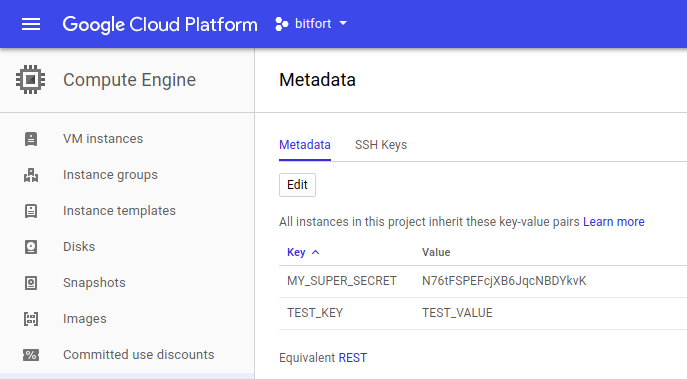
This is a gem/shard/package/script for Ruby/Crystal/Node.js/PHP respectively
that allows the loading of secure production-only secrets in Google Cloud
Platform. Secrets are stored using the Cloud Metadata Service and are
automatically loaded as environment variables. The goal of this project is to
make loading secrets as easy in GCP as it is in AWS.
## Ruby
Add the following to your Gemfile:
```
gem 'gcp-secrets'
```
Run `bundle install` in the root of your project.
Add the following to your `application.rb` file if using Rails or otherwise
add it somewhere that will run before any code that might need a production
secret or environment variable:
```ruby
require 'gcp-secrets'
```
That's it, you're done. You can manage your production-only secrets from
https://console.cloud.google.com/compute/metadata. All metadata variables
will be made accessible automatically via the `ENV` hash.
## Crystal
Add this to your application's `shard.yml`:
```yaml
dependencies:
gcp-secrets:
github: sam0x17/gcp-secrets
```
Run `shards install`
Add the following somewhere in your app so that it will run before
everything that might need to access a production secret or environment
variable:
```crystal
require "gcp-secrets"
```
That's it, you're done. You can manage your production-only secrets from
https://console.cloud.google.com/compute/metadata. All metadata variables
will be made accessible automatically via the `ENV` hash.
## Contributing
1. Fork it ( https://github.com/[your-github-name]/gcp-secrets/fork )
2. Create your feature branch (git checkout -b my-new-feature)
3. Commit your changes (git commit -am 'Add some feature')
4. Push to the branch (git push origin my-new-feature)
5. Create a new Pull Request
## Contributors
- [[sam0x17]](https://github.com/sam0x17) Sam Johnson - creator, maintainer