https://github.com/samiheikki/pokemon-selector
🐥 Combo Box Selector for Pokémons. Yep, there's an element for that.
https://github.com/samiheikki/pokemon-selector
custom-element pokemon polymer web-components
Last synced: over 1 year ago
JSON representation
🐥 Combo Box Selector for Pokémons. Yep, there's an element for that.
- Host: GitHub
- URL: https://github.com/samiheikki/pokemon-selector
- Owner: samiheikki
- License: mit
- Created: 2017-02-28T12:33:57.000Z (over 9 years ago)
- Default Branch: master
- Last Pushed: 2018-09-04T10:56:16.000Z (almost 8 years ago)
- Last Synced: 2025-04-11T10:03:41.701Z (over 1 year ago)
- Topics: custom-element, pokemon, polymer, web-components
- Language: HTML
- Homepage: https://suoheikki.com/pokemon-selector/
- Size: 3.18 MB
- Stars: 7
- Watchers: 1
- Forks: 2
- Open Issues: 0
-
Metadata Files:
- Readme: README.md
- License: LICENSE.txt
Awesome Lists containing this project
README
[](https://vaadin.com/directory/component/samiheikkipokemon-selector)
[](https://vaadin.com/directory/component/samiheikkipokemon-selector)

[](https://www.webcomponents.org/element/samiheikki/pokemon-selector)
# <pokemon-selector>
[Live Demo ↗](https://suoheikki.com/pokemon-selector/)
<pokemon-selector> is an HTML element for selecting a Pokémon from a dropdown list.
```html
```
[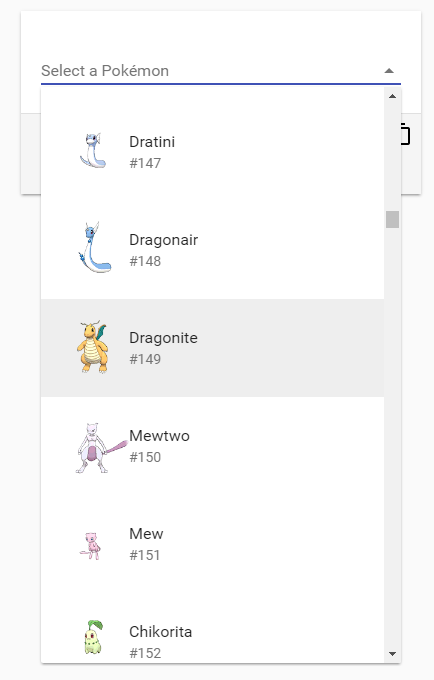 ](https://suoheikki.com/pokemon-selector/)
## Install
```
bower install pokemon-selector
```
## Usage
```html
```
## Contributing
1. Fork the `pokemon-selector` repository and clone it locally.
1. When in the `pokemon-selector` directory, run `bower install` to install dependencies.
1. Create a pull request :)
## Running demos in browser
1. Install [Polymer CLI](https://www.polymer-project.org/1.0/docs/tools/polymer-cli): `npm install -g polymer-cli`
2. When in the `pokemon-selector` directory, run `polymer serve --o`, browser will automatically open the component API documentation.
1. You can also open demo by adding **demo** to the URL, for example:
- http://localhost:8080/components/pokemon-selector/demo