https://github.com/samouri/measure-wasted-renders
Find your most inefficient React components
https://github.com/samouri/measure-wasted-renders
optimization-tools react
Last synced: 4 months ago
JSON representation
Find your most inefficient React components
- Host: GitHub
- URL: https://github.com/samouri/measure-wasted-renders
- Owner: samouri
- License: mit
- Created: 2018-04-18T14:43:57.000Z (over 8 years ago)
- Default Branch: master
- Last Pushed: 2024-01-14T18:28:34.000Z (over 2 years ago)
- Last Synced: 2025-08-14T19:37:28.665Z (12 months ago)
- Topics: optimization-tools, react
- Language: JavaScript
- Homepage:
- Size: 4.88 KB
- Stars: 0
- Watchers: 2
- Forks: 1
- Open Issues: 0
-
Metadata Files:
- Readme: README.md
- License: LICENSE
Awesome Lists containing this project
README
# measure-wasted-renders
**to install**
```bash
npm install --save-dev measure-wasted-renders
```
**to use**
```js
// in your app's entry-point
import React from "react";
import measureWastedRenders from "measure-wasted-renders";
if (process.env.NODE_ENV !== "production") {
measureWastedRenders(React);
}
```
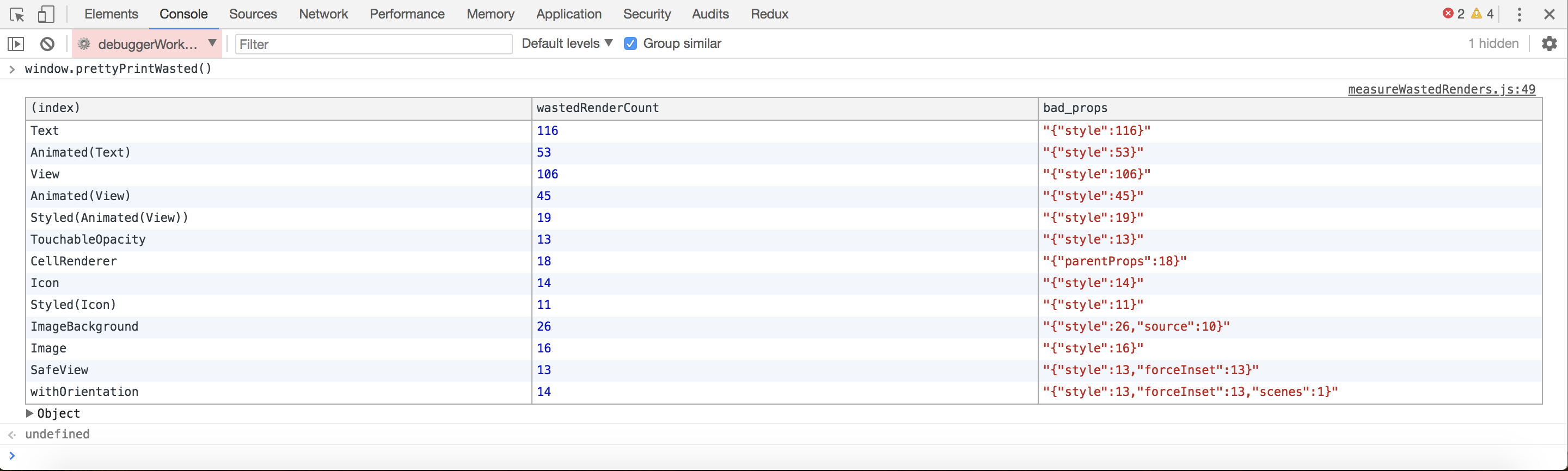
Then later inside the devtools console you can run `window.prettyPrintWasted()` which outputs a table describing all of the components that have rerendered based on shallow changes to its props that were actually deeply equal to previous props.

Can be used with React Native with similar steps:
- Install using `npm install --save-dev measure-wasted-renders`
- Run your app and select "Debug JS Remotely" in the simulator.
- Select "debuggerWorker.js" in the Chrome console.
- In the console, run `window.prettyPrintWasted()`
## TO DO
- remove lodash dependency
- publish to npm