https://github.com/samueldonovan/minimost
A lightweight, self-hosted chat platform built for private networks.
https://github.com/samueldonovan/minimost
chat chat-application flask lan local-network mattermost-alternative messaging no-database pwa python real-time screen-sharing self-hosted self-hosted-chat slack-alternative sqlite team-chat video-call voice-chat webrtc
Last synced: 22 days ago
JSON representation
A lightweight, self-hosted chat platform built for private networks.
- Host: GitHub
- URL: https://github.com/samueldonovan/minimost
- Owner: SamuelDonovan
- License: mit
- Created: 2025-12-26T22:34:16.000Z (7 months ago)
- Default Branch: main
- Last Pushed: 2026-06-30T02:14:21.000Z (22 days ago)
- Last Synced: 2026-06-30T02:23:06.815Z (22 days ago)
- Topics: chat, chat-application, flask, lan, local-network, mattermost-alternative, messaging, no-database, pwa, python, real-time, screen-sharing, self-hosted, self-hosted-chat, slack-alternative, sqlite, team-chat, video-call, voice-chat, webrtc
- Language: Python
- Homepage: https://minimost.readthedocs.io/en/latest/
- Size: 8.16 MB
- Stars: 2
- Watchers: 0
- Forks: 1
- Open Issues: 0
-
Metadata Files:
- Readme: README.md
- License: LICENSE
- Security: SECURITY.md
Awesome Lists containing this project
README
---
[](https://pypi.org/project/minimost/)
[](https://pepy.tech/project/minimost)
[](https://github.com/SamuelDonovan/minimost/blob/main/LICENSE)
[](https://www.python.org/)
[](https://flask.palletsprojects.com/)
[](https://www.sqlite.org/)
[](https://developer.mozilla.org/en-US/docs/Web/Progressive_web_apps)
[](https://github.com/psf/black)
[](https://github.com/prettier/prettier)
[](https://github.com/astral-sh/ruff)
[](https://github.com/SamuelDonovan/minimost/actions/workflows/build.yml)
[](https://github.com/SamuelDonovan/minimost/actions/workflows/ruff.yml)
[](https://github.com/SamuelDonovan/minimost/actions/workflows/eslint.yml)
[](https://github.com/SamuelDonovan/minimost/actions/workflows/bandit.yml)
[](https://github.com/SamuelDonovan/minimost/actions/workflows/semgrep.yml)
[](https://github.com/SamuelDonovan/minimost/actions/workflows/pip-audit.yml)
[](https://github.com/SamuelDonovan/minimost/actions/workflows/codeql.yml)
[](https://minimost.readthedocs.io/en/latest/)
[](https://sonarcloud.io/summary/overall?id=SamuelDonovan_minimost)
[](https://sonarcloud.io/summary/overall?id=SamuelDonovan_minimost)
[](https://sonarcloud.io/summary/overall?id=SamuelDonovan_minimost)
[](https://sonarcloud.io/summary/overall?id=SamuelDonovan_minimost)
[](https://github.com/SamuelDonovan/minimost/actions/workflows/rpm.yml)
[](https://copr.fedorainfracloud.org/coprs/samuel-donovan-fas/Minimost/package/Minimost/)
**MiniMost** is a lightweight, self-hosted chat platform built for private networks. It runs entirely on Python and SQLite — no external database, no root access, no infrastructure required. Just Flask and a browser.
---
## Quick start
```bash
pip install minimost # 1. install (only needs Python 3.6+ and Flask)
minimost # 2. run → https://127.0.0.1:5000
```
Open the URL, sign up with any username and password, and start chatting. To let others on your network join:
```bash
minimost --host 0.0.0.0 # listen on all interfaces
```
Then point a browser at `https://:5000`, accept the self-signed certificate warning once, and you're done — no database to provision, no accounts to pre-create, no internet required.
> On Red Hat / Fedora? Skip pip and install the packaged systemd service straight from COPR — see [On Red Hat / Fedora (COPR)](#on-red-hat--fedora-copr).
---
## Screenshots
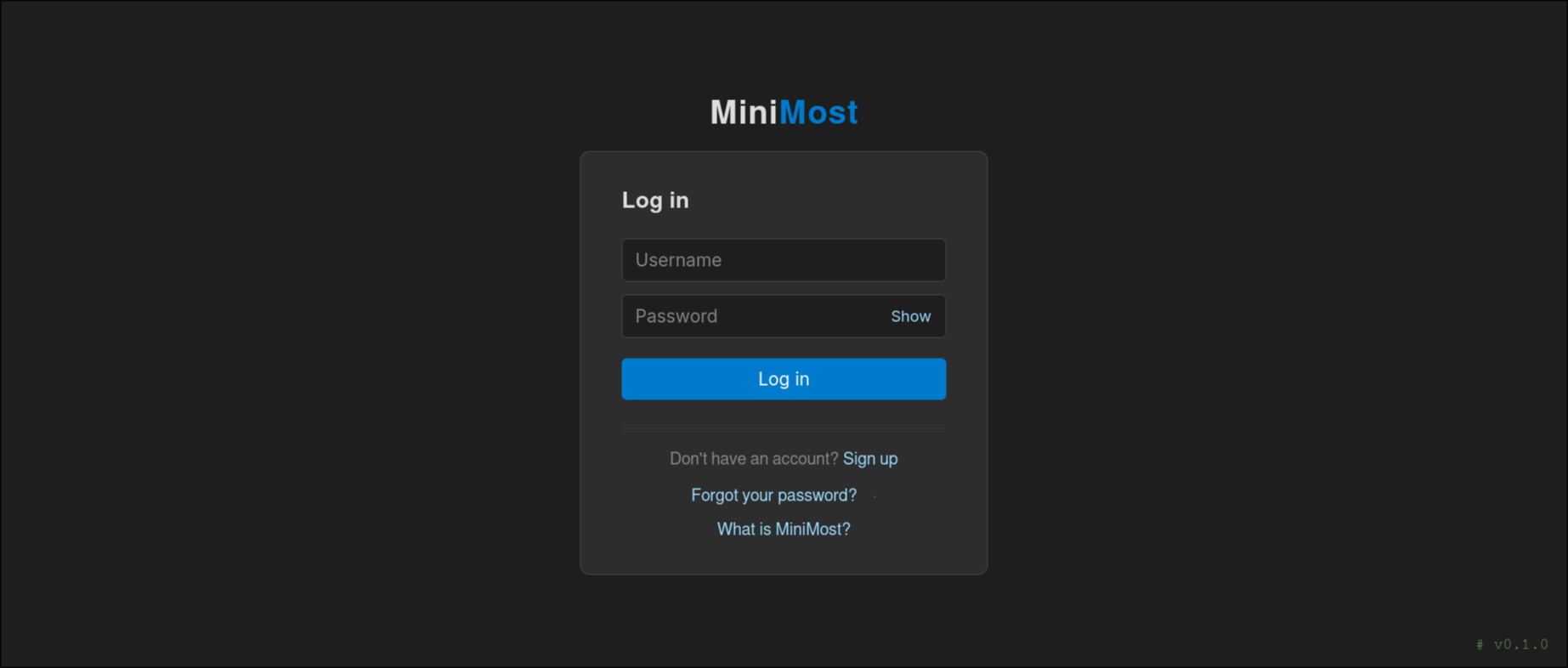
_The login page — clean, minimal, and version-tagged._
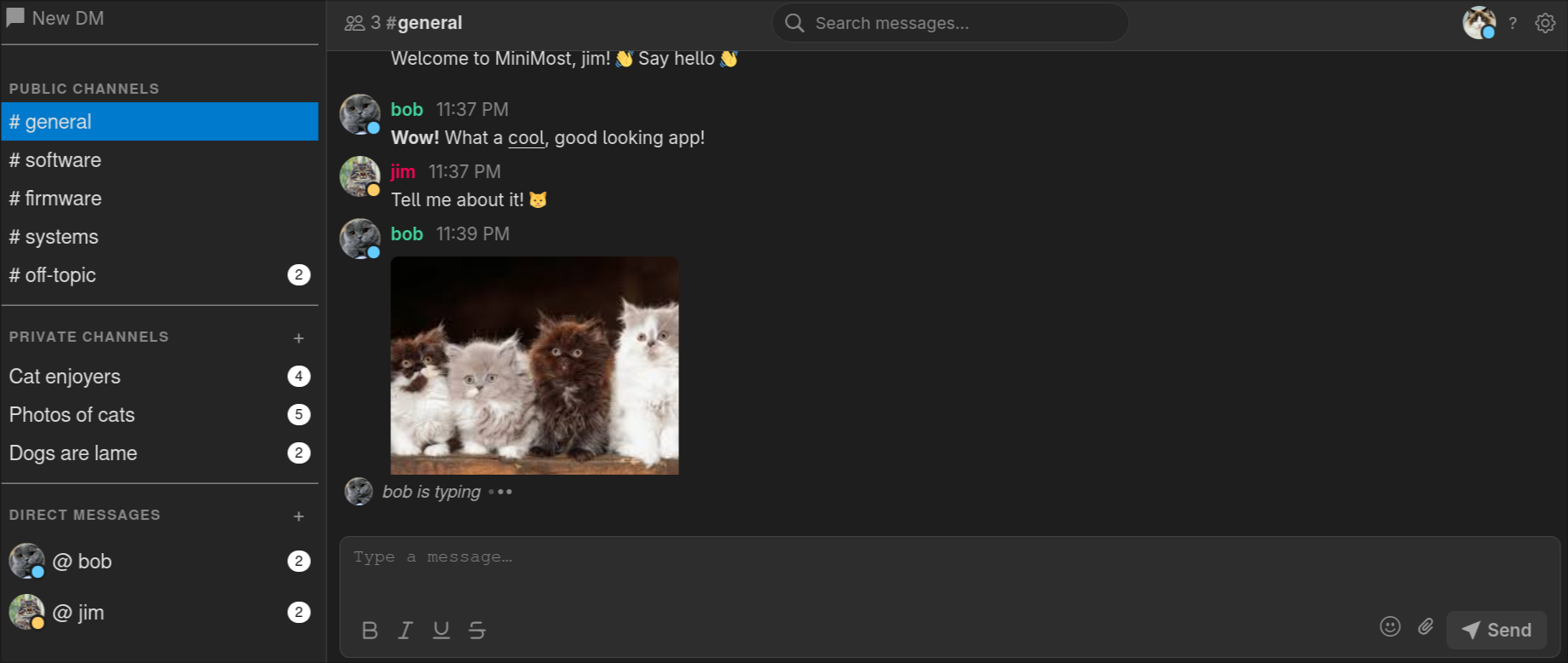
_The main chat interface — channel list, direct messages, inline image attachments, and real-time typing indicators._
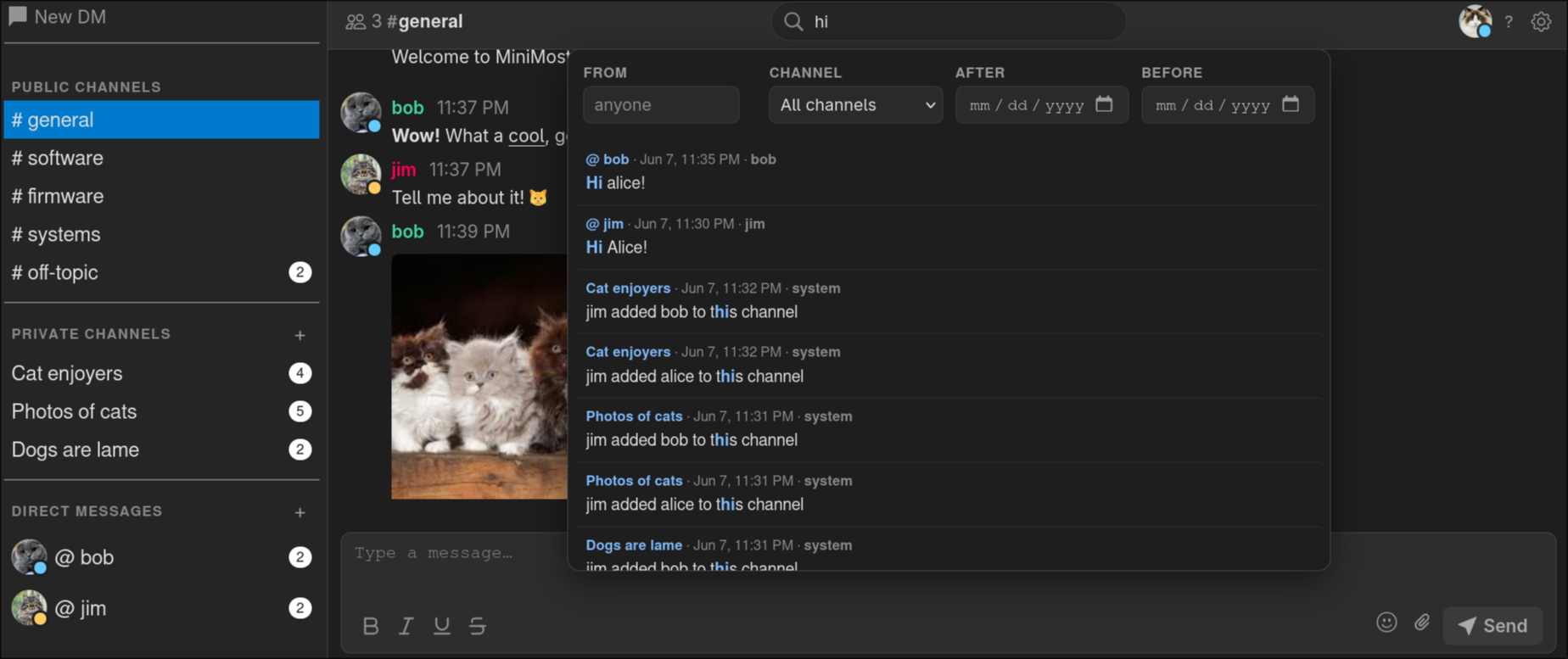
_Full-text message search with highlighted results._
---
## Features
- ⚡ **Sign up in seconds** — pick a username and password and you're in; no email verification, no waiting. Changed your mind? Accounts can be deleted just as quickly.
- 🔒 **Your password stays secret** — passwords are hashed and salted (PBKDF2) with enforced complexity, so not even the server admin can see what you typed.
- 📁 **Messages are read-protected** — the message database is locked down on disk, so your conversations aren't sitting around for anyone to open.
- 💬 **Channels & direct messages** — public channels (configurable), invite-only private channels you can rename and manage, and one-on-one or group DMs that keep going so anyone can catch up on what they missed.
- 🔍 **Every message is saved & searchable** — nothing disappears, and full-text search finds any message in an instant. New users see the history from day one.
- 📷 **Images show up inline** — paste, drag-and-drop, or use the paperclip button to attach any file. Images embed right in the conversation; everything else becomes a download link.
- ✏️ **Replies, edits & reactions** — quote any message to reply in context, edit or delete your own messages, and react with emoji. Every change syncs to everyone in real time.
- 👀 **Presence, typing & @mentions** — see who's online, watch the typing dots, and ping the right person with an @mention (or `@everyone`). Mentions alert you with a sound and desktop notification even while the tab is focused, and read receipts show who's seen your messages.
- 📞 **Voice, video & screen sharing** — jump on a call or share your screen right from the chat in any DM or private channel. Calls grow into group calls with the in-call "Add person" button, and participant tiles reflow automatically with live speaking indicators.
- 🛡️ **LAN-first, peer-to-peer media** — call and screen-share media is sent directly between participants over WebRTC and never touches the server. A small bundled STUN server means there's nothing external to configure — it even works on fully air-gapped LANs.
- 🎨 **Make it yours** — upload a profile avatar (or use the default initials), pick a display-name colour, and hide DM threads you're done with (they reappear if a new message arrives).
- 🔔 **Notifications, your way** — desktop and sound alerts are configurable per session and mutable with one click.
- 🖥️ **Works everywhere** — runs right in your browser on Linux and Windows, with a touch-friendly, mobile-responsive layout, a drawer sidebar, and pinch-to-zoom font sizing.
- 🌙 **Dark theme** — easy on the eyes.
- 🧹 **Tidies up after itself** — a background thread automatically removes old messages and attachments past a configurable age (default: 770 days for messages, 30 for files) and trims the oldest content once the database or uploads grow past a size cap. Runs every 24 hours, no cron job required.
- 🗑️ **Account self-deletion** — delete your own account from Settings. A soft delete re-attributes your messages to "Deleted User" while preserving chat history; a hard delete removes every message you ever sent. Both require password confirmation.
- 🔑 **Admin password reset** — generate a one-time, time-limited reset URL from the CLI; the user gets an in-app notification when a reset is requested.
---
## Free, MIT licensed, and fully auditable
MiniMost is released under the [MIT License](https://github.com/SamuelDonovan/minimost/blob/main/LICENSE) — free to use, free to modify, and free to redistribute, with no strings attached.
- 💯 **Truly free** — there's no license to set up, no activation key, no seat count to track, and no paid tier hiding features behind a paywall.
- 👥 **No user limit** — invite your whole team, your whole company, or your whole LAN. The software never counts heads or asks you to upgrade.
- 🔍 **Every line is open to inspect & audit** — all of the code is right here in this repository. Unlike "open core" products that ship a stripped-down public version while keeping the real functionality closed, there is no hidden enterprise edition and nothing held back. What you read is exactly what you run.
---
## How MiniMost compares
MiniMost trades breadth of features for something most chat platforms can't offer: it's fully open, runs on your own private network with no external services, and installs in one command. Here's how it lines up against common alternatives.
| | **MiniMost** | **Mattermost** | **Cisco Jabber** | **Microsoft Teams** | **Slack** | **Skype**¹ |
| ---------------------------- | ---------------------------- | ---------------------------------------- | --------------------------------- | -------------------------- | -------------------------------- | ---------------------------------------- |
| **License** | MIT | Open core (source-available + paid EE) | Proprietary | Proprietary | Proprietary | Proprietary |
| **Source open & auditable** | ✅ Fully — every line public | ⚠️ Core only; enterprise features closed | ❌ | ❌ | ❌ | ❌ |
| **Cost** | Free, forever | Free core; paid tiers | Paid (Cisco licensing) | Paid (Microsoft 365 plans) | Freemium; paid per-seat tiers | Was free |
| **User / seat limit** | Unlimited | Free Team Ed. capped (≤250 users) | Per-license | Per-license | Free tier limited; paid per-seat | n/a |
| **Self-host on private LAN** | ✅ | ✅ | ⚠️ On-prem, needs Cisco UC infra | ❌ Cloud (SaaS) | ❌ Cloud (SaaS) | ⚠️ Consumer cloud; SfB Server is on-prem |
| **Works fully air-gapped** | ✅ | ⚠️ Possible, with effort | ⚠️ | ❌ | ❌ | ❌ |
| **Database** | SQLite (bundled, file-based) | PostgreSQL (external, you run it) | Cisco UC backend | Microsoft cloud | Slack cloud | Microsoft cloud |
| **Runtime dependencies** | Python + Flask | Go binary + DB + reverse proxy | CUCM / IM&P servers | Microsoft 365 tenant | Internet account | Internet account |
| **Ease of setup** | One `pip`/`dnf` command | Moderate (DB, config, proxy) | Heavy (enterprise infrastructure) | Account signup | Account signup | n/a |
| **Voice / video / screen** | ✅ P2P WebRTC over LAN | ⚠️ Via calls plugin / integrations | ✅ | ✅ | ✅ | ✅ |
¹ Consumer Skype retired May 2025; Skype for Business Server is on-prem (end of support Oct 2025).
This isn't a feature-count contest — the big platforms have far more functionality (see the [FAQ](#faq)). MiniMost wins only where it's designed to: zero infrastructure, full auditability, and running on a network with no internet at all.
---
## Requirements
- Python 3.6+
- Flask (`pip install flask`)
That's it!
---
## Installation
### From PyPI (recommended)
```bash
pip install minimost
```
### From source
```bash
git clone https://github.com/SamuelDonovan/minimost.git
cd minimost
pip install -e .
```
### On Red Hat / Fedora (COPR)
MiniMost is packaged for Fedora, RHEL, and their rebuilds (Rocky, Alma, CentOS Stream) via [COPR](https://copr.fedorainfracloud.org/coprs/samuel-donovan-fas/Minimost/). This installs MiniMost as a proper RPM with a hardened systemd service — no `pip`, no virtualenv.
```bash
# Enable the COPR repository (one-time). On RHEL/EL, first install the plugin:
# sudo dnf install -y dnf-plugins-core
sudo dnf copr enable samuel-donovan-fas/Minimost
# Install the package
sudo dnf install minimost
# Start it now and on every boot
sudo systemctl enable --now minimost
```
The RPM ships a locked-down systemd unit that runs MiniMost under a transient `DynamicUser`, keeping all state (databases, uploads, TLS material) under `/var/lib/minimost`. The service listens on **HTTPS port 6767** by default:
```bash
systemctl status minimost # check it's running
sudo systemctl restart minimost # apply settings.json changes
journalctl -u minimost -f # follow the logs
```
Browse to `https://:6767`. Clients can fetch the CA certificate to trust at `https://:6767/ca.pem`. Remember to open the port (and UDP `3478` for calls) in `firewalld`:
```bash
sudo firewall-cmd --permanent --add-port=6767/tcp
sudo firewall-cmd --permanent --add-port=3478/udp
sudo firewall-cmd --reload
```
### From wheel (latest dev build)
Download the latest `.whl` from the [releases page](https://github.com/SamuelDonovan/minimost/releases/tag/dev), then:
```bash
pip install minimost-*.whl
```
### Dependencies only (no internet access)
Download the Flask wheel and its dependencies, then:
```bash
pip install --user *.whl
```
---
## Running
```bash
minimost
```
Or without installing:
```bash
python3 -m minimost
```
On first run MiniMost automatically generates a self-signed TLS certificate (`cert.pem` / `key.pem`) in pure Python (no `openssl` binary required) and serves over **HTTPS**. The server starts at [https://127.0.0.1:5000](https://127.0.0.1:5000) by default. Use `--host` and `--port` to change the bind address:
```bash
# Listen on all interfaces (accessible from other machines on the network)
minimost --host 0.0.0.0
# Listen on a specific IP and port
minimost --host 192.168.1.10 --port 8080
```
To reach the server from another machine, navigate to `https://:` in a browser. The generated certificate is self-signed, so your browser will show a security warning — add a permanent exception to dismiss it.
> **Note:** HTTPS is required for voice and video calling (browsers only allow camera/microphone and WebRTC access in secure contexts). The certificate is generated in pure Python (standard library only — no `openssl` binary required), so this works the same on Linux, macOS, and Windows.
> **Note:** Calls and screen shares connect peers directly over WebRTC. For this to work, peers must be on the **same LAN/subnet** and able to reach each other (and the bundled STUN server on UDP `3478`, configurable via `stun_port` in `settings.json`) over UDP. No public STUN/TURN server is used, so calls work on air-gapped networks, but they will not traverse the public internet or connect peers on different subnets.
### Ports & firewall
| Port | Protocol | Open on | Required for | Notes |
| ------------------------------------- | -------- | ---------------- | ------------------------------------------------------- | -------------------------------------------------------------------------------------------------- |
| `6767` (Gunicorn) / `5000` (dev) | TCP | Server (inbound) | Everything — web UI, chat, file uploads, call signaling | The only port needed for text chat. Set via `--port` or `gunicorn.conf.py`. |
| `3478` | UDP | Server (inbound) | Voice/video calls & screen sharing | Bundled STUN server. Set via `stun_port` in `settings.json`. |
| Ephemeral UDP (Linux `32768`–`60999`) | UDP | Between clients | WebRTC media (audio/video/screen) | Peer-to-peer, browser-chosen; only matters if clients run host firewalls or sit on segmented LANs. |
No outbound internet access is required (no external database, no public STUN/TURN) — MiniMost runs fully air-gapped. There is **no TURN relay**, so peers must be on the same LAN/subnet, and SQLite is file-based so there is no database port. See the [deployment docs](https://github.com/SamuelDonovan/minimost/blob/main/docs/deployment.rst) for an administrator setup checklist plus `firewalld` / `ufw` examples.
### Production deployment
The built-in Flask server is suitable for development and small private networks. For a more robust deployment, run MiniMost behind a WSGI server such as Gunicorn:
```bash
pip install gunicorn
# From an installed package (wheel or `pip install -e .`) — uses the config
# module shipped inside the package, so no source checkout is required:
gunicorn "minimost:create_app()" -c python:minimost.gunicorn_conf
# From a source checkout — equivalent thin shim that re-exports the same config:
gunicorn "minimost:create_app()" --config gunicorn.conf.py
```
Both forms handle automatic TLS certificate generation before Gunicorn starts. The bundled `gunicorn.conf.py` is a thin shim around the packaged `minimost.gunicorn_conf` module, so the two are interchangeable.
### Configuration
Edit `settings.json` (bundled with the package at `src/minimost/settings.json`) to configure MiniMost. All keys are optional and fall back to sensible defaults if omitted:
```json
{
"channels": ["general", "software", "firmware", "systems", "off-topic"],
"image_retention_days": 30,
"file_retention_days": 30,
"message_retention_days": 770,
"max_message_db_size_mb": 1024,
"max_upload_dir_size_mb": 2048,
"max_upload_size_mb": 25,
"max_avatar_size_mb": 5,
"stun_port": 3478,
"max_login_attempts": 5,
"lockout_duration_minutes": 15,
"rate_limit_enabled": true,
"max_event_streams_per_user": 12,
"rate_limits": {
"login": [60, 60],
"signup": [20, 3600],
"password_reset": [30, 3600],
"send": [240, 60],
"avatar": [60, 3600],
"create_channel": [60, 3600]
}
}
```
MiniMost bounds disk usage two complementary ways: **age-based** retention deletes content once it gets old enough, and **size-based** caps delete content once a store grows past a limit (whichever triggers first). Size-cap eviction is **fair** — the account consuming the most space is trimmed first — so one user flooding messages or uploads cannot delete everyone else's data. Note the difference between the two upload settings: `max_upload_size_mb` is a per-file ceiling enforced at upload time, while `max_upload_dir_size_mb` caps the _total_ size of all stored attachments.
MiniMost also includes built-in **denial-of-service throttles** (no external dependency): per-IP/per-user [rate limits](docs/security.rst) on abuse-prone routes (login, signup, message send, uploads) and a cap on concurrent live-update streams per user. They are generous enough that normal use never trips them; tune or disable them with the `rate_limit_enabled`, `max_event_streams_per_user`, and `rate_limits` keys below.
| Key | Default | Description |
| ---------------------------- | ------------- | ------------------------------------------------------------------------------------------------------------------------------------------------------------------- |
| `channels` | `["general"]` | Public channel names shown in the sidebar. Restart required. |
| `image_retention_days` | `30` | Days before image attachments are auto-deleted. No restart needed. |
| `file_retention_days` | `30` | Days before non-image attachments are auto-deleted. No restart needed. |
| `message_retention_days` | `770` | Days before messages are permanently deleted from the database. No restart needed. |
| `max_message_db_size_mb` | `1024` | Total size cap (MB) for the message database `users/messages.db`; the heaviest sender's oldest messages are deleted when exceeded. `0` disables. No restart needed. |
| `max_upload_dir_size_mb` | `2048` | Total size cap (MB) for the `uploads/` attachment directory; the heaviest uploader's oldest files are deleted when exceeded. `0` disables. No restart needed. |
| `max_upload_size_mb` | `25` | Maximum size in MB for a **single** file attachment, rejected at upload time. Restart required. |
| `max_avatar_size_mb` | `5` | Maximum size in MB for a profile avatar upload. Restart required. |
| `stun_port` | `3478` | UDP port for the bundled STUN server used by WebRTC calls/screen share. Must be `1`–`65535`. Restart required. |
| `max_login_attempts` | `5` | Consecutive failed logins before an account is locked. Set to `0` to disable lockout. No restart needed. |
| `lockout_duration_minutes` | `15` | How long an account stays locked after too many failed logins. No restart needed. |
| `rate_limit_enabled` | `true` | Master switch for the built-in DoS throttles (request rate limits + SSE stream cap). Restart required. |
| `max_event_streams_per_user` | `12` | Max concurrent live-update (`/events`) streams a single user may hold open. Excess connections get `429`. No restart needed. |
| `rate_limits` | _(see above)_ | Per-route request limits as `{action: [max, window_seconds]}`. Omitted actions keep their default. Returns `429` when exceeded. No restart needed. |
---
## Keyboard Shortcuts
### Messaging
| Key | Action |
| --------------- | ------------------------------------------------------------------ |
| `Enter` | Send message |
| `Shift + Enter` | New line |
| `@` | Open the mention dropdown (`↑`/`↓` navigate, `Enter`/`Tab` accept) |
| `Esc` | Unfocus input / close menus |
### Navigation
| Key | Action |
| ----------------------- | ----------------------- |
| `i` | Focus message input |
| `o` | Start a new DM |
| `/` or `f` | Search messages |
| `j` / `k` | Scroll down / up |
| `d` / `u` | Scroll down / up (2×) |
| `G` | Jump to bottom |
| `g` | Jump to top |
| `Ctrl + J` / `Ctrl + K` | Next / previous channel |
| `?` | Open help menu |
### Visual Mode
Press `v` in normal mode (input unfocused) to enter visual mode, which highlights a single message for direct keyboard actions. The topbar shows `-- visual --` while active.
| Key | Action |
| --------- | ----------------------------------------------- |
| `v` | Enter visual mode (selects most recent message) |
| `j` / `↓` | Move selection to next (newer) message |
| `k` / `↑` | Move selection to previous (older) message |
| `d` | Delete highlighted message |
| `c` | Edit highlighted message |
| `o` | Reply to highlighted message |
| `y` | Copy highlighted message text to clipboard |
| `e` | React to highlighted message with emoji |
| `Esc` | Exit visual mode |
### Text Formatting
| Key | Action |
| ---------- | ----------------- |
| `Ctrl + B` | **Bold** |
| `Ctrl + I` | _Italic_ |
| `Ctrl + U` | Underline |
| `Ctrl + S` | ~~Strikethrough~~ |
All formatting uses Markdown syntax (underline uses `__text__`). Shortcuts work on selected text or toggle the format on/off while typing.
### Media & Display
- **Attach files** — paste from clipboard, drag onto the message box, or use the paperclip button; any file type is accepted
- **Images** are displayed inline; all other file types appear as a download link showing the original filename
- **File size limit** — configurable per-upload maximum (default 25 MB); the browser warns before attempting an oversized upload
- **Font size** — pinch (mobile) or `Ctrl + Scroll` (desktop); preference is saved across sessions
---
## Security
- Passwords are salted and hashed with PBKDF2 via Werkzeug — no plaintext or bare SHA-256 storage
- Password complexity is enforced on both frontend and backend (8+ characters, uppercase, number, special character)
- All database queries use parameterized statements — no SQL injection surface
- Messages live in a single shared SQLite database; every read enforces channel access control (public channels, private-channel membership, and DM participation)
- SAST scanning via [Bandit](https://bandit.readthedocs.io/), [Semgrep](https://semgrep.dev/), [CodeQL](https://codeql.github.com/), and [SonarCloud](https://sonarcloud.io/) in CI
- Dependency vulnerabilities audited on every push with [pip-audit](https://github.com/pypa/pip-audit)
- Flask debug mode is disabled in production
---
## FAQ
**Are messages encrypted?**
Messages are not end-to-end encrypted. All data lives in SQLite files on the server filesystem. These files are not world-readable, but an administrator with filesystem access can read/audit them. Treat this as an internal LAN tool, not a secure messenger.
**What if a user forgets their password?**
An administrator can generate a one-time reset link from the command line:
```bash
minimost reset-password
```
This prints a URL valid for 60 minutes (configurable with `--expires`) and sends the user an in-app notification via a system DM. Share the URL with the user through another channel (email, phone, etc.). When they open it, they can set a new password. The link expires after use or when the timer runs out — whichever comes first. Run `minimost reset-password --help` for all options.
**Does it have feature X from Slack/Discord/Mattermost?**
Probably not. Those products have hundreds of engineers and years of development. MiniMost is intentionally minimal — the goal is something that runs anywhere with zero infrastructure overhead.