https://github.com/samyakbardiya/trex
A Terminal app for RegEx visualization
https://github.com/samyakbardiya/trex
bubbletea cli cli-app cobra-cli golang lipgloss regex regex-util regexp regular-expression terminal tui
Last synced: 6 months ago
JSON representation
A Terminal app for RegEx visualization
- Host: GitHub
- URL: https://github.com/samyakbardiya/trex
- Owner: samyakbardiya
- License: mit
- Created: 2025-02-12T20:21:30.000Z (over 1 year ago)
- Default Branch: main
- Last Pushed: 2025-02-27T20:18:09.000Z (over 1 year ago)
- Last Synced: 2025-02-28T03:29:54.290Z (over 1 year ago)
- Topics: bubbletea, cli, cli-app, cobra-cli, golang, lipgloss, regex, regex-util, regexp, regular-expression, terminal, tui
- Language: Go
- Homepage:
- Size: 88.9 KB
- Stars: 3
- Watchers: 1
- Forks: 0
- Open Issues: 2
-
Metadata Files:
- Readme: README.md
- License: LICENSE
Awesome Lists containing this project
README
# TReX :t-rex:


**TReX** is a terminal-based tool for writing, visualizing, and testing Regular
Expressions. Designed for efficiency, it provides a keyboard-driven interface
for rapid feedback on your regex experiments—all within your terminal.
[](https://asciinema.org/a/704948)
- [Why TReX?](#why-trex)
* [Okay, but why "TReX"?](#okay-but-why-trex)
- [Features](#features)
- [Installation](#installation)
* [From the source](#from-the-source)
- [Usage](#usage)
- [Roadmap](#roadmap)
- [Contributing](#contributing)
- [Implementation](#implementation)
## Why TReX?
[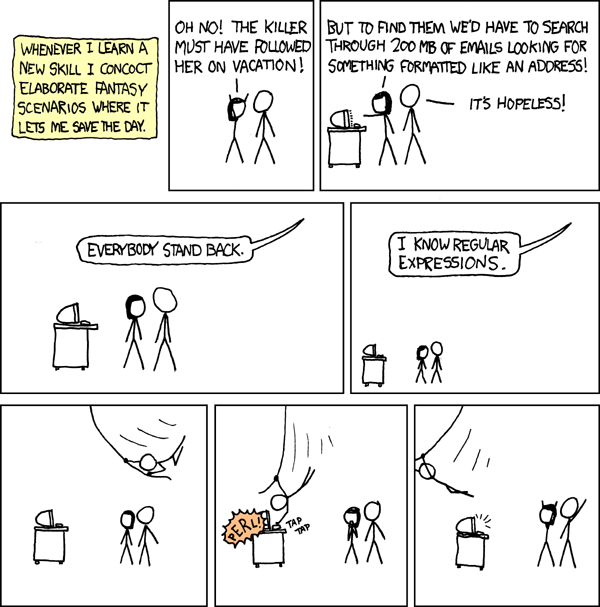](https://xkcd.com/208)
Sometimes you just want to quickly test out a regex without switching between
multiple browser tabs or online tools. TReX lets you see how your regex
interacts with your text in real time—all within your terminal.
- **Quick feedback:** Validate and debug regex patterns instantly.
- **Integrated testing:** Load files and experiment with regex combinations.
- **Efficient workflow:** Stay in your terminal and keep your focus on writing code.
### Okay, but why "TReX"?
TReX, is a playful fusion of TUI and RegEx. The `T` comes from **T**UI,
while `ReX` from **R**eg**Ex**, hence **_TReX_** :t-rex:. Roar!
## Features
- **Written in Go:** Fast and portable.
- **External file loading:** Test regex patterns against real-world data.
- **Keyboard-driven interface:** Navigate without the need for a mouse.
- **Mouse support:** For users who prefer it or need it.
## Installation
- **Install from Go Package Reference**:
```sh
go install github.com/samyakbardiya/trex@latest
```
OR from the source
### From the source
- **Clone the repository:**
```sh
git clone https://github.com/samyakbardiya/trex.git
cd trex
```
- **Build the application:**
```sh
go install
go build
```
- **_Optionally_, you can copy the binary to your `PATH`:**
```sh
cp ./trex ~/.local/bin
```
- **Verify the installation:**
```sh
./trex --version
```
## Usage
- **Start TReX:**
```sh
trex
```
- **Load a file into TReX:**
```sh
trex file.txt
```
- **Advanced usage:** Check out the help flag for more commands:
```sh
trex --help
```
## Roadmap
- [ ] **Editable Text Area**: Replace the read-only view with an editable interface.
- [ ] **Local History**: Implement local history similar to shell history,
navigable with arrow keys.
- [ ] **Syntax Highlighting**: Add syntax highlighting for the RegEx input.
- [ ] **Toggleable Flags**: Implement quick toggling for RegEx flags, such as:
- `g` (global)
- `m` (multi-line)
- `i` (case-insensitive)
- `U` (ungreedy)
## Contributing
Contributions are welcome! Feel free to open issues or submit pull requests.
For major changes, please open an issue first to discuss what you'd like to
change.
## Implementation
Developed in Go, **TReX** leverages:
- [Bubble Tea](https://github.com/charmbracelet/bubbletea) for building the TUI.
- [Cobra](https://github.com/spf13/cobra) for command-line functionality.
- [Lip Gloss](https://github.com/charmbracelet/lipgloss) for styling.
- [Bubbles](https://github.com/charmbracelet/bubbles) for additional utilities
---
Made during
FOSS HACK 2025
in India :india: