https://github.com/sano-suguru/slicefx
Feature files for ASP.NET Core Minimal APIs with generated registrations, clients, and portability checks.
https://github.com/sano-suguru/slicefx
aot aspnet-core dotnet minimal-api native-aot serverless source-generator vertical-slice-architecture wasi
Last synced: about 1 month ago
JSON representation
Feature files for ASP.NET Core Minimal APIs with generated registrations, clients, and portability checks.
- Host: GitHub
- URL: https://github.com/sano-suguru/slicefx
- Owner: sano-suguru
- License: mit
- Created: 2026-05-20T15:09:06.000Z (about 2 months ago)
- Default Branch: main
- Last Pushed: 2026-05-26T03:19:00.000Z (about 1 month ago)
- Last Synced: 2026-05-26T03:21:45.508Z (about 1 month ago)
- Topics: aot, aspnet-core, dotnet, minimal-api, native-aot, serverless, source-generator, vertical-slice-architecture, wasi
- Language: C#
- Homepage: https://sano-suguru.github.io/slicefx/
- Size: 1.52 MB
- Stars: 1
- Watchers: 0
- Forks: 0
- Open Issues: 0
-
Metadata Files:
- Readme: README.md
- Changelog: CHANGELOG.md
- Contributing: CONTRIBUTING.md
- License: LICENSE
- Code of conduct: CODE_OF_CONDUCT.md
- Security: SECURITY.md
Awesome Lists containing this project
README
# SliceFx
[](https://github.com/sano-suguru/slicefx/actions/workflows/ci.yml)
[](https://github.com/sano-suguru/slicefx/actions/workflows/perf.yml)
[](https://github.com/sano-suguru/slicefx/actions/workflows/pages.yml)
[](https://dotnet.microsoft.com/)
[](LICENSE)
> One feature file per endpoint. Generated ASP.NET Core registration, checks, clients, and portability hints.
Website:
**SliceFx** is an experimental .NET framework for teams that like ASP.NET Core Minimal APIs but do not want route strings, DTOs, validation, filters, clients, and deployment checks to drift apart. A feature is one static class with its request, response, handler, validation, and filters in one place. The generator emits standard Minimal API registrations plus a route manifest for tooling, AOT-friendly startup, Lambda experiments, and WASI/WebAssembly dispatch.
Curious about the design choices? See **[Design decisions FAQ](docs/design-decisions.md)** and **[Production readiness criteria](docs/production-readiness.md)**.
## Why use SliceFx?
| Need | SliceFx provides |
| --- | --- |
| Endpoint code that is easy to review | One feature file per endpoint: request, response, handler, validation, and filters stay together. |
| Less hand-synced API glue | `AddSlice()` / `MapSlices()`, route metadata, and typed clients are generated from the same feature definitions. |
| Standard ASP.NET Core behavior | Minimal API binding, DI, endpoint filters, DataAnnotations, OpenAPI compatibility, and `IResult` remain available. |
| Native AOT-friendly startup | Generated `MapMethods` calls avoid startup route scanning; `SliceFx.Core` has no `PackageReference` entries and only uses the `Microsoft.AspNetCore.App` framework reference. |
| Early portability feedback | `slicefx routes` classifies each endpoint as `portable`, `partial`, or `aspnet-only`; Lambda and wasi:http adapters are optional. |
| Low lock-in | Generated code compiles down to standard `MapMethods` calls. Remove the source generator reference and expand the output in place for a low-residue exit path. |
SliceFx doesn't restrict any ASP.NET feature. For authorization, rate limiting, caching, CORS, and custom validation patterns see [What you keep](#what-you-keep).
SliceFx is not a replacement for ASP.NET Core. It is a generated vertical-slice layer around Minimal APIs for teams that want explicit feature files, generated contracts, and portability checks without adopting a mediator stack or custom endpoint pipeline.
SliceFx compiles down to standard `WebApplication.MapMethods` calls — removing the source generator reference and expanding the generated output in place is the full exit path. For teams already on FastEndpoints or similar, SliceFx fills a different niche: compile-time portability classification across ASP.NET, Lambda, and wasi:http, not a richer filter and pipeline ecosystem.
Existing ASP.NET Core apps do not need a rewrite. Start with one endpoint, keep the rest of the app on controllers or handwritten Minimal APIs, and use the migration audit plus contract checks to evaluate the shape. See [migrating from Minimal APIs](docs/migrations/from-minimal-api.md) and [migrating from controllers](docs/migrations/from-controllers.md).
### Latest benchmark results
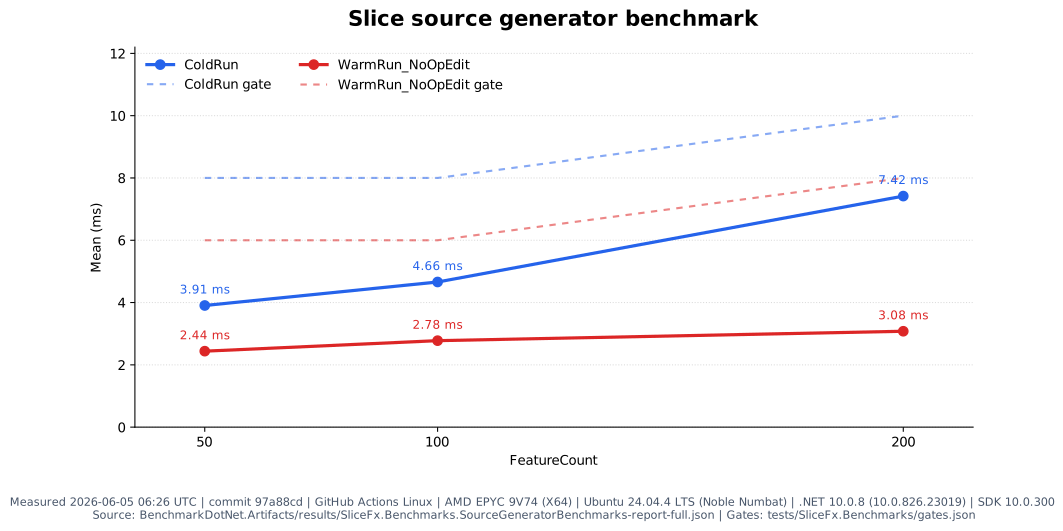
Each endpoint is a static feature file: request, response, validation, filters, and handler stay together. The source generator turns those features into ASP.NET registrations, route metadata for tooling, Lambda handlers, or wasi:http dispatch where the handler shape is portable.
```bash
dotnet run --project samples/SliceFx.Sample
curl http://localhost:5099/health
```
## Project status
SliceFx is pre-1.0 experimental software. Preview packages use `0.x` versions until the API is intentionally stabilized.
**Release status:** `0.1.0-preview.8` is the latest preview release. Install from NuGet:
```bash
dotnet add package SliceFx.Core --version 0.1.0-preview.8
dotnet add package SliceFx.SourceGenerator --version 0.1.0-preview.8
```
See the [package table](#project-status) for satellite packages. NuGet package pages: [SliceFx.Core](https://www.nuget.org/packages/SliceFx.Core), [SliceFx.SourceGenerator](https://www.nuget.org/packages/SliceFx.SourceGenerator), [SliceFx.Cli](https://www.nuget.org/packages/SliceFx.Cli).
**SDK and analyzer policy:** the repository targets .NET 10 with SDK `10.0.300` pinned in `global.json` and `rollForward: latestFeature`. Warnings and code-analysis diagnostics are treated as errors, but the analyzer recommendation set is pinned to `10.0-recommended` so normal PR/main builds do not unexpectedly break when a newer SDK promotes analyzer rules. A separate analyzer canary workflow checks the latest .NET 10 analyzer behavior and reports drift for dedicated maintenance PRs.
WASI support (`SliceFx.Wasi`) is experimental and depends on an unstable upstream toolchain: [componentize-dotnet](https://github.com/bytecodealliance/componentize-dotnet), NativeAOT-LLVM preview packages, WASI Preview 2 / `wasi:http@0.2`, and Cloudflare's JS transpile/shim path when targeting Workers. Native WASI publish requires Linux x64 or Windows x64; macOS requires a Linux x64 Docker cross-build. "Experimental" means SliceFx.Wasi's own 0.x API may change; "unstable upstream toolchain" means those external build and deployment tools may break independently of SliceFx runtime code.
All adapters are opt-in. Reference only the packages you need; the source generator emits code only for the surfaces you reference. An ASP.NET-only app uses just `SliceFx.Core` and `SliceFx.SourceGenerator`.
| Package | Purpose |
| --- | --- |
| `SliceFx.Core` | Core runtime: `[Feature]`, `[Filter]`, validation, and endpoint filters. |
| `SliceFx.SourceGenerator` | AOT-friendly generated registrations and route metadata. |
| `SliceFx.Lambda` | ASP.NET-hosted AWS Lambda adapter. |
| `SliceFx.Lambda.FunctionPerFeature` | Experimental HTTP API v2 function-per-feature Lambda handlers. |
| `SliceFx.TestHost` | In-process test host helpers. |
| `SliceFx.Wasi` | ASP.NET-independent wasi:http dispatch. |
| `SliceFx.Wasi.KeyValue` | `IKeyValueStore` abstraction and in-memory test double for WASI features. |
| `SliceFx.Wasi.HttpClient` | `IWasiHttpClient` abstraction and in-memory test double for outgoing HTTP in WASI features. |
| `SliceFx.Wasi.Spin` | `ISpinCronHandler` abstraction, `SpinCronDispatcher`, and recording test double for Spin cron trigger integration in WASI features. |
| `SliceFx.Cli` | Scaffolding, route inspection, AWS SAM manifest/package helpers, and typed client generation. |
Add `SliceFx.Core` and `SliceFx.SourceGenerator` at the same preview version:
```bash
dotnet add package SliceFx.Core --version 0.1.0-preview.8
dotnet add package SliceFx.SourceGenerator --version 0.1.0-preview.8
```
## Hello, SliceFx
`Program.cs`:
```csharp
var builder = WebApplication.CreateSlimBuilder(args);
builder.Services.AddSlice();
builder.Services.AddSingleton();
var app = builder.Build();
app.MapSlices();
app.Run();
```
`Features/Users/CreateUser.cs`:
```csharp
namespace SliceFx.Sample.Features.Users;
[Feature("POST /users", Summary = "Create a new user")]
public static class CreateUser
{
public record Request(
[Required, MinLength(2)] string Name,
[Required, EmailAddress] string Email);
public record Response(Guid Id, string Name, string Email, DateTime CreatedAt);
public static async Task Handle(Request req, IUserStore store, CancellationToken ct)
{
var user = await store.AddAsync(req.Name, req.Email, ct);
return new Response(user.Id, user.Name, user.Email, user.CreatedAt);
}
}
```
The generator discovers `[Feature]` classes, emits `AddSlice()` / `MapSlices()`, wires Minimal API binding, and attaches validation. Prefer plain response records for portable endpoints. Use `IResult` when the feature intentionally needs ASP.NET-specific response helpers such as `Results.NotFound()` or `Results.NoContent()`.
> **DI binding note:** On the ASP.NET path binding is plain Minimal API — any registered service (concrete or interface) resolves from DI automatically, identical to raw Minimal API. Annotate concrete service params with `[FromServices]` (keyed services with `[FromKeyedServices(key)]`) only if you want the handler portable across ASP.NET, WASI, and Lambda — the portable-dispatch generator cannot probe the DI container at compile time. See [`docs/guides/parameter-binding.md`](docs/guides/parameter-binding.md) and `samples/SliceFx.Sample/Features/Users/PromoteUser.cs`.
## Filters and validation
Feature filters are standard ASP.NET Core `IEndpointFilter` types:
```csharp
[Feature("DELETE /users/{id:guid}", Summary = "Delete a user")]
[Filter]
[Filter]
public static class DeleteUser
{
public static async Task Handle(Guid id, IUserStore store, CancellationToken ct)
{
var user = await store.GetAsync(id, ct);
if (user is null) return Results.NotFound();
await store.RemoveAsync(id, ct);
return Results.NoContent();
}
}
```
`AddSlice()` registers referenced filters and matching validators as scoped services, and `[Filter]` applies filters in declaration order. Supported DataAnnotations rules are generated and run first; closed `ISliceValidator` implementations are discovered when `TRequest` is a Slice request parameter and run automatically before feature filters for rules that need code. A request type can have one Slice validator; orphan validators fail the build so validation is never skipped silently.
For production authorization policies, prefer ASP.NET Core Authorization. Slice filters are best for explicit per-feature endpoint filter behavior.
Read more:
- [Filter declarations](docs/guides/filter-declarations.md)
- [Filter configuration](docs/patterns/filter-configuration.md)
- [Return-type guidance](docs/guides/return-types.md)
- [ASP.NET features and escape hatches](docs/guides/aspnet-features.md)
## What you keep
SliceFx generated code is pure Minimal API expansion — the full ASP.NET surface stays available.
**Features you keep on every endpoint:**
- ASP.NET Core Authorization — `[Authorize]`, policies, fallback policy, `RequireAuthorization()`
- Output caching — `CacheOutput()` via route group
- Rate limiting — `RequireRateLimiting()` via route group
- CORS — `RequireCors()` via route group
- Exception handling middleware and `IProblemDetailsService`
- `[Filter]` endpoint filters with full `IEndpointFilter` access
- OpenAPI integration — `builder.Services.AddOpenApi()` / `app.MapOpenApi()`
- Standard Minimal API binding — `[FromRoute]`, `[FromQuery]`, `[FromHeader]`, `[FromForm]`, `[FromServices]`, `[FromKeyedServices]`
**Escape hatches for common needs:**
| Need | Default path | Escape hatch |
| --- | --- | --- |
| Validation | DataAnnotations attributes on the request record | Implement `ISliceValidator` for the request type |
| Authorization | ASP.NET Core Authorization (`[Authorize]`, policies) | Group-level `RequireAuthorization(...)` or fallback policy |
| Rate limiting / caching / CORS | Route group: `app.MapGroup("/api").RequireRateLimiting(...).MapSlices()` | Per-group or per-endpoint policy |
| Cross-cutting behavior | `[Filter]` endpoint filter | Standard ASP.NET Core middleware |
For more detail see [ASP.NET features and escape hatches](docs/guides/aspnet-features.md).
## What works today
| Feature | Status |
| --- | --- |
| `[Feature("METHOD /path")]` declarative routing | Implemented |
| Source-generated `AddSlice()` / `MapSlices()` | Implemented |
| Static handlers with body / route / query / DI / `CancellationToken` binding | Implemented |
| Source-generated DataAnnotations validation for supported property/positional-record attributes | Implemented |
| `ISliceValidator` custom validation | Implemented |
| `[Filter]` endpoint filters | Implemented |
| Route metadata manifest | Experimental |
| `slicefx routes` portability classification | Experimental |
| `slicefx client csharp` typed client generation | Experimental |
| `slicefx client typescript` typed fetch client generation | Experimental |
| AWS SAM manifest generation | Experimental |
| ASP.NET-hosted Lambda adapter | Experimental |
| Function-per-feature Lambda handlers | Experimental HTTP API v2 NativeAOT binary-per-feature packaging |
| TestHost helper | Experimental |
| WASI adapter | Experimental single-component in-process wasi:http dispatch; per-feature WASM packaging is not implemented |
| `SliceResult` / `SliceResult` typed WASI results | Implemented — host-neutral result structs in `SliceFx.Core`; source generator + CLI client generator unwrap to the payload type |
The C# typed client reuses C# request/response types rather than generating DTO copies. Use nested feature DTOs when the client can reference the feature assembly; use non-nested DTOs in a shared contracts project when Blazor or another .NET client should reference contracts without referencing server features. The TypeScript client emits interfaces from built metadata. Routes returning `SliceResult` generate `Task` methods; routes returning the non-generic `SliceResult` generate `Task` (void) methods.
## Adoption evidence
| Evidence type | Current public count | Notes |
| --- | ---: | --- |
| Production adoption | 1 | Maintainer dogfooding: [slicefx-inbox](https://github.com/sano-suguru/slicefx-inbox) running on Fermyon Cloud (Spin WASI, `wasi:http/incoming-handler`) since preview.5. All 8 routes use `SliceResult` / `SliceResult` (preview.7); `SliceApiClient.g.cs` is fully generated. |
| Published personal dogfooding logs | 0 | A published write-up is planned; the dogfooding itself is live. |
## Portability
Most projects use all three portability classes in the same codebase — the classification tells tooling where a feature can run, not whether it is well-written.
The source generator classifies each feature endpoint at build time. `slicefx routes` reports the result; the same data drives typed-client generation, WASI route tables, and Lambda function-per-feature eligibility.
| Class | Meaning |
| --- | --- |
| `portable` | Returns a plain record or void. Eligible for typed-client generation, WASI dispatch, and function-per-feature Lambda. |
| `partial` | Portable handler shape, but attached endpoint filters are ASP.NET-only today. |
| `aspnet-only` | Returns `IResult` or uses ASP.NET-specific behavior. The full Minimal API feature set is available. |
`aspnet-only` features are standard Minimal API endpoints with the complete ASP.NET ecosystem available — they are not penalized or degraded.
### WASI and edge are optional
You do not need WASI or edge hosting to use SliceFx. The default path is still a normal ASP.NET Core app.
**Edge** usually means running code closer to users on platforms such as Cloudflare Workers or Fermyon Spin instead of only in one central server region. **WASI** is a standards-based way to package server-side code as a WebAssembly component that those hosts can run. In SliceFx, WASI support proves the portability story: if a feature returns plain request/response records and avoids ASP.NET-only response helpers, the same feature shape can be dispatched outside ASP.NET through a generated route table and `SliceFx.Wasi`.
That path is intentionally experimental. `SliceFx.Wasi` depends on preview tooling, has stricter JSON and validation rules, and does not run arbitrary ASP.NET endpoint filters. The practical deployment target today is one `wasi:http` component with generated in-process route dispatch, not one WASM component per feature. The practical benefit today is visibility: `slicefx routes` tells you which endpoints are portable, which are partially portable, and which intentionally stay ASP.NET-only.
## OpenAPI
Slice endpoints work with ASP.NET Core's standard OpenAPI support out of the box. Add `Microsoft.AspNetCore.OpenApi`, call `builder.Services.AddOpenApi()`, and map `app.MapOpenApi()` in the ASP.NET host:
```csharp
builder.Services.AddSlice();
builder.Services.AddOpenApi();
var app = builder.Build();
app.MapSlices();
if (app.Environment.IsDevelopment())
{
app.MapOpenApi();
}
```
The Slice route manifest is a separate build-time artifact for portability classification, client generation, and `slicefx openapi` manifest projections. It complements rather than replaces the ASP.NET Core OpenAPI document. See [docs/guides/openapi.md](docs/guides/openapi.md).
## Tooling and adapters
| Topic | Details |
| --- | --- |
| Source generator and route manifest | [docs/source-generator.md](docs/source-generator.md) |
| CLI commands | [docs/cli.md](docs/cli.md) |
| Blazor WASM + generated typed client sample | [samples/SliceFx.BlazorSample/](samples/SliceFx.BlazorSample/README.md) |
| OpenAPI integration | [docs/guides/openapi.md](docs/guides/openapi.md) |
| Lambda hosting and function-per-feature Lambda | [docs/lambda.md](docs/lambda.md) |
| Lambda function-per-feature sample | [samples/SliceFx.LambdaFunctionPerFeatureSample/](samples/SliceFx.LambdaFunctionPerFeatureSample/README.md) |
| WASI deploy path | [samples/SliceFx.WasiSample/README.md](samples/SliceFx.WasiSample/README.md) |
| Migration guides | [Minimal API](docs/migrations/from-minimal-api.md), [controllers](docs/migrations/from-controllers.md) |
| Platform abstraction and DI swap patterns | [docs/patterns/platform-abstraction.md](docs/patterns/platform-abstraction.md) |
| ASP.NET features and escape hatches | [docs/guides/aspnet-features.md](docs/guides/aspnet-features.md) |
| Design decisions FAQ | [docs/design-decisions.md](docs/design-decisions.md) |
| Product direction | [docs/product-direction.md](docs/product-direction.md) |
| Production readiness | [docs/production-readiness.md](docs/production-readiness.md) |
## Build & run
```bash
dotnet build
dotnet run --project samples/SliceFx.Sample
```
Then:
```bash
curl http://localhost:5099/health
curl -X POST http://localhost:5099/users \
-H "Content-Type: application/json" \
-d '{"name":"Alice","email":"alice@example.com"}'
curl -X DELETE http://localhost:5099/users/{id} -H "X-API-Key: secret"
```
## License
MIT. See [LICENSE](LICENSE).