https://github.com/sarckk/highliter
⚡ Lightweight JS highlighter
https://github.com/sarckk/highliter
highlight javascript no-dependencies range selection
Last synced: 5 months ago
JSON representation
⚡ Lightweight JS highlighter
- Host: GitHub
- URL: https://github.com/sarckk/highliter
- Owner: sarckk
- Created: 2020-03-11T00:20:23.000Z (over 6 years ago)
- Default Branch: master
- Last Pushed: 2022-12-12T04:46:10.000Z (over 3 years ago)
- Last Synced: 2025-10-02T09:28:00.848Z (10 months ago)
- Topics: highlight, javascript, no-dependencies, range, selection
- Language: JavaScript
- Homepage: https://sarckk.github.io/highliter/
- Size: 3.88 MB
- Stars: 5
- Watchers: 1
- Forks: 1
- Open Issues: 20
-
Metadata Files:
- Readme: README.md
Awesome Lists containing this project
README

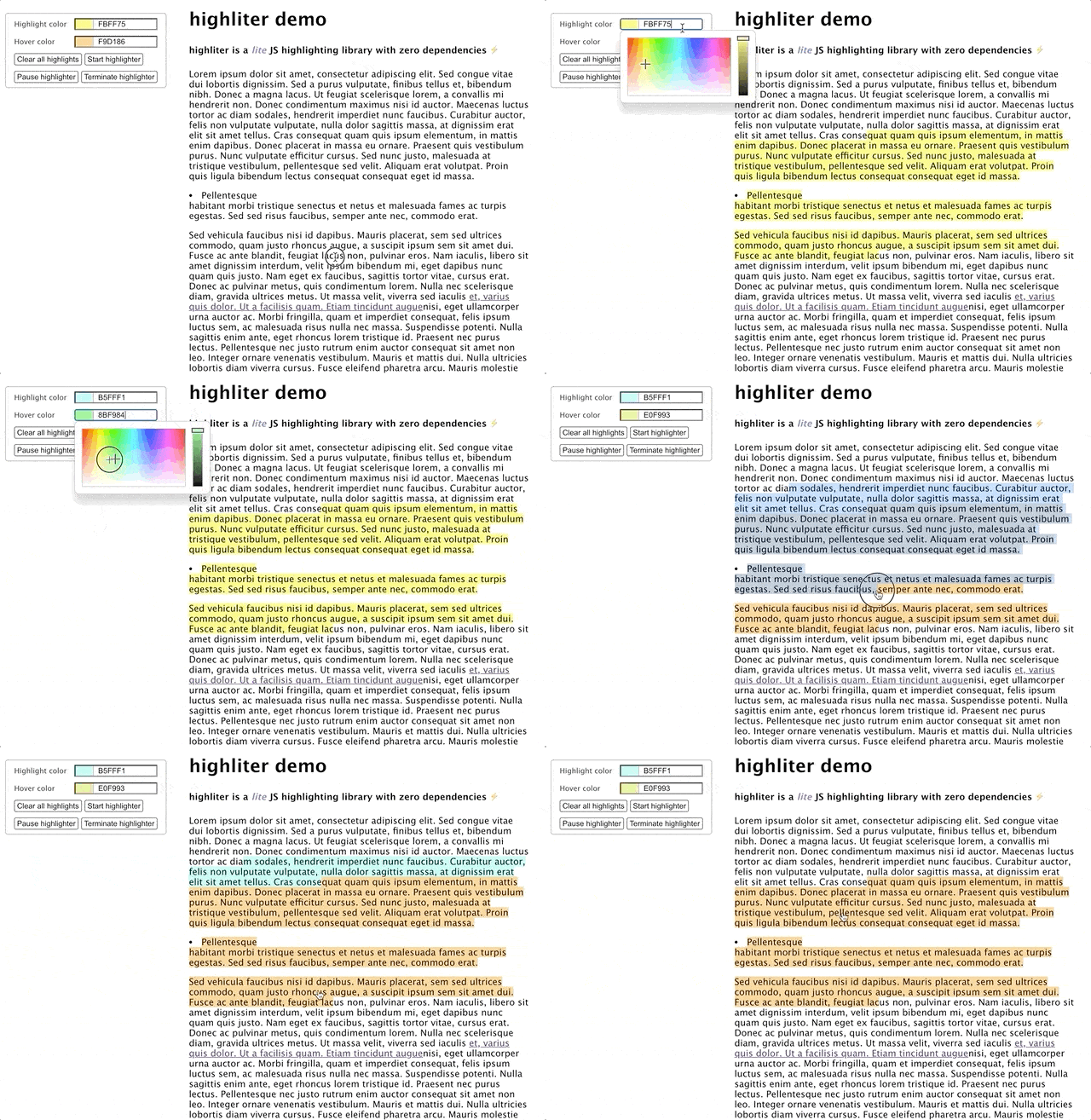
highliter is a lite JS highlighting library with no dependencies ⚡


---
## About
Sometimes it's good to re-invent the wheel (or at least part of it).
**highliter** was born out of my attempt to understand the [Range API](https://developer.mozilla.org/en-US/docs/Web/API/Range).
I took a lot of inspiration from [alienzhou](https://github.com/alienzhou)'s [web-highlighter](https://github.com/alienzhou/web-highlighter) library, and large potions of the code is directly modelled after his code. However, there are some differences in
the underlying implementation (look at `getHighlightRanges()` in `src/util/dom.js` for example) which (the author contends) has resulted in a major improvement in readability in most parts of the code. The main differences between **highliter** and [web-highlighter](https://github.com/alienzhou/web-highlighter) are:
1. it uses `TreeWalker` to retrieve the list of text nodes which overlap the selected range, resulting in much simpler code
2. ...uses [Range API](https://developer.mozilla.org/en-US/docs/Web/API/Range)'s `surroundContents()` method instead of the more verbose method of creating documentFragments
3. ...fixes a minor implementation error in [web-highlighter](https://github.com/alienzhou/web-highlighter) in which an incorrect range is restored if the absolute offset of the saved range (relative to its parent element) is 0 (see the comment [here](https://github.com/sarckk/highliter/blob/c18753e1c79f188d5602639d1a7dcb16a0c83828/src/util/dom.js#L162) for details)
4. ...supports the creation and deletion of overlapping highlights in a fundamentally different (and much simpler) way than [web-highlighter](https://github.com/alienzhou/web-highlighter). The key insight here is that instead of partitioning partially overlapped highlights into separate highlights, we can allow nested highlights by storing the highlighted range relative to the nearest parent element which is not a highlight element. The [absToRelativeOffset()](https://github.com/sarckk/highliter/blob/c18753e1c79f188d5602639d1a7dcb16a0c83828/src/util/dom.js#L145) method then handles the conversion to locate the correct startContainer and endContainer for the range the library is trying to restore
5. ...but offers less customizability compared to [web-highlighter](https://github.com/alienzhou/web-highlighter)
The library should be thought of as an experimental work, and as such has no test coverage. It is not recommended for use in a production environment.
## Intallation
```bash
npm i highliter
```
## Usage
```javascript
import Highliter from 'highliter';
const highliter = new Highliter();
```
The highlighting functionality is automatically enabled by default upon importing. To prevent this, immediately call `.pause()` to temporarily disable it until further action, like so:
```javascript
highliter.pause();
```
## Demo
Check out the demo page [here](https://sarckk.github.io/highliter/), or look inside the `demo` folder for the source code.
To run the demo locally, clone the repo:
```bash
git clone https://github.com/sarckk/highliter.git
```
Change into the directory and install the dependencies:
```bash
npm i
```
Then run the following npm script:
```bash
npm start
```
...and visit [http://localhost:8080/](http://localhost:8080/) to play around with the demo.
## API Guide
### Optional parameters
Pass in the options when initialising a new instance of the `Highliter` class like so:
```javascript
const highliter = new Highliter({
highlightColor: '#42f575',
hoverColor: '#f5d142',
customTagName: 'custom-element',
exclude: ['li', 'div']
});
```
All options:
| name | type | description | required | default |
| -------------- | ------------------------- | ------------------------------------------------------------------------------------------------------------------------------------------------------------------------------------------------------------------------------- | -------- | -------------------------------- |
| highlightColor | `string` | RGB/RGBA/HEX string of the initial highlight color | No | `#FAFF60` |
| hoverColor | `string` | RGB/RGBA/HEX string of the initial highlight color | No | `#F1F73B` |
| customTagName | `string` | [Kebab-case](https://en.toolpage.org/tool/kebabcase) (dash in the name) string representing the name of the custom html element which will wrap around each text node in the highlight range[more info](#f1) | No | `highlight-snippet` |
| exclude | `string or array` | A single string or an array of strings of the tag name of elements whose child text nodes will be excluded during highlights | No | `['SCRIPT','STYLE','NO-SCRIPT']` |
more info: Any names with dash-separated strings will do, except for the following reserved names:
- `annotation-xmli`
- `color-profile`
- `font-face`
- `font-face-src`
- `font-face-uri`
- `font-face-format`
- `font-face-name`
- `missing-glyph`
See [here](https://stackoverflow.com/questions/22545621/do-custom-elements-require-a-dash-in-their-name) for the full discussion. [↩](#a1)
### Important properties
#### `.currentRange`
An object containing the property `range` which is the the javascript Range object representing the currently selected range after clean-up, and `isSelectionBackwards` which is the boolean value representing whether or not the selection was made in reverse direction (right to left).
#### `.currentHighlightColor`
Currently selected highlight color
#### `.currentHoverColor`
Currently selected hover color (color of snippets when user hovers over it)
#### static `Highliter.Events`
Object containing constants representing the names of events triggered by the `Highliter` instance. Can be thought of as an enum. There are 10 possible events which the user can listen to, and some of the events will pass in arguments to the callback function. If the callback receives an argument, it will be an object with properties described under the table column `argument property` under each event:
1. `Events.HOVER`
triggers when mouse enters a highlight
|argument property|description|type|
|---|---|---|
|`highlightID`|Value of the `highlightId` custom data attribute of the highlight element which the mouse has entered|string(`uuid`)|
2. `Events.HOVER_OUT`
triggers when mouse exits a highlight
|argument property|description|type|
|---|---|---|
|`highlightID`|Value of the `highlightId` custom data attribute of the highlight element which the mouse has left|string(`uuid`)|
3. `Events.CLICKED`
triggers when mouse clicks a highlight
|argument property|description|type|
|---|---|---|
|`highlightID`|Value of the `highlightId` custom data attribute of the highlight element which has been clicked|string(`uuid`)|
4. `Events.CLICKED_OUT`
triggers when mouse clicks outside of the highlight which is in a clicked state
|argument property|description|type|
|---|---|---|
|`highlightID`|Value of the `highlightId` custom data attribute of the currently clicked highlight element which the mouse has clicked out of|string(`uuid`)|
5. `Events.CREATED`
triggers when a highlight is created
|argument property|description|type|
|---|---|---|
|`highlight`|Object obtained from parsing a serialized highlight which has been successfully created from user input|Object|
6. `Events.LOADED`
triggers when a highlight is loaded
|argument property|description|type|
|---|---|---|
|`highlight`|Object obtained from parsing a serialized highlight which has been successfully restored in the DOM from another source|Object|
7. `Events.REMOVED`
triggers when a highlight is removed
|argument property|description|type|
|---|---|---|
|`highlightID`|Value of the `highlightId` custom data attribute of the highlight element removed|string(`uuid`)|
8. `Events.ERROR_LOADING`
triggers when a serialized highlight is malformed / invalid and cannot not be restored
|argument property|description|type|
|---|---|---|
|`highlight`|Object obtained from parsing a serialized highlight|Object|
|`error`|Error message explaining reason why the highlight failed to be restored|string|
9. `Events.SHOW_MENU`
Triggers when user has selected a new valid range (to be used to position menu)
> No argument passed
10. `Events.HIDE_MENU`
Triggers when the menu has to be hidden
> No argument passed
Users can listen to any of one of these events like so:
```javascript
highliter
.on(Highliter.Events.HOVER, ({ highlightID }) => {
// do something on hover
})
.on(Highliter.Events.HOVER_OUT, ({ highlightID }) => {
// do something on hover out
})
.on(Highliter.Events.CLICKED_OUT, ({ highlightID }) => {
// do something on click out
});
```
### Exposed methods
#### `.start()`
Adds event listeners to enable all core highlighting features. Text selected is not automatically highlighted, but instead it listens to a custom `highlight` event to create a highlight. Call this method to restart the highlighter after `.pause()` or `.terminate()`
#### `.pause()`
Pauses ability to highlight by removing event listenings on `mouseup` and `highlight`. Existing highlights on the DOM can still be clicked and hovered on.
#### `.terminate()`
Completely removes all highlighter related functionalities and clears all highlights on the screen
#### `.restoreHighlights(highlights)`
Restores highlights from an array of js object(s) containing info about each highlight. The argument `highlights` is an array of objects obtained from parsing the serialized JSON data of highlights. For each object in `highlights`, it will emit `Events.ERROR_LOADING` if it fails to restore the highlight, and `Events.LOADED` if successful.
#### `.setHighlightColor(color)`
Changes the highlight color. The argument `color` is a string representing either the RGB, RGBA or HEX value of the color of the highlight created.
#### `.setHoverColor(color)`
Changes the hover color of the highlights. The argument `color` is a string representing either the RGB, RGBA or HEX value of the color which a highlight takes on when a mouse enters it
#### `.remove(highlightID)`
Removes all highlight snippets with the `highlightId` data attribute matching the argument passed in from the DOM. The argument `highlightID` is a string representing the uuid given to each highlight.
#### `.clearAll()`
Clears all highlights from the DOM.
### How to create a highlight
By default, the `Highliter` instance does not create a highlight whenever a user selects a new range. It does this because most use cases dictates a user to confirm the highlight, such as by pressing a button (the exposed events `Highliter.Events.SHOW_MENU` and `Highliter.Events.HIDE_MENU` are provided to make the hiding/showing and positioning of a menu easy to implement). Instead, it listens for the `highlight` event, which is a custom event that needs to be dispatched by the script using this library. For example, in `demo/menu.js`, this is done by adding a `click` event listener to the `highlight-menu` element, and dispatching a new `CustomEvent` whenever it is clicked:
```javascript
this.addEventListener('click', () => {
this.dispatchEvent(
new CustomEvent('highlight', {
bubbles: true,
composed: true // required here in order to cross ShadowDOM boundary
})
);
});
```
**Note:** In the particular example above, `composed:true` has to be set because the event is being dispatched from within a shadow dom and thus the property needs to be set to `true` so that the `highlight` event can bubble past the shadow dom boundary and reach the event listener in the `document`.
## TODO
- Add support for mixing of colors for overlapping highlights