https://github.com/saropa/saropa_lints
2100+ advanced lint rules for Flutter & Dart. Catches memory leaks, security flaws (OWASP), and runtime crashes that standard linters miss. Optimized for AI coding assistants.
https://github.com/saropa/saropa_lints
accessibility bloc code-quality compliance dart dev-tools flutter linter memory-leaks owasp riverpod security static-analysis
Last synced: about 1 month ago
JSON representation
2100+ advanced lint rules for Flutter & Dart. Catches memory leaks, security flaws (OWASP), and runtime crashes that standard linters miss. Optimized for AI coding assistants.
- Host: GitHub
- URL: https://github.com/saropa/saropa_lints
- Owner: saropa
- License: mit
- Created: 2025-01-07T17:38:29.000Z (over 1 year ago)
- Default Branch: main
- Last Pushed: 2026-05-31T17:21:44.000Z (about 1 month ago)
- Last Synced: 2026-05-31T18:17:57.227Z (about 1 month ago)
- Topics: accessibility, bloc, code-quality, compliance, dart, dev-tools, flutter, linter, memory-leaks, owasp, riverpod, security, static-analysis
- Language: Dart
- Homepage: https://saropa.github.io/saropa_lints/
- Size: 30 MB
- Stars: 8
- Watchers: 1
- Forks: 2
- Open Issues: 0
-
Metadata Files:
- Readme: README.md
- Changelog: CHANGELOG.md
- Contributing: CONTRIBUTING.md
- License: LICENSE
- Code of conduct: CODE_OF_CONDUCT.md
- Security: SECURITY.md
- Roadmap: ROADMAP.md
Awesome Lists containing this project
README

**Catch memory leaks, security vulnerabilities, and runtime crashes that standard linters miss.**
Developed by [Saropa](https://saropa.com) to make the world of Dart & Flutter better.
[](https://pub.dev/packages/saropa_lints) [](https://pub.dev/packages/saropa_lints/score) [](https://pub.dev/packages/saropa_lints/score) [](https://github.com/saropa/saropa_lints/actions) [](https://github.com/saropa/saropa_lints) [](https://github.com/saropa/saropa_lints) [](https://github.com/saropa/saropa_lints/issues) [](https://github.com/saropa/saropa_lints/commits)
[](https://pub.dev/packages/saropa_lints) [](https://flutter.dev/) [](https://opensource.org/licenses/MIT)
> 💬 **Have feedback on Saropa Lints?** Please share it by [opening an issue](https://github.com/saropa/saropa_lints/issues/new) on GitHub!
---
## VS Code Extension (Recommended)
**Install the [Saropa Lints VS Code extension](https://marketplace.visualstudio.com/items?itemName=saropa.saropa-lints)** for the full experience. Also on [Open VSX](https://open-vsx.org/extension/saropa/saropa-lints) (Cursor, VSCodium).
The package and the extension are **one product** — published together and versioned in sync. The Dart package provides the rules; the extension is the primary setup, configuration, and triage surface. This README is the single source for both the pub.dev and Marketplace listings.
Lint integration defaults **on** for Dart workspaces (`saropaLints.enabled`). Overview and setup stay available even when integration is off; turn it off with **Saropa Lints: Turn Off Lint Integration** if you only want the sidebar without analyzer runs. After installing, run **"Saropa Lints: Getting Started"** from the Command Palette for a guided tour of all features.
At a glance:
- **Health Score** — 0–100 score in the status bar; green/yellow/red bands in the Overview
- **Violations view** — Violations grouped by severity and file, with Error Lens-style inline annotations; multi-select works with **Copy as JSON**
- **Security Posture** — OWASP Top 10 coverage matrix, compliance export
- **Triage** — Disable noisy rules from the UI; see estimated score impact before acting
- **Rule packs / Lints Config** — Enable stack bundles (Riverpod, Drift, …) from **Saropa Lints: Open Lints Config** (editor tab: per-pack toggles, rule lists, target platforms when embedder folders exist); see [`doc/guides/rule_packs.md`](https://github.com/saropa/saropa_lints/blob/main/doc/guides/rule_packs.md)
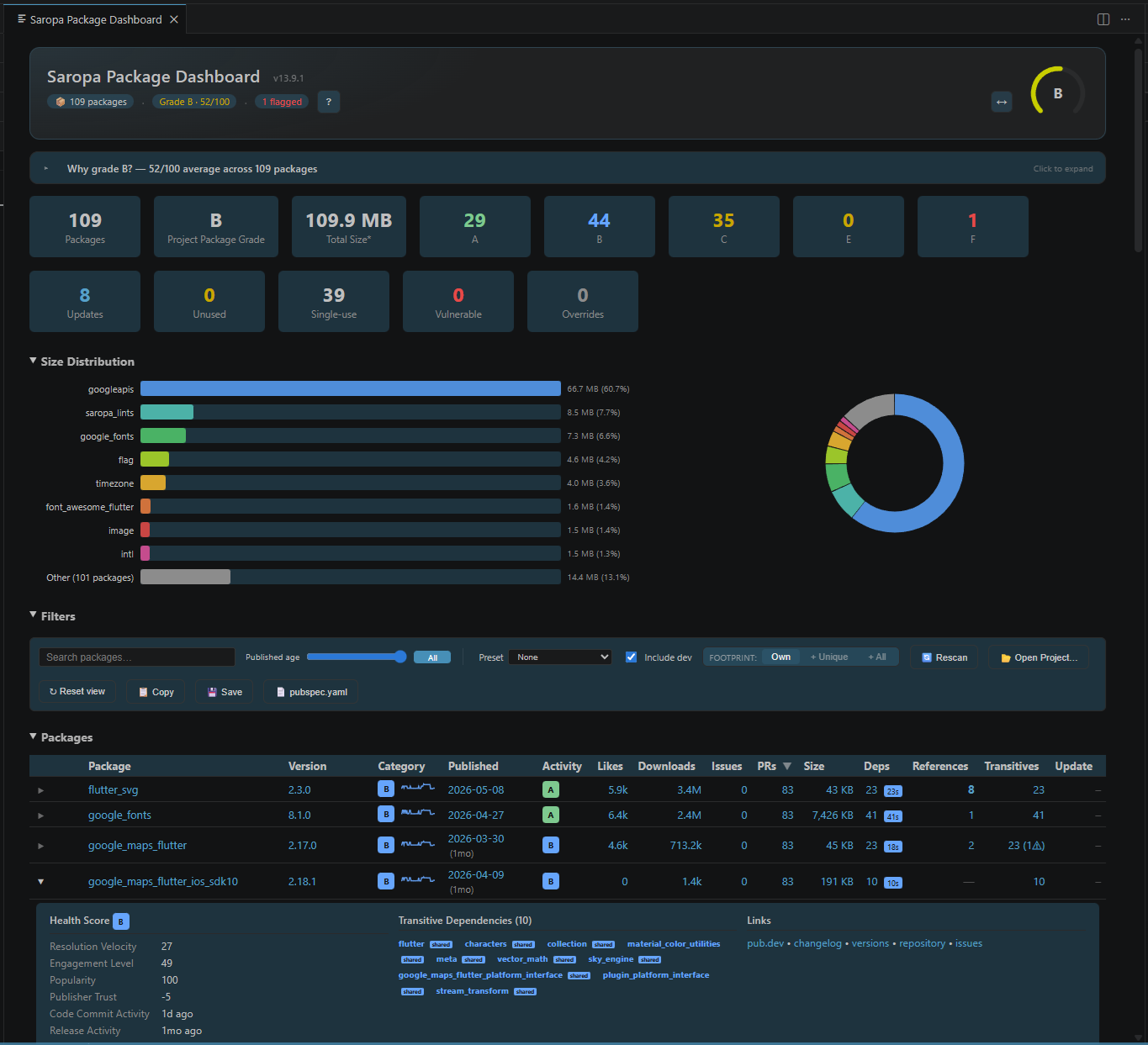
- **Package Vibrancy** — Dependency health, alerts, and optional **version-gap** PR/issue triage (enable with `saropaLints.packageVibrancy.enableVersionGap`; a GitHub token improves results)
- **Project Vibrancy** — Project code-health scoring for your own Dart source via **Open Code Health Dashboard** (editor-area webview; same scan as the CLI JSON output); use the graph icon on **Violations**, **Overview**, **Config**, or **Package Vibrancy** view titles, or the Command Palette
- **TODOs & Hacks** — Sidebar scan for TODO/FIXME/HACK-style markers; full-workspace scan is **opt-in** (`saropaLints.todosAndHacks.workspaceScanEnabled`; leave `false` until you need it) via **TODOs & Hacks: Enable workspace scan**
- **File Risk** — Files ranked by violation density; focus on the riskiest first
- **Trends** — Score progression over time with milestone celebrations
Problems panel empty, analyzer plugin stuck, or no lightbulb fixes? Start with **[`doc/troubleshooting.md`](https://github.com/saropa/saropa_lints/blob/main/doc/troubleshooting.md)** (narrow IDE-focused checks) — then README [Troubleshooting](#troubleshooting) if you still need broader setup help.
**Set Up Project** wires `pubspec.yaml`, `analysis_options.yaml`, and analysis. No terminal commands required for that path.
### Requirements
- Dart SDK (or Flutter SDK) on PATH
- A Dart/Flutter project (workspace with `pubspec.yaml`)
### Usage
1. Open a Dart/Flutter project.
2. Open the **Saropa Lints** view (checklist icon in the activity bar). **Overview & options** lists workspace settings, **Activity bar sections** (the default place to show/hide panels), and links (About, Getting Started).
3. When you are ready to wire the package in, run **Saropa Lints: Set Up Project (pubspec + config)** (or click **Lint integration: Off** if you disabled integration). That will add `saropa_lints` to `dev_dependencies`, run pub get, run `write_config` for your tier, and optionally analyze.
4. Run **"Saropa Lints: Getting Started"** from the Command Palette for a guided tour of all features.
5. Use **Run Analysis** and **Open Analysis Options** as needed. Violations appear in the **Violations** view when `reports/.saropa_lints/violations.json` exists (written by the analyzer).
### Health Score
A single 0–100 number in the **Overview** and **status bar**, computed from violation count and impact severity. Higher is better:
- **80–100** (green): Good shape — few issues, none critical.
- **50–79** (yellow): Needs work — some high-impact issues.
- **Below 50** (red): Serious problems — many critical/high-impact violations.
The status bar shows the score with a delta from the last run, plus the finding count, in a single item (e.g. "Saropa: 78 ▲4 · ⚠ 12"); its background stays neutral rather than turning red, and the score is held back until a full analysis has covered enough of the project. When violations decrease, a celebration message includes the score change.
### Violations view
The **Violations** view lists lint findings from your analysis report in a **tree**: first by **severity** (Error, Warning, Info), then by **project structure** (folders and files). Each file lists violations (capped per file; excess shown as “and N more…”).
- **Group by (toolbar):** Change how the tree is organized — by Severity (default), File, Impact, Rule, OWASP Category, Rule Type, or Rule Status. Click the tree icon in the toolbar to switch.
- **Filters (toolbar):** Filter by text (file path, rule, or message), Filter by type (severity and impact), Filter by rule (multi-select), or Filter by rule metadata (`ruleType` / `ruleStatus`). When active, the view shows “Showing X of Y”.
- **Suppressions:** Right-click a folder, file, violation, or severity node to hide it from the tree (e.g. “Hide folder”, “Hide rule”). Suppressions are persisted; use **Clear suppressions** in the toolbar to restore all.
- **Code Lens:** In Dart files that have violations, a lens at the top shows e.g. “Saropa: 3 violations — Show in Saropa”. Click to open the Violations view filtered to that file.
- **Multi-select + JSON:** Ctrl+click (Windows/Linux) or Cmd+click (macOS) multiple tree rows, then **Copy as JSON** (context menu or toolbar) to export those subtrees. For all violations at once, use `reports/.saropa_lints/violations.json` (see [VIOLATION_EXPORT_API.md](https://github.com/saropa/saropa_lints/blob/main/VIOLATION_EXPORT_API.md)).
- **Context menus:** **Explain rule** (book icon) opens a side tab with full rule details; Apply fix (wrench icon) and Copy message (clipboard icon), then a separator, then hide options: Hide rule from view, Hide rule in this file. On folders/files: Hide folder, Hide file, Copy path; on files: Fix all in file, Show only this file. On severity nodes: Hide this severity.
- **Explain rule:** Right-click a violation and choose **Explain rule** (or run **Saropa Lints: Explain rule** from the command palette and pick a rule) to open a tab beside your code with the rule’s problem message, how to fix, severity, impact, OWASP mapping (if any), and a link to the ROADMAP.
- **Violation tooltips:** Show rule name and a “More” link to rule documentation (ROADMAP).
- **Summary → Violations:** Click **Total violations** in the Summary view to open the Violations view with all findings (clears any active filters). By severity / By impact rows open Violations with the matching filter, and **By rule type / By rule status** rows open Violations filtered to matching metadata groups.
- **Problems view:** Right-click a problem and choose **Saropa Lints: Show in Saropa Lints** to focus the Violations view filtered to the active file.
The **File Risk** view ranks files by weighted violation density (same weights as the Health Score). Files with critical violations appear first with a flame icon. Click a file to filter the Violations view to that file.
The **Security Posture** view shows OWASP Mobile and Web Top 10 coverage based on the active rules and violations. Right-click a category to export an OWASP compliance report.
The **Triage** view focuses on rule groups by impact/volume and quick enable/disable actions, while full config controls live in **Config Dashboard**.
**TODOs & Hacks** — Todo-Tree-style markers (TODO, FIXME, …) **after you opt in** to workspace scanning (`saropaLints.todosAndHacks.workspaceScanEnabled`, default **off** to avoid heavy full-repo I/O). Until then, the view shows **Enable workspace scan…** (or use **TODOs & Hacks: Enable workspace scan**). No `violations.json` required. Default globs: Dart, YAML, TypeScript, JavaScript; add `**/*.md` to `includeGlobs` if you want Markdown. Toolbar: Refresh, Toggle group by tag / folder. Auto-refresh on save respects the same gate. Custom regex: `saropaLints.todosAndHacks.customRegex`.
The **Logs** view lists analysis reports from `reports/`. Each log shows a parsed hint (e.g. violation counts, init tier). A "Run Analysis" action appears when the latest report is over 1 hour old.
### Package Vibrancy activity signal
The Package Vibrancy report includes an **Activity** grade column (**A-F**) that reflects maintenance activity separately from overall vibrancy.
- Uses both **code activity** (last commit from GitHub `pushed_at`) and **release activity** (latest pub.dev publish date).
- Activity score uses a 90-day decay for both timelines and takes the weaker side.
- Report surfaces dormancy hints:
- **90+ days** with no commits and no releases: stale
- **180+ days** with no commits and no releases: dormant
This helps distinguish "not recently released but still actively maintained" from "no recent release and no recent code changes."
### Code Health (your own source)
The **Code Health Dashboard** scores the functions in your own Dart code (separate from Package Vibrancy, which scores dependencies).
- Scans your project with `dart run saropa_lints:project_vibrancy` and shows the worst function hotspots in an editor-tab dashboard.
- KPI cards double as one-click filters for `unused`, `uncovered`, `stub_tested`, `suspicious_coverage`, and `test_drift`.
- Free-text search filter, sortable table, and active-filter chip strip.
- Quality gates (min grade, max-unused, max-uncovered, etc.) configured under **Code Health** settings — failures show a banner and are surfaced as a warning toast.
- Run from the Command Palette via **Saropa Lints: Open Code Health Dashboard**, from the Saropa Lints sidebar entry **Code Health Dashboard**, or from the in-dashboard **Rescan** button.
### Extension settings
| Setting | Default | Description |
|--------|--------|-------------|
| `saropaLints.enabled` | `true` | Lint integration for this workspace (upgrade checks, status-bar treatment). Overview stays usable when off; use **Set Up Project** to add the package and config. |
| `saropaLints.tier` | `recommended` | Tier used when enabling or re-initializing (essential, recommended, professional, comprehensive, pedantic). |
| `saropaLints.runAnalysisAfterConfigChange` | `true` | Run `dart analyze` after init when enabling. |
| `saropaLints.runAnalysisOpenEditorsOnly` | `false` | When true, `Run Analysis` runs `dart/flutter analyze` only for Dart files currently open in VS Code (workspace text documents) under the detected project root (pubspec.yaml directory). |
| `saropaLints.issuesPageSize` | `100` | Max violations shown per file in the Violations tree (1–1000). Remaining appear as “and N more…”. |
| `saropaLints.violationsGroupBy` | `impact` | Default tree grouping: `impact`, `severity`, `file`, `rule`, `owasp`, `ruleType`, or `ruleStatus`. `impact` lists Critical / High first. Change anytime from the Violations toolbar. |
**Sidebar defaults:** **Commands** (searchable index of every command), **Overview & options**, **Violations**, **Config Dashboard**, and **Package Vibrancy** show in the activity bar by default. Use **Saropa: Open Package Dashboard** for the full dependency report in an editor tab. Overview includes embedded Health Summary, Next Steps, and Riskiest Files groups when violations exist. **Package Details** appears automatically after a Vibrancy scan. Turn on standalone **Triage**, Summary, Security, File Risk, TODOs, etc. from **Overview & options -> Activity bar sections** (default path) or Settings (`saropaLints.sidebar.show*` advanced mirror).
| **TODOs & Hacks** | | |
|--------|--------|-------------|
| `saropaLints.todosAndHacks.workspaceScanEnabled` | `false` | When **true**, the view scans the workspace for comment markers (resource-intensive). |
| `saropaLints.todosAndHacks.tags` | `["TODO", "FIXME", "HACK", "XXX", "BUG"]` | Tags to search for in comments (case-sensitive). |
| `saropaLints.todosAndHacks.includeGlobs` | `["**/*.dart", "**/*.yaml", "**/*.ts", "**/*.js"]` | Glob patterns for files to scan. |
| `saropaLints.todosAndHacks.excludeGlobs` | `["**/node_modules/**", "**/.dart_tool/**", "**/build/**", "**/.git/**"]` | Extra exclude patterns (merged with search.exclude). |
| `saropaLints.todosAndHacks.maxFilesToScan` | `2000` | Maximum number of files to scan; view shows a message when capped. |
| `saropaLints.todosAndHacks.autoRefresh` | `true` | Refresh the TODOs & Hacks view when a file is saved (debounced). |
| `saropaLints.todosAndHacks.groupByTag` | `false` | When true, group tree by tag (TODO, FIXME, …) then by file; when false, by folder then file. |
| `saropaLints.todosAndHacks.customRegex` | `""` | Optional regex override for comment markers. Use capture group 1 for tag, optional group 2 for snippet. Empty = default (//, #,