https://github.com/saurabhdaware/vue-extra
Ready made VueJS components to import directly into your VueJS app. Make websites without writing HTML/CSS! just some JSON configurations and you're done 🎉
https://github.com/saurabhdaware/vue-extra
node-module nodejs-modules npm-install npm-module npm-package vue-components vue-extra
Last synced: 5 months ago
JSON representation
Ready made VueJS components to import directly into your VueJS app. Make websites without writing HTML/CSS! just some JSON configurations and you're done 🎉
- Host: GitHub
- URL: https://github.com/saurabhdaware/vue-extra
- Owner: saurabhdaware
- License: mit
- Created: 2019-05-14T06:32:15.000Z (about 7 years ago)
- Default Branch: master
- Last Pushed: 2019-05-24T10:19:57.000Z (about 7 years ago)
- Last Synced: 2025-10-28T16:38:47.521Z (7 months ago)
- Topics: node-module, nodejs-modules, npm-install, npm-module, npm-package, vue-components, vue-extra
- Language: Vue
- Homepage: https://www.npmjs.com/package/vue-extra
- Size: 21.5 KB
- Stars: 1
- Watchers: 1
- Forks: 0
- Open Issues: 5
-
Metadata Files:
- Readme: README.md
- Contributing: CONTRIBUTING.md
- License: LICENSE
Awesome Lists containing this project
README
# vue-extra
Ready to add extra components for VueJS.
[](https://npmjs.org/package/vue-extra)
[](https://www.npmjs.com/package/vue-extra)
# Table of Contents
- [Overview](#overview)
- [Installation](#installation)
- [How to use](#how-to-use)
- [To paste inside your template tag](#to-paste-inside-your-template-tag)
- [To paste inside your script tag](#to-paste-inside-your-script-tag)
- [Referrence](#referrence)
- [Navbar](#navbar)
- [Color Navbar](#color-navbar)
- [Change Brand Name](#change-brand-name)
- [Drop Shadow](#drop-shadow)
- [Right Aligned Items](#right-aligned-items)
- [Change property after set](#change-property-after-set)
- [Header](#header)
- [Contribution](#contribution)
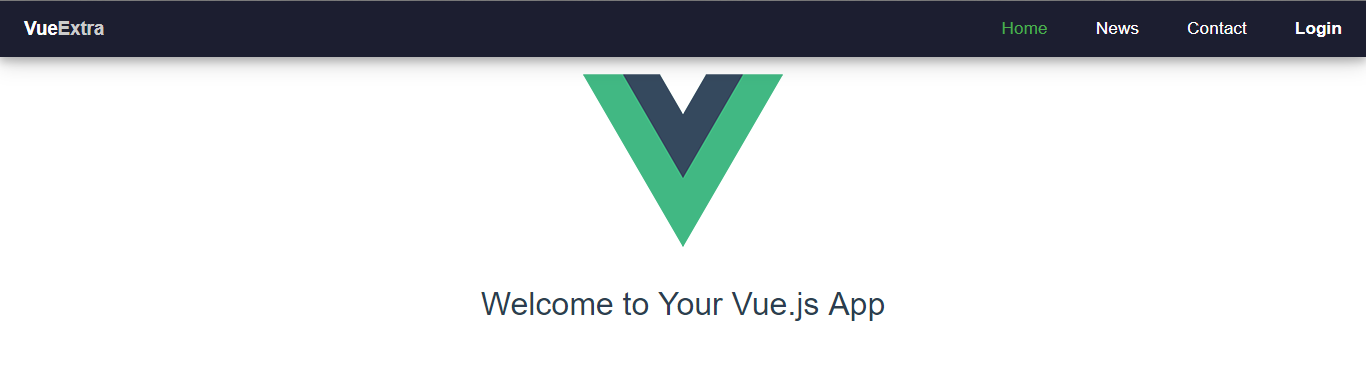
- [Screenshot](#screenshot)
# Overview
### Installation
`npm install --save vue-extra`
### How to use
- Currently the module supports vue-extra/Navbar only. However I will be adding some more elements in future.
#### To paste inside your template tag
```css
...
...
```
:style attribute is optional that lets you change the style of outer navbar element.
variable "navbar" is defined below in javascript code
#### To paste inside your script tag
Full Example :
```javascript
import Navbar from 'vue-extra/Navbar'
export default {
data () {
return {
navbar:{
defaultAlign:'right', // Default alignment of items in navbar
backgroundColor:'#222', // background color of navbar
color:'#ddd', // color of items in navbar
activeLinkColor:'#f90', // color of .active class link in navbar
hoverColor:'#ff0', // color when hovered over item
brand:'VueExtra',
shadow:true, // shadow effect on navbar
navItems:[
{
name:'Home',
href:"home",
class:'active',
},
{
name:'News',
href:"https://github.com/saurabhdaware",
router:false, // By default all navItems are rendered as by setting router:false we tell code to render element as instead.
},
{
name:'Contact',
href:"home",
},
{
name:'Login',
href:'#login',
align:'right',
style:{fontWeight:'bold'}
}
]
}
}
},
components:{
Navbar
}
}
```
# REFERRENCE
## Navbar
#### Color Navbar
```javascript
navbar:{
backgroundColor:'#222',
color:'#ddd',
hoverColor:'#fff',
activeLinkColor:'#09f'
}
```
#### Change brand Name
```javascript
navbar:{
brand:'CompanyName'
}
```
or
```javascript
navbar:{
brand:'https://image.com/logo.png' // Link of image - This will be rendered as an image
}
```
#### Drop shadow
```javascript
navbar:{
shadow:true // false
}
```
#### Right aligned items
```javascript
navbar:{
defaultAlign:'right' // 'left'
}
```
#### Change property after set
To change the property that is once set, sadly you have to change the whole navbar object. You can do this like `this.navbar = {...this.navbar,color:'#f30'}`. Here's example to change color of links after 2 seconds.
```javascript
mounted(){
setTimout(()=>{
this.navbar = {...this.navbar,color:'#f30'}
},2000)
}
```
## Header
Ummm I am still working on this.
## Contribution
[](https://github.com/saurabhdaware/vue-extra/issues)
- This project is open for contributions you can pick up a task from [Issues](https://github.com/saurabhdaware/vue-extra/issues) or Work on a new feature.
- Read [CONTRIBUTING.md](http://github.com/saurabhdaware/vue-extra/blob/master/CONTRIBUTING.md) before contributing for complete guide of Contribution and Local Development.
## Screenshot