https://github.com/sawyerbutton/chatroom_front
https://github.com/sawyerbutton/chatroom_front
Last synced: over 1 year ago
JSON representation
- Host: GitHub
- URL: https://github.com/sawyerbutton/chatroom_front
- Owner: sawyerbutton
- License: mit
- Created: 2018-06-07T03:46:21.000Z (about 8 years ago)
- Default Branch: master
- Last Pushed: 2018-06-07T03:48:54.000Z (about 8 years ago)
- Last Synced: 2025-02-07T04:41:13.082Z (over 1 year ago)
- Language: TypeScript
- Size: 284 KB
- Stars: 0
- Watchers: 3
- Forks: 0
- Open Issues: 0
-
Metadata Files:
- Readme: README.md
- License: LICENSE
Awesome Lists containing this project
README


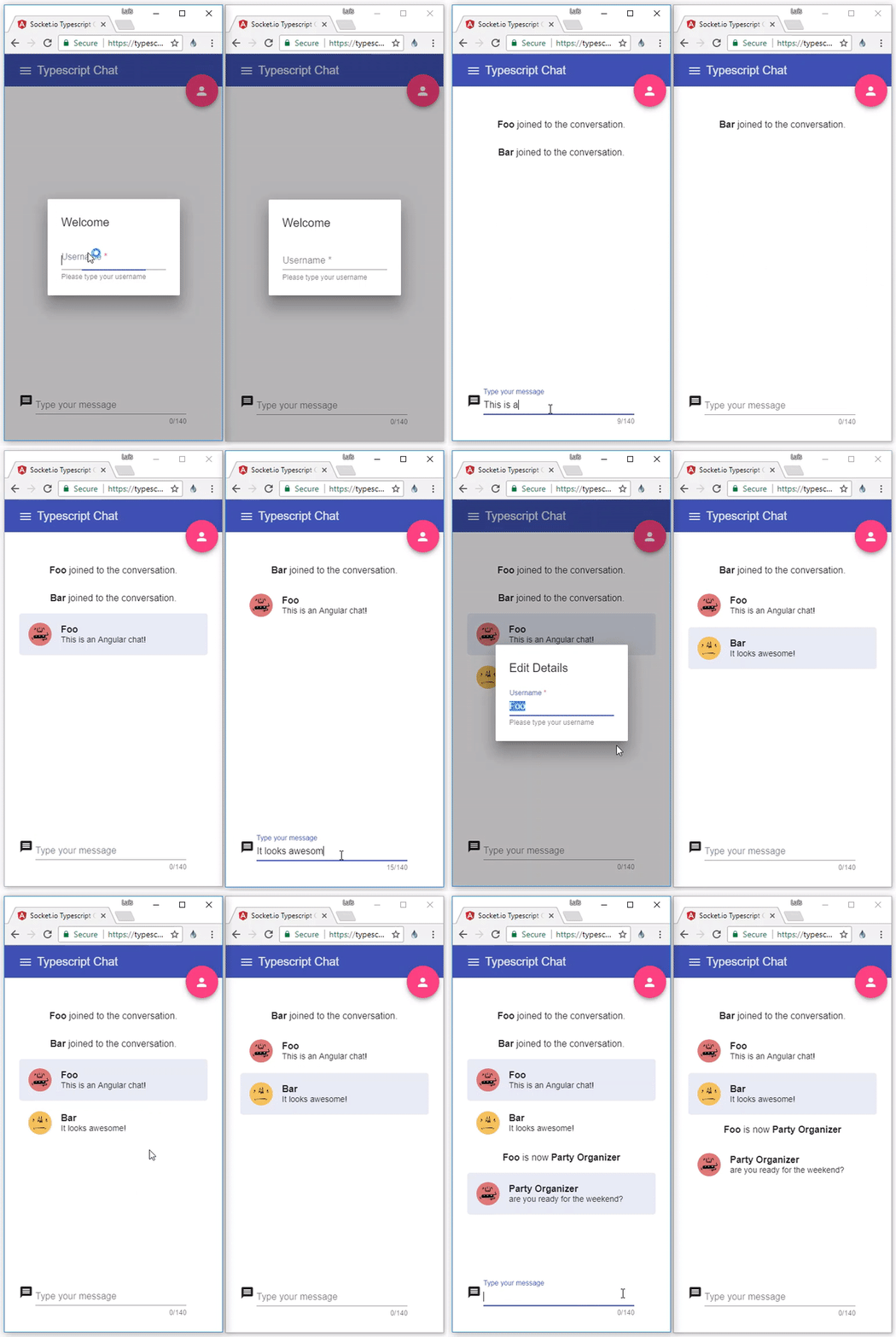
A Socket.io Chat Example Using TypeScript
=========================================
This repository contains server & client side code using `TypeScript` language
## Blog Post
Read the blog post with details about this project: [Real Time Apps with TypeScript: Integrating Web Sockets, Node & Angular](https://medium.com/dailyjs/real-time-apps-with-typescript-integrating-web-sockets-node-angular-e2b57cbd1ec1)
## Live Demo
Try live demo: [https://typescript-chat.firebaseapp.com](https://typescript-chat.firebaseapp.com)
# Support this project
- Star GitHub repository :star:
- Create pull requests, submit bugs or suggest new features
- Follow updates on [Twitter](https://twitter.com/luixaviles) or [Github](https://github.com/luixaviles)
# Running Server and Client locally
## Prerequisites
First, ensure you have the following installed:
1. NodeJS - Download and Install latest version of Node: [NodeJS](https://nodejs.org)
2. Git - Download and Install [Git](https://git-scm.com)
3. Angular CLI - Install Command Line Interface for Angular [https://cli.angular.io/](https://cli.angular.io/)
After that, use `Git bash` to run all commands if you are on Windows platform.
## Clone repository
In order to start the project use:
```bash
$ git clone https://github.com/luixaviles/socket-io-typescript-chat.git
$ cd socket-io-typescript-chat
```
## Run Server
To run server locally, just install dependencies and run `gulp` task to create a build:
```bash
$ cd server
$ npm install -g gulp-cli
$ npm install
$ gulp build
$ npm start
```
The `socket.io` server will be running on port `8080`
## Run Angular Client
Open other command line window and run following commands:
```bash
$ cd client
$ npm install
$ ng serve
```
Now open your browser in following URL: [http://localhost:4200](http://localhost:4200/)
# Forks
The Open Source community is awesome! If you're working in a fork with other tech stack, please add the reference of your project here:
| Features | Author | Status |
|-------------------------------------------|-------------------------------|-----------|
| [React + TypeScript + Material-UI client](https://github.com/nilshartmann/socket-io-typescript-chat/tree/react-client/client-react) | [nilshartmann](https://github.com/nilshartmann) | In Progress |
# Contribution
Contributions are greatly appreciated. You can contribute by adding `i18n` support with your language, the testing section or any other feature.
# Contributors
[ ](https://github.com/luixaviles) | [
 ](https://github.com/hughanderson4) | [
 ](https://github.com/ultrarunner) | [
 ](https://github.com/theIDinside) | [
 ](https://github.com/carmius) | [
 ](https://github.com/Hellmy) |
:---: |:---: |:---: |:---: |:---: |:---: |
[luixaviles](https://github.com/luixaviles) |[hughanderson4](https://github.com/hughanderson4) |[ultrarunner](https://github.com/ultrarunner) |[theIDinside](https://github.com/theIDinside) |[carmius](https://github.com/carmius) |[Hellmy](https://github.com/Hellmy) |
[ ](https://github.com/luixaviles) |
:---: |
[You](https://github.com/luixaviles) |
## License
MIT
# chatroom_front
# chatroom_front