https://github.com/sayak-sarkar/contextlake
A local context layer for AI tools: mirror your repositories, index them into a knowledge graph, and serve it over MCP — so agents work from real source.
https://github.com/sayak-sarkar/contextlake
ai cli code-search context gitlab knowledge-graph mcp
Last synced: 2 days ago
JSON representation
A local context layer for AI tools: mirror your repositories, index them into a knowledge graph, and serve it over MCP — so agents work from real source.
- Host: GitHub
- URL: https://github.com/sayak-sarkar/contextlake
- Owner: sayak-sarkar
- License: mit
- Created: 2026-06-21T07:26:00.000Z (9 days ago)
- Default Branch: main
- Last Pushed: 2026-06-22T00:09:05.000Z (8 days ago)
- Last Synced: 2026-06-22T02:26:27.290Z (8 days ago)
- Topics: ai, cli, code-search, context, gitlab, knowledge-graph, mcp
- Language: Python
- Size: 328 KB
- Stars: 1
- Watchers: 0
- Forks: 0
- Open Issues: 1
-
Metadata Files:
- Readme: README.md
- Changelog: CHANGELOG.md
- Contributing: CONTRIBUTING.md
- License: LICENSE
- Code of conduct: CODE_OF_CONDUCT.md
- Security: SECURITY.md
- Roadmap: ROADMAP.md
Awesome Lists containing this project
README

contextlake
All your real context, in one local lake.
A local context layer for your AI tools: mirror your repositories, index them
into a knowledge graph, and serve it over MCP, so agents answer from real source instead of guessing.


---
## Why contextlake
Your AI assistant is only as good as what it can actually see. Point it at one file and
it's sharp; ask it about *the system*, which service calls this API, who depends on that
package, where a symbol is really defined across dozens of repos, and it starts guessing.
**contextlake gives your tools the real source to read.** It mirrors your repositories to
your machine, indexes them into a queryable knowledge graph, and serves that graph to your
editor over [MCP](https://modelcontextprotocol.io). Everything runs locally and offline,
no code leaves your machine, and it carries no credentials of its own.
## How it works
contextlake is three layers you adopt one at a time. The mirror is useful on its own, and
each layer above it is optional.
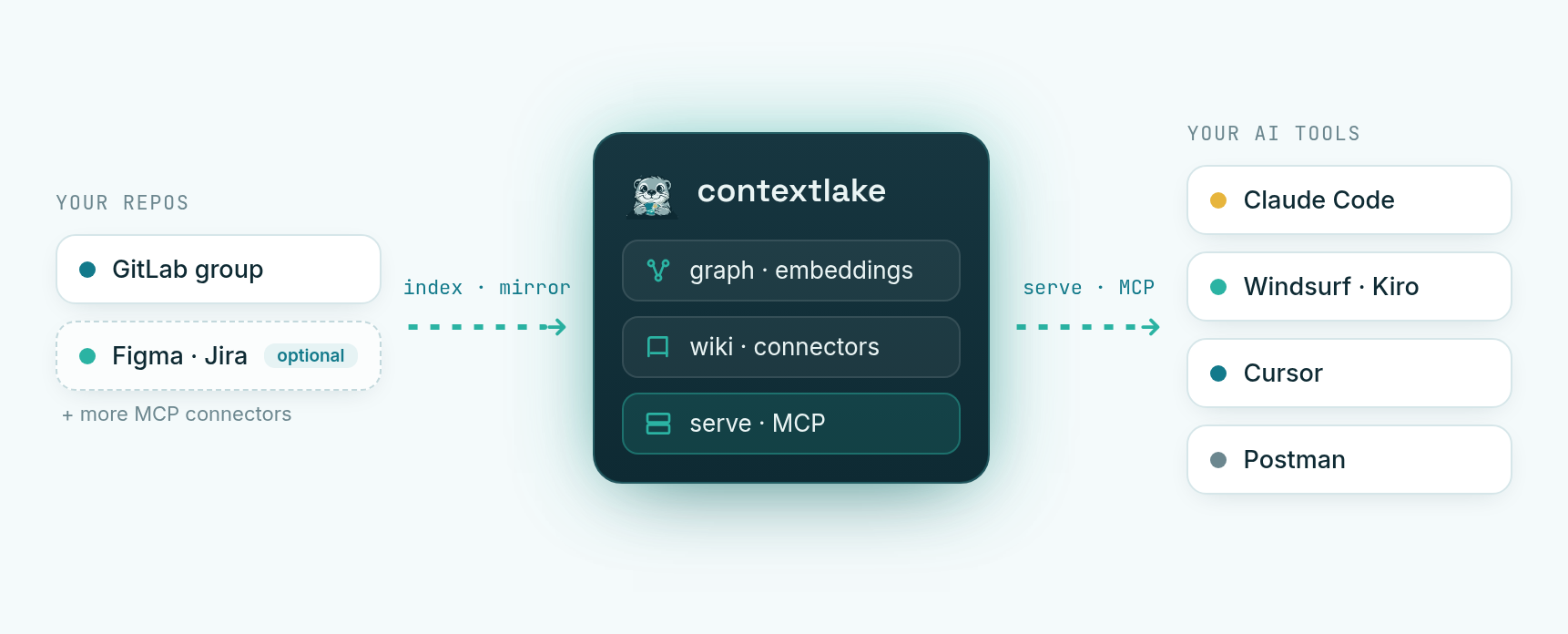
1. **Mirror**: clone every repo you can reach in a GitLab group into a faithful copy of its
namespace tree, each on its most active branch, kept fresh with one command. *(The source
is GitLab today; the design is source-agnostic.)*
2. **Knowledge layer** *(optional)*: parse the mirror into a code + dependency **graph**, add
**semantic search**, a council-verified **wiki**, and **connectors** to Atlassian / Figma / GitLab.
3. **Serve**: expose it all over **MCP** and an offline interactive **graph visualizer**, so
agents can answer *"where is `X` defined?"* or *"who calls `Y`?"* instead of grepping.
Each layer has its own guide: the mirror in **[Usage & config](docs/usage.md)**, the knowledge
layer and serving in **[Knowledge layer](docs/knowledge-layer.md)**, and the whole flow start to
finish in **[QUICKSTART](QUICKSTART.md)**.
## Install
```bash
pip install contextlake # the mirroring CLI
pip install "contextlake[kb]" # + the knowledge layer (graph, search, wiki, MCP server)
```
Prefer an isolated, zero-setup install? [`uv`](https://docs.astral.sh/uv/) fetches the right
Python and an isolated environment for you:
```bash
uv tool install "contextlake[kb]" # install the CLI on your PATH
uvx --from "contextlake[kb]" contextlake --help # …or run it once, without installing
# pipx install "contextlake[kb]" # pipx works too
```
From source (for contributors)
```bash
git clone https://github.com/sayak-sarkar/contextlake && cd contextlake
pip install -e ".[kb]"
```
**Prerequisites:** `git`, and, only for GitLab mirroring, an authenticated
[`glab`](https://gitlab.com/gitlab-org/cli) (`glab auth login`). The knowledge layer needs
neither. Once installed, `contextlake`, `python -m contextlake`, and `python3 contextlake.py`
are equivalent.
## Quickstart: one repo, no setup
You don't need GitLab or any config to try contextlake on a repo you already have.
No install? Run it once with [`uvx`](https://docs.astral.sh/uv/): prefix any command
below with `uvx --from "contextlake[kb]"` (e.g. `uvx --from "contextlake[kb]" contextlake index --source .`).
```bash
contextlake index # parse the current repo into a local knowledge graph
contextlake graph --overview --open # open the interactive graph in your browser
contextlake serve # …or serve it to your AI IDE over MCP
```
**Wire it into your editor in one line**, no config file needed (it uses the local
`~/.contextlake/kb` store you just built):
```bash
claude mcp add contextlake -- contextlake serve # Claude Code
# zero-install variant: claude mcp add contextlake -- uvx --from "contextlake[kb]" contextlake serve
```
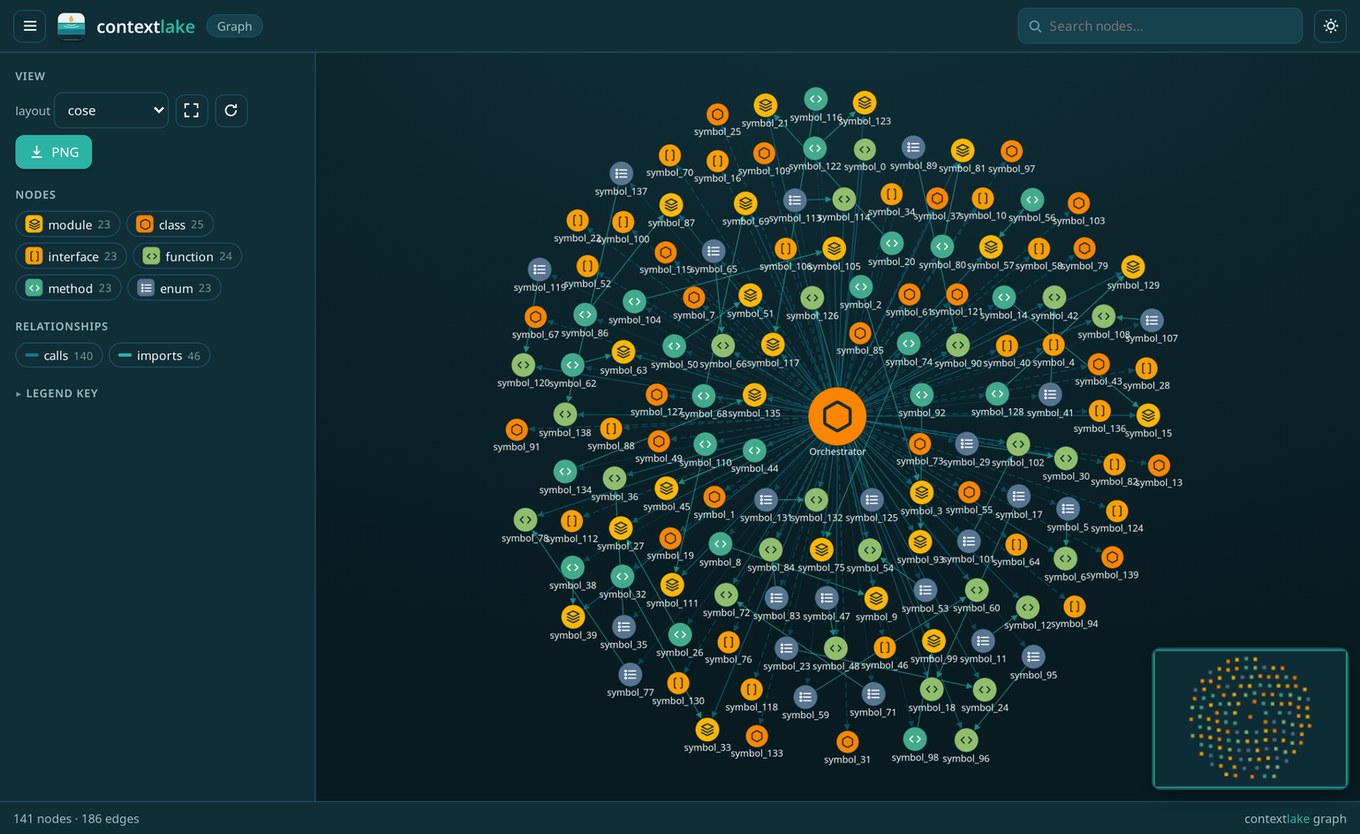
contextlake graph, a whole codebase as one offline, navigable graph.
Everything lands in a local store (`~/.contextlake/kb`), nothing leaves your machine. Index
any path with `--source PATH`, or every git repo under a directory with `--workspace DIR`.
> **Want the full path**, mirror a GitLab fleet → graph → wired editor in a few minutes?
> [**QUICKSTART.md**](QUICKSTART.md) walks the whole flow.
## Fleet mode: mirror a GitLab group
Where contextlake goes beyond single-repo tools is mirroring and cross-referencing a *whole
GitLab fleet*. Copy the example config and set your group + workspace:
```bash
cp .contextlake.ini.example ~/.contextlake.ini
```
```ini
[contextlake]
work_dir = ~/work
gitlab_group = your-gitlab-group
```
```bash
contextlake status # see where you stand (read-only)
contextlake sync # fetch → clone → update → branches → verify → audit
```
It carries no credentials of its own (auth rides on your existing `glab` login), so
`.contextlake.ini` holds only non-secret settings and is gitignored by default. It runs
across hundreds of repos **concurrently**, with an adaptive worker pool, retries with
backoff, and **never stomps on the feature branch you're in the middle of**.
> **Behind a slow / TLS-inspecting corporate proxy** (e.g. Zscaler) where `glab`'s API calls
> time out? Set `GITLAB_TOKEN` (a `read_api` token) and contextlake enumerates projects via
> its own HTTP client, which tolerates the slow DNS where `glab`'s short dial timeout fails.
## Commands at a glance
Run any command as `contextlake `. Full per-command docs: **[docs/usage.md](docs/usage.md)**.
| Command | What it does |
| --- | --- |
| `status` | Show the workspace sync state vs GitLab (read-only) |
| `sync` | The full pipeline: fetch → clone → update → branches → verify → audit |
| `fetch` · `clone` · `update` | The sync steps, individually |
| `branches` | Switch each repo to its most active branch |
| `verify` · `audit` | Check the mirror vs GitLab; report repo health, age & drift (JSON + CSV) |
| `bootstrap` | **Turnkey**: sync + index + connect + embed + wiki + steer |
| `index` | Build the code/dependency graph (`--workspace`, incremental, `--watch`) |
| `connect` | Link repos to Atlassian / Figma / GitLab items (`--watch` to keep refreshing) |
| `embed` | Build semantic-search vectors (zero-config built-in CPU model, Ollama, or an API; incremental, `--watch`) |
| `ingest` | Aggregate external docs into the graph + semantic store (built-in `files`/`web`/`api`/`mcp` sources, or plugins) |
| `wiki` | LLM-synthesized, council-verified wiki pages |
| `query` | Search the index (`--kind`, `--repo`, `--as-of `) |
| `owners` | Likely owners / SMEs for a repo (or `--path`), ranked from git history |
| `impact` | Change-impact / blast radius: what depends on a symbol (`--hops`) |
| `graph` | Visualize the graph, offline interactive HTML / DOT / Mermaid / JSON |
| `serve` | Expose the graph over MCP (`--transport stdio`/`http`) |
| `steer` | Write editor steering, `AGENTS.md`, `.mcp.json`, `.windsurfrules`, skills |
| `lint` · `doctor` · `eval` | Graph health · environment check · retrieval-quality scoring |
Global options apply to any command: `--dry-run` (preview without changing anything),
`-v`/`-q` (verbosity), `--log-file PATH`, `--config PATH`, `--version`. Output is colorized on
a TTY and plain when piped; set `NO_COLOR` to force-disable.
## Knowledge layer
Beyond mirroring, the optional `contextlake.kb` layer turns your repos into a **knowledge
graph** and serves it to AI tools over **MCP**. It can link repos to their Atlassian / Figma /
GitLab items, add **semantic search**, write a curated **wiki**, **visualize** the graph
(offline interactive HTML, fleet overview, a symbol's neighbourhood, or a single repo), and
generate per-tool **steering files** + a skills library. Most of it needs no model; the rest
works with a local Ollama or any OpenAI-compatible endpoint.
One command sets it all up:
```bash
contextlake bootstrap --kb-config ~/.contextlake/kb.toml
```
Full guide: **[docs/knowledge-layer.md](docs/knowledge-layer.md)**.
## Documentation
- **[QUICKSTART.md](QUICKSTART.md)**, install → bootstrap → wire your editor, in minutes
- **[docs/usage.md](docs/usage.md)**, every command, configuration, branch safety, scheduling
- **[docs/knowledge-layer.md](docs/knowledge-layer.md)**, the graph, connectors, search, wiki, steering
- **[docs/internals.md](docs/internals.md)**, architecture & internals
- **[docs/releasing.md](docs/releasing.md)**, maintainer runbook: versioning, tagging, publishing
- **[CHANGELOG.md](CHANGELOG.md)** · **[ROADMAP.md](ROADMAP.md)** · **[CONTRIBUTING.md](CONTRIBUTING.md)** · **[BRANDING.md](BRANDING.md)**
## License
MIT, see [LICENSE](LICENSE). Pebble the otter is the project mascot; *deep context, clear answers.*