https://github.com/sc5/serverless-messenger-workshop
https://github.com/sc5/serverless-messenger-workshop
Last synced: 16 days ago
JSON representation
- Host: GitHub
- URL: https://github.com/sc5/serverless-messenger-workshop
- Owner: SC5
- License: mit
- Created: 2016-11-04T07:51:02.000Z (over 9 years ago)
- Default Branch: master
- Last Pushed: 2016-11-04T10:38:58.000Z (over 9 years ago)
- Last Synced: 2025-02-22T20:48:14.560Z (over 1 year ago)
- Language: JavaScript
- Size: 138 KB
- Stars: 0
- Watchers: 20
- Forks: 0
- Open Issues: 0
-
Metadata Files:
- Readme: README.md
- License: LICENSE
Awesome Lists containing this project
README
# Serverless Messenger Bot Workshop by 
**The Objective**
To create a Facebook Messenger chatbot using Serverless Framework to build backend for the service.
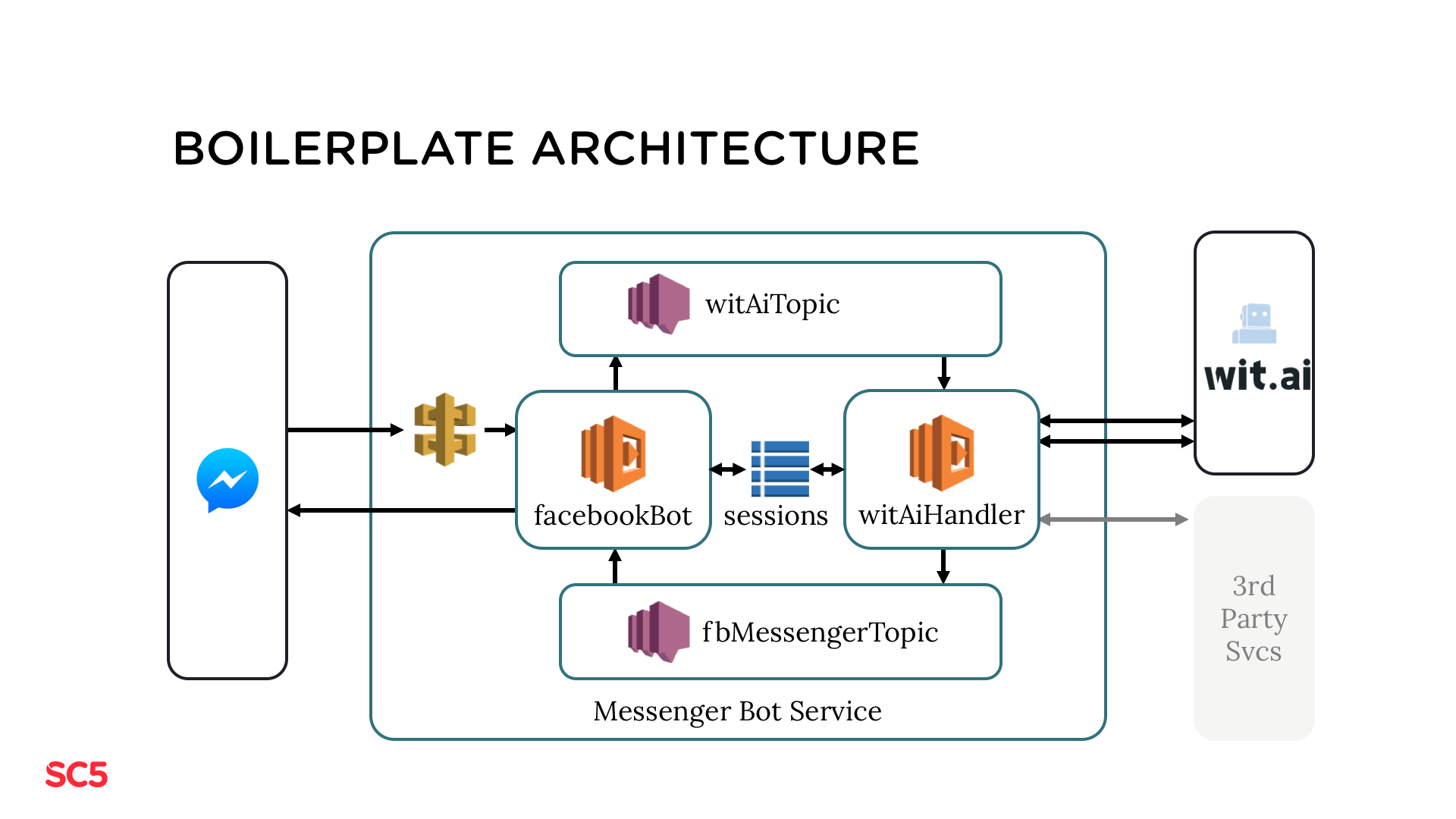
1. User sends message from Facebook Messenger to Facebook Messenger API which forwards it to the AWS API Gateway
2. AWS API Gateway triggers Lambda function facebookBot which sends the message forward to the SNS topic witAiTopic
3. Lambda function witAiHandler, which subscribes to the witAiTopic SNS topic, receives the message, forwards it to wit.ai, processes actions required by the bot (e.g. fetch data from 3rd party services) and posts the response to the SNS topic fbMessengerTopic
that forwards message to wit.ai which processes it and returns context
4. Lambda function facebookBot subscribes to the fbMessenger topic. It receives the message sent by witAiHandler and forwards it the the Messenger Platform
5. User receives the response to the message
## Boilerplate Installation
1. Run `serverless install --url https://github.com/SC5/serverless-messenger-boilerplate`
2. Run `npm install`
3. Rename example.env to .env and fill in `FACEBOOK_BOT_VERIFY_TOKEN`
4. Run `serverless deploy` then copy the GET endpoint url
## Facebook App Configuration
1. In Facebook Developer site create new Facebook application and page
* Create Facebook application -> https://developers.facebook.com/quickstarts/?platform=web
* Create Facebook page -> https://www.facebook.com/pages/create
2. Go to the App Dashboard and under Product Settings and setup webhook by clicking `Setup Webhooks`
* Callback URL -> url from step 4
* Verify Token -> from step 3
* Select Subscription field `messages` (select `message_deliveries`, `messaging_optins`, and `messaging_postbacks` only if you plan to implement functionality related to opt-ins, delivery / read receipts or postbacks)
* At this stage, the application is available only for developers and testers. The application needs to be approved by Facebook for public access
3. Click `Verify and Save`
4. In the Token Generation section, select the page created in step 5 and copy the generated token
5. In Webhooks section, select page created in step 5 to be the one that subscribes the webhooks
6. Paste token copied in step 8 to .env file as `FACEBOOK_BOT_PAGE_ACCESS_TOKEN`
More detailed instructions for Facebook Messenger platform configuration can be found from https://developers.facebook.com/docs/messenger-platform/quickstart/
- Run `serverless deploy`
- Open Facebook page created in step 1 and send message "Hello" to it
## Wit.ai Configuration
Following steps are slightly modified version of https://wit.ai/docs/quickstart
1. Register to wit.ai https://wit.ai
2. Click + icon located in top menu to create a new app
3. Type in app name and description
4. If you wish you can change language and data privacy
5. Select settings
6. Copy App ID
7. Paste token to `.env` file as `WIT_AI_TOKEN`
8. Implement wit.ai flow
## Testing
The serverless-mocha-plugin module is included in the boilerplate. You can invoke tests locally with
1. `serverless invoke test` (for all test)
2. `serverless invoke test -f facebookBot` (to run only the facebookBot tests)
3. `serverless invoke test -f withAiHandler` (to run only the witAiHandler tests)
Implement the test cases for your bot to test/witAiHandler.js.
By default, the tests are run silently (not forwarded to Messenger). If you want to run full tests,
comment out the row `process.env.SILENT = 1;` from the tests test/*.js.
## Final Touch
1. Run `serverless deploy`
2. Open Messenger and search you bot
3. Now you can converse with your bot
## License
Copyright (c) 2016 [SC5](http://sc5.io/), licensed for users and contributors under MIT license.
https://github.com/SC5/serverless-messenger-boilerplate/blob/master/LICENSE