https://github.com/schbenedikt/oauth-with-github-python
A easy python code how to generate a oAuthentifcation application with Github & Python
https://github.com/schbenedikt/oauth-with-github-python
authentification flask flask-application github oauth oauth2 pyhton pyqt pyqt5 pyqt5-desktop-application
Last synced: 2 months ago
JSON representation
A easy python code how to generate a oAuthentifcation application with Github & Python
- Host: GitHub
- URL: https://github.com/schbenedikt/oauth-with-github-python
- Owner: SchBenedikt
- Created: 2023-07-05T12:40:39.000Z (about 3 years ago)
- Default Branch: main
- Last Pushed: 2023-07-05T13:30:08.000Z (about 3 years ago)
- Last Synced: 2025-02-05T11:44:40.069Z (over 1 year ago)
- Topics: authentification, flask, flask-application, github, oauth, oauth2, pyhton, pyqt, pyqt5, pyqt5-desktop-application
- Language: Python
- Homepage: https://schbenedikt.github.io/oAuth-with-Github-Python/
- Size: 18.6 KB
- Stars: 1
- Watchers: 1
- Forks: 1
- Open Issues: 0
-
Metadata Files:
- Readme: README.md
Awesome Lists containing this project
README
# Flask GitHub Login
This is a Flask web application that allows users to log in with their GitHub account and view their GitHub projects. It utilizes OAuth authentication with GitHub and retrieves the user's projects using the GitHub API.
## Images
## Features
### User Authentication
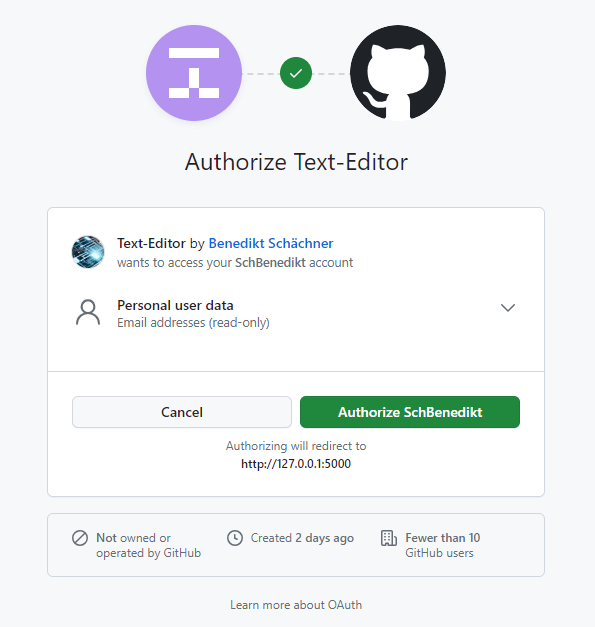
The application uses the GitHub OAuth flow to authenticate users. Here's how the authentication process works:
1. When the user accesses the application, they are redirected to the GitHub login page.
2. After the user logs in with their GitHub account, they are redirected back to the application with an authorization code.
3. The application exchanges the authorization code for an access token by making a request to GitHub's access token endpoint.
4. The access token is saved in the user's session for future API requests.
### Project Listing
Once the user is authenticated, they can view a list of their GitHub projects. The project listing feature works as follows:
1. The application makes a request to the GitHub API, providing the user's access token, to fetch the user's repositories.
2. The response from the API contains information about each repository, including the name.
3. The application extracts the project names from the API response and displays them to the user.
### File Storage
The application stores some information in local files:
1. Projects: The names of the user's GitHub projects are saved in a file called `projects.txt`. This file is used to persist the project names between sessions.
2. User Information: The user's GitHub username, name, and email are saved in a file called `about.txt`. This file is updated whenever the user logs in.
## Prerequisites
Before running the application, make sure you have the following:
- Python 3 installed
- Flask and its dependencies installed (`flask`, `requests`, `authlib`)
- GitHub OAuth application credentials (client ID and client secret)
You can install the dependencies using `pip`, the package installer for Python.
### Automatic Installation of Dependencies
To automatically install all the required Python dependencies for this Flask application, follow these steps:
1. Clone or download the repository to your local machine.
2. Open your terminal or command prompt and navigate to the folder containing the repository.
3. Run the following command:
`python install_dependencies.py`
This will install all the necessary dependencies (flask, requests, authlib) for the Flask application.
4. After installing the dependencies, you can proceed with running the Flask application using the instructions provided in the README.md file.
## Running the Application
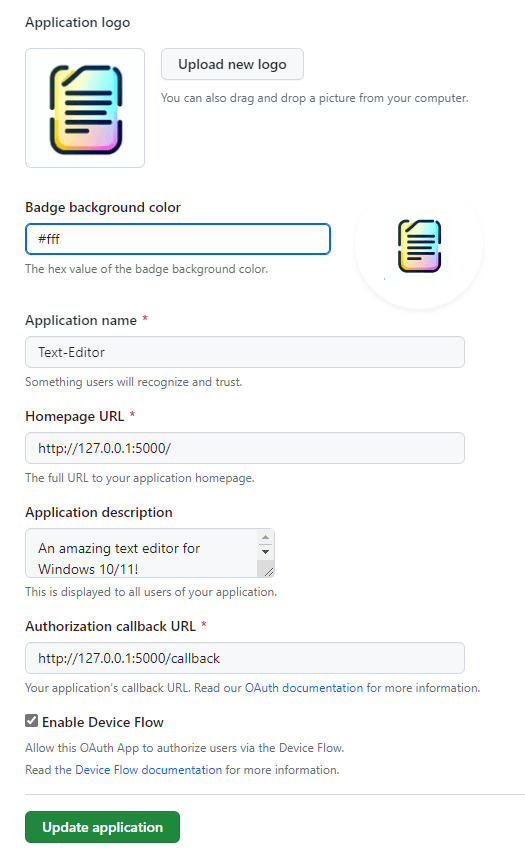
### How to generate an oAuth Application with Github
- Visit url.schächner.de/l3m
- click on "New oAuth App"
- set authorized callback url to http://127.0.0.1:5000/callback
- set homepage url to http://127.0.0.1:5000/
### How to generate client secret
Tip on "generate a new client secret"
### Set the GitHub OAuth application credentials in the code:
```python
client_id = "YOUR_CLIENT_ID"
client_secret = "YOUR_CLIENT_SECRET"
```
Feel free to adjust the content as needed. Make sure to replace `"YOUR_CLIENT_ID"` and `"YOUR_CLIENT_SECRET"` with your actual GitHub OAuth application credentials.
Let me know if you need further assistance!