https://github.com/scientisst/scientisst_db
Simple and powerful NoSQL document-based local database.
https://github.com/scientisst/scientisst_db
Last synced: 4 months ago
JSON representation
Simple and powerful NoSQL document-based local database.
- Host: GitHub
- URL: https://github.com/scientisst/scientisst_db
- Owner: scientisst
- License: mit
- Created: 2021-02-06T00:40:38.000Z (over 5 years ago)
- Default Branch: main
- Last Pushed: 2022-04-14T22:19:31.000Z (about 4 years ago)
- Last Synced: 2026-02-15T11:26:30.409Z (4 months ago)
- Language: Dart
- Homepage:
- Size: 360 KB
- Stars: 1
- Watchers: 1
- Forks: 3
- Open Issues: 1
-
Metadata Files:
- Readme: README.md
- Changelog: CHANGELOG.md
- License: LICENSE
Awesome Lists containing this project
README
# scientisst_db
[](https://pub.dev/packages/scientisst_db)
Open source Flutter plugin that implements a NoSQL document-based local database.
The syntax of this package is similar to other well-known databases, organizing its data in collections and documents.
Made by the [ScientISST](https://scientisst.com) team.
## Installation
```yaml
dependencies:
flutter:
sdk: flutter
scientisst_db: ^0.1.2
```
## Architecture
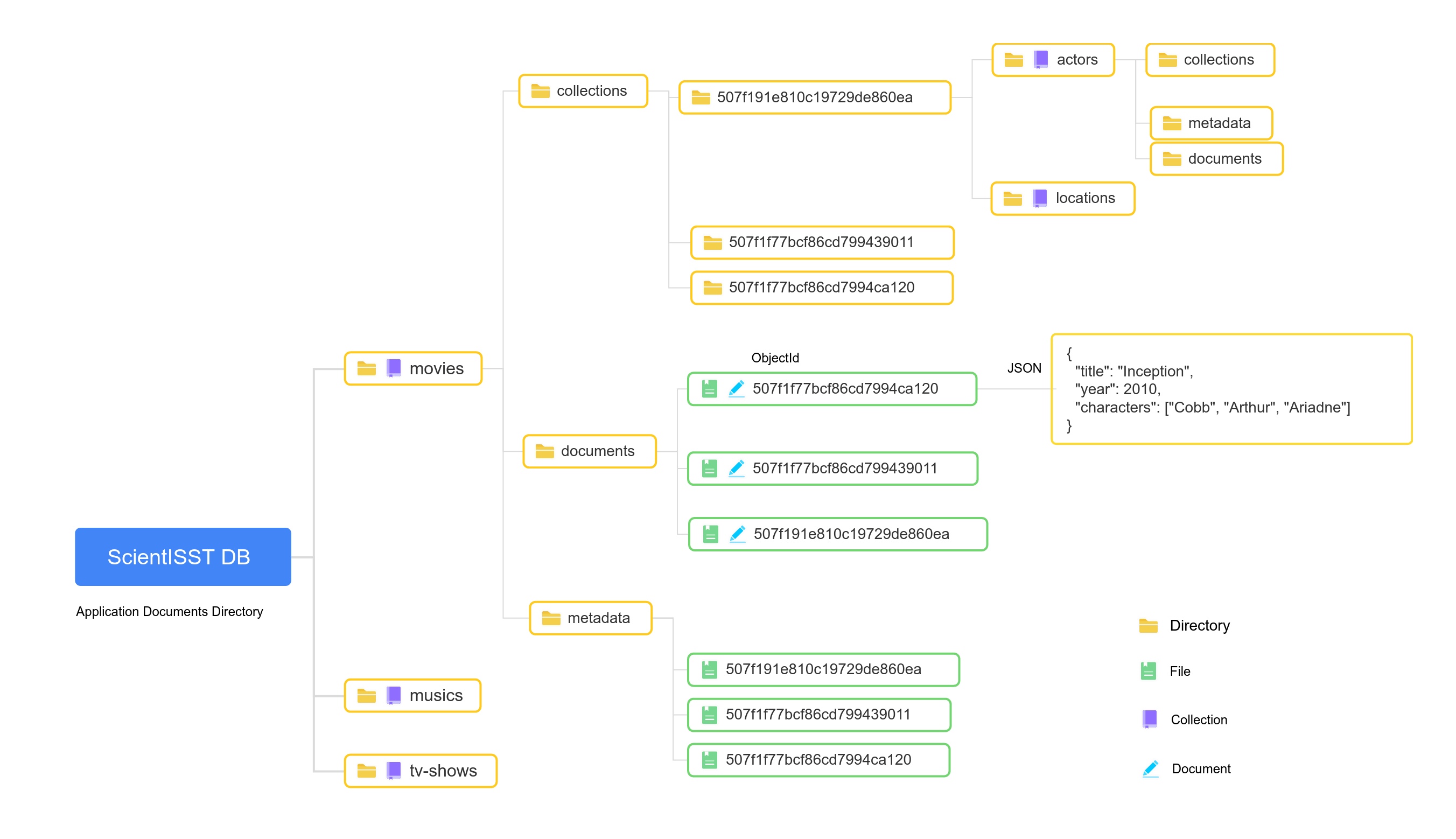
The database stores data in the Applications Documents Directory, provided by [`path_provider`](https://pub.dev/packages/path_provider).
The database directory is stored in a root folder called `scientisst_db`.
The first layer is constituted only by `collections`, which have their corresponding directory. Each `collection` directory is constituted by three separate folders: `collections`, `documents`, and `metadata`. The `collection` children `documents` are stored in the `documents` folder, where each `document` has its separate file with a filename corresponding to its `ObjectId`. The `ObjectId` is generated according to MongoDB's [standard](https://docs.mongodb.com/manual/reference/method/ObjectId/) or can be an arbitrary `String`. The `document` data is stored in a JSON formatted text file.
Each `document` has a corresponding `metadata` file which is stored in the `metadata` folder inside the `collection` directory, with a filename equal to the `ObjectId`, encoded also in the JSON format.
A `document` can store `collections` (sub-collections), which are stored in a folder inside the `collections` directory under the parent `collection` directory. This folder has the same filename as the `document` `ObjectId` and it follows the same `collection` structure.
## Examples
See the full example [here](https://github.com/scientisst/scientisst_db/blob/master/example/example.dart).
Some basic examples:
---
Add a document to a collection:
```dart
DocumentReference doc = await ScientISSTdb.instance.collection("movies").add(
{
"title": "Eternal Sunshine of the Spotless Mind",
"year": 2004,
"characters": [
"Joel",
"Clementine",
],
},
);
```
---
Update a document:
```dart
await doc.update(
{
"title": "Hello world",
},
);
```
---
Delete a document:
```dart
await ScientISSTdb.instance.collection("movies").document("507f1f77bcf86cd7994ca120").delete();
```
---
Get all documents from a collection:
```dart
await ScientISSTdb.instance.collection("movies").getDocuments();
```
---
Order documents by field value:
```dart
await ScientISSTdb.instance
.collection("movies")
.orderBy("year", ascending: false)
.getDocuments();
```
## Future
- Improve the `Exceptions` thrown.
If you have any suggestion or problem, let us know and we'll try to improve or fix them.
## License
GNU General Public License v3.0, see the [LICENSE](https://github.com/scientisst/scientisst_db/tree/master/LICENSE) file for details.