https://github.com/scikit-hep/uproot-browser
A TUI viewer for ROOT files
https://github.com/scikit-hep/uproot-browser
python scikit-hep
Last synced: over 1 year ago
JSON representation
A TUI viewer for ROOT files
- Host: GitHub
- URL: https://github.com/scikit-hep/uproot-browser
- Owner: scikit-hep
- License: bsd-3-clause
- Created: 2021-07-22T03:35:43.000Z (almost 5 years ago)
- Default Branch: main
- Last Pushed: 2025-03-24T19:07:58.000Z (over 1 year ago)
- Last Synced: 2025-03-29T15:05:27.886Z (over 1 year ago)
- Topics: python, scikit-hep
- Language: Python
- Homepage:
- Size: 292 KB
- Stars: 74
- Watchers: 2
- Forks: 7
- Open Issues: 11
-
Metadata Files:
- Readme: README.md
- Contributing: .github/CONTRIBUTING.md
- License: LICENSE
Awesome Lists containing this project
README

# uproot-browser
[![Actions Status][actions-badge]][actions-link]
[![PyPI version][pypi-version]][pypi-link]
[![PyPI platforms][pypi-platforms]][pypi-link]
[![GitHub Discussion][github-discussions-badge]][github-discussions-link]
[![Gitter][gitter-badge]][gitter-link]
[![License][license-badge]][license-link]
[![Scikit-HEP][sk-badge]](https://scikit-hep.org/)
[![Conda-Forge][conda-badge]][conda-link]
uproot-browser is a [plotext](https://github.com/piccolomo/plotext) based command line library in which the command line interface is provided by [Click](https://github.com/pallets/click). It is powered by [Hist](https://github.com/scikit-hep/hist) and it's TUI is put together by [Textual](https://github.com/Textualize/textual). Its aim is to enable a user to browse and look inside a ROOT file, completely via the terminal. It takes its inspiration from the [ROOT object browser](https://root.cern/doc/master/classTRootBrowser.html).
## Installation
You can install this library from [PyPI](https://pypi.org/project/uproot-browser/) with `pip`:
```bash
python3 -m pip install uproot-browser
```
You can also use `pipx` to run the library without installing it:
```bash
pipx run uproot-browser
```
## Features
uproot-browser currently provides the following features (get help with `-h` or `--help`, view the current version with `--version`):
- `browse` can be used to display a TUI (text user interface), acts as default if no subcommand specified.
- `plot` can be used to display a plot.
- `tree` can be used to display a tree.
## Examples
This example uses data from the [scikit-hep-testdata](https://github.com/scikit-hep/scikit-hep-testdata) package. It is placed in the same directory as the uproot-browser repository.
**`browse` command:**
```bash
uproot-browser browse ../scikit-hep-testdata/src/skhep_testdata/data/uproot-Event.root
```

**`plot` command:**
```bash
uproot-browser plot ../scikit-hep-testdata/src/skhep_testdata/data/uproot-Event.root:hstat
hstat -- Entries: 1000
┌───────────────────────────────────────────────────────────────┐
18.0┤▐▌ │
│▐▌ ▗▖ ▄│
15.6┤▐▌▗▖ ▐▌ █│
│███▌ █ █ ▐▌ ▐█│
13.1┤████▟▌ ▗▖ ▗▖ █▌▗▖ ▐▌ ▄ █▌ ▄ ▟▌█ ▗▄▐▙▗▖ ▐▌▐█│
10.6┤█████▌ ▐▌ ▐▙▖ █▌▐▌ ▐▙ █▄ █▙ █ █▌█ ▐█▟█▐▌ ▗▄▟▌▐█│
│█████▌ █▌▐█▌ ████▌█▌▐█ ▐█▐▌ ▐▌ ███▐██ ▐█ ▐████▐███▐▌ ▐███▌▐█│
8.2┤█████▌▐█▌▐█▌ █████▌██▐█ ██▐█ ▐▌▐████▐███▌▐█ █████▐███▐██▐████▐█│
│████████▙██▌█████████▟█▖████▖▟██████▟██████▖████████████▟██████│
5.8┤███████████▙███████████▙████▌██████████████▌███████████████████│
│████████████████████████████▌██████████████████████████████████│
3.3┤███████████████████████████████████████████████████████████████│
└┬───────────────┬──────────────┬───────────────┬──────────────┬┘
0.00 0.25 0.50 0.75 1.00
[x] xaxis
```
If you're on macOS and using iTerm2, click here:
You can get an iterm plot, the required dependencies can be installed via:
```bash
python3 -m pip install uproot-browser[iterm]
```
Or can be run via `pipx` without installing:
```bash
pipx run uproot-browser[iterm]
```
Adding the argument `--iterm` gives us the plot:
```bash
uproot-browser plot ../scikit-hep-testdata/src/skhep_testdata/data/uproot-Event.root:hstat --iterm
```
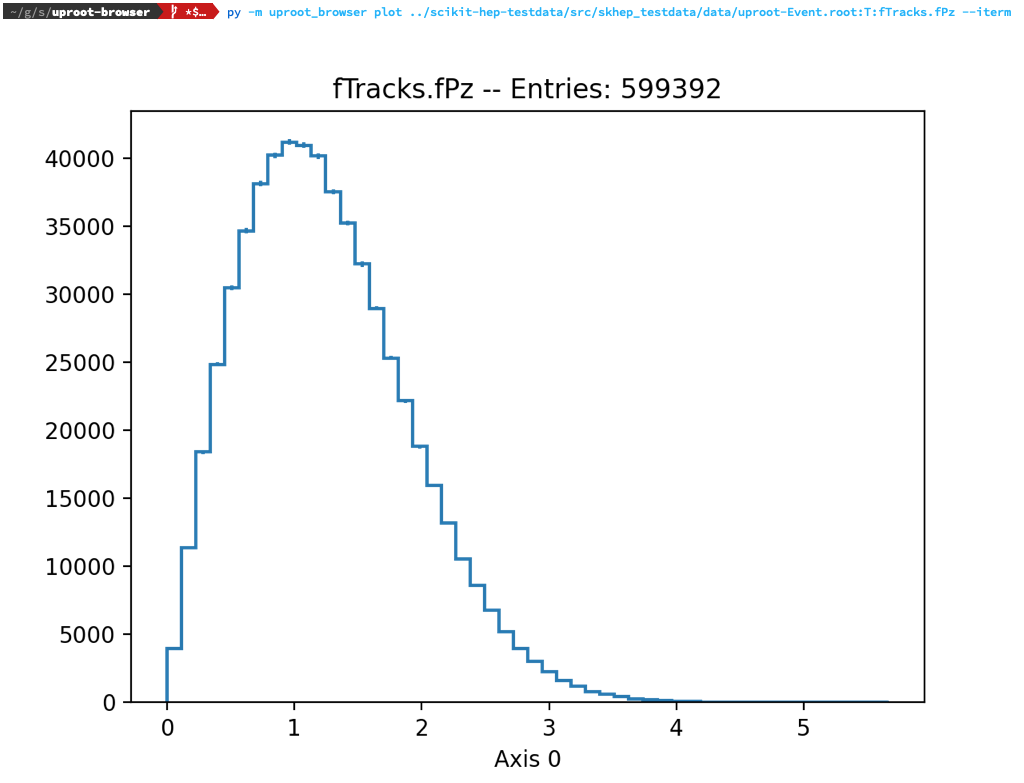
**`tree` command:**
```bash
uproot-browser tree ../scikit-hep-testdata/src/skhep_testdata/data/uproot-Event.root
📁 uproot-Event.root
┣━━ ❓ TProcessID
┣━━ 🌴 T (1000)
┃ ┗━━ 🌿 event Event
┃ ┣━━ 🌿 TObject (group of fUniqueID:uint32_t, fBits:uint32_t)
┃ ┃ ┣━━ 🍁 fBits uint32_t
┃ ┃ ┗━━ 🍁 fUniqueID uint32_t
┃ ┣━━ 🍁 fClosestDistance unknown[]
┃ ┣━━ 🍁 fEventName char*
┃ ┣━━ 🌿 fEvtHdr EventHeader
┃ ┃ ┣━━ 🍁 fEvtHdr.fDate int32_t
┃ ┃ ┣━━ 🍁 fEvtHdr.fEvtNum int32_t
┃ ┃ ┗━━ 🍁 fEvtHdr.fRun int32_t
┃ ┣━━ 🍁 fFlag uint32_t
┃ ┣━━ 🍁 fH TH1F
┃ ┣━━ 🍁 fHighPt TRefArray*
┃ ┣━━ 🍁 fIsValid bool
┃ ┣━━ 🍁 fLastTrack TRef
┃ ┣━━ 🍁 fMatrix[4][4] float[4][4]
┃ ┣━━ 🍁 fMeasures[10] int32_t[10]
┃ ┣━━ 🍁 fMuons TRefArray*
┃ ┣━━ 🍁 fNseg int32_t
┃ ┣━━ 🍁 fNtrack int32_t
┃ ┣━━ 🍁 fNvertex uint32_t
┃ ┣━━ 🍁 fTemperature float
┃ ┣━━ 🌿 fTracks TClonesArray*
┃ ┃ ┣━━ 🍃 fTracks.fBits uint32_t[]
┃ ┃ ┣━━ 🍃 fTracks.fBx Float16_t[]
┃ ┃ ┣━━ 🍃 fTracks.fBy Float16_t[]
┃ ┃ ┣━━ 🍃 fTracks.fCharge Double32_t[]
┃ ┃ ┣━━ 🍃 fTracks.fMass2 Float16_t[]
┃ ┃ ┣━━ 🍃 fTracks.fMeanCharge float[]
┃ ┃ ┣━━ 🍃 fTracks.fNpoint int32_t[]
┃ ┃ ┣━━ 🍃 fTracks.fNsp uint32_t[]
┃ ┃ ┣━━ 🍁 fTracks.fPointValue unknown[][]
┃ ┃ ┣━━ 🍃 fTracks.fPx float[]
┃ ┃ ┣━━ 🍃 fTracks.fPy float[]
┃ ┃ ┣━━ 🍃 fTracks.fPz float[]
┃ ┃ ┣━━ 🍃 fTracks.fRandom float[]
┃ ┃ ┣━━ 🍃 fTracks.fTArray[3] float[][3]
┃ ┃ ┣━━ 🍁 fTracks.fTriggerBits.fAllBits uint8_t[][]
┃ ┃ ┣━━ 🍃 fTracks.fTriggerBits.fBits uint32_t[]
┃ ┃ ┣━━ 🍃 fTracks.fTriggerBits.fNbits uint32_t[]
┃ ┃ ┣━━ 🍃 fTracks.fTriggerBits.fNbytes uint32_t[]
┃ ┃ ┣━━ 🍃 fTracks.fTriggerBits.fUniqueID uint32_t[]
┃ ┃ ┣━━ 🍃 fTracks.fUniqueID uint32_t[]
┃ ┃ ┣━━ 🍃 fTracks.fValid int16_t[]
┃ ┃ ┣━━ 🍃 fTracks.fVertex[3] Double32_t[][3]
┃ ┃ ┣━━ 🍃 fTracks.fXfirst Float16_t[]
┃ ┃ ┣━━ 🍃 fTracks.fXlast Float16_t[]
┃ ┃ ┣━━ 🍃 fTracks.fYfirst Float16_t[]
┃ ┃ ┣━━ 🍃 fTracks.fYlast Float16_t[]
┃ ┃ ┣━━ 🍃 fTracks.fZfirst Float16_t[]
┃ ┃ ┗━━ 🍃 fTracks.fZlast Float16_t[]
┃ ┣━━ 🌿 fTriggerBits TBits
┃ ┃ ┣━━ 🌿 fTriggerBits.TObject (group of fTriggerBits.fUniqueID:uint32_t, fTriggerBits.fBits:uint32_t)
┃ ┃ ┃ ┣━━ 🍁 fTriggerBits.fBits uint32_t
┃ ┃ ┃ ┗━━ 🍁 fTriggerBits.fUniqueID uint32_t
┃ ┃ ┣━━ 🍃 fTriggerBits.fAllBits uint8_t[]
┃ ┃ ┣━━ 🍁 fTriggerBits.fNbits uint32_t
┃ ┃ ┗━━ 🍁 fTriggerBits.fNbytes uint32_t
┃ ┣━━ 🍁 fType[20] int8_t[20]
┃ ┗━━ 🍁 fWebHistogram TRef
┣━━ 📊 hstat TH1F (100)
┗━━ 📊 htime TH1F (10)
```
## Development
[![pre-commit.ci status][pre-commit-badge]][pre-commit-link]
See [CONTRIBUTING.md](https://github.com/scikit-hep/uproot-browser/blob/main/.github/CONTRIBUTING.md) for details on how to set up a development environment.
[actions-badge]: https://github.com/scikit-hep/uproot-browser/workflows/CI/badge.svg
[actions-link]: https://github.com/scikit-hep/uproot-browser/actions
[conda-badge]: https://img.shields.io/conda/vn/conda-forge/uproot-browser
[conda-link]: https://github.com/conda-forge/uproot-browser-feedstock
[github-discussions-badge]: https://img.shields.io/static/v1?label=Discussions&message=Ask&color=blue&logo=github
[github-discussions-link]: https://github.com/scikit-hep/uproot-browser/discussions
[gitter-badge]: https://badges.gitter.im/Scikit-HEP/community.svg
[gitter-link]: https://gitter.im/Scikit-HEP/community?utm_source=badge&utm_medium=badge&utm_campaign=pr-badge
[license-badge]: https://img.shields.io/badge/License-BSD_3--Clause-blue.svg
[license-link]: https://opensource.org/licenses/BSD-3-Clause
[pypi-link]: https://pypi.org/project/uproot-browser/
[pypi-platforms]: https://img.shields.io/pypi/pyversions/uproot-browser
[pypi-version]: https://badge.fury.io/py/uproot-browser.svg
[sk-badge]: https://scikit-hep.org/assets/images/Scikit--HEP-Project-blue.svg
[pre-commit-badge]: https://results.pre-commit.ci/badge/github/scikit-hep/uproot-browser/main.svg
[pre-commit-link]: https://results.pre-commit.ci/repo/github/scikit-hep/uproot-browser