https://github.com/scottpeterman/secure_cartography
A secure, Python-based network discovery and mapping tool that generates comprehensive network topology maps using SSH-based device interrogation.
https://github.com/scottpeterman/secure_cartography
multi-vendor-support network-automation network-discovery python-networking topology-mapping
Last synced: 3 months ago
JSON representation
A secure, Python-based network discovery and mapping tool that generates comprehensive network topology maps using SSH-based device interrogation.
- Host: GitHub
- URL: https://github.com/scottpeterman/secure_cartography
- Owner: scottpeterman
- Created: 2024-12-16T04:09:08.000Z (over 1 year ago)
- Default Branch: main
- Last Pushed: 2026-01-31T11:42:51.000Z (5 months ago)
- Last Synced: 2026-03-11T06:59:21.182Z (4 months ago)
- Topics: multi-vendor-support, network-automation, network-discovery, python-networking, topology-mapping
- Language: Python
- Homepage:
- Size: 92.7 MB
- Stars: 6
- Watchers: 2
- Forks: 2
- Open Issues: 2
-
Metadata Files:
- Readme: README.md
Awesome Lists containing this project
README
# Secure Cartography v2
**SSH & SNMP-Based Network Discovery and Topology Mapping**
[](https://www.python.org/downloads/)
[](https://www.gnu.org/licenses/gpl-3.0)
[](https://www.riverbankcomputing.com/software/pyqt/)
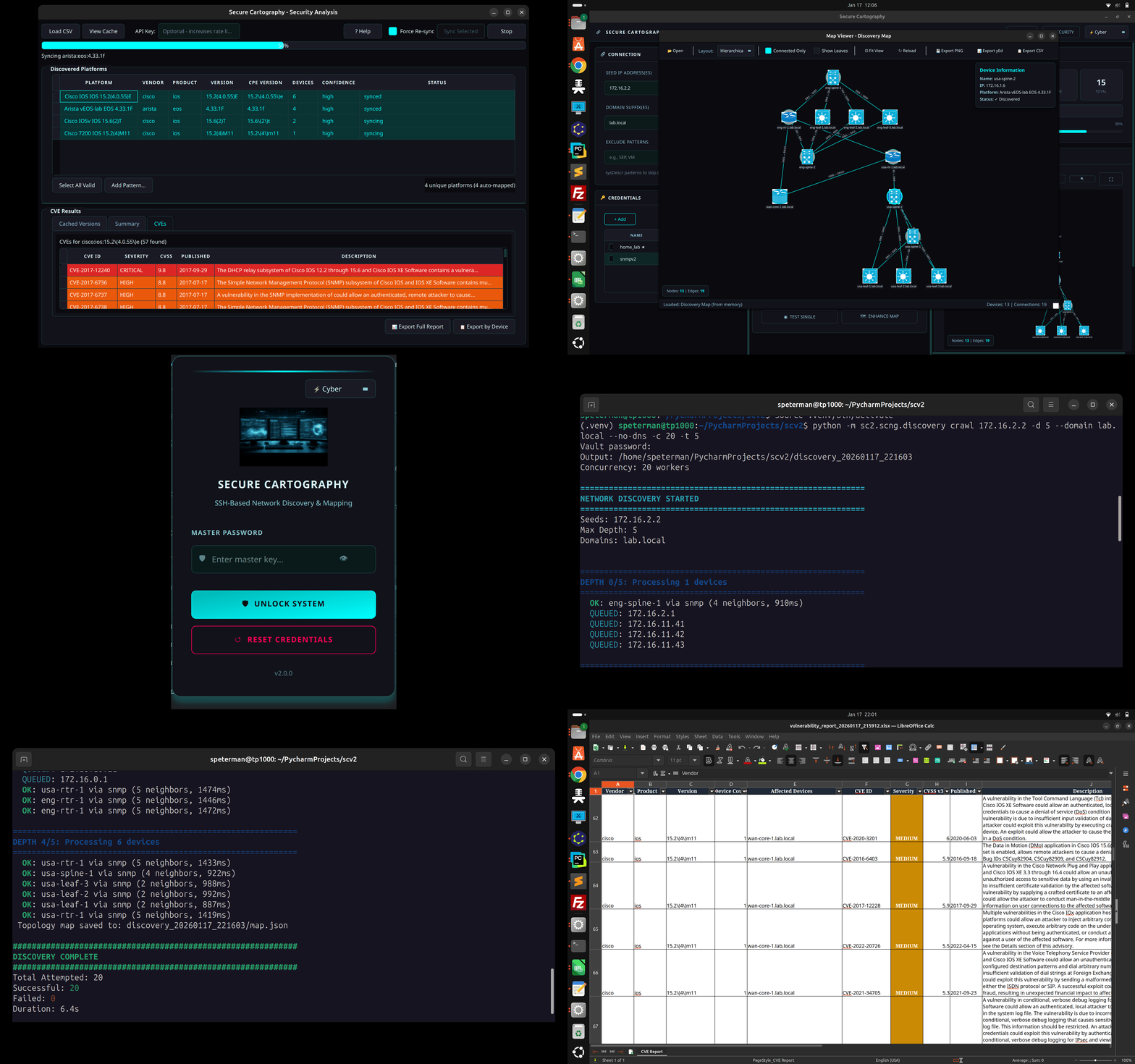
Secure Cartography is a network discovery tool that crawls your infrastructure via SNMP and SSH, collecting CDP/LLDP neighbor information to automatically generate topology maps. Built by a network engineer, for network engineers.
If you are interested in a non-python native application for network maps see [Secure Cartography JS](https://github.com/scottpeterman/secure_cartography_js)
---
## What's New in v2
Version 2 is a complete rewrite with a modernized architecture:
| Feature | v1 | v2 |
|---------|------------------------------|------------------------------------------------------------------------|
| Discovery Engine | Synchronous, single-threaded | **Async with configurable concurrency** |
| Discovery Protocol | SSH only | **SNMP-first with SSH fallback** |
| Credential Storage | No credential persistance | **SQLite vault with AES-256 encryption** |
| CLI | Basic | **Full-featured with test/discover/crawl commands** |
| Progress Reporting | Callbacks | **Structured events for GUI integration** |
| SNMP Support | None | **v2c and v3 (authPriv)** |
| Vendor Support | Cisco, Arista | **+ Cisco, Arista and Juniper, Others fingerprinted based on sysdesc** |
| GUI | PyQt6 | **PyQt6 with theme support (Cyber/Dark/Light)** |
| Topology Viewer | External (yEd/Draw.io) | **Embedded Cytoscape.js with vendor coloring, yEd & Draw.io export** |
| Security Analysis | None | **CVE vulnerability scanning via NIST NVD** |
| Device Polling | None | **Interactive SNMP fingerprinting from map** |
---
## Features
### Discovery Engine
- **SNMP-first discovery** with automatic SSH fallback
- **CDP and LLDP** neighbor detection across vendors
- **Two-pass LLDP resolution** - correctly handles lldpLocPortNum vs ifIndex
- **Bidirectional link validation** - only confirmed connections appear in topology
- **Concurrent crawling** - discover 20+ devices simultaneously
- **Depth-limited recursion** - control how far the crawler goes
- **Exclusion patterns** - skip devices by hostname, sys_name, or sysDescr
- **No-DNS mode** - use IPs directly from neighbor tables (home lab friendly)
### Credential Management
- **Encrypted SQLite vault** - AES-256-GCM encryption at rest
- **Multiple credential types** - SSH (password + key), SNMPv2c, SNMPv3
- **Priority ordering** - try credentials in sequence until one works
- **Credential discovery** - auto-detect which credentials work on which devices
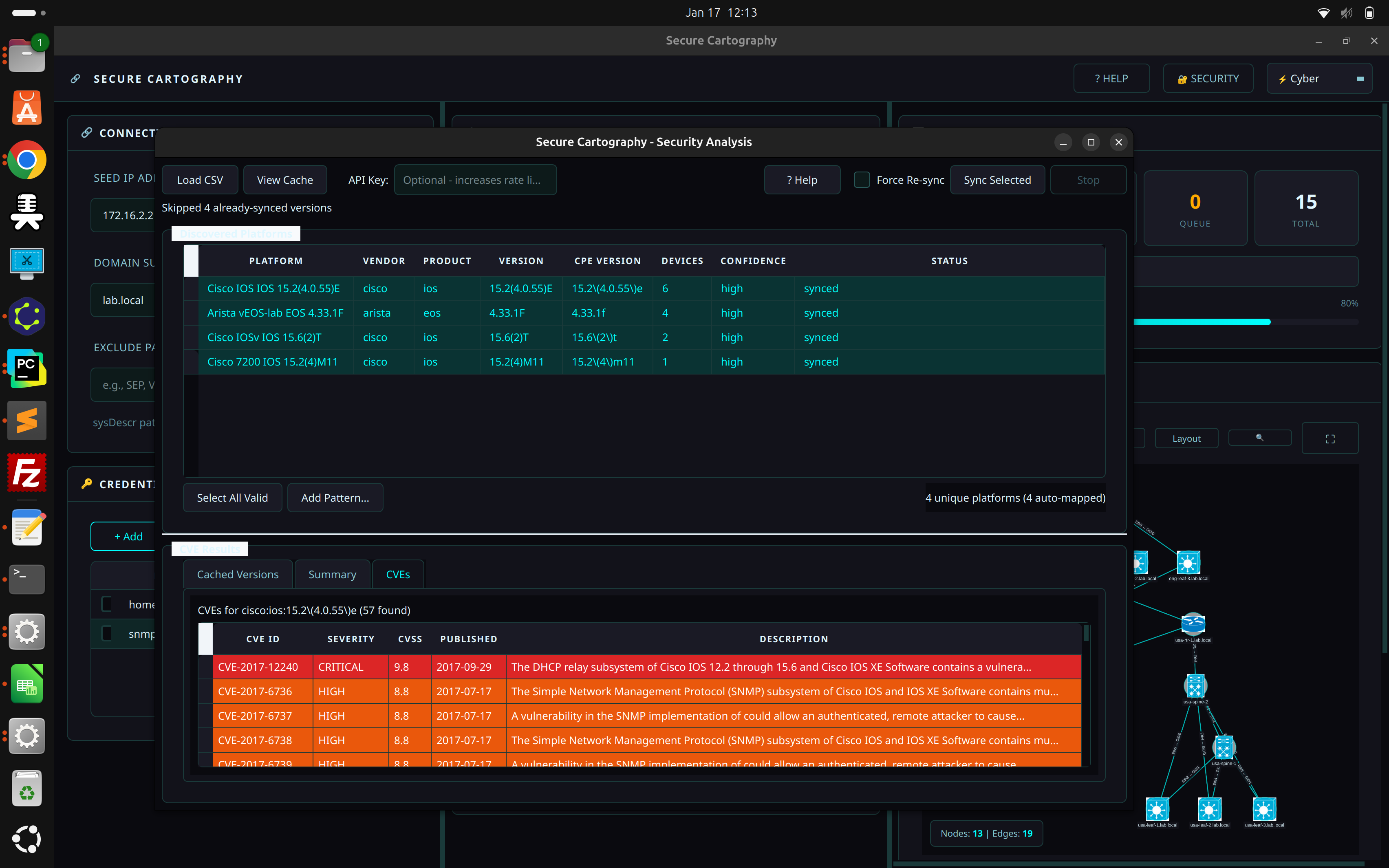
### Security Analysis (CVE Vulnerability Scanning)
- **Platform-to-CPE mapping** - automatically parses discovered platform strings
- **NIST NVD integration** - queries National Vulnerability Database for CVEs
- **Severity color-coding** - CRITICAL/HIGH/MEDIUM/LOW at a glance
- **Local CVE cache** - SQLite cache avoids repeated API calls
- **Export reports** - CSV export with affected devices per CVE
- **Device-centric view** - "Export by Device" shows CVE counts per device
- **Multi-vendor support** - Cisco IOS/IOS-XE/NX-OS, Arista EOS, Juniper JUNOS, Palo Alto, Fortinet
### Live Topology Preview
- **Embedded Cytoscape.js viewer** - interactive network visualization
- **Real-time rendering** - topology displayed immediately after discovery
- **Vendor-specific styling** - Cisco (blue), Arista (green), Juniper (orange) with distinct colors
- **Undiscovered peer nodes** - referenced but unreachable devices shown with warning markers
- **Theme-aware** - visualization adapts to Cyber/Dark/Light themes
- **Interactive controls** - fit view, auto-layout, node selection with details popup
### Draw.io Export
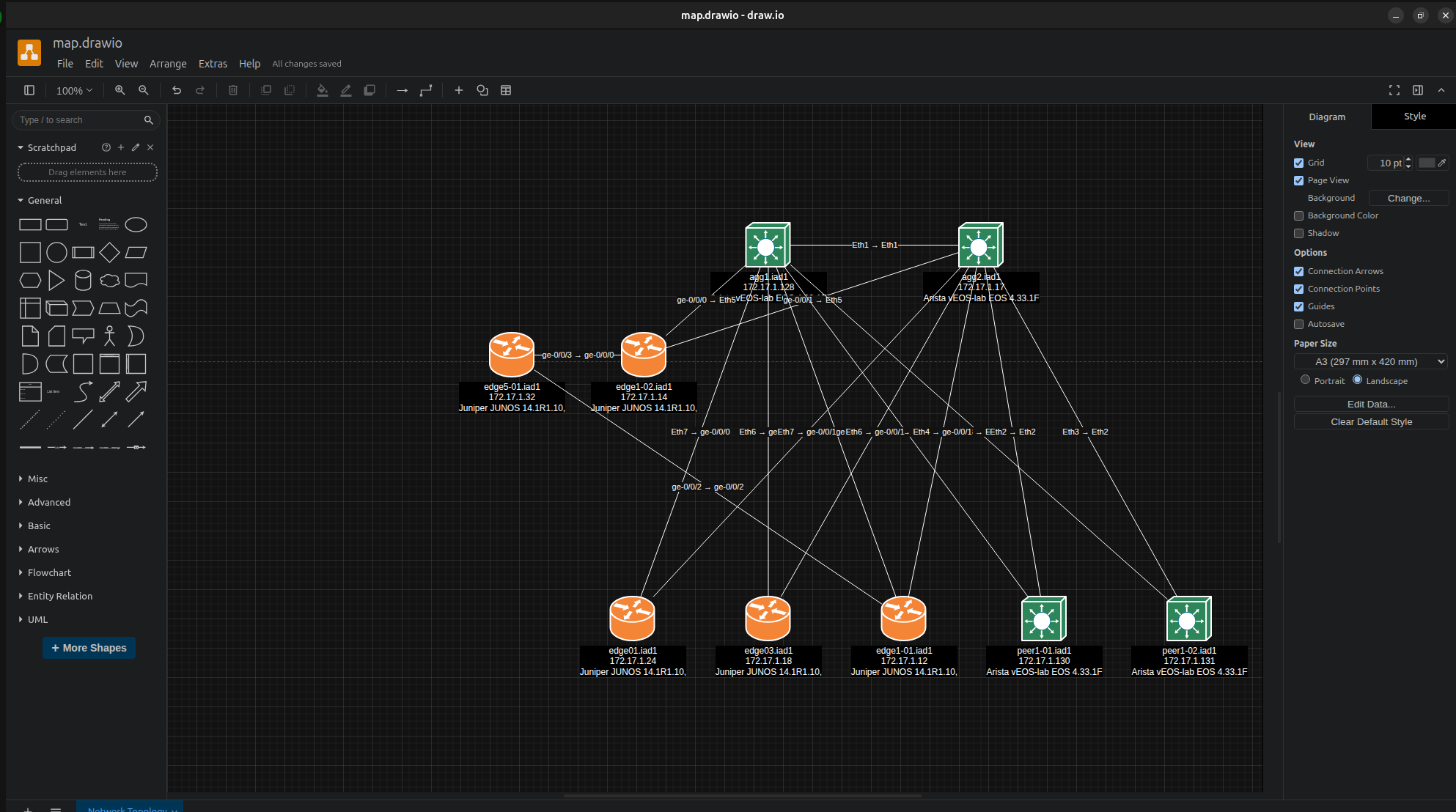
One-click export to Draw.io format for professional network documentation:
- **Cisco mxgraph stencils** - native Draw.io shapes for switches, routers, firewalls, wireless
- **Vendor coloring** - automatic fill colors match the embedded viewer (Cisco blue, Juniper orange, Arista green)
- **Hierarchical layout** - tree algorithm positions devices by network tier
- **Interface labels** - port-to-port connections preserved on edges
- **Universal compatibility** - open in Draw.io desktop, web (diagrams.net), or VS Code extension
- **Edit and annotate** - recipients can modify layouts, add notes, highlight paths
### Interactive Device Polling
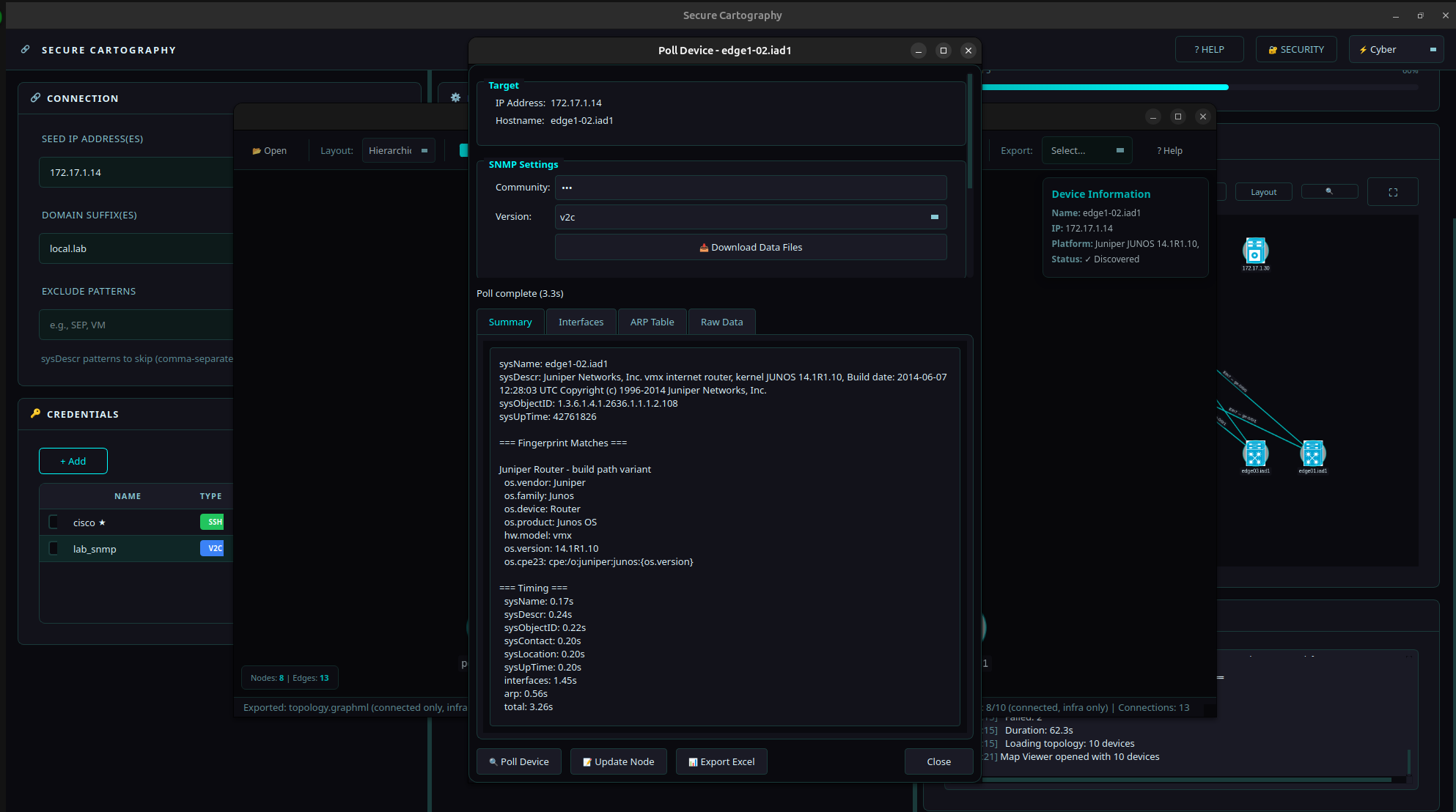
Poll individual devices directly from the Map Viewer for on-demand identification and inventory — no full discovery required.
- **SNMP fingerprinting** - identifies vendor, model, OS version via Rapid7 Recog patterns
- **Interface inventory** - collects ifTable with MAC addresses and OUI vendor lookup
- **ARP table collection** - neighbor IP/MAC mappings with vendor identification
- **Two operating modes**:
- **Local mode** - direct SNMP using pysnmp-lextudio (works on Windows/Linux/Mac)
- **Proxy mode** - for targets only reachable from a jump host ([SNMP Proxy](snmp_proxy/README.md))
- **Export to Excel** - multi-sheet workbook with Summary, Interfaces, and ARP data
### Themed GUI
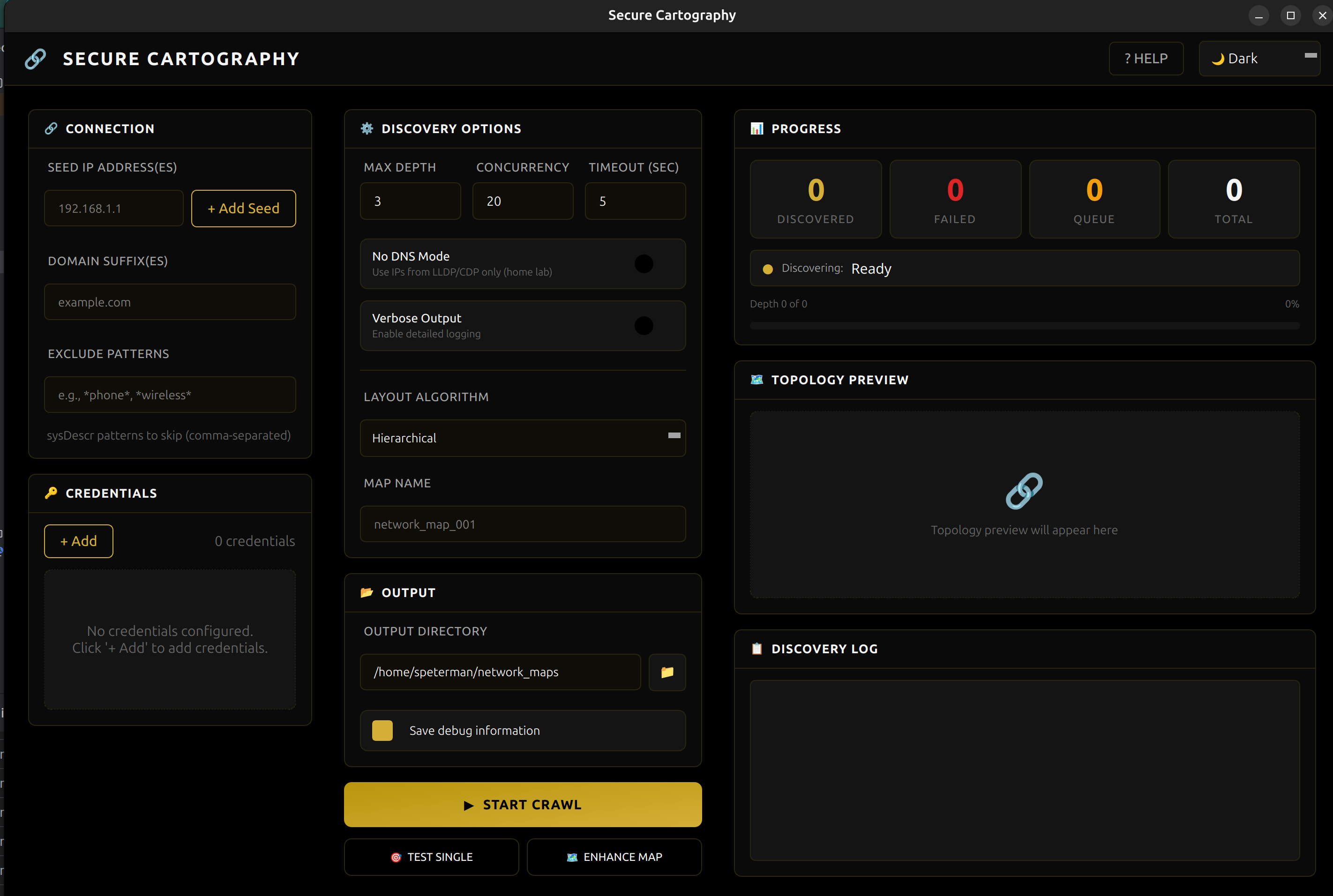
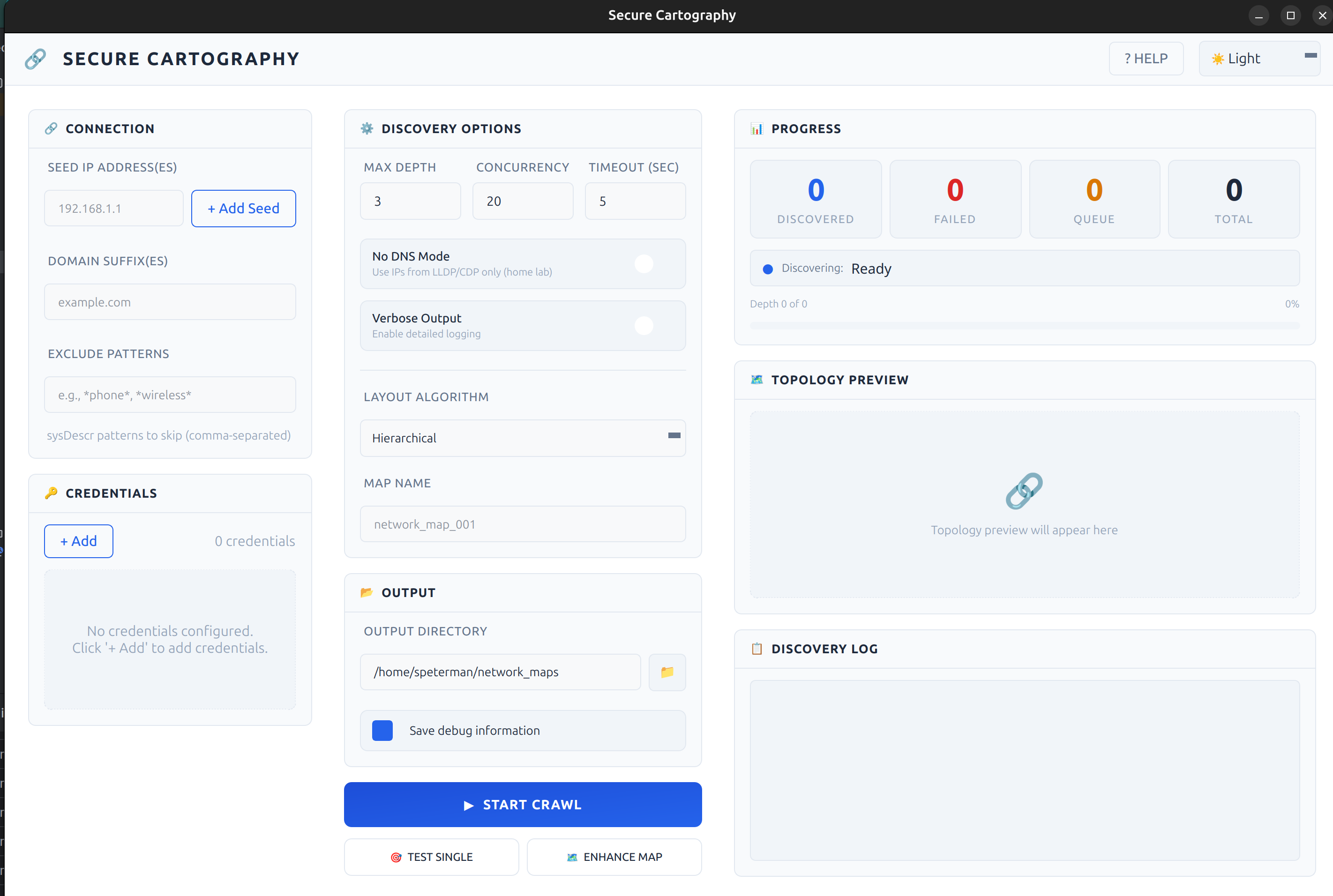
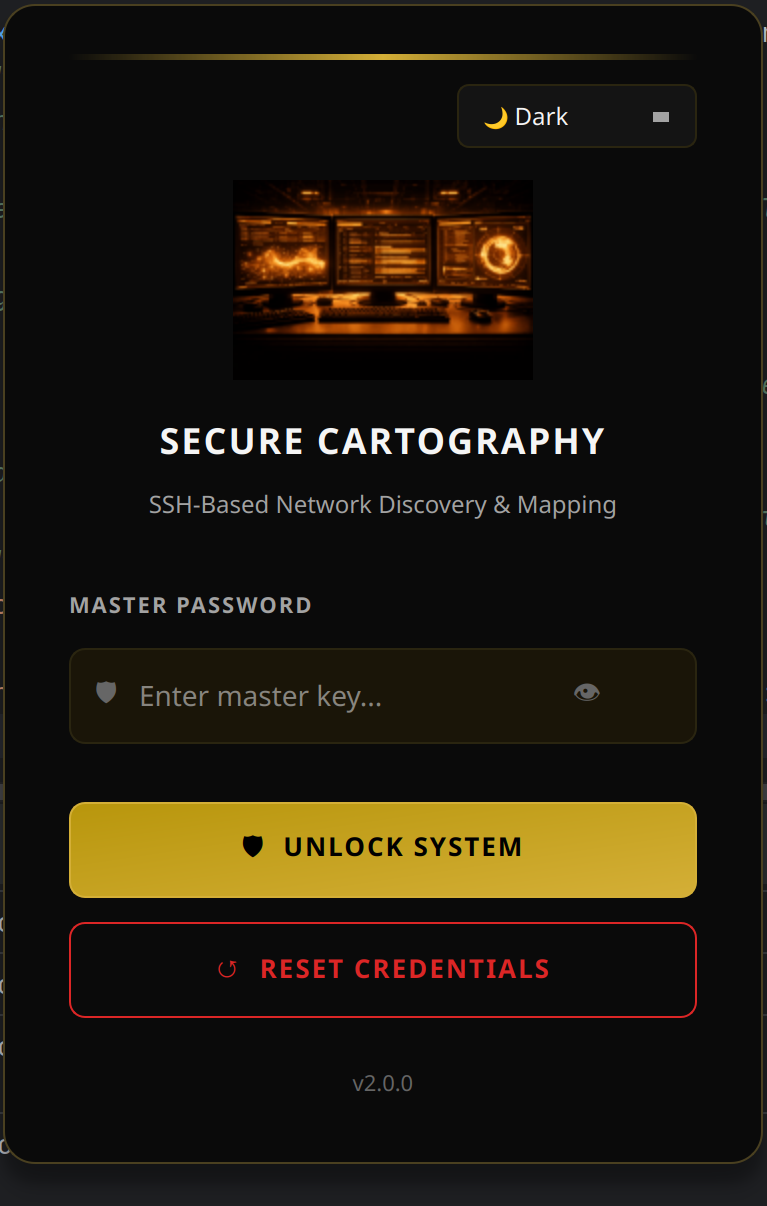
- **Three themes** - Cyber (cyan), Dark (gold), Light (blue)
- **Real-time progress** - live counters, depth tracking, log output
- **Responsive design** - UI remains interactive during discovery
- **Click-to-inspect** - node details (hostname, IP, platform) on selection
### Supported Platforms
| Vendor | SNMP | SSH | CVE Mapping |
|--------|------|-----|-------------|
| Cisco IOS/IOS-XE | ✓ | ✓ | ✓ |
| Cisco NX-OS | ✓ | ✓ | ✓ |
| Arista EOS | ✓ | ✓ | ✓ |
| Juniper JUNOS | ✓ | ✓ | ✓ |
* Others will likely appear but testing has been limited
---
## Screenshots
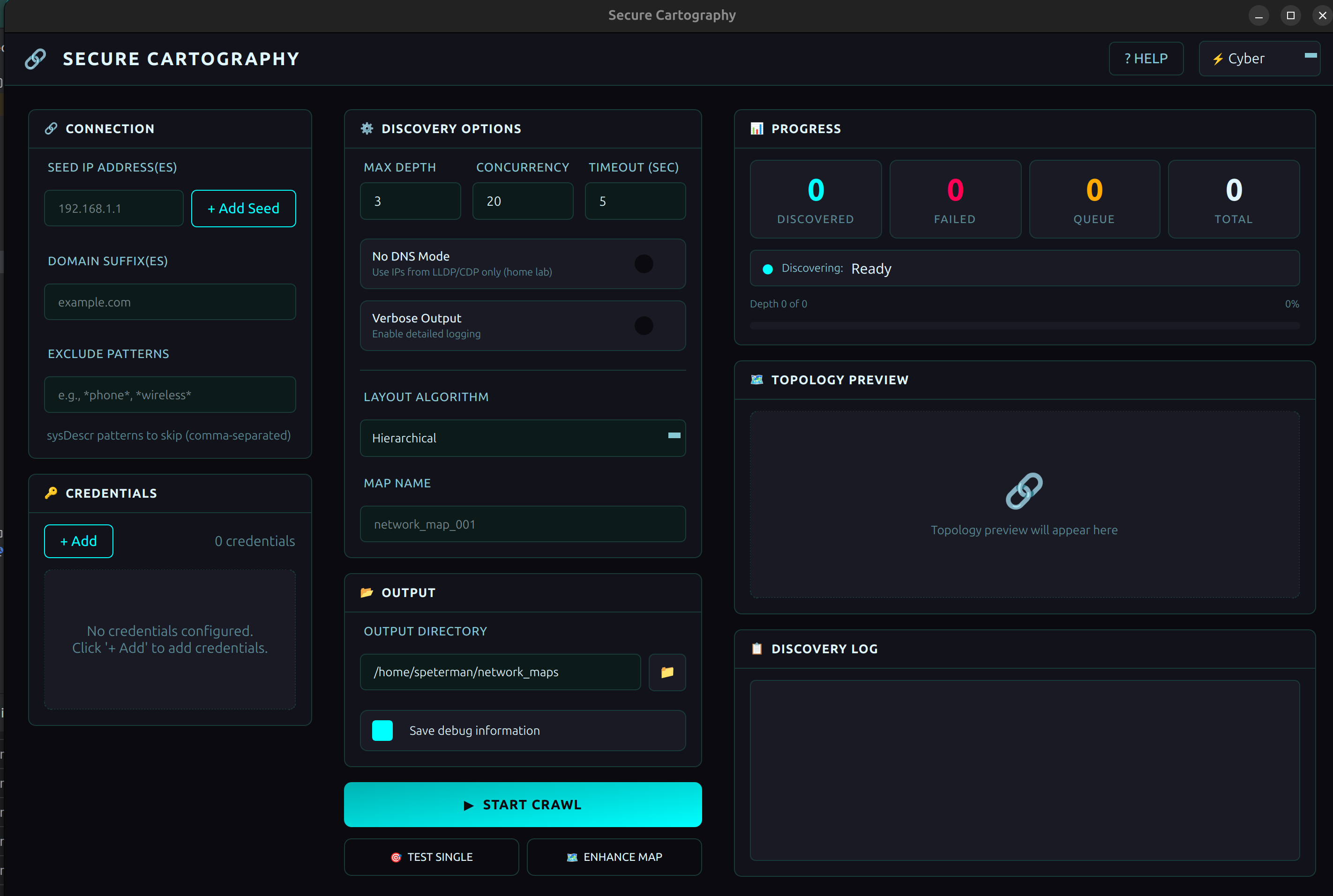
Cyber - Teal accents
Dark - Gold accents
Light - Blue accents
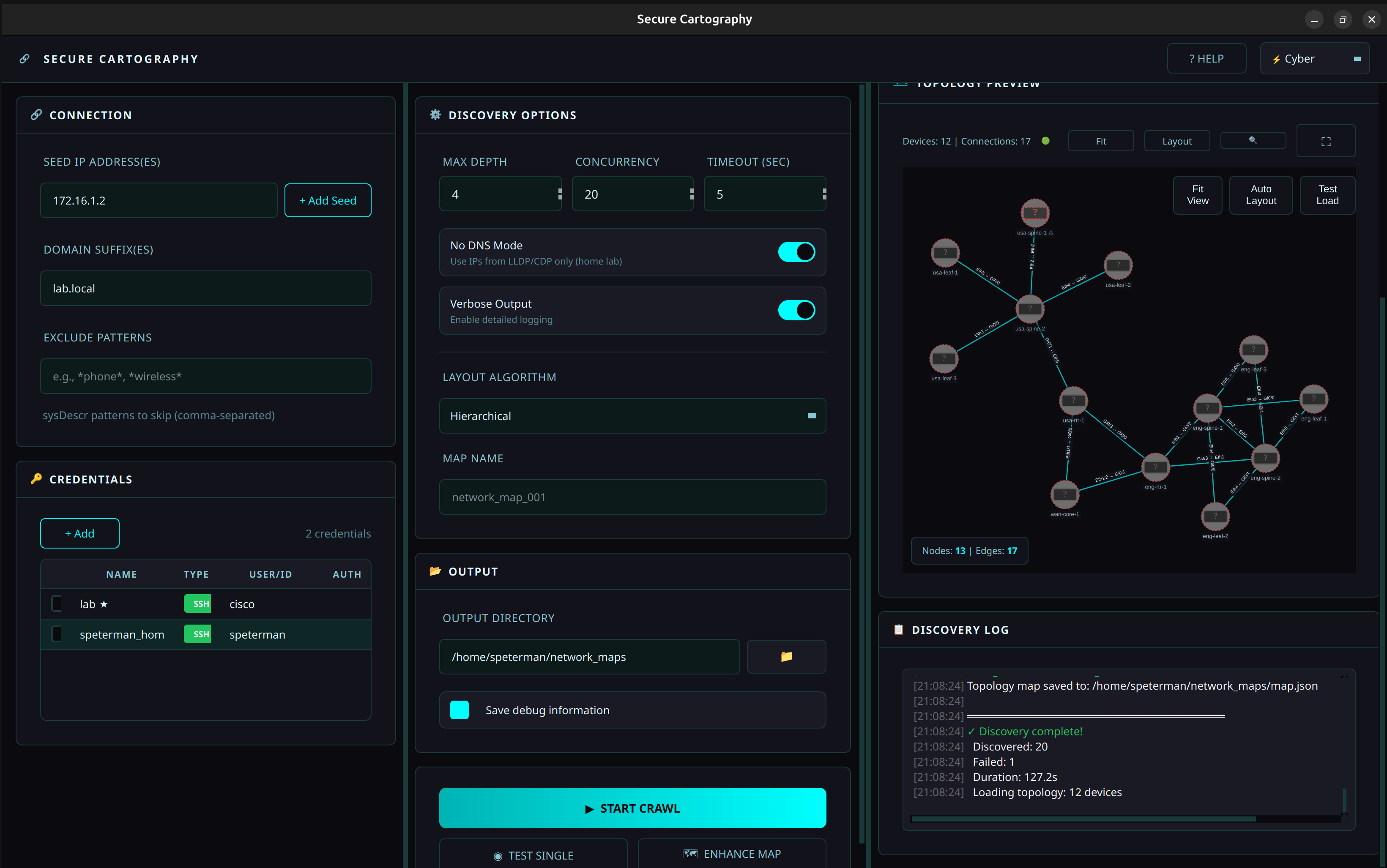
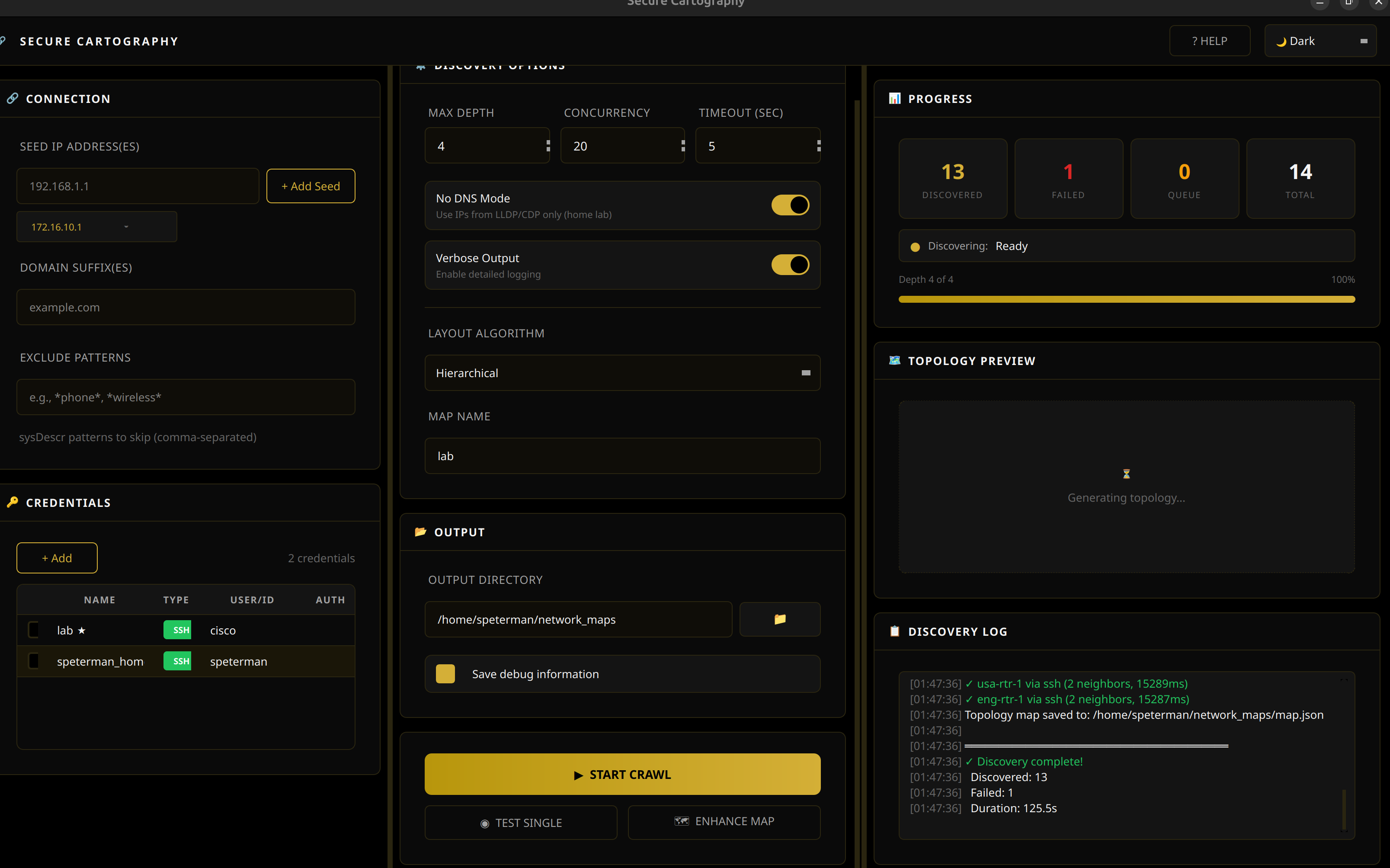
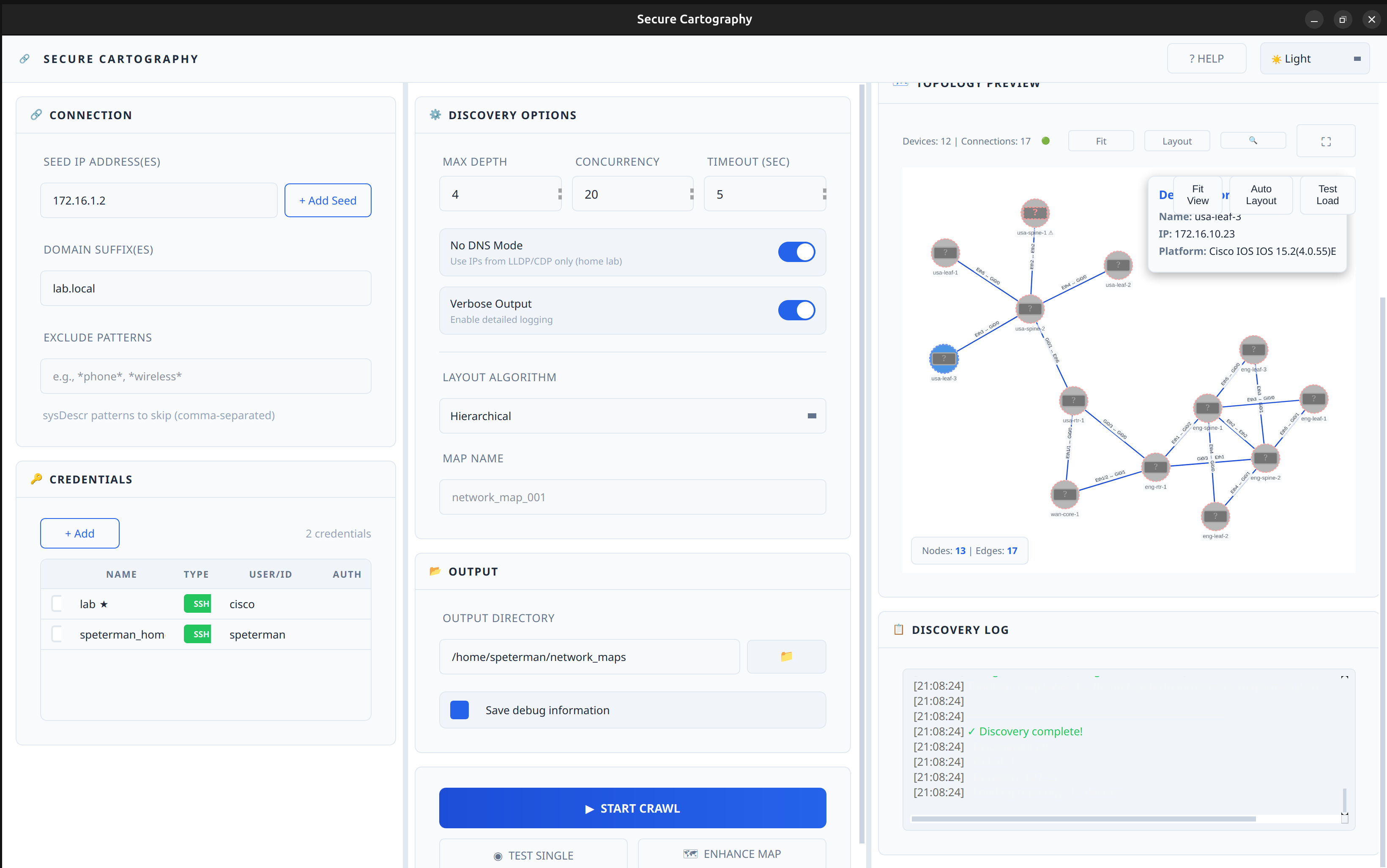
Topology Preview - Cyber
Topology Preview - Dark
Topology Preview - Light
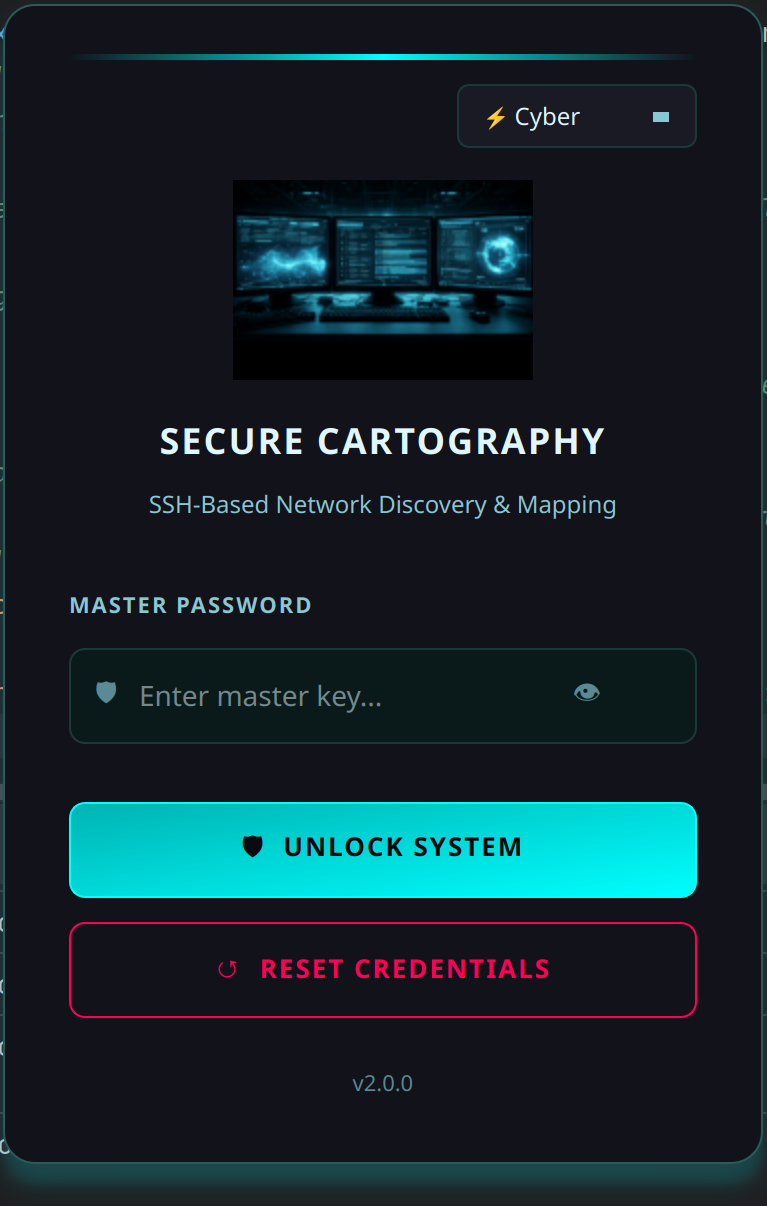
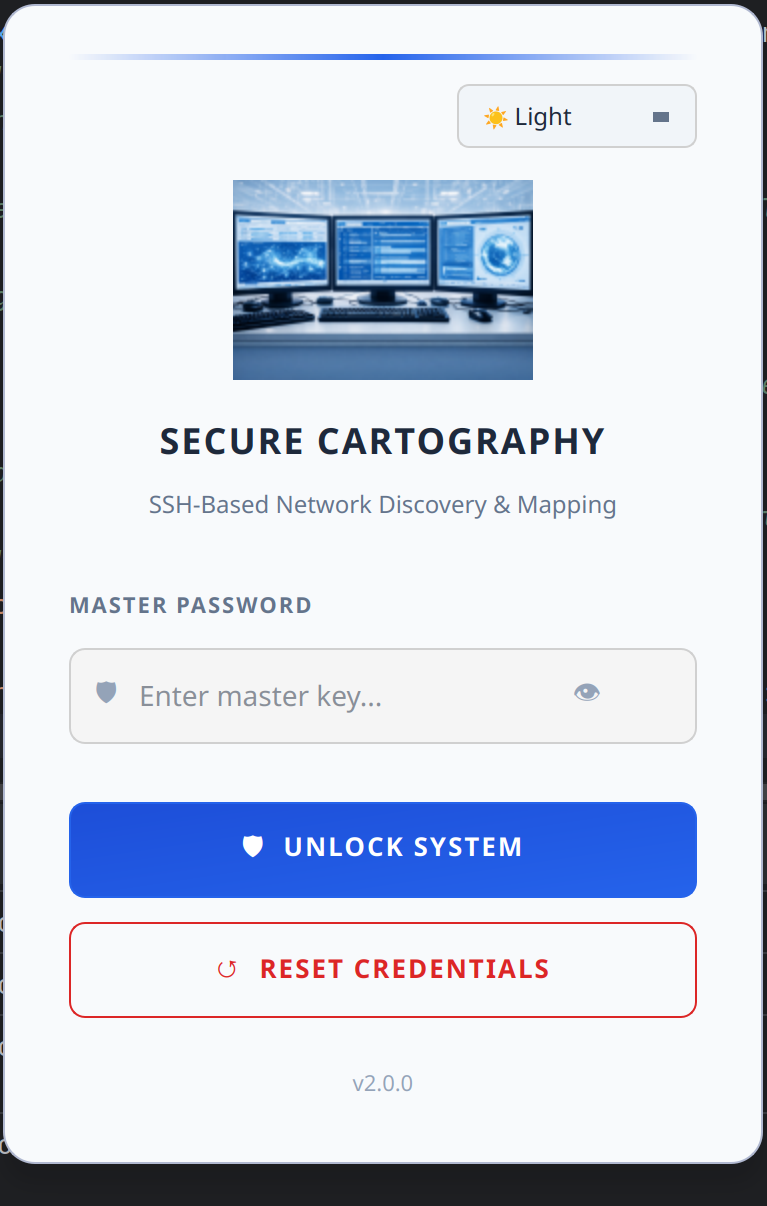
Login - Cyber
Login - Dark
Login - Light
---
## Installation
### Prerequisites
- Python 3.10 or higher
- pip
### From Source
```bash
git clone https://github.com/scottpeterman/secure_cartography.git
cd secure_cartography
pip install -e .
```
### Dependencies
```bash
# Core
pip install pysnmp-lextudio paramiko cryptography textfsm aiofiles
# GUI
pip install PyQt6 PyQt6-WebEngine
```
---
## Quick Start
### 1. Initialize the Credential Vault
```bash
# Create vault and set master password
python -m sc2.scng.creds init
# Add SNMP credential
python -m sc2.scng.creds add snmpv2c snmp-readonly --community public
# Add SSH credential
python -m sc2.scng.creds add ssh network-admin --username admin
# List credentials
python -m sc2.scng.creds list
```
### 2. Test Connectivity
```bash
# Quick SNMP test (no vault needed)
python -m sc2.scng.discovery test 192.168.1.1 --community public
# Test with vault credentials
python -m sc2.scng.discovery device 192.168.1.1
```
### 3. Run Discovery
```bash
# Basic crawl
python -m sc2.scng.discovery crawl 192.168.1.1 -d 3
# With options
python -m sc2.scng.discovery crawl 192.168.1.1 10.0.0.1 \
-d 5 \
--domain corp.example.com \
--exclude "phone,wireless,linux" \
--output ./network_maps
```
### 4. Launch GUI
```bash
python -m sc2.ui
```
### 5. Security Analysis
After running discovery, click the **🔐 SECURITY** button in the header bar to open the Security Analysis window:
1. **Load CSV** - Import the `devices.csv` from your discovery output
2. **Review Mappings** - Verify auto-detected platform → CPE mappings
3. **Sync Selected** - Query NIST NVD for CVEs (optional: add free API key for faster rate limits)
4. **Analyze Results** - Review CVEs sorted by severity
5. **Export Report** - Generate CSV with CVEs and affected devices
---
## Security Analysis Workflow
The Security Analysis module transforms your network inventory into an actionable vulnerability report.
### Platform Recognition
Secure Cartography automatically parses platform strings into CPE (Common Platform Enumeration) format:
```
"Cisco IOS IOS 15.2(4.0.55)E" → cpe:2.3:o:cisco:ios:15.2(4.0.55)e:*:*:*:*:*:*:*
"Arista vEOS-lab EOS 4.33.1F" → cpe:2.3:o:arista:eos:4.33.1f:*:*:*:*:*:*:*
```
### CVE Lookup
Queries the NIST National Vulnerability Database for known vulnerabilities:
- Results cached locally in `~/.scng/cve_cache.db`
- Free NVD API key increases rate limits (get one at [nvd.nist.gov](https://nvd.nist.gov/developers/request-an-api-key))
### Export Options
Two export formats for different use cases:
| Export | Format | Use Case |
|--------|--------|----------|
| **Export Report** | One row per CVE | Security team review, compliance audits |
| **Export by Device** | One row per device | Remediation planning, patch prioritization |
### Jump Host Workflow
When your desktop doesn't have SNMP access:
1. SSH to a jump host with network access
2. Run discovery via CLI: `python -m sc2.scng.discovery crawl ...`
3. Copy `devices.csv` back to your desktop
4. Open in GUI → Security Analysis → Load CSV → Sync
---
## Architecture
```
sc2/
├── scng/ # Discovery engine
│ ├── creds/ # Credential vault
│ │ ├── vault.py # Encrypted SQLite storage
│ │ ├── models.py # SSH, SNMPv2c, SNMPv3 dataclasses
│ │ ├── resolver.py # Credential testing & discovery
│ │ └── cli.py # Credential management CLI
│ │
│ ├── discovery/ # Discovery engine
│ │ ├── engine.py # Async orchestration, crawl logic
│ │ ├── models.py # Device, Neighbor, Interface
│ │ ├── cli.py # Discovery CLI
│ │ │
│ │ ├── snmp/ # SNMP collection
│ │ │ ├── walker.py # Async GETBULK table walks
│ │ │ └── collectors/ # system, interfaces, lldp, cdp, arp
│ │ │
│ │ └── ssh/ # SSH fallback
│ │ ├── client.py # Paramiko wrapper
│ │ ├── collector.py # Vendor detection, command execution
│ │ └── parsers.py # TextFSM integration
│ │
│ └── utils/
│ └── tfsm_fire.py # TextFSM auto-template selection
│
├── export/ # Export modules
│ ├── graphml_exporter.py # yEd GraphML export
│ └── drawio_exporter.py # Draw.io export with vendor styling
│
└── ui/ # PyQt6 GUI
├── themes.py # Theme system (Cyber/Dark/Light)
├── login.py # Vault unlock dialog
├── main_window.py # Main application window
├── help_dialog.py # Help system (GUI/CLI/Security docs)
│
├── assets/
│ └── icons_lib/
│ └── platform_icon_drawio.json # Draw.io icon mappings
│
└── widgets/ # Custom themed widgets
├── panel.py # Base panel with title bar
├── connection_panel.py # Seeds, domains, excludes
├── credentials_panel.py # Credential management UI
├── discovery_options.py # Depth, concurrency, toggles
├── output_panel.py # Output directory config
├── progress_panel.py # Stats, progress bar
├── discovery_log.py # Styled log output
├── discovery_controller.py # Discovery↔UI bridge with throttled events
├── topology_preview_panel.py # Preview container (singleton)
├── topology_viewer.py # QWebEngineView + Cytoscape.js bridge
├── topology_viewer.html # Cytoscape.js visualization
├── map_viewer_dialog.py # Full-screen topology viewer
├── security_widget.py # CVE vulnerability analysis
├── tag_input.py # Tag/chip input widget
├── toggle_switch.py # iOS-style toggle
└── stat_box.py # Counter display boxes
```
---
## Topology Viewer
The embedded topology viewer uses [Cytoscape.js](https://js.cytoscape.org/) for interactive network visualization.
### Features
- **Automatic layout** - Dagre algorithm for hierarchical network arrangement
- **Vendor coloring** - Platform-specific border and fill colors (Cisco blue, Juniper orange, Arista green)
- **Undiscovered nodes** - Peers referenced but not crawled shown with dashed borders and ⚠ markers
- **Edge labels** - Interface pairs displayed on connections
- **Click inspection** - Select nodes to view device details
- **Theme integration** - Colors adapt to current UI theme
### Export Options
| Format | Use Case |
|--------|----------|
| **Draw.io** | Editable diagrams with Cisco stencils for documentation, Confluence, SharePoint |
| **yEd (GraphML)** | Professional diagrams with automatic layouts and port labels |
| **PNG** | Quick image export for reports and presentations |
| **CSV** | Device and connection lists for spreadsheet analysis |
| **JSON** | Raw topology data for custom processing |
### Data Flow
```
Discovery Engine → map.json → Base64 encode → QWebChannel → JavaScript → Cytoscape.js
```
The viewer uses base64 encoding for reliable Python→JavaScript data transfer, avoiding escaping issues with complex JSON payloads.
---
## CLI Reference
Secure Cartography provides two CLI modules that can be used independently of the GUI:
- `sc2.scng.creds` - Credential vault management
- `sc2.scng.discovery` - Network discovery engine
Both CLIs support `--help` on all commands and subcommands.
---
### Credential Management (`sc2.scng.creds`)
```
usage: scng-creds [-h] [--vault-path VAULT_PATH] [--password PASSWORD]
{init,unlock,add,list,show,remove,set-default,test,discover,change-password,deps} ...
```
#### Global Options
| Option | Description |
|--------|-------------|
| `-v, --vault-path` | Path to vault database (default: `~/.scng/credentials.db`) |
| `-p, --password` | Vault password (or set `SCNG_VAULT_PASSWORD` env var) |
#### Commands
##### `init` - Initialize a new vault
```bash
python -m sc2.scng.creds init
python -m sc2.scng.creds init --vault-path /path/to/custom.db
```
##### `add` - Add credentials
```bash
# SSH with password (prompts for password)
python -m sc2.scng.creds add ssh admin-cred --username admin --password
# SSH with key file
python -m sc2.scng.creds add ssh key-cred --username automation --key-file ~/.ssh/id_rsa
# SNMPv2c
python -m sc2.scng.creds add snmpv2c readonly --community public
# SNMPv3 (authPriv)
python -m sc2.scng.creds add snmpv3 snmpv3-cred \
--username snmpuser \
--auth-protocol sha256 \
--auth-password authpass123 \
--priv-protocol aes128 \
--priv-password privpass123
```
##### `list` - List all credentials
```bash
python -m sc2.scng.creds list
```
Output shows credential name, type, priority, and default status.
##### `show` - Show credential details
```bash
python -m sc2.scng.creds show admin-cred
python -m sc2.scng.creds show admin-cred --reveal # Show passwords/communities
```
##### `remove` - Delete a credential
```bash
python -m sc2.scng.creds remove old-credential
```
##### `set-default` - Set credential as default for its type
```bash
python -m sc2.scng.creds set-default admin-cred
```
##### `test` - Test credential against a host
```bash
python -m sc2.scng.creds test admin-cred 192.168.1.1
python -m sc2.scng.creds test readonly 10.0.0.1
```
##### `discover` - Find which credentials work on a host
```bash
python -m sc2.scng.creds discover 192.168.1.1
```
Tests all credentials and reports which ones succeed.
##### `change-password` - Change vault master password
```bash
python -m sc2.scng.creds change-password
```
##### `deps` - Check required dependencies
```bash
python -m sc2.scng.creds deps
```
---
### Network Discovery (`sc2.scng.discovery`)
```
usage: scng.discovery [-h] {test,device,crawl} ...
```
#### Commands
##### `test` - Quick SNMP connectivity test (no vault required)
```bash
python -m sc2.scng.discovery test 192.168.1.1 --community public
python -m sc2.scng.discovery test 192.168.1.1 --community public --verbose
```
##### `device` - Discover a single device
```bash
python -m sc2.scng.discovery device 192.168.1.1
python -m sc2.scng.discovery device core-switch.example.com --output ./results
```
##### `crawl` - Recursive network discovery
```
usage: scng.discovery crawl [-h] [-d DEPTH] [--domain DOMAINS] [--exclude EXCLUDE_PATTERNS]
[-o OUTPUT] [-v] [--no-dns] [-c CONCURRENCY] [-t TIMEOUT]
[--no-color] [--timestamps] [--json-events]
seeds [seeds ...]
```
| Option | Description |
|--------|-------------|
| `seeds` | One or more seed IP addresses or hostnames |
| `-d, --depth` | Maximum discovery depth (default: 3) |
| `--domain` | Domain suffix for hostname resolution (repeatable) |
| `--exclude` | Exclusion patterns for devices to skip (repeatable, comma-separated) |
| `-o, --output` | Output directory for results |
| `-v, --verbose` | Enable debug output |
| `--no-dns` | Disable DNS lookups; use IPs from LLDP/CDP directly |
| `-c, --concurrency` | Maximum parallel discoveries (default: 20) |
| `-t, --timeout` | SNMP timeout in seconds (default: 5) |
| `--no-color` | Disable colored terminal output |
| `--timestamps` | Show timestamps in log output |
| `--json-events` | Output events as JSON lines (for GUI/automation integration) |
#### Crawl Examples
```bash
# Basic crawl from single seed
python -m sc2.scng.discovery crawl 192.168.1.1
# Multiple seeds with depth limit
python -m sc2.scng.discovery crawl 10.1.1.1 10.2.1.1 --depth 5
# With domain suffix for DNS resolution
python -m sc2.scng.discovery crawl core-sw01 --domain corp.example.com --domain example.com
# Exclude devices by pattern (matches hostname, sys_name, or sysDescr)
python -m sc2.scng.discovery crawl 192.168.1.1 --exclude "linux,vmware,phone"
# Multiple exclude flags also work
python -m sc2.scng.discovery crawl 192.168.1.1 \
--exclude "linux" \
--exclude "phone" \
--exclude "wireless"
# Home lab mode (no DNS, faster)
python -m sc2.scng.discovery crawl 192.168.1.1 --no-dns
# High concurrency for large networks
python -m sc2.scng.discovery crawl 10.0.0.1 -c 50 -d 10 -o ./enterprise_map
# Full production example
python -m sc2.scng.discovery crawl \
core-rtr-01.dc1.example.com \
core-rtr-01.dc2.example.com \
--depth 8 \
--domain dc1.example.com \
--domain dc2.example.com \
--exclude "linux,esxi,vcenter,phone,wireless,ups" \
--concurrency 30 \
--timeout 10 \
--output ./network_discovery_$(date +%Y%m%d) \
--verbose
```
#### Exclusion Patterns
The `--exclude` option filters devices from propagating the crawl. Patterns are:
- **Case-insensitive** substring matches
- **Comma-separated** for multiple patterns in one flag
- Matched against **three fields**: `sysDescr`, `hostname`, and `sys_name`
This means exclusions work for both SNMP-discovered devices (via sysDescr) and SSH-discovered devices (via hostname).
| Pattern | Matches |
|---------|---------|
| `linux` | Any device with "linux" in sysDescr, hostname, or sys_name |
| `rtr-lab,sw-test` | Devices with "rtr-lab" OR "sw-test" in any field |
| `phone,wireless,ap-` | Common patterns to skip IP phones and APs |
**Note:** Excluded devices are still discovered (credentials tested, data collected), but their neighbors are not queued for further discovery. This prevents the crawl from expanding through non-network infrastructure.
---
## Output Format
Discovery creates per-device folders with JSON data:
```
discovery_output/
├── core-switch-01/
│ ├── device.json # System info, interfaces
│ ├── cdp.json # CDP neighbors
│ └── lldp.json # LLDP neighbors
├── dist-switch-01/
│ └── ...
├── devices.csv # Device inventory (for Security Analysis)
├── discovery_summary.json
├── topology.graphml # yEd-compatible graph
└── map.json # Topology with bidirectional validation
```
### map.json (Topology)
```json
{
"core-switch-01": {
"node_details": {
"ip": "10.1.1.1",
"platform": "Arista vEOS-lab EOS 4.33.1F"
},
"peers": {
"dist-switch-01": {
"ip": "10.1.1.2",
"connections": [
["Eth1/1", "Gi0/1"],
["Eth1/2", "Gi0/2"]
]
}
}
}
}
```
### devices.csv (Security Analysis Input)
```csv
hostname,ip,platform,vendor,model,serial
core-switch-01,10.1.1.1,Cisco IOS IOS 15.2(4.0.55)E,cisco,WS-C3850-24T,FCW2134L0NK
dist-switch-01,10.1.1.2,Arista vEOS-lab EOS 4.33.1F,arista,vEOS,SN-VEOS-01
```
---
## GUI Theme System
The GUI uses a comprehensive theme system with three built-in themes:
| Theme | Primary | Accent | Use Case |
|-------|---------|--------|----------|
| **Cyber** | `#0a0a0f` | `#00ffff` (cyan) | SOC/NOC aesthetic |
| **Dark** | `#000000` | `#d4af37` (gold) | Professional elegance |
| **Light** | `#ffffff` | `#2563eb` (blue) | Bright environments |
See [README_Style_Guide.md](README_Style_Guide.md) for widget styling details.
---
## Documentation
| Document | Description |
|----------|-------------|
| [README_Creds.md](README_Creds.md) | Credential vault API and CLI |
| [README_scng.md](README_scng.md) | Discovery engine architecture |
| [README_SNMP_Discovery.md](README_SNMP_Discovery.md) | SNMP collection details |
| [README_SSH_Discovery.md](README_SSH_Discovery.md) | SSH fallback module |
| [README_Progress_events.md](README_Progress_events.md) | GUI progress event reference |
| [README_Style_Guide.md](README_Style_Guide.md) | PyQt6 widget theming guide |
| [snmp_proxy/README.md](snmp_proxy/README.md) | SNMP proxy deployment for remote polling |
---
## Development Status
### ✅ Complete
- Credential vault with encryption
- SNMP discovery (v2c, v3)
- SSH fallback discovery
- Async crawl engine with progress events
- CLI for creds and discovery
- Theme system (Cyber/Dark/Light)
- Login dialog with vault unlock
- Main window layout with all panels
- Custom themed widgets
- Discovery↔UI integration with throttled events
- Live topology preview with Cytoscape.js
- Vendor coloring in topology viewer
- Undiscovered peer node visualization
- Security Analysis with CVE vulnerability scanning
- Export to yEd (GraphML with port labels)
- Export to Draw.io with Cisco stencils and vendor coloring
- Built-in help system
- Interactive device polling (local + proxy modes)
- Device fingerprinting via Rapid7 Recog patterns
- OUI vendor lookup for MAC addresses
### 📋 Planned
- Map enhancement tools (manual node positioning, annotations)
- Credential auto-discovery integration
- Settings persistence
- Export topology as PNG/SVG
- Topology diff (compare discoveries)
---
## Technical Notes
### Threading Architecture
The GUI uses a careful threading model to prevent UI lockups:
- **Discovery runs in QThread** - async engine wrapped in worker thread
- **Events throttled at source** - high-frequency events (stats, topology) rate-limited before emission
- **QueuedConnection for all signals** - ensures slots execute on main thread
- **WebView isolation** - no webview updates during active discovery; topology loads once at completion
### Topology Data Transfer
Python→JavaScript communication uses base64 encoding:
```python
# Python side
b64_data = base64.b64encode(json.dumps(topology).encode()).decode()
self._run_js(f"TopologyViewer.loadTopologyB64('{b64_data}')")
```
```javascript
// JavaScript side
loadTopologyB64(b64String) {
const jsonString = atob(b64String);
this.loadTopology(jsonString);
}
```
This avoids JSON escaping issues with complex network data containing special characters.
### Security Analysis Architecture
The Security Widget operates independently of the discovery engine:
- **Platform parsing** - regex patterns extract vendor/product/version from sysDescr strings
- **CPE generation** - converts parsed data to NIST CPE 2.3 format
- **NVD API client** - async queries with rate limiting and caching
- **SQLite cache** - `~/.scng/cve_cache.db` stores CVE data to avoid repeated API calls
- **Device tracking** - maps CVEs back to specific hostnames/IPs from discovery CSV
---
## Security Considerations
- **Master password** is never stored; derived key is held in memory only while vault is unlocked
- **Credentials are encrypted** with AES-256-GCM before storage
- **Salt** is randomly generated per installation
- **No credentials in logs** - discovery output never includes passwords/communities
- **Vault auto-locks** when application exits
- **CVE cache is local** - no sensitive data sent to NVD (only CPE queries)
---
## Performance
Typical discovery rates:
- Single device (SNMP): 2-5 seconds
- Single device (SSH fallback): 5-15 seconds
- 100 devices: 3-8 minutes with 20 concurrent workers
- 750+ devices: ~4-5 hours (production tested, 88%+ success rate)
Security Analysis:
- NVD API (no key): 5 requests per 30 seconds
- NVD API (with key): 50 requests per 30 seconds
- Cached lookups: instant
GUI remains responsive during discovery due to throttled event architecture.
---
## License
This project is licensed under the **GNU General Public License v3.0** - see [LICENSE](LICENSE) for details.
---
## Author
**Scott Peterman** - Network Engineer
- GitHub: [@scottpeterman](https://github.com/scottpeterman)
- Homepage: [scottpeterman](https://scottpeterman.github.io/)
*Built by a network engineer who got tired of manually drawing topology diagrams.*
---
## Acknowledgments
- Network visualization powered by [Cytoscape.js](https://js.cytoscape.org/)
- SNMP operations via [pysnmp-lextudio](https://github.com/lextudio/pysnmp)
- SSH via [Paramiko](https://www.paramiko.org/)
- CLI parsing with [TextFSM](https://github.com/google/textfsm)
- GUI powered by [PyQt6](https://www.riverbankcomputing.com/software/pyqt/)
- Encryption via [cryptography](https://cryptography.io/)
- CVE data from [NIST National Vulnerability Database](https://nvd.nist.gov/)
- Device fingerprinting via [Rapid7 Recog](https://github.com/rapid7/recog)
- OUI database from [Wireshark](https://www.wireshark.org/)
- Draw.io stencils from [mxgraph Cisco library](https://github.com/jgraph/mxgraph)