https://github.com/scottyzen/woonuxt
Static e-commerce powered by WooCommerce & Nuxt
https://github.com/scottyzen/woonuxt
decoupled ecommerce graphql headless nuxt static tailwindcss vuejs woocommerce wp-graphql
Last synced: 3 months ago
JSON representation
Static e-commerce powered by WooCommerce & Nuxt
- Host: GitHub
- URL: https://github.com/scottyzen/woonuxt
- Owner: scottyzen
- License: gpl-3.0
- Created: 2021-06-10T22:08:35.000Z (about 5 years ago)
- Default Branch: master
- Last Pushed: 2025-05-11T19:09:02.000Z (about 1 year ago)
- Last Synced: 2025-05-11T20:18:38.709Z (about 1 year ago)
- Topics: decoupled, ecommerce, graphql, headless, nuxt, static, tailwindcss, vuejs, woocommerce, wp-graphql
- Language: Vue
- Homepage: https://woonuxt.com
- Size: 17.1 MB
- Stars: 793
- Watchers: 16
- Forks: 242
- Open Issues: 52
-
Metadata Files:
- Readme: README.md
- Funding: .github/FUNDING.yml
- License: LICENSE
Awesome Lists containing this project
- awesome-nuxt - WooNuxt
README
# Next Generation Front-End for WooCommerce
## Introduction
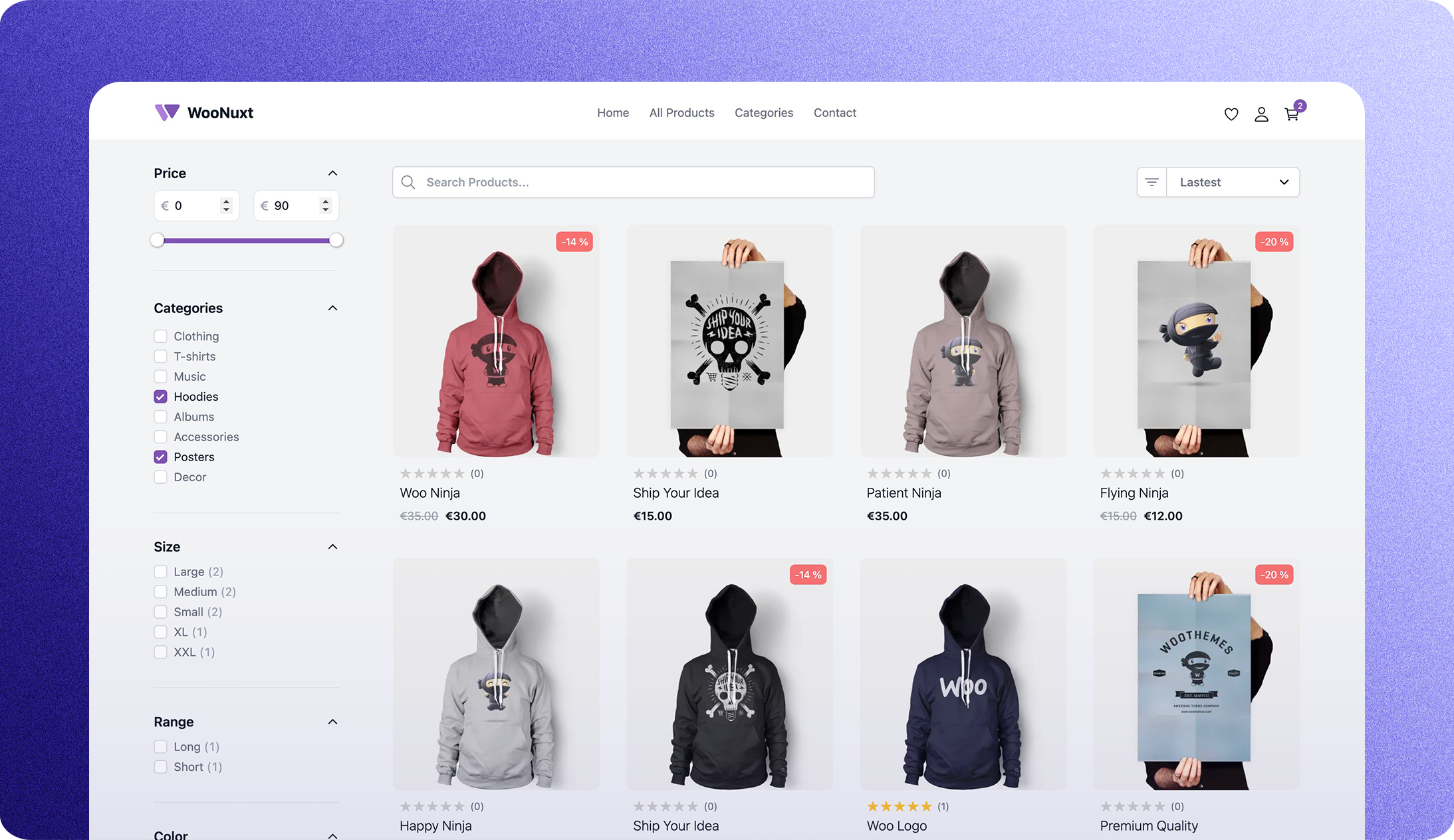
The goal of WooNuxt is to provide a modern, fast, and SEO-friendly front-end for WooCommerce. It's built on Nuxt 3 and uses the WPGraphQL API to retrieve all the data it needs. It's also fully customizable and can be extended with your custom components and modules. You can see a live demo of WooNuxt by clicking the button below.
| Demo | URL |
| --------------- | ------------------------------ |
| Netlify Demo | https://v3.woonuxt.com/ |
| Vercel Demo | https://woonuxt-v3.vercel.app/ |
| NuxtHub Demo | https://woo.nuxt.dev/ |
| Customized Demo | https://myshop.woonuxt.com/ |
## Troubleshooting
You can find some common errors and how to fix them [here](https://woonuxt.com/faq#some-common-errors-to-troubleshoot)
## Get Started
- Download the latest WooNuxt Settings plugin from the [woonuxt-settings releases](https://github.com/scottyzen/woonuxt-settings/releases).
- Install and activate the plugin on your WordPress site. This will install all the required plugins for WooNuxt, add some useful fields to the WPGraphQL schema, and automatically retrieve the WooCommerce payment gateway settings for [Stripe](https://wordpress.org/plugins/woocommerce-gateway-stripe/) and [PayPal](https://woo.com/document/paypal-standard/).
- Once the plugin is activated you are ready to deploy WooNuxt on whatever hosting you like or click one of the fast deploy buttons below.
- Once the plugin is activated, configure `GQL_HOST` and `NUXT_IMAGE_DOMAINS`. Check out the `.env.example` file for details.
[](https://app.netlify.com/start/deploy?repository=https://github.com/scottyzen/woonuxt) [](https://vercel.com/new/clone?repository-url=https%3A%2F%2Fgithub.com%2Fscottyzen%2FWooNuxt3&repository-name=WooNuxt&env=GQL_HOST,NUXT_IMAGE_DOMAINS)
## Large Catalog ISR Setup (10K+ Products)
For large catalogs, avoid full static generation and use Nuxt hybrid rendering with ISR.
- Build with `nuxt build` (not `nuxt generate`).
- Product catalog routes use Nitro `routeRules` with `isr` in `nuxt.config.ts`.
- Default revalidation window is 3600 seconds and can be overridden via `CATALOG_ISR_TTL`.
How ISR gets triggered:
- The first request to a route (for example `/product/some-slug`) generates the page and caches it.
- Requests during the TTL are served from cache.
- After TTL, the next request serves stale content and triggers background regeneration.
Platform notes:
- Vercel: uses Nuxt/Nitro ISR route rules directly.
- Netlify: use server build mode (`nuxt build`) so route rules can run on the serverless/edge runtime. Static generate mode (`nuxt generate`) bypasses ISR.
## How to customize & extend WooNuxt 🎨
WooNuxt now uses the Nuxt layers feature to make it easy to customize any part of WooNuxt just like you would with a WordPress theme with its child theme.
Example: I have created a pages directory and added a `contact.vue` file in the pages directory. This will override the default contact page that comes with WooNuxt. You can do this with any page or component. So think of the `woonuxt_base` folder as the parent theme and the root folder as the child theme.
Here is a [branch](https://github.com/scottyzen/woonuxt/tree/myshop) with an example of some basic customizations:
And here is the live demo of the customized WooNuxt site: [My Shop](https://myshop.woonuxt.com/).
### Progress
| Feature | Ongoing Enhancements | In the Pipeline | In Progress | Done | Next |
| --------------------------------------------------------- | -------------------- | --------------- | ----------- | ---- | ---- |
| Performance | 🔷 | | | ✅ | |
| SEO | 🔷 | | ✅ | | |
| Cart | | | | ✅ | |
| Search | | | | ✅ | |
| Shipping | | | | ✅ | |
| Checkout (Stripe, PayPal, Cash on Delivery) | 🔷 | | | ✅ | 🔶 |
| Filtering | 🔷 | | | ✅ | |
| Wishlists | | | | ✅ | |
| Account | | | | ✅ | |
| Coupons | | | | ✅ | |
| Product Reviews | | | ✅ | | |
| Product Category Pages | | | ✅ | | |
| WooNuxt Settings Module | 🔷 | | ✅ | | |
| Better TypeScript Support | 🔷 | | ✅ | | |
| Mobile layout | 🔷 | | | ✅ | |
| Countries & States Enums | | | | ✅ | |
| Cookie Popup & GDPR Compliance | | ✅ | | | |
| Progressive Web App (PWA) | | | ✅ | | |
| Queuing System (for checking out when the server is busy) | | ✅ | | | 🔶 |
| Language Support (i18n) | 🔷 | | ✅ | | |
### Required WordPress Plugins
| Plugin Name | Description |
| ---------------------------------------------------------------------------------- | ---------------------------------------- |
| [WooCommerce](https://wordpress.org/plugins/woocommerce/) | Core eCommerce plugin |
| [WPGraphQL](https://www.wpgraphql.com/) | A free, open-source plugin for WordPress |
| [WooGraphQL](https://woographql.com/) | GraphQL API for WooCommerce |
| ~~[WPGraphQL Cors](https://github.com/funkhaus/wp-graphql-cors)~~ | ~~Enable CORS for WPGraphQL~~ |
| [Headless Login for WPGraphQL](https://github.com/AxeWP/wp-graphql-headless-login) | Enable headless login for WPGraphQL |
| [woonuxt-settings.zip](https://github.com/scottyzen/woonuxt-settings/releases) | WooNuxt Settings plugin |
> **Note** The [woonuxt-settings.zip](https://github.com/scottyzen/woonuxt-settings/releases) plugin will help you install all the required plugins.
### Payment Methods
| Payment Method | Supported |
| ------------------------------------------------------------------- | --------- |
| [Stripe](https://wordpress.org/plugins/woocommerce-gateway-stripe/) | ✅ |
| [PayPal Standard](https://woo.com/document/paypal-standard/) | ✅ |
| Cash on Delivery | ✅ |
### Required Environment Variables
- `GQL_HOST` - The GraphQL endpoint for your WordPress site, for example `https://wp.example.com/graphql`.
- `NUXT_IMAGE_DOMAINS` - The WordPress/CDN hostnames used for optimized images, for example `wp.example.com,cdn.example.com`.
The WooNuxt Settings plugin automatically provides the remaining storefront settings through GraphQL.
#### Tested up to:
| Plugin/Software | Version |
| ---------------------------- | ------- |
| WordPress | 6.9.4 |
| WooCommerce | 10.7.0 |
| WPGraphQL | 2.12.0 |
| WooGraphQL | 1.0.2 |
| ~~WPGraphQL CORS~~ | ~~2.1~~ |
| Headless Login for WPGraphQL | 0.4.4 |
| Node | 22.22.2 |
| PHP | 8.4 |
### Current translations
| Language | Code |
| ------------- | ---- |
| English 🇺🇸 | en |
| German 🇩🇪 | de |
| Spanish 🇪🇸 | es |
| French 🇫🇷 | fr |
| Italian 🇮🇹 | it |
| Portuguese 🇵🇹 | pt |
### Local SSL Setup
- Install [mkcert](https://github.com/FiloSottile/mkcert) on your machine.
- Run `mkcert localhost` to generate a certificate for localhost. You should now have a `localhost.pem` and `localhost-key.pem` file in your current directory. See the image below for an example.
- Then run `mkcert -install` to install the certificate authority.
- Finally, run `npm run dev:ssl` to start the dev server with SSL.
#### Credits
This is an ongoing project but it wouldn't be possible without the help of the following people: [Jason Bahl](https://github.com/jasonbahl) & [Geoffrey K Taylor](https://github.com/kidunot89) for their ongoing work on WPGraphQL and WooGraphQL respectively. Also, a big thanks to the Nuxt team for all their hard work making Nuxt 3 a pleasure to build upon. And the [WooCommerce](https://woocommerce.com/) team for making such a great e-commerce platform. Some other honorable mentions are [Funkhaus](https://funkhaus.us/) for their work on the WPGraphQL Cors plugin. And the people who have contributed to making WooNuxt better every day, [Alex Lykesas](https://github.com/alexookah), [Zack Hatlen](https://github.com/zackha), [Galli](https://github.com/Zielgestalt), [Guillaume](https://github.com/GuillaumeDgr) Thank you all! 🙏
I don't know where this project will go, but I'm excited to see what the future holds. If you have any questions or would like to contribute to the project please feel free to reach out to me on [Twitter](https://twitter.com/scottyzen) or [GitHub](https://github.com/scottyzen).
## 🤝 Contributing
We welcome contributions! Please see [CONTRIBUTING.md](./CONTRIBUTING.md) for guidelines on how to get started.