https://github.com/scouzi1966/maclocal-api
'afm' command cli: macOS server and single prompt mode that exposes Apple's Foundation and MLX Models and other APIs running on your Mac through a single aggregated OpenAI-compatible API endpoint. Supports Apple Vision and single command (non-server) inference with piping as well . Now with Web Browser and local AI API aggregator
https://github.com/scouzi1966/maclocal-api
ai apple-foundation-models apple-intelligence apple-llm apple-llm-integration apple-silicon finetuning-llms local-llm localai lora macos-app macos-swift mlx mlx-swift openai-api openclaw opencode opencode-ai oss
Last synced: 4 months ago
JSON representation
'afm' command cli: macOS server and single prompt mode that exposes Apple's Foundation and MLX Models and other APIs running on your Mac through a single aggregated OpenAI-compatible API endpoint. Supports Apple Vision and single command (non-server) inference with piping as well . Now with Web Browser and local AI API aggregator
- Host: GitHub
- URL: https://github.com/scouzi1966/maclocal-api
- Owner: scouzi1966
- License: mit
- Created: 2025-08-08T01:20:14.000Z (12 months ago)
- Default Branch: main
- Last Pushed: 2026-03-01T16:19:34.000Z (5 months ago)
- Last Synced: 2026-03-01T18:57:47.030Z (5 months ago)
- Topics: ai, apple-foundation-models, apple-intelligence, apple-llm, apple-llm-integration, apple-silicon, finetuning-llms, local-llm, localai, lora, macos-app, macos-swift, mlx, mlx-swift, openai-api, openclaw, opencode, opencode-ai, oss
- Language: Swift
- Homepage:
- Size: 52.9 MB
- Stars: 154
- Watchers: 3
- Forks: 8
- Open Issues: 2
-
Metadata Files:
- Readme: README.md
- License: LICENSE
Awesome Lists containing this project
- awesome-mlx - maclocal-api - compatible API endpoint. Supports Apple Vision and single command (non-server) inference with piping as well . Now with Web Browser and local AI API aggregator (LLM & Inference)
README
If you find this useful, please ⭐ the repo! Also check out [Vesta AI Explorer](https://kruks.ai/)! — my full-featured native macOS AI app.
> [!NOTE]
>
> 31 Mar, 2026. AFM was pinned to an older version of https://github.com/huggingface/swift-huggingface. I have now pinned to the latest which uses hub for model cache. The older version downloaded models to the ~/Documents/Huggingface folder which was causing some pain with iCloud sync. They are now stored under ~/.cache which is not in iCloud scope. the TLDR is that models will be re-downloaded again. You can manually delete the older models located in ~/Documents/Huggingface to regain some valuable space available (spring cleaning!). Please report any issues.
>
> **Attention M-series Mac AI enthusiasts!** You don't need to be a Swift developer to explore. Vibe coding really allows anyone to participate in this project. A lot of the hype is real! It does work.
>
> [Fork this repo](https://github.com/scouzi1966/maclocal-api/fork) first, then clone your fork to submit PRs:
>
> ```bash
> git clone https://github.com//maclocal-api.git
> cd maclocal-api
> claude
> /build-afm
> ```
>
> To just experiment locally
>
> ```bash
> git clone https://github.com/scouzi1966/maclocal-api.git
> cd maclocal-api
> claude
> /build-afm
> ```
>
> /build-afm is an AI skill that builds for the first time so that you can start coding
>
> Start vibe coding! I will add support for skills with more coding agents in the future.
# afm — Run Any MLX LLM on Your Mac, 100% Local
Extensive testing of Qwen3.5-35B-A3B with afm. Uses an experimental technique with Claude and Codex as judges for evaluation scoring. Click the link below to view test results.
### [afm-next Nightly Test Report — Qwen3.5-35B-A3B Focus](https://kruks.ai/macafm/)
Run open-source MLX models **or** Apple's on-device Foundation Model through an OpenAI-compatible API. Built entirely in Swift for maximum Metal GPU performance. No Python runtime, no cloud, no API keys.
## Install
| | Stable (v0.9.9) | Nightly (afm-next) |
|---|---|---|
| **Homebrew** | `brew install scouzi1966/afm/afm` | `brew install scouzi1966/afm/afm-next` |
| **pip** | `pip install macafm` | `pip install --extra-index-url https://kruks.ai/afm/wheels/simple/ macafm-next` |
| **Release notes** | [v0.9.9](https://github.com/scouzi1966/maclocal-api/releases/tag/v0.9.9) | [v0.9.10-next](https://github.com/scouzi1966/maclocal-api/releases/tag/nightly-20260408-628c2bb) |
> [!NOTE]
> The stable release (v0.9.9) and the latest nightly are currently at the same level. Either one will give you the same experience.
> [!TIP]
> **Switching between stable and nightly:**
> ```bash
> brew unlink afm && brew install scouzi1966/afm/afm-next # switch to nightly
> brew unlink afm-next && brew link afm # switch back to stable
> ASSUMES you did a brew install scouzi1966/afm/afm previously
> ```
## What's new in afm-next
> [!IMPORTANT]
> The nightly build is the future stable release. It includes everything in v0.9.8 plus:
> - No new features yet — nightly is currently in sync with the stable release
## Quick Start
```bash
# Run any MLX model with WebUI
afm mlx -m mlx-community/Qwen3.5-35B-A3B-4bit -w
# Or any smaller model
afm mlx -m mlx-community/gemma-3-4b-it-8bit -w
# Chat from the terminal (auto-downloads from Hugging Face)
afm mlx -m Qwen3-0.6B-4bit -s "Explain quantum computing"
# Interactive model picker (lists your downloaded models)
MACAFM_MLX_MODEL_CACHE=/path/to/models afm mlx -w
# Apple's on-device Foundation Model with WebUI
afm -w
```
## Use with OpenCode
[OpenCode](https://opencode.ai/) is a terminal-based AI coding assistant. Connect it to afm for a fully local coding experience — no cloud, no API keys. No Internet required (other than initially download the model of course!)
**1. Configure OpenCode** (`~/.config/opencode/opencode.json`):
```json
{
"$schema": "https://opencode.ai/config.json",
"provider": {
"ollama": {
"npm": "@ai-sdk/openai-compatible",
"name": "macafm (local)",
"options": {
"baseURL": "http://localhost:9999/v1"
},
"models": {
"mlx-community/Qwen3-Coder-Next-4bit": {
"name": "mlx-community/Qwen3-Coder-Next-4bit"
}
}
}
}
}
```
**2. Start afm with a coding model:**
```bash
afm mlx -m mlx-community/Qwen3-Coder-Next-4bit -t 1.0 --top-p 0.95 --max-tokens 8192
```
**3. Launch OpenCode** and type `/connect`. Scroll down to the very bottom of the provider list — `macafm (local)` will likely be the last entry. Select it, and when prompted for an API key, enter any value (e.g. `x`) — tokenized access is not yet implemented in afm so the key is ignored. All inference runs locally on your Mac's GPU.
---
## 28+ MLX Models Tested

28 models tested and verified including Qwen3, Gemma 3/3n, GLM-4/5, DeepSeek V3, LFM2, SmolLM3, Llama 3.2, MiniMax M2.5, Nemotron, and more. See [test reports](test-reports/).
---
[](https://swift.org)
[](https://developer.apple.com/macos/)
[](LICENSE)
## ⭐ Star History
[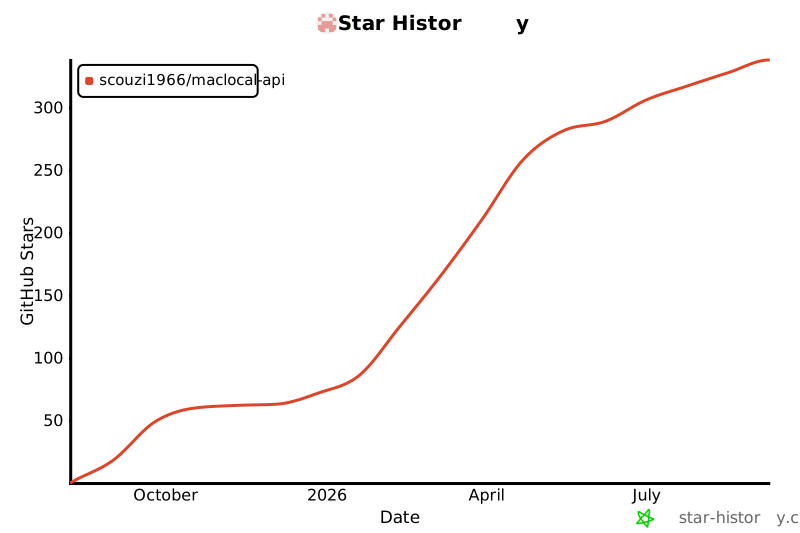](https://star-history.com/#scouzi1966/maclocal-api&Date)
## Related Projects
- [Vesta AI Explorer](https://kruks.ai/) — full-featured native macOS AI chat app
- [AFMTrainer](https://github.com/scouzi1966/AFMTrainer) — LoRA fine-tuning wrapper for Apple's toolkit (Mac M-series & Linux CUDA)
- [Apple Foundation Model Adapters](https://developer.apple.com/apple-intelligence/foundation-models-adapter/) — Apple's adapter training toolkit
## 🌟 Features
- **🔗 OpenAI API Compatible** - Works with existing OpenAI client libraries and applications
- **🧠 MLX Local Models** - Run any Hugging Face MLX model locally (Qwen, Gemma, Llama, DeepSeek, GLM, and 28+ tested models)
- **🌐 API Gateway** - Auto-discovers and proxies Ollama, LM Studio, Jan, and other local backends into a single API
- **⚡ LoRA adapter support** - Supports fine-tuning with LoRA adapters using Apple's tuning Toolkit
- **📱 Apple Foundation Models** - Uses Apple's on-device 3B parameter language model
- **👁️ Vision OCR** - Extract text from images and PDFs using Apple Vision (`afm vision`)
- **🖥️ Built-in WebUI** - Chat interface with model selection (`afm -w`)
- **🔒 Privacy-First** - All processing happens locally on your device
- **⚡ Fast & Lightweight** - No network calls, no API keys required
- **🛠️ Easy Integration** - Drop-in replacement for OpenAI API endpoints
- **📊 Token Usage Tracking** - Provides accurate token consumption metrics
## 📋 Requirements
- **macOS 26 (Tahoe) or later
- **Apple Silicon Mac** (M1/M2/M3/M4 series)
- **Apple Intelligence enabled** in System Settings
- **Xcode 26 (for building from source)
## 🚀 Quick Start
### Installation
#### Option 1: Homebrew (Recommended)
```bash
# Add the tap
brew tap scouzi1966/afm
# Install AFM
brew install afm
# Verify installation
afm --version
```
#### Option 2: pip (PyPI)
```bash
# Install from PyPI
pip install macafm
# Verify installation
afm --version
```
#### Option 3: Build from Source
```bash
# Clone the repository with submodules
git clone --recurse-submodules https://github.com/scouzi1966/maclocal-api.git
cd maclocal-api
# Build everything from scratch (patches + webui + release build)
./Scripts/build-from-scratch.sh
# Or skip webui if you don't have Node.js
./Scripts/build-from-scratch.sh --skip-webui
# Or use make (patches + release build, no webui)
make
# Run
./.build/release/afm --version
```
### Running
```bash
# API server only (Apple Foundation Model on port 9999)
afm
# API server with WebUI chat interface
afm -w
# WebUI + API gateway (auto-discovers Ollama, LM Studio, Jan, etc.)
afm -w -g
# Custom port with verbose logging
afm -p 8080 -v
# Show help
afm -h
```
### MLX Local Models
Run open-source models locally on Apple Silicon using MLX:
```bash
# Run a model with single prompt
afm mlx -m mlx-community/Qwen2.5-0.5B-Instruct-4bit -s "Explain gravity"
# Start MLX model with WebUI
afm mlx -m mlx-community/gemma-3-4b-it-8bit -w
# Interactive model picker (lists downloaded models)
afm mlx -w
# MLX model as API server
afm mlx -m mlx-community/Llama-3.2-1B-Instruct-4bit -p 8080
# Pipe mode
cat essay.txt | afm mlx -m mlx-community/Qwen3-0.6B-4bit -i "Summarize this"
# MLX help
afm mlx --help
```
Models are downloaded from Hugging Face on first use and cached locally. Any model from the [mlx-community](https://huggingface.co/mlx-community) collection is supported.
## 📡 API Endpoints
### Chat Completions
**POST** `/v1/chat/completions`
Compatible with OpenAI's chat completions API.
```bash
curl -X POST http://localhost:9999/v1/chat/completions \
-H "Content-Type: application/json" \
-d '{
"model": "foundation",
"messages": [
{"role": "user", "content": "Hello, how are you?"}
]
}'
```
### List Models
**GET** `/v1/models`
Returns available Foundation Models.
```bash
curl http://localhost:9999/v1/models
```
### Health Check
**GET** `/health`
Server health status endpoint.
```bash
curl http://localhost:9999/health
```
## 💻 Usage Examples
### Python with OpenAI Library
```python
from openai import OpenAI
# Point to your local MacLocalAPI server
client = OpenAI(
api_key="not-needed-for-local",
base_url="http://localhost:9999/v1"
)
response = client.chat.completions.create(
model="foundation",
messages=[
{"role": "user", "content": "Explain quantum computing in simple terms"}
]
)
print(response.choices[0].message.content)
```
### JavaScript/Node.js
```javascript
import OpenAI from 'openai';
const openai = new OpenAI({
apiKey: 'not-needed-for-local',
baseURL: 'http://localhost:9999/v1',
});
const completion = await openai.chat.completions.create({
messages: [{ role: 'user', content: 'Write a haiku about programming' }],
model: 'foundation',
});
console.log(completion.choices[0].message.content);
```
### curl Examples
```bash
# Basic chat completion
curl -X POST http://localhost:9999/v1/chat/completions \
-H "Content-Type: application/json" \
-d '{
"model": "foundation",
"messages": [
{"role": "system", "content": "You are a helpful assistant."},
{"role": "user", "content": "What is the capital of France?"}
]
}'
# With temperature control
curl -X POST http://localhost:9999/v1/chat/completions \
-H "Content-Type: application/json" \
-d '{
"model": "foundation",
"messages": [{"role": "user", "content": "Be creative!"}],
"temperature": 0.8
}'
```
### Single Prompt & Pipe Examples
```bash
# Single prompt mode
afm -s "Explain quantum computing"
# Piped input from other commands
echo "What is the meaning of life?" | afm
cat file.txt | afm
git log --oneline | head -5 | afm
# Custom instructions with pipe
echo "Review this code" | afm -i "You are a senior software engineer"
```
## 🏗️ Architecture
```
MacLocalAPI/
├── Package.swift # Swift Package Manager config
├── Sources/MacLocalAPI/
│ ├── main.swift # CLI entry point & ArgumentParser
│ ├── Server.swift # Vapor web server configuration
│ ├── Controllers/
│ │ └── ChatCompletionsController.swift # OpenAI API endpoints
│ └── Models/
│ ├── FoundationModelService.swift # Apple Foundation Models wrapper
│ ├── OpenAIRequest.swift # Request data models
│ └── OpenAIResponse.swift # Response data models
└── README.md
```
## 🔧 Configuration
### Command Line Options
```
OVERVIEW: macOS server that exposes Apple's Foundation Models through
OpenAI-compatible API
Use -w to enable the WebUI, -g to enable API gateway mode (auto-discovers and
proxies to Ollama, LM Studio, Jan, and other local LLM backends).
USAGE: afm
afm mlx [] Run local MLX models from Hugging Face
afm vision OCR text extraction from images/PDFs
OPTIONS:
-s, --single-prompt
Run a single prompt without starting the server
-i, --instructions
Custom instructions for the AI assistant (default:
You are a helpful assistant)
-v, --verbose Enable verbose logging
--no-streaming Disable streaming responses (streaming is enabled by
default)
-a, --adapter Path to a .fmadapter file for LoRA adapter fine-tuning
-p, --port Port to run the server on (default: 9999)
-H, --hostname
Hostname to bind server to (default: 127.0.0.1)
-t, --temperature
Temperature for response generation (0.0-1.0)
-r, --randomness
Sampling mode: 'greedy', 'random',
'random:top-p=<0.0-1.0>', 'random:top-k=', with
optional ':seed='
-P, --permissive-guardrails
Permissive guardrails for unsafe or inappropriate
responses
-w, --webui Enable webui and open in default browser
-g, --gateway Enable API gateway mode: discover and proxy to local
LLM backends (Ollama, LM Studio, Jan, etc.)
--prewarm Pre-warm the model on server startup for faster first
response (y/n, default: y)
--version Show the version.
-h, --help Show help information.
Note: afm also accepts piped input from other commands, equivalent to using -s
with the piped content as the prompt.
```
### Environment Variables
The server respects standard logging environment variables:
- `LOG_LEVEL` - Set logging level (trace, debug, info, notice, warning, error, critical)
## ⚠️ Limitations & Notes
- **Model Scope**: Apple Foundation Model is a 3B parameter model (optimized for on-device performance)
- **macOS 26+ Only**: Requires the latest macOS with Foundation Models framework
- **Apple Intelligence Required**: Must be enabled in System Settings
- **Token Estimation**: Uses word-based approximation for token counting (Foundation model only; proxied backends report real counts)
## 🔍 Troubleshooting
### "Foundation Models framework is not available"
1. Ensure you're running **macOS 26 or later
2. Enable **Apple Intelligence** in System Settings → Apple Intelligence & Siri
3. Verify you're on an **Apple Silicon Mac**
4. Restart the application after enabling Apple Intelligence
### Server Won't Start
1. Check if the port is already in use: `lsof -i :9999`
2. Try a different port: `afm -p 8080`
3. Enable verbose logging: `afm -v`
### Build Issues
1. Ensure you have **Xcode 26 installed
2. Update Swift toolchain: `xcode-select --install`
3. Clean and rebuild: `swift package clean && swift build -c release`
## 🤝 Contributing
Contributions are welcome! Please feel free to submit a Pull Request. For major changes, please open an issue first to discuss what you would like to change.
### Development Setup
```bash
# Clone the repo with submodules
git clone --recurse-submodules https://github.com/scouzi1966/maclocal-api.git
cd maclocal-api
# Full build from scratch (submodules + patches + webui + release)
./Scripts/build-from-scratch.sh
# Or for debug builds during development
./Scripts/build-from-scratch.sh --debug --skip-webui
# Run with verbose logging
./.build/debug/afm -w -g -v
```
## 📄 License
This project is licensed under the MIT License - see the [LICENSE](LICENSE) file for details.
## 🙏 Acknowledgments
- Apple for the Foundation Models framework
- The Vapor Swift web framework team
- OpenAI for the API specification standard
- The Swift community for excellent tooling
## 📞 Support
If you encounter any issues or have questions:
1. Check the [Troubleshooting](#-troubleshooting) section
2. Search existing [GitHub Issues](https://github.com/scouzi1966/maclocal-api/issues)
3. Create a new issue with detailed information about your problem
## 🗺️ Roadmap
- [x] Streaming response support
- [x] MLX local model support (28+ models tested)
- [x] Multiple model support (API gateway mode)
- [x] Web UI for testing (llama.cpp WebUI integration)
- [x] Vision OCR subcommand
- [x] Function/tool calling (OpenAI-compatible, multiple formats)
- [ ] Performance optimizations
- [ ] [BFCL](https://github.com/ShishirPatil/gorilla/tree/main/berkeley-function-call-leaderboard) integration for automated tool calling validation
- [ ] Docker containerization (when supported)
---
**Made with ❤️ for the Apple Silicon community**
*Bringing the power of local AI to your fingertips.*