https://github.com/screenshotbot/screenshotbot-oss
A Screenshot Testing service to tie with your existing Android, iOS and Web screenshot tests
https://github.com/screenshotbot/screenshotbot-oss
android-screenshot-tests ci ios-snapshot-tests screenshot-tests snapshot-testing swift-snapshot-testing testing
Last synced: 5 months ago
JSON representation
A Screenshot Testing service to tie with your existing Android, iOS and Web screenshot tests
- Host: GitHub
- URL: https://github.com/screenshotbot/screenshotbot-oss
- Owner: screenshotbot
- License: mpl-2.0
- Created: 2021-04-25T02:02:14.000Z (about 5 years ago)
- Default Branch: main
- Last Pushed: 2026-02-08T16:03:11.000Z (5 months ago)
- Last Synced: 2026-02-08T17:54:10.658Z (5 months ago)
- Topics: android-screenshot-tests, ci, ios-snapshot-tests, screenshot-tests, snapshot-testing, swift-snapshot-testing, testing
- Language: Common Lisp
- Homepage: https://screenshotbot.io
- Size: 114 MB
- Stars: 292
- Watchers: 6
- Forks: 13
- Open Issues: 0
-
Metadata Files:
- Readme: README.md
- License: LICENSE
Awesome Lists containing this project
- awesome-cl - screenshotbot-oss
README

# Screenshotbot: Screenshot Testing Service
[](https://app.circleci.com/pipelines/github/screenshotbot/screenshotbot-oss?branch=main)
[](https://screenshotbot.io/active-run?org=5fd16bcf4f4b3822fd0000e1&channel=screenshotbot-oss&branch=master)
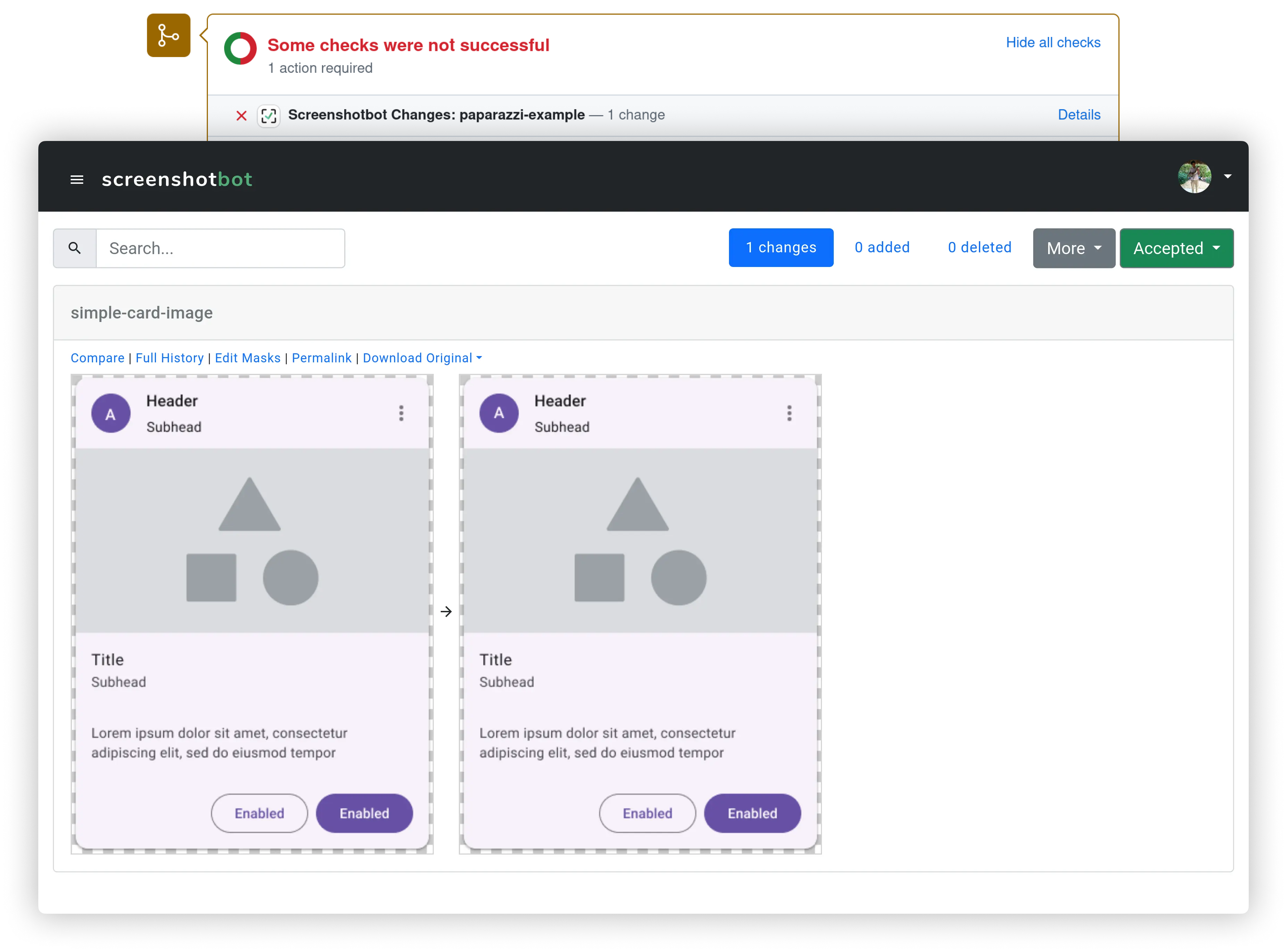
Screenshotbot is a Screenshot Testing service. Screenshotbot will
connect your existing Android, iOS or Selenium tests to track how
screenshots change over time, notifying you on Pull Requests, Jira
etc. We provide several integrations to common Code Review and Task
Management platforms, and have more in the pipeline.
Screenshotbot-oss powers our own commercial platform
[screenshotbot.io](https://screenshotbot.io).
## Quick installation with Docker
```
$ docker-compose up --build
```
If you need to modify the `config.lisp`, modify it before running this
command. In the future we'll provide live reloading of config.lisp for
docker, but at the moment that's only available when not using docker.
## Quick Installation in the cloud
If you want a publicly accessible instance, complete with HTTPS, we
have a script that will help you set it up in your cloud.
See [this wiki page](https://github.com/screenshotbot/screenshotbot-oss/wiki/Quick-installation-in-the-cloud) for details.
## Configuration
Screenshotbot has integrations with various external tools,
e.g. GitHub, Jira, SSO etc. Most of these platforms require some
kind of API key to access their APIs, and must be configured with
Screenshotbot before you can use them.
For simplicity and maintainability, we don't have complex GUIs to
modify these _site-admin_ configurations. Instead each of these
integrations are exposed as plugins that must be configured with basic
Common Lisp code. The configuration can be hot-reloaded.
Screenshotbot looks for a file called `config.lisp` in both the
git-root, and in `~/.config/screenshotbot/`. If found, it loads this
file as the configuration.
See [Updating
config.lisp](https://github.com/screenshotbot/screenshotbot-oss/wiki/Updating-config.lisp)
for a more thorough discussion.
### Becoming a Site-Admin
After installing Screenshotbot, we recommend setting up one user as a
site-admin. The site-admin gets special administrative powers that
will be required for hot-reloading config files, and hot-reloading
updates. We might also build more configuration powers for site-admins
in the future.
After signing up and logging in, go to
`https:///site-admin/self-promotion`. Follow the steps. You'll
need shell access to the directory with the Screenshotbot
installation. You'll now have access to an Admin menu on the bottom
left.
## Calling Screenshotbot from your CI jobs
First, you'll need to generate an API key inside Screenshotbot. You'll
use this to access the API or the CLI tools.
Next you need to build the CLI tool for your platform. Common Lisp is
a compiled language, so in general you'll need different binaries for
different platforms (Linux, Mac or Windows; Intel vs ARM). You can
download pre-built binaries for Linux and Mac from
https://screenshotbot.io/recorder.sh.
To create a binary on a specific platform, call the script
`scripts/build-cli.lisp`. For instance, if you're using SBCL to build the CLI,
it will look like:
```
$ sbcl --script scripts/build-cli.lisp
```
This will generate a screenshotbot-cli executable script. Copy it to a
location from which it can be dowloading during your CI runs, or check
it in to your repository. (As of this writing SBCL generates a binary
that is 105MB in size, and 24MB zipped; CCL 100MB/21MB excluding core;
LispWorks 25MB/4.4MB. LispWorks has extra features to remove unused
code.)
For an example use of this executable see:
https://github.com/tdrhq/fast-example/blob/master/.circleci/config.yml.
You'll also have to pass the `--hostname` argument, which will be the
URL of your Screenshotbot installation.
## Setting up SSO
Screenshotbot comes with an in-built email/password authentication
system, and also supports OpenID Connect out of the box. We also have
in-built connectors for Google OAuth restricted to domains, which
might be easier for smaller companies.
See [Configuring
SSO](https://github.com/screenshotbot/screenshotbot-oss/wiki/Configuring-SSO)
for a thorough discussion.
## Feature Status
Not all the features on [screenshotbot.io](https://screenshotbot.io)
are available in this OSS repository. We are in the process of moving
most integrations here, but that will depend on community interest.
| Feature | LispWorks | CCL | SBCL | screenshotbot.io (Enterprise) |
|:---------------------:|:------------:|:------------:|:-----------------:|:------------------------------:|
| **SSO/OAuth** | | | | |
| User / Email | Supported | Supported | Supported | Supported |
| OpenID Connect | Supported | Supported | Supported | Supported |
| SAML | Via Keycloak | Via Keycloak | Via Keycloak | Supported |
| **VCS Integrations** | | | | |
| GitHub | Supported | Supported | Supported | Supported |
| GitLab | Supported | Supported | Supported | Supported |
| Phabricator | Supported | Supported | Supported | Supported |
| BitBucket | Supported | Supported | Supported | Supported |
| Azure DevOps | Supported | Supported | Supported | Supported |
| **Tasks Integration** | | | | |
| Slack | Supported | Supported | Supported | Supported |
| Email | Supported | Supported | Supported | Supported |
| Jira | Planned | Planned | Not supported [1] | Supported |
| Trello | Planned | Planned | Not supported [1] | Supported |
| Asana | Planned | Planned | Not supported [1] | Planned |
| **Annotations** [2] | Planned | Planned | Planned | Supported |
| Jira | Planned | Planned | Not supported [1] | Supported |
Footnotes:
1. Not supported because SBCL doesn't support Java
2. Annotations allow you to create tasks directly from Screenshotbot
## Upgrading
In most cases, upgrading will be done via hot-reloading. As a
site-admin, you can `git pull` on the repository, on the shell, go to
go `https:///admin` and hit `Reload`. This will bring the new
code live without any downtime.
Small catch: Our database is stored is in-memory (with transactions
logged to disk for recovery). Hot-reloading code can force schema
changes. For instance, if a field is deleted between two major
versions, hot reloading will cause that field to be lost forever (but
there are snapshots of old versions of the database for recovery). In
general we'll try to guarantee that between minor versions, on
released commits, as long as you're upgrading (as opposed to
downgrading), we'll be able to auto-migrate any schema cleanly.
You can also upgrade by killing the Lisp process and restarting it. If
you do so, we recommend hitting `Snapshot` on the admin menu before
killing the Lisp process. However killing the Lisp process can cause a
minor downtime. You can work around this by using a tool called
`socketmaster`, but the description of that tool is beyond the scope
of this document.
## Contributing
We welcome Pull Requests!
Keep in mind, we'll do the code review on GitHub, but we'll merge it
via our internal Phabricator instance. The source of truth for the
code is in our internal mono-repo, which is copied over to the OSS
code via Copybara, similar to the process that Google and Facebook
use. We have open sourced many other projects where the source of
truth is GitHub, but Screenshotbot is an actively-developed complex
application that makes this difficult.
We might reject large new features if we think it adds too much
maintenance overhead for us. Bug-fixes are always welcome.
## Open Source Support
We want the Open Source version of Screenshotbot to be successful. That being
said, we are a very small company, so it's difficult for us to dedicate
a lot of resources specifically for keeping Open Source supported across multiple
platforms, multiple deployment styles, etc.
You can help us! Just be patient with us when we ask for specifics about your installation.
Send us any feedback---good, bad or neutral---to arnold@screenshotbot.io.
Get other
teams to use Screenshotbot, either open-source or paid. The more users we have the
easier it is for us to catch bugs early and stream-line the open source experience.
Give us a star on GitHub!
We aren't currently accepting donations, but consider convincing your
team to pay us for support. If you're a small team or an individual
developer, just send us an email and we'll make sure you have a plan
you can afford. Most of our code is open-source, so by paying us
you're directly supporting our open-source contributions.
## Security
We take security at Screenshotbot very seriously. We partner with an
external security research firm, [Pensive
Security](https://pensivesecurity.io) to perform annual penetration
tests. The latest Penetration Test reports can be requested on our
[Trust and Security](https://trust.screenshotbot.io) dashboard.
## Authors
Screenshotbot is built and maintained by Arnold Noronha
(arnold@screenshotbot.io). I also wrote
[screenshot-tests-for-android](https://github.com/facebook/screenshot-tests-for-android),
the de-facto screenshot testing library for Android.
## License
Screenshot is licensed under the Mozilla Public License, v2.