https://github.com/scriptedalchemy/jetbrains-ide-performance
High Performance Configuration for Jetbrains IDEs [IntelliJ, WebStorm, etc..]
https://github.com/scriptedalchemy/jetbrains-ide-performance
Last synced: about 1 year ago
JSON representation
High Performance Configuration for Jetbrains IDEs [IntelliJ, WebStorm, etc..]
- Host: GitHub
- URL: https://github.com/scriptedalchemy/jetbrains-ide-performance
- Owner: ScriptedAlchemy
- Created: 2018-07-10T15:32:35.000Z (almost 8 years ago)
- Default Branch: master
- Last Pushed: 2024-06-02T20:38:37.000Z (about 2 years ago)
- Last Synced: 2025-03-31T05:06:35.633Z (about 1 year ago)
- Language: Shell
- Size: 33.2 KB
- Stars: 276
- Watchers: 7
- Forks: 36
- Open Issues: 6
-
Metadata Files:
- Readme: README.md
Awesome Lists containing this project
README
# jetbrains-ide-performance
High Performance Configuration for Jetbrains IDEs [IntelliJ, WebStorm, etc..]
# Motivation
Once you step into the realm of multi-project development, large scale dev, or just have to have like 6 IDE's open. You really start to feel a performance hit on jetbrains IDEs.
This configuration aims to give at least 10x performance increases across the board.
# Goals
* Faster Indexing Times
* More Responsive IntelliSense
* Less random freezing or UI lockups
* Better Memory Management
* More multi-threading
* Quicker startup time
# What you need to do
The recommended way of changing the JVM options in the recent product versions is from the **Help | Edit Custom VM Options menu**. To change the IDE options go to **Help | Edit Custom Properties*
For Older IDEs, something like this: `vim /Applications/IntelliJ\ IDEA\ 15.app/Contents/bin/idea.vmoptions`
> * idea.vmoptions --> Help | Edit Custom VM Options menu
> * idea.properties --> Help | Edit Custom Properties
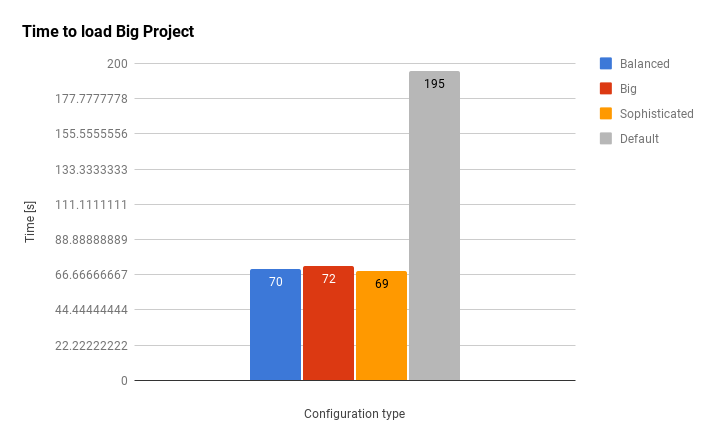
# Minimum Expected Results & Benchmarks
**Note that this example is the orange one (sophisticated)**


# Even More IO Performance
## RAMDISK OSX
If you still want even more indexing and startup performance. Then mounting a RAM Disk and symlinking all caching data is the ultimate powerhouse.
## Trim Enabler (OSX)
* Access advanced macOS tweaks to improve your performance or free up several gigabytes of disk space.
* The advanced Health feature uses S.M.A.R.T technology to report drive status and remaining health.
* Flip the switch to enable Trim safely and improve your data writing speeds and overall drive longevity.
I use this, and see a system-wide performance increase!
# Even More Processing Power (Force Enable Intel Turbo Boost)
If you need a little more CPU power, Install this
# Additional Great Tweaks
* Disable unused global symbols: https://twitter.com/theKashey/status/1016824878706524160
* Turn off error reporting: Preferences | Appearance & Behaviour | System Settings | Data Sharing | Send usage statistics