https://github.com/seebi/cimd
Collect and share metadata of CI/CD processes.
https://github.com/seebi/cimd
cicd command-line-tool gitlab-ci json-schema metadata python
Last synced: 5 months ago
JSON representation
Collect and share metadata of CI/CD processes.
- Host: GitHub
- URL: https://github.com/seebi/cimd
- Owner: seebi
- License: apache-2.0
- Created: 2025-01-04T13:08:49.000Z (over 1 year ago)
- Default Branch: main
- Last Pushed: 2025-04-05T15:16:04.000Z (over 1 year ago)
- Last Synced: 2026-01-05T07:28:33.505Z (7 months ago)
- Topics: cicd, command-line-tool, gitlab-ci, json-schema, metadata, python
- Language: Python
- Homepage:
- Size: 1.26 MB
- Stars: 1
- Watchers: 1
- Forks: 0
- Open Issues: 2
-
Metadata Files:
- Readme: README.md
- Changelog: CHANGELOG.md
- Contributing: CONTRIBUTING.md
- License: LICENSE
Awesome Lists containing this project
README

cimd is about collecting and sharing structured metadata of CI/CD processes.
cimd is an acronym for Continuous Integration Meta Data.
🤓 Motivation
···
🚀 Features
···
⚙️ Installation
🐍 Development
···
📄 Specification
···
ℹ️ Similar Project
## Badges
![User Script][userscript] [![Greasy Fork Entry][greasyfork-shield]][cimd-greasyfork] [![Sources][js-source-shield]][userscript-github]
![Python Package][python-package] [![pypi-version][pypi-version-shield]][pypi-link] [![pypi-version][pypi-downloads-shield]][pypi-link] [![python-versions][python-versions-shield]][pypi-link]
![Docker Image:][docker-image] [![docker][docker-pulls-shield]][docker-link] [![docker][docker-size-shield]][docker-link] [![Base Image][base-image-shield]][base-image-link]
![Used Tools:][used-tools] [![poetry][poetry-shield]][poetry-link] [![copier][copier-shield]][copier] [![task][task-shield]][task-link]
![Code and License][code-and-license] [![license-shield]][license-link] [![ruff][ruff-shield]][ruff-link] [![mypy][mypy-shield]][mypy-link]
![Github Stats][github-stats] [![Github Issues][issues-shield]][issues-link] [![Github Action][action-shield]][action-link] [![Github Commits][commit-activity-shield]][commit-activity-link]
## Motivation
To enable a fast overview of recent pipelines and their metadata in a GitLab-managed repository, this project provides the backend and frontend capabilities to extend the GitLab pipeline list with a custom metadata column.
GitLab already has some metadata mechanisms (e.g. [coverage patterns](https://docs.gitlab.com/ee/ci/testing/code_coverage.html#test-coverage-examples)), but they are limited to a specific scope.
The basic idea of this project is to prepare and provide extensible metadata artefacts on a well-known position, which can be easily fetched and parsed by a custom user script to extend the pipeline list with metadata item representations.
## Features
**cimd** contains of a command line tool (CLI) and a frontend user script.
### Frontend
The frontend is available as a single JavaScript file in the [js folder][userscript-github].
It is currently tested with Tampermonkey on Google Chrome only 🙈.
Once activated, it will extend the pipeline view of your [![cmid metadata enabled][cmid-metadata-enabled]][cmid-metadata-enabled] GitLab project with a metadata column, showing the items (screenshot example below).
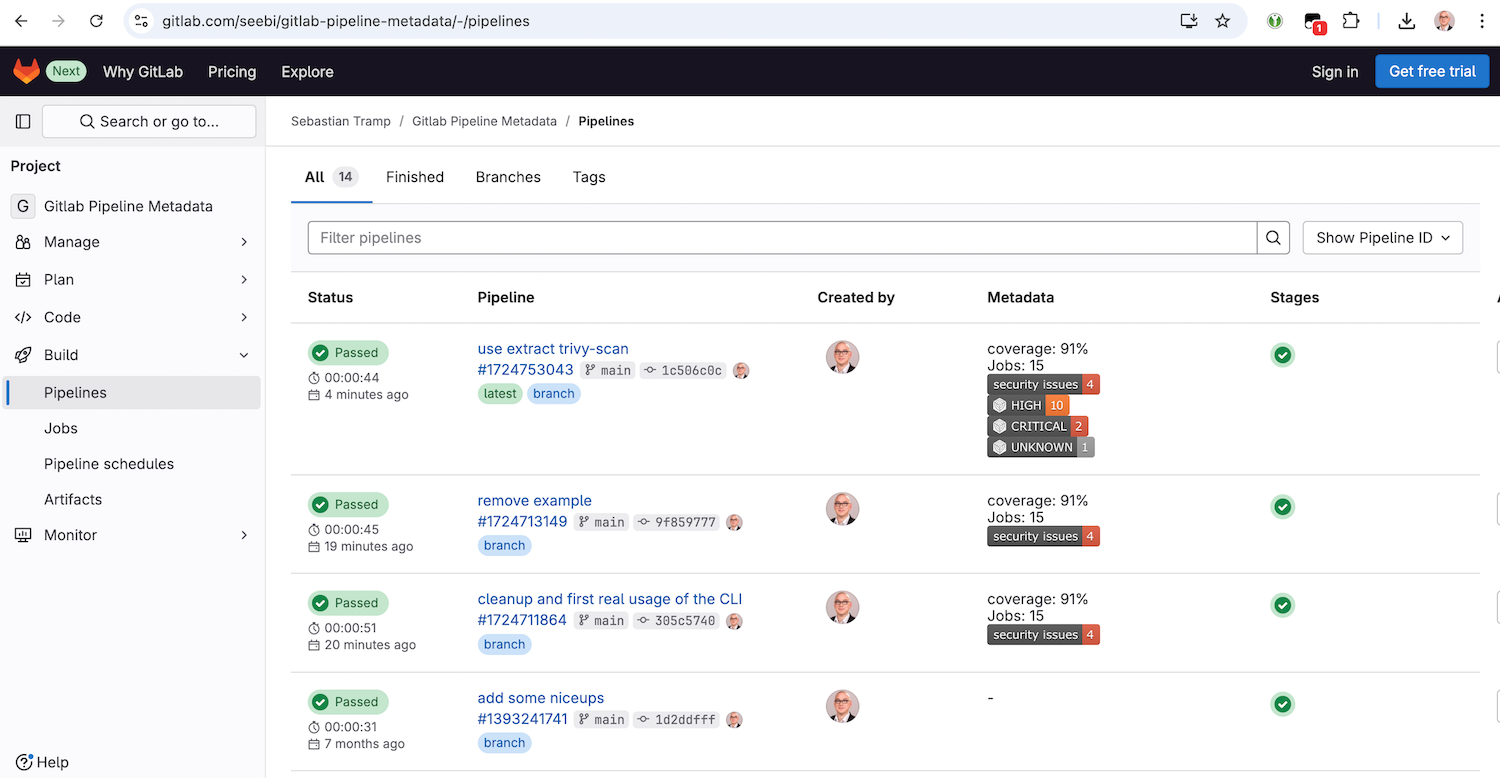
### Command Line Tool
The CLI is used to prepare and manipulate metadata items in a `__metadata__.json` document.
It has the following features:
- commands for basic CRUD operations:
- `add` - add a metadata item
- `delete` - delete metadata items
- `get` - get data of a metadata item
- `list` - list metadata items
- `extract` command group, which collects commands to extract metadata items from different sources:
- `coverage-xml` - extract metadata from a Coverage XML output files
- `junit-xml` - extract metadata from JUnit XML output files
- `pipeline-logs` - extract metadata from gitlab pipeline job logs
- `trivy-scan` - extract metadata from Trivy scan JSON output files
- `extend` command group, which collects commands to extend metadata items in a special way:
- `gitlab-link` - extend metadata items with a raw gitlab artifact link
- `shields-badge` - extend metadata items with a [shields.io](https://shields.io) badge
## Installation
### Frontend
To install the **frontend userscript** with a user script manager such as Tampermonkey, you have the following options:
- Recommended: Go to the [greasyfork.org][cimd-greasyfork] entry of cimd and click the install button.
- Create a new script entry and copy/paste the content of the script from the [js folder][userscript-github].
After installation, feel free to go to the example pipeline list at [gitlab.com/seebi/gitlab-pipeline-metadata][example-pipeline-list].
### Command Line Tool
To install and use the **cimd command line interface**, you have all the options the python ecosystem provides:
- Recommended ... via [pipx](https://pipx.pypa.io/stable/)
``` shell
pipx install cimd
```
- The cool way ... via [uv](https://docs.astral.sh/uv/guides/tools/)
``` shell
uvx cimd
```
- There is also a [docker image][docker-link] ...
``` shell
docker run -i -t --rm -v $(pwd):/data seebi/cimd
```
## Development
- Run [task](https://taskfile.dev/) to see all major development tasks.
- Use [pre-commit](https://pre-commit.com/) to avoid errors before commit.
- This repository was created with [this copier template](https://github.com/eccenca/cmem-plugin-template).
## Specification
This section describes the details about the JSON data artifact (`__metadata__.json`) which holds your pipeline metadata.
### Location
In your pipeline description, create a job which provides a JSON artifact adhering to the schema at the path `__metadata__.json`.
An example `.gitlab-ci.yml`, which creates some basic metadata items, is available at [gitlab.com/seebi/gitlab-pipeline-metadata][example-pipeline].
### Content
The content of the `__metadata__.json` is a simple structure to describe separate metadata items.
The minimal version of a metadata item has simply a `value` key.
``` json
{
"items": {
"coverage": {
"value": "87%"
}
}
}
```
In addition to that, the following optional keys can be used for a metadata item: `label`, `description`, `image`, `link` and `comment`.
``` json
{
"items": {
"coverage": {
"value": "87",
"comment": "'value' is the only mandatory key of a metadata item."
},
"jobs": {
"value": "15",
"label": "Jobs",
"description": "Number of overall jobs executed in the pipeline.",
"comment": "'label' and 'description' can be used to enhance the UI."
},
"security_issues": {
"value": "4",
"image": "https://img.shields.io/badge/security%20issues-4-red",
"link": "https://example.org/security_issues",
"comment": "We all love badges - and clickable badges are even better."
}
}
}
```
Hereinafter you will find some comments on the optional field:
- `label` - A human readable label for a metadata item. If present, it should be used by the frontend instead of the item identifier.
- `description` - A description of the metadata item. If present, can be used as on-hover text in the frontend for an item.
- `image` - An optional link to an image representation of the item (e.g. a shields.io image). If present, it should be used instead of the ID/Label/Value representation of the item. Images should be rendered with max-height/width.
- `link` - If present, the metadata item representation is click-able.
- `comment` - will be ignored by the frontend, for debugging only.
### Schema
The proposed JSON structure is formalized as a [JSON Schema](https://json-schema.org/) which is available at [schema/schema.json][schema-github] or can be visualized in the [json-schema-viewer@vercel.app][schema-app].
## Similar Projects
[💬 Drop me a note](https://github.com/seebi/cimd/issues/new) if you miss a project here ...
- [github-action-benchmark](https://github.com/benchmark-action/github-action-benchmark) - is a GitHub Action for continuous benchmarking to keep performance
[poetry-link]: https://python-poetry.org/
[poetry-shield]: https://img.shields.io/endpoint?url=https://python-poetry.org/badge/v0.json
[ruff-link]: https://docs.astral.sh/ruff/
[ruff-shield]: https://img.shields.io/endpoint?url=https://raw.githubusercontent.com/astral-sh/ruff/main/assets/badge/v2.json&label=Code%20Style
[mypy-link]: https://mypy-lang.org/
[mypy-shield]: https://www.mypy-lang.org/static/mypy_badge.svg
[copier]: https://copier.readthedocs.io/
[copier-shield]: https://img.shields.io/endpoint?url=https://raw.githubusercontent.com/copier-org/copier/master/img/badge/badge-grayscale-inverted-border-purple.json
[docker-link]: https://hub.docker.com/r/seebi/cimd
[docker-pulls-shield]: https://img.shields.io/docker/pulls/seebi/cimd?logo=docker&logoColor=white
[docker-size-shield]: https://img.shields.io/docker/image-size/seebi/cimd/latest?logo=docker&logoColor=white
[action-link]: https://github.com/seebi/cimd/actions
[action-shield]: https://github.com/seebi/cimd/actions/workflows/check.yml/badge.svg
[commit-activity-shield]: https://img.shields.io/github/commit-activity/y/seebi/cimd?logo=github&logoColor=white
[commit-activity-link]: https://github.com/seebi/cimd/pulse/monthly
[license-link]: https://github.com/seebi/cimd?tab=Apache-2.0-1-ov-file
[license-shield]: https://img.shields.io/pypi/l/cimd?logo=apache&logoColor=white
[pypi-link]: https://pypi.org/project/cimd
[pypi-version-shield]: https://img.shields.io/pypi/v/cimd?logo=pypi&logoColor=white
[pypi-downloads-shield]: https://img.shields.io/pypi/dm/cimd?logo=pypi&logoColor=white
[python-versions-shield]: https://img.shields.io/pypi/pyversions/cimd?logo=python&logoColor=white
[issues-shield]: https://img.shields.io/github/issues/seebi/cimd?logo=github&logoColor=white
[issues-link]: https://github.com/seebi/cimd/issues
[base-image-shield]: https://img.shields.io/badge/FROM-ubi9--minimal-orange?logo=redhat
[base-image-link]: https://hub.docker.com/r/redhat/ubi9-minimal/tags
[task-shield]: https://img.shields.io/badge/Taskfile-Enabled-brightgreen?logo=task&logoColor=white
[task-link]: https://taskfile.dev/
[greasyfork-shield]: https://img.shields.io/badge/Greasy_Fork-Available-black?labelColor=darkred&logo=data:image/png;base64,iVBORw0KGgoAAAANSUhEUgAAABAAAAAQCAYAAAAf8/9hAAAABmJLR0QA/wD/AP+gvaeTAAAACXBIWXMAAAsTAAALEwEAmpwYAAAAB3RJTUUH3ggEBCQHM3fXsAAAAVdJREFUOMudkz2qwkAUhc/goBaGJBgUtBCZyj0ILkpwAW7Bws4yO3AHLiCtEFD8KVREkoiFxZzX5A2KGfN4F04zMN+ce+5c4LMUgDmANYBnrnV+plBSi+FwyHq9TgA2LQpvCiEiABwMBtzv95RSfoNEHy8DYBzHrNVqVEr9BWKcqNFoxF6vx3a7zc1mYyC73a4MogBg7vs+z+czO50OW60Wt9stK5UKp9Mpj8cjq9WqDTBHnjAdxzGQZrPJw+HA31oulzbAWgLoA0CWZVBKIY5jzGYzdLtdE9DlcrFNrY98zobqOA6TJKHW2jg4nU5sNBpFDp6mhVe5rsvVasUwDHm9Xqm15u12o+/7Hy0gD8KatOd5vN/v1FozTVN6nkchxFuI6hsAAIMg4OPxMJCXdtTbR7JJCMEgCJhlGUlyPB4XfumozInrupxMJpRSRtZlKoNYl+m/6/wDuWAjtPfsQuwAAAAASUVORK5CYII=
[js-source-shield]: https://img.shields.io/badge/GitHub-Source-blue?logo=Javascript
[code-and-license]: https://img.shields.io/badge/Code_and_License_%3E-gray?color=white
[github-stats]: https://img.shields.io/badge/Github_Stats_%3E%3E%3E%3E-gray?color=white
[userscript]: https://img.shields.io/badge/Frontend_Script_%3E%3E-gray?color=white
[python-package]: https://img.shields.io/badge/Python_Package_%3E%3E-gray?color=white
[docker-image]: https://img.shields.io/badge/Docker_Image_%3E%3E%3E-gray?color=white
[used-tools]: https://img.shields.io/badge/Used_Tools_%3E%3E%3E%3E%3E-gray?color=white
[userscript-github]: https://github.com/seebi/cimd/blob/main/js/
[schema-app]: https://json-schema-viewer.vercel.app/view?url=https://raw.githubusercontent.com/seebi/cimd/refs/heads/main/schema/schema.json&description_is_markdown=on&expand_buttons=on&show_breadcrumbs=on&show_toc=on&with_footer=on&template_name=js#items_pattern1
[schema-github]: https://github.com/seebi/cimd/blob/main/schema/schema.json
[example-pipeline]: https://gitlab.com/seebi/gitlab-pipeline-metadata/-/blob/main/.gitlab-ci.yml?ref_type=eb2b4498
[cimd-greasyfork]: https://greasyfork.org/en/scripts/530296-gitlab-pipeline-metadata-via-cimd
[cmid-metadata-enabled]: https://img.shields.io/badge/%7Bcimd%7D-metadata_enabled-gray?labelColor=orange
[example-pipeline-list]: https://gitlab.com/seebi/gitlab-pipeline-metadata/-/pipelines