https://github.com/seeminglyscience/editorservicescommandsuite
Collection of editor commands for use in PowerShell Editor Services.
https://github.com/seeminglyscience/editorservicescommandsuite
Last synced: about 1 year ago
JSON representation
Collection of editor commands for use in PowerShell Editor Services.
- Host: GitHub
- URL: https://github.com/seeminglyscience/editorservicescommandsuite
- Owner: SeeminglyScience
- License: other
- Created: 2017-07-16T16:42:17.000Z (about 9 years ago)
- Default Branch: 0.5.0
- Last Pushed: 2021-07-29T20:58:26.000Z (almost 5 years ago)
- Last Synced: 2025-07-12T16:02:32.628Z (about 1 year ago)
- Language: C#
- Size: 620 KB
- Stars: 157
- Watchers: 13
- Forks: 13
- Open Issues: 7
-
Metadata Files:
- Readme: README.md
- Contributing: docs/CONTRIBUTING.md
- License: LICENSE
- Code of conduct: docs/CODE_OF_CONDUCT.md
Awesome Lists containing this project
README
# EditorServicesCommandSuite
EditorServicesCommandSuite is a PowerShell module of editor commands to assist with editing PowerShell scripts in VSCode.
This project adheres to the Contributor Covenant [code of conduct](https://github.com/SeeminglyScience/EditorServicesCommandSuite/tree/master/docs/CODE_OF_CONDUCT.md).
By participating, you are expected to uphold this code. Please report unacceptable behavior to seeminglyscience@gmail.com.
## Features
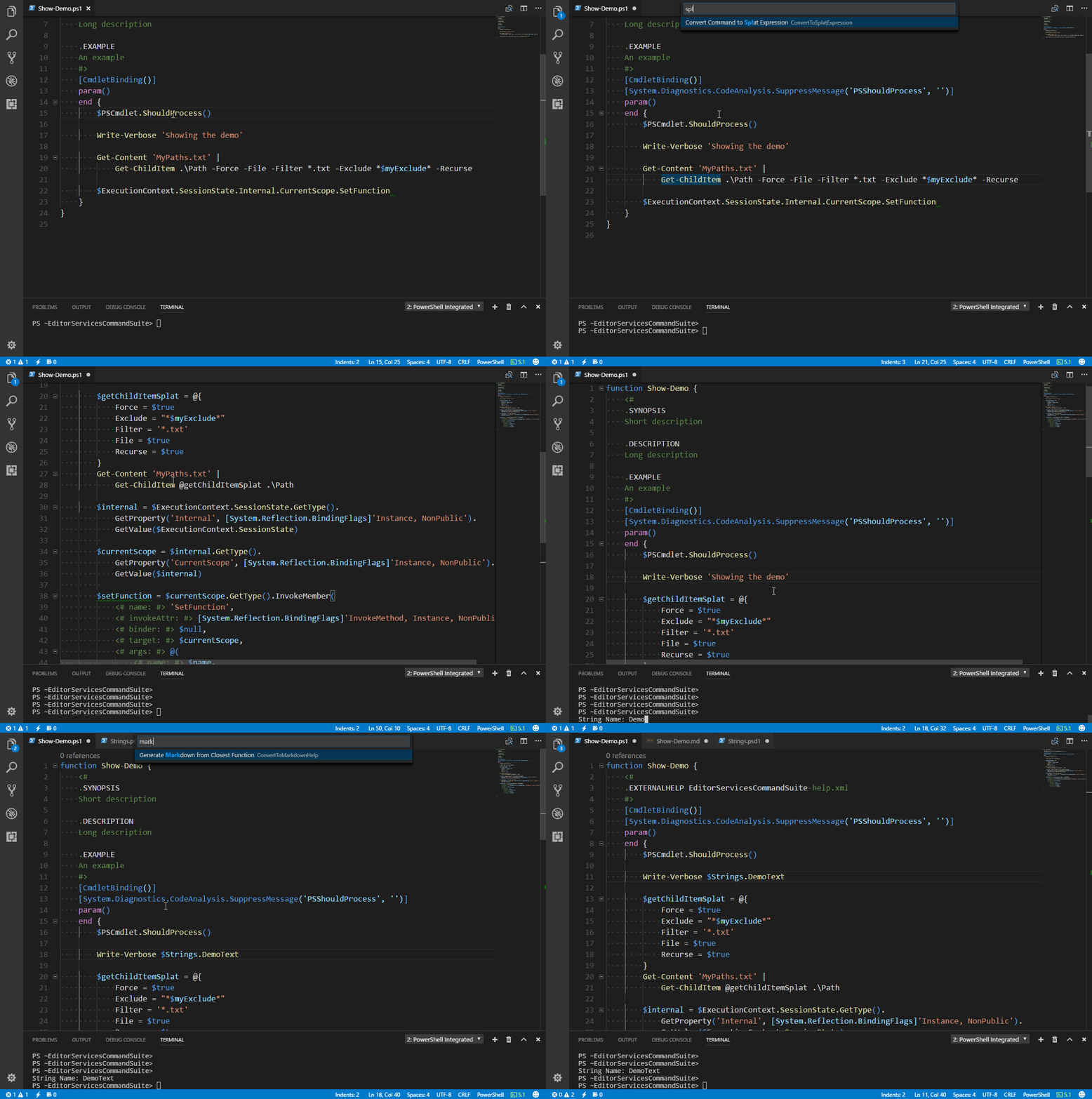
- Generate markdown help using PlatyPS
- Implement a .NET interface with PowerShell classes
- Module maintenance like adding commands to the manifest
- Suppress PSScriptAnalyzer rules
- Splat commands
## Documentation
Check out our **[documentation](https://github.com/SeeminglyScience/EditorServicesCommandSuite/tree/master/docs/en-US/EditorServicesCommandSuite.md)** for a full list of editor commands and what they do.
## Demo
## Installation
### Install from the Gallery
```powershell
Install-Module EditorServicesCommandSuite -Scope CurrentUser -AllowPrerelease -RequiredVersion 1.0.0-beta4
```
### Add to Profile (Optional)
```powershell
# Place this in your VSCode profile
Import-CommandSuite
```
```powershell
# Or copy this command and paste it into the integrated console
psedit $profile;$psEditor|% g*t|% c*e|% i* "Import-CommandSuite`n" 1 1 1 1
```
## Importing
```powershell
Import-CommandSuite
```
This function will import all editor commands in the module and initialize event handlers.
## Using Editor Commands
Check out the [Using Editor Commands](http://powershell.github.io/PowerShellEditorServices/guide/extensions.html#using-editor-commands) guide in the PowerShell Editor Services documentation. I also highly recommend setting up a hotkey for the editor command menu. Here is mine as an example.
```json
{ "key": "ctrl+shift+c", "command": "PowerShell.ShowAdditionalCommands",
"when": "editorLangId == 'powershell'" },
```
## Settings
This module is built to be compatible with the project structure from my Plaster template [SSPowerShellBoilerplate](https://github.com/SeeminglyScience/SSPowerShellBoilerplate). If you prefer a different structure you can configure the paths with a workspace settings file. You can create a default settings file in the current workspace with the [New-ESCSSettingsFile](./docs/en-US/New-ESCSSettingsFile.md) function.
## Included Commands
All commands unless otherwise noted target the closest relevant expression.
|Function Name|Editor Command Name|Description|
|---|---|---|
|Add-CommandToManifest|Add Closest Function To Manifest|Add a function to the manifest fields ExportedFunctions and FileList|
|Add-ModuleQualification|Add Module Name to Closest Command|Infers the origin module of the command closest to the cursor and prepends the module name|
|Add-PinvokeMethod|Insert Pinvoke Method Definition|Searches the pinvoke.net web service for a matching function and creates a Add-Type expression with the signature|
|ConvertTo-FunctionDefinition|Create New Function From Selection|Generate a function definition expression from current selection|
|ConvertTo-LocalizationString|Add Closest String to Localization File|Replaces a string expression with a variable that references a localization file, and adds the string to that file|
|ConvertTo-MarkdownHelp|Generate Markdown from Closest Function|Generate markdown using PlatyPS, add the markdown file to your docs folder, and replace the comment help with an external help file comment.|
|ConvertTo-SplatExpression|Convert Command to Splat Expression|Create a splat hashtable variable from named parameters in a command and replace the named parameters with a a splat expression.|
|Expand-Expression|Expand Selection Text to Output|Invoke the currently selected text and replace it with the result.|
|Expand-MemberExpression|Expand Member Expression|Expands the closest member expression of a non-public member to a reflection statement to access it. For public methods it will also expand to include parameter name comments.|
|Expand-TypeImplementation|Expand Closest Type to Implementation|Replace a type expression with a class that implements the .NET class. Includes methods that are required to be implemented.|
|Remove-Semicolon|Remove cosmetic semicolons|Remove semi-colons that are at the end of a line, not in a string, and not a part of a property definition in a class.|
|Set-HangingIndent|Set Selection Indent to Selection Start|Indent selected lines to the start of the selection.|
|Set-RuleSuppression|Suppress Closest Analyzer Rule Violation|Create a SuppressMessage attribute for the closest rule violation and place it either above the violation if supported or above the param block.|
|Set-UsingStatementOrder|Sort Using Statements|Sort using statements by type (assembly, module, or namespace) and alphabetically|
## Contributions Welcome!
We would love to incorporate community contributions into this project. If you would like to
contribute code, documentation, tests, or bug reports, please read our [Contribution Guide](https://github.com/SeeminglyScience/EditorServicesCommandSuite/tree/master/docs/CONTRIBUTING.md) to learn more.