https://github.com/selfmadeengineercode/microservices-go-starter
Starter template for the Ride-Sharing course project - Microservices with Go
https://github.com/selfmadeengineercode/microservices-go-starter
golang grpc microservice rabbitmq
Last synced: 2 months ago
JSON representation
Starter template for the Ride-Sharing course project - Microservices with Go
- Host: GitHub
- URL: https://github.com/selfmadeengineercode/microservices-go-starter
- Owner: SelfMadeEngineerCode
- Created: 2025-03-06T11:30:03.000Z (over 1 year ago)
- Default Branch: main
- Last Pushed: 2025-07-07T12:46:53.000Z (12 months ago)
- Last Synced: 2025-07-07T14:03:23.917Z (12 months ago)
- Topics: golang, grpc, microservice, rabbitmq
- Language: TypeScript
- Homepage: https://www.selfmadeengineer.com/courses/microservices-with-go
- Size: 110 KB
- Stars: 1
- Watchers: 1
- Forks: 0
- Open Issues: 0
-
Metadata Files:
- Readme: README.md
Awesome Lists containing this project
README
# "Microservices with Go" course project
This is the starter code for the "Microservices with Go" project.
## Project overview
In this project‑driven course, you’ll build the backend microservices system for a Uber‑style ride‑sharing app from the ground up—using Go, Docker, and Kubernetes.
By the end, you’ll have a fully deployed, horizontally scalable ride‑sharing system that’s ready for real traffic. Plus, you’ll walk away with reusable template for building future distributed projects—accelerating your path to become a lead engineer.
Check it out at: https://www.selfmadeengineer.com/
## Trip Scheduling Flow
[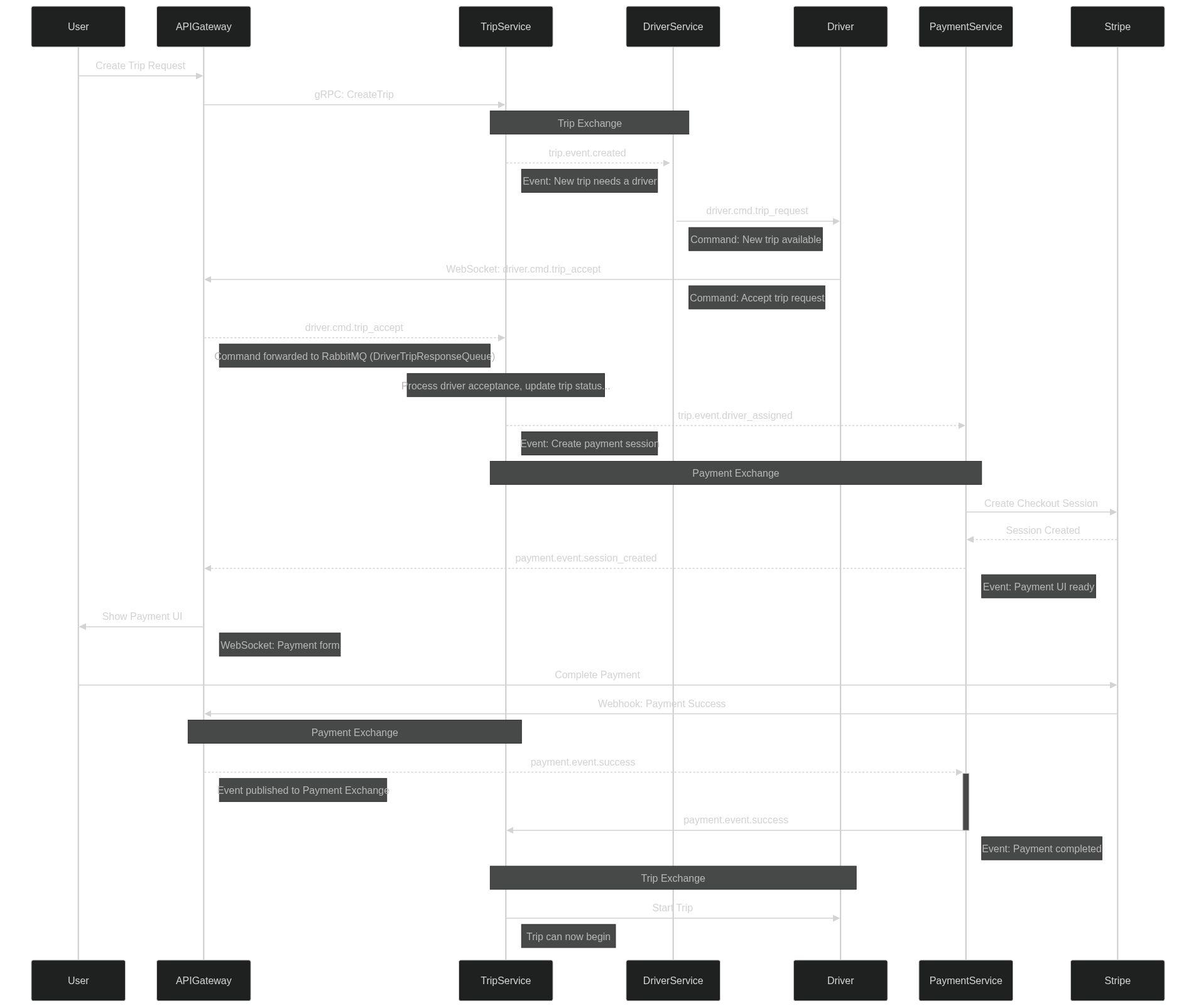](https://mermaid.live/edit#pako:eNqNVt9v2jAQ_lcsP21qGvGjZSEPlSpaTX1YxWDVpAmpMvZBIkicOQ6UVf3fd4mdEgcKzQOK47v7vjt_d-aVcimAhnSW5vC3gJTDXcyWiiWzlOCTMaVjHmcs1eQpB3X49Xb88J1p2LLd4d4vFWdTUJuYw-HmnYo3oM5sH34fs10Cqf7Qb6oRFL-bnZLz5c3NnmRIRgrwteJGJmXOuTa2eyP0aFAPyXIyHtWO5YaxN7-PEoNJpNrM1nOSCw3Y_QuPWLq0nBvWl4h30fIos_Bhg5n6vMIVDTgVLyNN5II4LO9L65A8wrbyJimAyAkjwlbSBHBwENisQ2vl80T4pfezapbGRW1RHckkYaloILMNi9dsvgYXtHUQv2E-lXwF-hCccQ5ZE3sNiwZ0A_O2sjSw6oPTbB_nWbT3TB3dGEiykGrLlABBtCQTNp_H-sdP8sUwK3EmkGcS2-lnAQV8rUtwVCchGSvJIc8tJ2KoMGxDjxSZKIVapZZrpovc9_2j4nF7whGPifvM8jxepp8XkW2SzAQmOVKMZXoyF6_Nwq5bunetkLxp2HfIUQR8JQts5Bqz9DJGx3K1ZtZdHAVpCc9mZStkc3s-0WZtTFukOsGnB5QeE7u6PM4gKScQsozktmF_TmuN1qidUHZJa6q9V04m2RowlrV1SnbQc5GUq33YacFL_R2faHtPzxXt0ZN1O-6iXbRW1Zu4HxeiqjTJivk6ziPTcp-U1aXD-NPgZ46a21KL061Qj6kzc38_facarzCyv1tOdGgVk7OUpCipOSxjZEI9moBKWCzwKn8tQ8yojiCBGQ3xVTC1muEV_4Z2rNByuks5DbUqwKNKFsuIhgu2znFlZo79C1Cb4L36R8rmkoav9IWGvW_-1XVn0O_1-kE3GAyHgUd3-Lnb8fu9frc_xKfbvQ6CN4_-qyJ0_KDX7Q86QTDoDAfD66ve23_1IPGQ)
## Installation
The project requires a couple tools to run, most of which are part of many developer's toolchains.
- Docker
- Go
- Tilt
- A local Kubernetes cluster
### MacOS
1. Install Homebrew from [Homebrew's official website](https://brew.sh/)
2. Install Docker for Desktop from [Docker's official website](https://www.docker.com/products/docker-desktop/)
3. Install Minikube from [Minikube's official website](https://minikube.sigs.k8s.io/docs/)
4. Install Tilt from [Tilt's official website](https://tilt.dev/)
5. Install Go on MacOS using Homebrew:
```bash
brew install go
```
6. Make sure [kubectl](https://kubernetes.io/docs/tasks/tools/install-kubectl-macos/) is installed.
### Windows (WSL)
This is a step by step guide to install Go on Windows using WSL.
You can either install via WSL (recommended) or using powershell (not covered, but similar to WSL).
1. Install WSL for Windows from [Microsoft's official website](https://learn.microsoft.com/en-us/windows/wsl/install)
2. Install Docker for Windows from [Docker's official website](https://www.docker.com/products/docker-desktop/)
3. Install Minikube from [Minikube's official website](https://minikube.sigs.k8s.io/docs/)
4. Install Tilt from [Tilt's official website](https://tilt.dev/)
5. Install Go on Windows using WSL:
```bash
# 1. Get the Go binary
wget https://dl.google.com/go/go1.23.0.linux-amd64.tar.gz
# 2. Extract the tarball
sudo tar -xvf go1.23.0.linux-amd64.tar.gz
# 3. Move the extracted folder to /usr/local
sudo mv go /usr/local
# 4. Add Go to PATH (following the steps from the video)
cd ~
explorer.exe .
# Open .bashrc file and add following lines at the bottom and save the file.
export GOROOT=/usr/local/go
export GOPATH=$HOME/go
export PATH=$GOPATH/bin:$GOROOT/bin:$PATH
# 5. Verify the installation
go version
```
6. Make sure [kubectl](https://kubernetes.io/docs/tasks/tools/install-kubectl-macos/) is installed.
## Run
```bash
tilt up
```
## Monitor
```bash
kubectl get pods
```
or
```bash
minikube dashboard
```
## Deployment (Google Cloud example)
It's advisable to first run the steps manually and then build a proper CI/CD flow according to your infrastructure.
## 0. Environments
```bash
REGION: europe-west1 # change according to your location
PROJECT_ID:
```
## 1. Add secrets.yaml file to the production folder
Production folder needs to contain a secrets.yaml for the production environment, you can just copy secrets from the development folder for now.
## 2. Build Docker Images
Build all docker images and tag them accordingly to push to Artifact Registry.
```bash
# Build the Api gateway
docker build -t {REGION}-docker.pkg.dev/{PROJECT_ID}/ride-sharing/api-gateway:latest --platform linux/amd64 -f infra/production/docker/api-gateway.Dockerfile .
# Build the Driver service
docker build -t {REGION}-docker.pkg.dev/{PROJECT_ID}/ride-sharing/driver-service:latest --platform linux/amd64 -f infra/production/docker/driver-service.Dockerfile .
# Build the Trip service
docker build -t {REGION}-docker.pkg.dev/{PROJECT_ID}/ride-sharing/trip-service:latest --platform linux/amd64 -f infra/production/docker/trip-service.Dockerfile .
# Build the Payment service
docker build -t {REGION}-docker.pkg.dev/{PROJECT_ID}/ride-sharing/payment-service:latest --platform linux/amd64 -f infra/production/docker/payment-service.Dockerfile .
```
## 3. Create a Artifact Registry repository
Go to Google Cloud > Artifact Registry and manually create a docker repository to host your project images.
## 4. Push the Docker images to artifact registry
Docker push the images.
If you get errors pushing:
1. Make sure to `gcloud login`, select the right project or even `gcloud init`.
2. Configure artifact on your docker config `gcloud auth configure-docker {REGION}-docker.pkg.dev` [Docs](https://cloud.google.com/artifact-registry/docs/docker/pushing-and-pulling#cred-helper)
## 5. Create a Google Kubernetes Cluster
You can either run a `gcloud` command to start a GKE cluster or manually create a cluster on the UI (recommended).
## 6. Update manifests files
Connect to your remote cluster and apply the kubernetes manifests.
```bash
gcloud container clusters get-credentials ride-sharing --region {REGION}--project {PROJECT_ID}
```
Next, upload each manifest by hand to make sure the correct order is maintained.
```bash
# First, apply the app-config and secrets
kubectl apply -f infra/production/k8s/app-config.yaml
kubectl apply -f infra/production/k8s/secrets.yaml
# Jaeger
kubectl apply -f infra/production/k8s/jaeger-deployment.yaml
# RabbitMQ
kubectl apply -f infra/production/k8s/rabbitmq-deployment.yaml
# Wait for both Jaeger and RabbitMQ to be running successfully
# Then, apply the services
kubectl apply -f infra/production/k8s/api-gateway-deployment.yaml
# Wait until the API is up and then do the next and so on...
kubectl apply -f infra/production/k8s/driver-service-deployment.yaml
kubectl apply -f infra/production/k8s/trip-service-deployment.yaml
kubectl apply -f infra/production/k8s/payment-service-deployment.yaml
```
If you need to redeploy you can use the same command above or just `kubectl apply -f infra/production/k8s`
Sometimes pods might need to be deleted for new ones to be deployed.
```bash
kubectl get pods
kubectl delete pod
# or for all deployments
kubectl rollout restart deployment
```
## 7. Enjoy!
```bash
Get the External IP from the api-gateway
kubectl get services
```
Go back to locally developing your project by changing kubernetes context
```bash
kubectl config get-contexts
# For Docker Desktop
kubectl config use-context docker-desktop
# OR for Minikube
kubectl config use-context minikube
```
## Adding HTTPS to your API
0. Reserve a static IP in GCP:
Go to the Google Cloud Console → VPC Network → External IP addresses.
Click "RESERVE STATIC ADDRESS".
Name it api-gateway-ip (to match your annotation).
Choose the same region as your GKE cluster (or "global" if using a global Ingress).
Confirm your IP exists:
```bash
gcloud compute addresses list
```
1. Add the ingress deployment
2. Change from LoadBalancer to ClusterIP
3. Apply the config
```bash
kubectl apply -f infra/production/k8s/api-gateway-ingress.yaml
kubectl apply -f infra/production/k8s/api-gateway-deployment.yaml
```
4. Get the IP address:
```bash
kubectl get ingress api-gateway-ingress
```
You should also wait for SSL certificate to be provisioned. Check the status:
```bash
kubectl describe managedcertificate api-gateway-cert
```
Once the certificate is provisioned (you'll see a "Provisioning" status change to "Active")
5. The Ingress will automatically provision a Google-managed SSL certificate for the IP address. You can access your API using:
```bash
https://
```
Note: Since this is using a self-signed certificate, browsers will show a security warning. This is normal and expected. You can:
Accept the warning in your browser (not recommended for production)
Use a proper domain name (recommended for production)