https://github.com/selfup/gdsm
Go Daemon Socket Manager - Distribute Go apps with ease
https://github.com/selfup/gdsm
Last synced: 11 months ago
JSON representation
Go Daemon Socket Manager - Distribute Go apps with ease
- Host: GitHub
- URL: https://github.com/selfup/gdsm
- Owner: selfup
- License: mit
- Created: 2019-07-08T23:04:11.000Z (almost 7 years ago)
- Default Branch: master
- Last Pushed: 2025-02-18T03:57:36.000Z (over 1 year ago)
- Last Synced: 2025-03-16T02:27:15.889Z (over 1 year ago)
- Language: Go
- Homepage:
- Size: 40 KB
- Stars: 1
- Watchers: 1
- Forks: 0
- Open Issues: 0
-
Metadata Files:
- Readme: README.md
- License: LICENSE
Awesome Lists containing this project
README
[](https://gitlab.com/selfup/gdsm/pipelines)
[](https://godoc.org/github.com/selfup/gdsm)
# GDSM (MATTD)
_aka MATT (Map Active TCP Tunnels) Daemon_
Similar to [EPMD (Erlang Port Mapper Daemon)](http://erlang.org/doc/man/epmd.html) but for Go!
Very much ALPHA STAGE. API is subject to change. Single Node Manager might go away and a Manager-less system might become a reality.
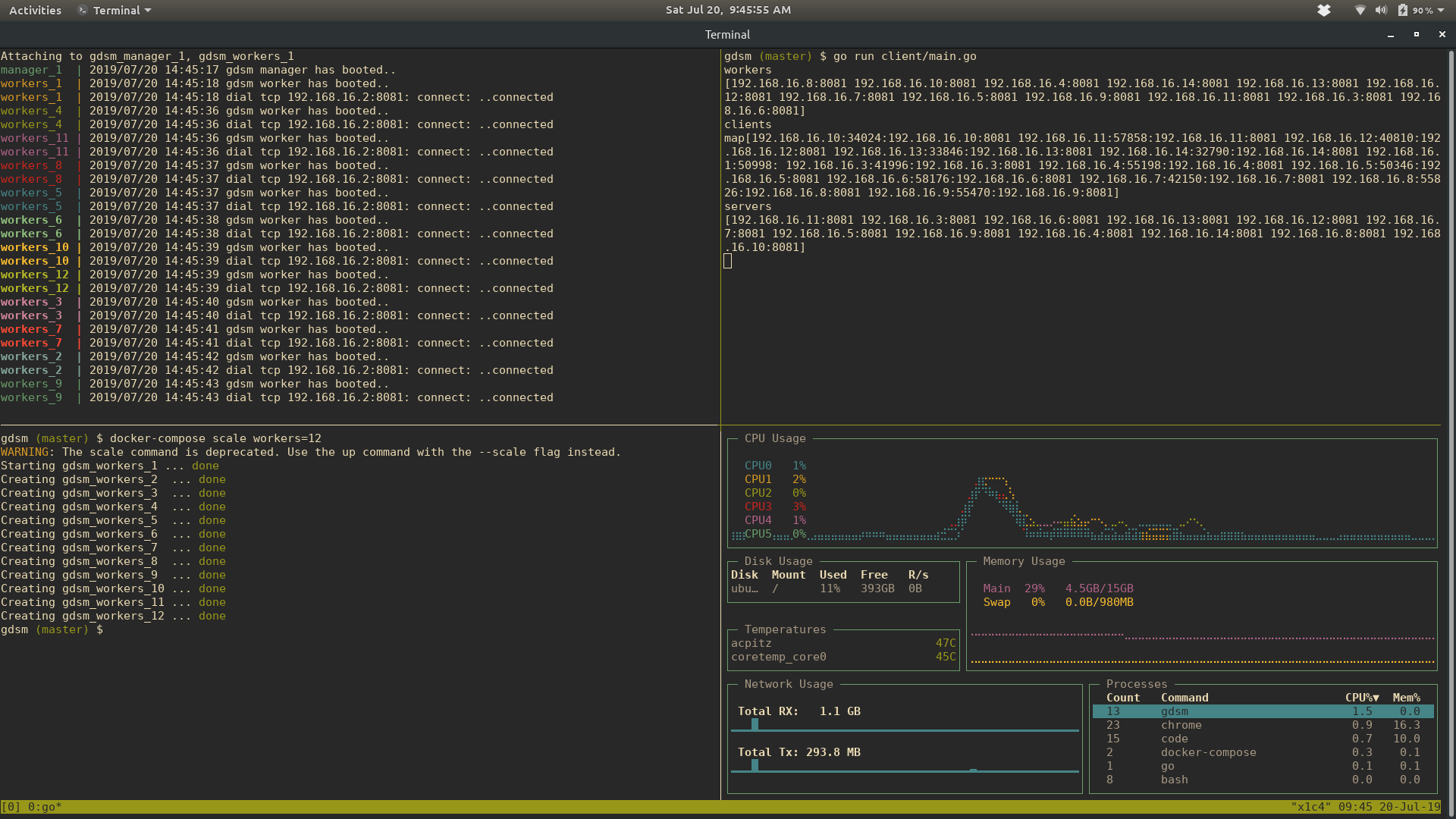
### What does this do?
This is a manager based (single node manager) solution that can help truly distributed Golang apps to exist.
Any worker node you have can connect to the manager. If any other worker nodes are connected to the manager, they will be updated with the new worker in a pipe delimeted list of IPs.
Example:
```
192.168.16.3:8081|192.168.16.4:8081
```
The manager (IP/DNS name) needs to be known.
If the manager goes down, the workers will keep the same list of workers until the manager comes back up. All workers will attempt to reconnect every second.
Semaphores are heavily utilized. No race conditions should occur.
Can be used as a health indicator for a fleet of nodes in a cluster.
### How to use?
_Non blocking_
```go
package main
import (
"log"
"time"
"github.com/selfup/gdsm"
)
func main() {
daemon := gdsm.BuildDaemon()
go gdsm.BootDaemon(daemon)
time.Sleep(2 * time.Second)
nodes := daemon.Nodes()
log.Println("nodes", nodes)
workers := daemon.Workers()
log.Println("workers", workers)
log.Println("not blocked")
}
```
_Blocking_
```go
package main
import (
"github.com/selfup/gdsm"
)
func main() {
daemon := gdsm.BuildDaemon()
gdsm.BootDaemon(daemon)
}
```
For the MANAGER node, just expose an ENV: `MANAGER=true go run cmd/daemon/main.go`
For the worker nodes: `UPLINK=manager_dns_or_ip_and:port go run cmd/daemon/main.go`
If running on the same IP you will need to assign separate PORT ENVs for each process:
Example (different shells/tabs/panes/terminals):
```
MANAGER=true go run cmd/daemon/main.go
UPLINK=localhost:8081 PORT=8082 go run cmd/daemon/main.go
UPLINK=localhost:8081 PORT=8083 go run cmd/daemon/main.go
UPLINK=localhost:8081 PORT=8084 go run cmd/daemon/main.go
```
Please reference the quite simple `docker-compose.yml` to understand the order and ENV variables needed.
Example logs of workers and a manager booting and attaching:
```
manager_1 | 2019/07/19 19:23:41 gdsm manager has booted..
workers_1 | 2019/07/19 19:23:42 gdsm worker has booted..
workers_1 | 2019/07/19 19:23:42 dial tcp 192.168.16.2:8081: connect: ..connected
workers_2 | 2019/07/19 19:24:26 gdsm worker has booted..
workers_2 | 2019/07/19 19:24:26 dial tcp 192.168.16.2:8081: connect: ..connected
```
### Using client/main.go to query the manager
`go run cmd/client/main.go`
Then ask for questions in the shell:
```
$ go run cmd/client/main.go
workers
172.23.0.3:8081|172.23.0.6:8081|172.23.0.7:8081|172.23.0.9:8081
servers
172.23.0.3|172.23.0.6|172.23.0.7|172.23.0.9
nodes
172.23.0.7|172.23.0.9|172.23.0.3|172.23.0.6
clients
172.23.0.3:52824|172.23.0.1:34626|172.23.0.6:35436|172.23.0.7:54964|172.23.0.9:51984
```
You may also set ENV vars for the IP and PORT as so:
`IP=0.0.0.0 PORT=8081 go run cmd/client/main.go`
You can also query the workers, but typically the manager should be the only node exposed.
### Registry
registry.gitlab.com
### Docker Image (1.5MB)
registry.gitlab.com/selfup/gdsm:latest
### Release Repo
https://gitlab.com/selfup/gdsm
### Watch
You will need `entr`
`./scripts/watch.sh`
### Watch, build container, and run manager/workers with docker-compose
You will need `entr`
`./scripts/docker.watch.sh`