https://github.com/selfup/mega_power
Pulls data from nyc gov api for mega millions and powerball. Basic CLI functionality
https://github.com/selfup/mega_power
Last synced: about 1 year ago
JSON representation
Pulls data from nyc gov api for mega millions and powerball. Basic CLI functionality
- Host: GitHub
- URL: https://github.com/selfup/mega_power
- Owner: selfup
- License: mit
- Created: 2018-09-21T03:27:01.000Z (over 7 years ago)
- Default Branch: master
- Last Pushed: 2019-08-12T00:15:32.000Z (almost 7 years ago)
- Last Synced: 2025-01-22T15:11:21.677Z (over 1 year ago)
- Language: PowerShell
- Size: 18.6 KB
- Stars: 1
- Watchers: 2
- Forks: 0
- Open Issues: 0
-
Metadata Files:
- Readme: README.md
- License: LICENSE
Awesome Lists containing this project
README
# MEGA POWER
[Go](#go)
[Bash](#bash)
[Powershell](#powershell)
Fetches Powerball and Megamillions CSV data from the NewYork Gov Website.
`https://data.ny.gov/api/views/:id/rows.csv?accessType=DOWNLOAD`
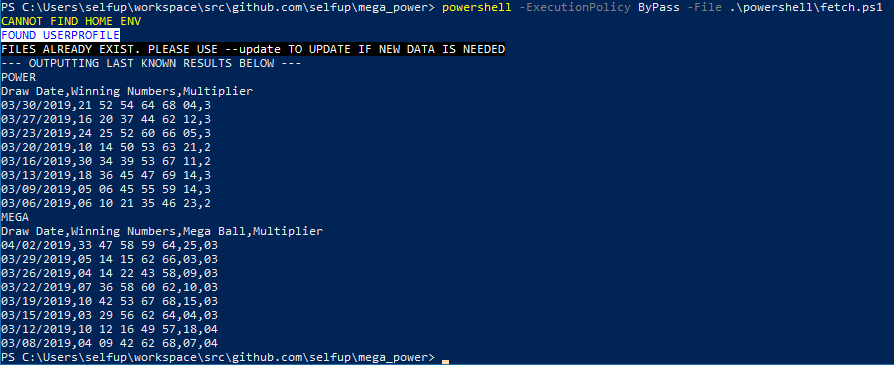
If data is already local, it just reads the existing files.
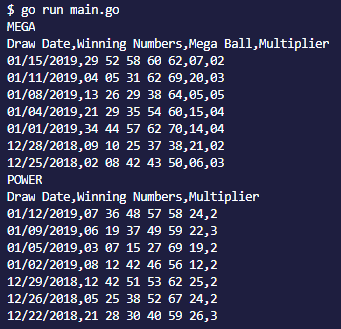
If you pass `new` to the `go` program it fetches new data.
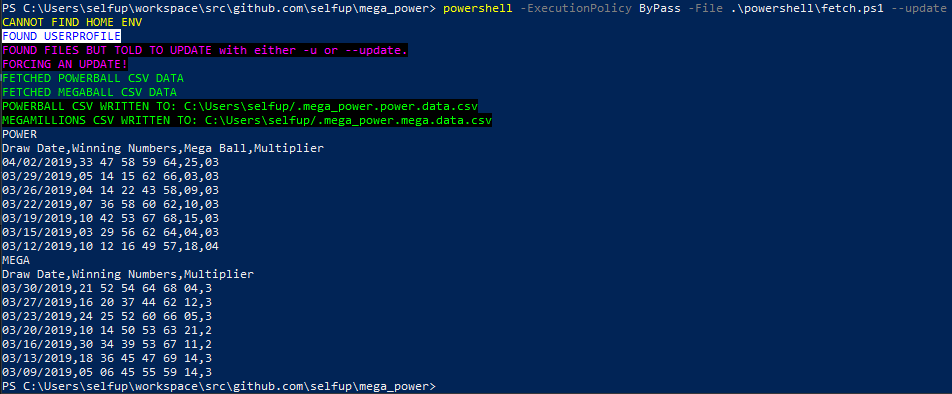
If you pass `--update` or `-u` to the `powershell` program it fetches new data.
If you use `bash`, you will update manually. But it's quite simple :smile:
Example of latest 8
## Fair Warning
Since files are being written, I write two dotfiles in your `HOME/USERPROFILE` directory:
- macOS/Linux: `$HOME`
- Windows: `%USERPROFILE%`
To get rid of these harmless files: `rm ~/.mega_power.*` (bash/pwsh) :pray:
## Be nice
Don't slam the api. I would just call `new` (go) or `--update` (pwsh) every few days. Keep the data fresh, api calls low :boat:
## Go
```bash
go get github.com/selfup/mega_power \
&& go install github.com/selfup/mega_power
```
Now globally: `mega_power`
To update the files (new drawing) just pass `new`: `mega_power new` or `go run main.go new` :tada:
## Development
**Go**
If you want to work on this make sure you clone this into your `$GOPATH`
Otherwise imports will break :boom:
**Bash/Powershell**
Just regular git flow, anywhere on the machine should be fine :smile:
## Bash
_cd into this repo_
#### Fetch lottery data for Mega and Power
_If you recently ran the `go` or `powershell` scripts you can skip this step unless you need to update for a more recent drawing_
`./scripts/fetch.data.sh`
#### Check last [n] drawings for Mega
`./scripts/mega.last.sh 3` --> returns last 3 drawings
#### Check last [n] drawings for Power
`./scripts/power.last.sh 3` --> returns last 3 drawings
#### Check by date of drawing
```bash
./scripts/date.mega.sh "09/21/2018"
09/21/2018,01 02 11 52 64,09,04
```
This is just a grep, so you can check by only month - day - year or any combo of MM/DD/YY
Example:
```bash
./scripts/date.mega.sh "21/2018"
08/21/2018,14 16 19 38 57,11,03
09/21/2018,01 02 11 52 64,09,04
```
#### Check to see if numbers match
Use a last scripts for your lottery of choice
`numbers.mega.sh` takes two args:
1. First arg is how many latest drawings
1. Second arg is a string of the numbers you wanna grep
```bash
./scripts/numbers.mega.sh 3 "01 02"
```
Returns:
```bash
09/21/2018,01 02 11 52 64,09,04
```
Grep is nice and highlights matches in red :tada:
To narrow down the grep you can filter by date if your ticket is old or something.
You can even just check for one number on that draw date too:
```bash
./scripts/numbers.mega.sh 3 "01 02" | grep "09/21/2018"
09/21/2018,01 02 11 52 64,09,04
```
## PowerShell
_cd into this repo_
Basic use:
```powershell
.\powershell\fetch.ps1
```
If you get a permission error, try:
```powershell
powershell -ExecutionPolicy ByPass -File .\powershell\fetch.ps1
```
#### Update Data Flag
Full prompt when updating existing csv data:
```powershell
powershell -ExecutionPolicy ByPass -File .\powershell\fetch.ps1 --update
```