https://github.com/semyonsinchenko/flake8-pyspark-with-column
A flake8 plugin that detects of usage withColumn in a loop or inside reduce
https://github.com/semyonsinchenko/flake8-pyspark-with-column
flake8 flake8-plugin flake8-plugins lint linter linting pyspark
Last synced: over 1 year ago
JSON representation
A flake8 plugin that detects of usage withColumn in a loop or inside reduce
- Host: GitHub
- URL: https://github.com/semyonsinchenko/flake8-pyspark-with-column
- Owner: SemyonSinchenko
- License: apache-2.0
- Created: 2024-09-22T09:18:32.000Z (almost 2 years ago)
- Default Branch: main
- Last Pushed: 2025-01-15T10:17:35.000Z (over 1 year ago)
- Last Synced: 2025-03-17T03:41:46.501Z (over 1 year ago)
- Topics: flake8, flake8-plugin, flake8-plugins, lint, linter, linting, pyspark
- Language: Python
- Homepage: https://pypi.org/project/flake8-pyspark-with-column/
- Size: 169 KB
- Stars: 27
- Watchers: 2
- Forks: 1
- Open Issues: 0
-
Metadata Files:
- Readme: README.md
- License: LICENSE
Awesome Lists containing this project
README
# Flake8-pyspark-with-column
[](https://github.com/SemyonSinchenko/flake8-pyspark-with-column/actions/workflows/python-publish.yml) 
## Getting started
```sh
pip install flake8-pyspark-with-column
flake8 --select PSRPK001,PSPRT002,PSPRK003,PSPRK004
```
Alternatively you can add the following `tox.ini` file to the root of your project:
```
[flake8]
select =
PSPRK001,
PSPRK002,
PSPRK003,
PSPRK004
```
## About
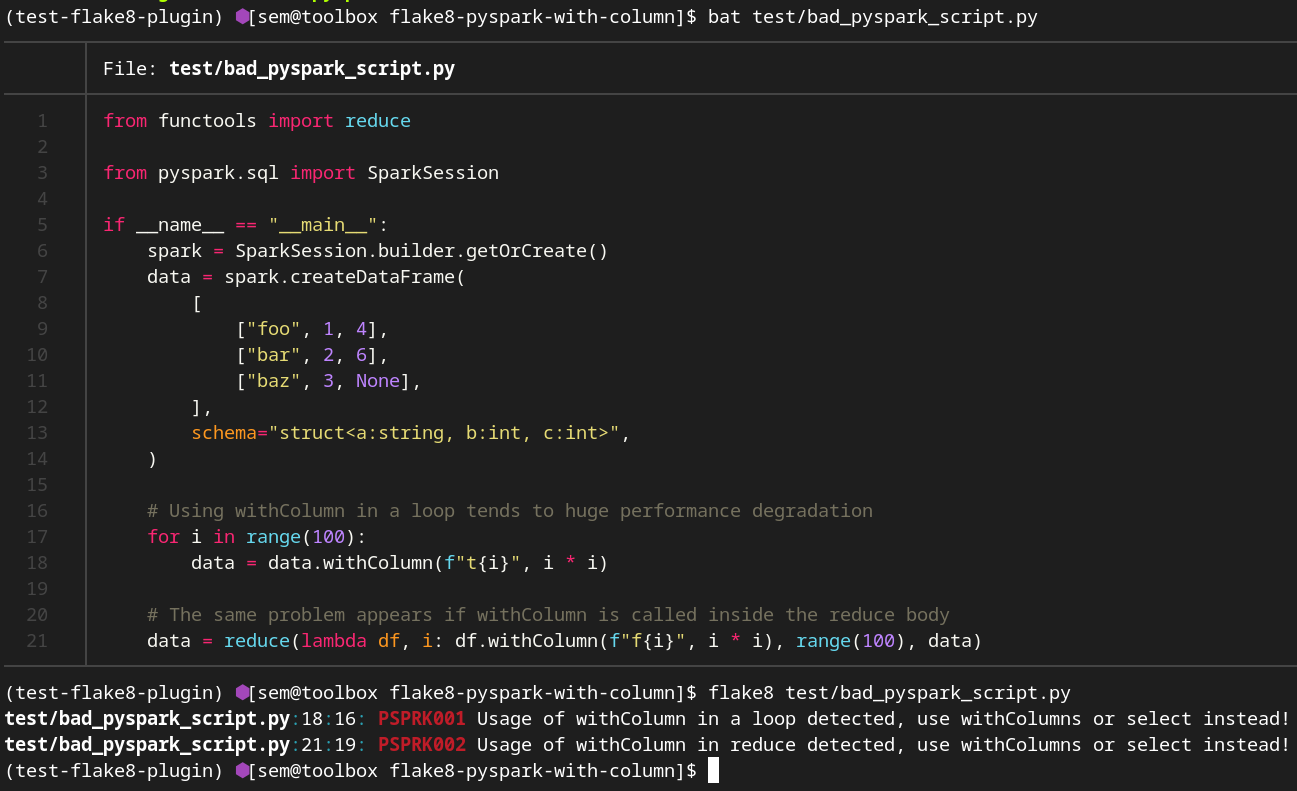
A flake8 plugin that detects of usage `withColumn` in a loop or inside `reduce`. From the PySpark documentation about `withColumn` method:
> This method introduces a projection internally. Therefore, calling it multiple times, for instance, via loops in order to add multiple columns can generate big plans which can cause performance issues and even StackOverflowException. To avoid this, use select() with multiple columns at once.
### What happens under the hood?
When you run a PySpark application the following happens:
1. Spark creates `Unresolved Logical Plan` that is a result of parsing SQL
2. Spark do analysis of this plan to create an `Analyzed Logical Plan`
3. Spark apply optimization rules to create an `Optimized Logical Plan`
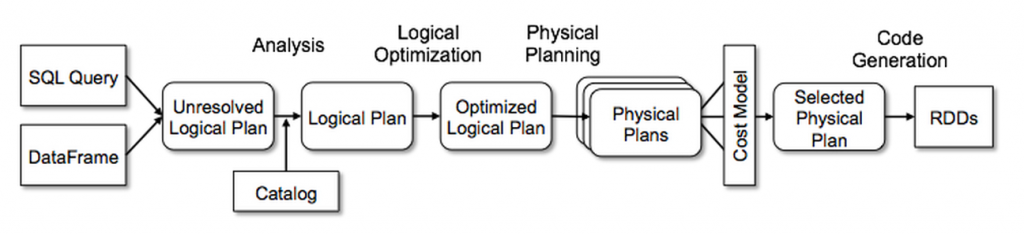
What is the problem with `withColumn`? It creates a single node in the unresolved plan. So, calling `withColumn` 500 times will create an unresolved plan with 500 nodes. During the analysis Spark should visit each node to check that column exists and has a right data type. After that Spark will start applying rules, but rules are applyed once per plan recursively, so concatenation of 500 calls to `withColumn` will require 500 applies of the corresponding rule. All of that may significantly increase the amount of time from `Unresolved Logical Plan` to `Optimized Logical Plan`:
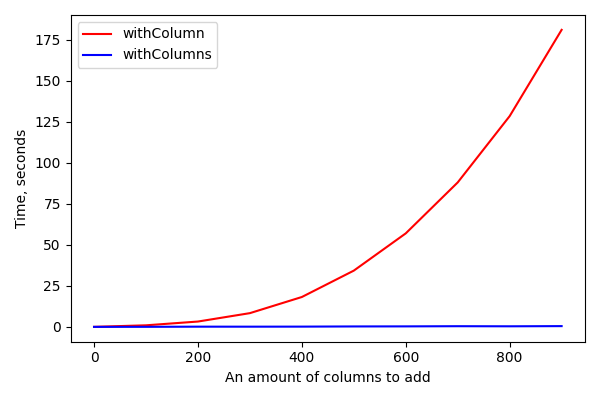
From the other side, both `withColumns` and `select(*cols)` create only one node in the plan doesn't matter how many columns we want to add.
## Rules
This plugin contains the following rules:
- `PSPRK001`: Usage of withColumn in a loop detected
- `PSPRK002`: Usage of withColumn inside reduce is detected
- `PSPRK003`: Usage of withColumnRenamed in a loop detected
- `PSPRK004`: Usage of withColumnRenamed inside reduce is detected
### Examples
Let's imagine we want to apply an ML model to our data but our Model expects double values and our table contain decimal values. The goal is to cast all `Decimal` columns to `Double`.
Implementation with `withColumn` (bad example):
```python
def cast_to_double(df: DataFrame) -> DataFrame:
for field in df.schema.fields:
if isinstance(field.dataType, DecimalType):
df = df.withColumn(field.name, col(field.name).cast(DoubleType()))
return df
```
Implementation without `withColumn` (good example):
```python
def cast_to_double(df: DataFrame) -> DataFrame:
cols_to_select = []
for field in df.schema.fields:
if isinstance(field.dataType, DecimalType):
cols_to_select.append(col(field.name).cast(DoubleType()).alias(field.name))
else:
cols_to_select.append(col(field.name))
return df.select(*cols_to_select)
```
## Usage
`flake8 %your-code-here%`