https://github.com/sendgrid/sendgrid-parse-api-example
Example application using the SendGrid Parse API.
https://github.com/sendgrid/sendgrid-parse-api-example
Last synced: 10 months ago
JSON representation
Example application using the SendGrid Parse API.
- Host: GitHub
- URL: https://github.com/sendgrid/sendgrid-parse-api-example
- Owner: sendgrid
- Created: 2013-09-19T03:37:08.000Z (almost 13 years ago)
- Default Branch: master
- Last Pushed: 2024-02-10T05:34:43.000Z (over 2 years ago)
- Last Synced: 2024-04-08T17:29:21.684Z (over 2 years ago)
- Language: JavaScript
- Homepage:
- Size: 129 KB
- Stars: 45
- Watchers: 199
- Forks: 19
- Open Issues: 5
-
Metadata Files:
- Readme: README.md
Awesome Lists containing this project
README
# sendgrid-parse-api-example
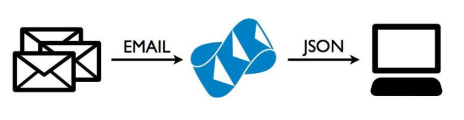
Example application using the SendGrid Parse API.
This application demonstrates how to use SendGrid's Parse API. Additionally, it acts as a boilerplate of code that you can adjust to your own needs. It comes with complete instructions for getting the SendGrid Parse API working.
## Getting Started
You will need [an account on SendGrid](https://sendgrid.com/user/signup).
### Production
#### 1. Deploy to Heroku
Click this button to deploy to Heroku.
[](https://heroku.com/deploy)
#### 2. Check for 200 OK
Then you should be able to run the following - receiving a success 200 response.
```
$ curl -I -X POST http://your-heroku-subdomain.herokuapp.com/inbound
```
#### 3. Set SendGrid Parse Settings
Next, setup your [SendGrid Parsing Incoming Emails setting](http://sendgrid.com/developer/reply) like the following but with a hostname of your own and the url you deployed this app to. (You'll notice I actually made my hostname a subdomain `m.carve.io`. You can do the same or the more standard root of your domain.)

#### 4. Configure Your MX Records
Now you have to configure an MX record on the hostname you set above. It should look something like the following.

Now wait a couple hours to 48 hours. (It can take up to 48 hours for MX records to propagate around the world.)
#### 5. Send an Email
Send an email to `inbound@the-hostname-you-setup.com` and this app will now parse it.
It will deliver an email back to you with an attachment containing the content of the webhook data. The contents will look something [like this](https://gist.github.com/scottmotte/6642578/raw/d66d703abdd45addec9e8ff7aa92214db7dda326/gistfile1.txt).
#### 6. Adjust the code
You can now adjust the code in [routes/inbound.js](https://github.com/sendgrid/sendgrid-parse-api-example/blob/master/routes/inbound.js) to do whatever logic you require.
### Development
#### 1. Set ENV vars
```
$ mv .env.example .env
```
Change the contents of .env to your username and password.
```
SENDGRID_USERNAME=your_sendgrid_username
SENDGRID_PASSWORD=your_sendgrid_password
```
#### 2. Run App
```
$ npm install
$ node app.js
```
#### 3. Setup ngrok
Detailed [install instructions here](https://ngrok.com/).
```
$ wget https://dl.ngrok.com/darwin_amd64/ngrok.zip
$ unzip ngrok.zip -d /usr/local/bin
$ ngrok 3000
```
Note the url the `ngrok` command gives you.
#### 4. Set SendGrid Parse Settings
Next, setup your [SendGrid Parsing Incoming Emails setting](http://sendgrid.com/developer/reply) like the following but with a hostname of your own and the url granted to you from the `ngrok` command above plus the /inbound path.

#### 5. Configure Your MX Records
Now you have to configure an MX record on the hostname you set above. It should look something like the following.

Wait 1-48 hours. (It can take up to 48 hours for MX records to propagate around the world.)
#### 6. Send an Email
Send an email to `inbound@the-hostname-you-setup.com` and this app will now parse it.
It will deliver an email back to you with an attachment containing the content of the webhook data. The contents will look something [like this](https://gist.github.com/scottmotte/6642578/raw/d66d703abdd45addec9e8ff7aa92214db7dda326/gistfile1.txt).
## Alternatives
If you just need a quick way to inspect the payload contents of the Parse API webhook, I recommend using one of the following. You'll still have to setup your MX records.
* [RequestBin](http://requestb.in/)
* [HookDebug](hookdebug.sendgrid.com)