https://github.com/sensetecnic/wotkit-example-python-edison
A simple example to post data and actuate a relay using an Edison Arduino Board and WoTKit
https://github.com/sensetecnic/wotkit-example-python-edison
Last synced: 8 months ago
JSON representation
A simple example to post data and actuate a relay using an Edison Arduino Board and WoTKit
- Host: GitHub
- URL: https://github.com/sensetecnic/wotkit-example-python-edison
- Owner: SenseTecnic
- Created: 2015-05-26T23:21:21.000Z (about 11 years ago)
- Default Branch: master
- Last Pushed: 2015-05-27T00:26:01.000Z (about 11 years ago)
- Last Synced: 2024-12-27T12:12:51.335Z (over 1 year ago)
- Language: Python
- Size: 484 KB
- Stars: 0
- Watchers: 7
- Forks: 0
- Open Issues: 0
-
Metadata Files:
- Readme: README.md
Awesome Lists containing this project
README
This is a very simple script that posts data to a sensor and pulls from its control chanel using Sense Tecnic's IoT platform and an Intel Edison board.
Dependencies
================
* Python >2.7
* Wiringx86 (https://github.com/emutex/wiring-x86)
Getting Started
===============
You will need to create a WoTKit account at https://wotkit.sensetecnic.com
You can generate a key and password at: http://wotkit.sensetecnic.com/wotkit/keys.
You can create a sensor to receive the data at: http://wotkit.sensetecnic.com/wotkit/sensors
Edit the wotkit_demo.py file and modify the following lines to match your credentials and sensor name:
```
SENSOR_NAME = 'YOURSENSORNAME'
USERNAME = 'YOURUSERNAME'
PASSWORD = 'YOURPASSWORD'
```
Wiring Things Up
================
To wire a sensor (e.g. a temp sensor):
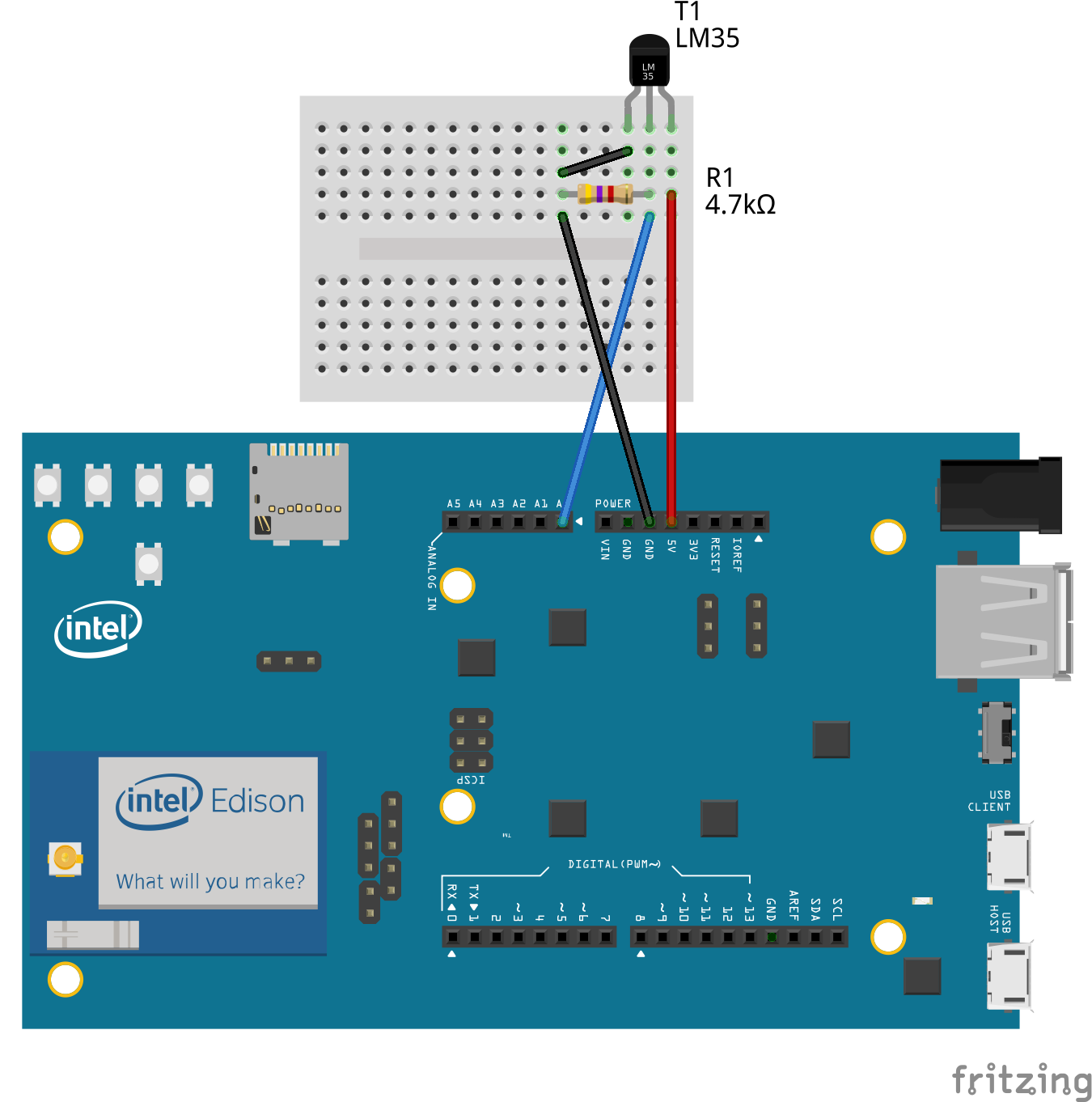
To wire a 5V relay:

Running Script
================
To run the script run:
```
python wotkit-edison.py
```
Running at Boot on Edison
=========================
Edison uses systemd for services, we have provided a file ```wotkit-edison.service``` that will run the shell script if located at ```/home/root/wotkit-example-python-edison/startwotkitedison.sh```.
So, first, make that file executable:
```
cd /home/root/wotkit-example-python-edison
chmod a+x startwotkitedison.sh
```
Copy the service file to the ```lib/systemd/system``` folder.
```
cd /home/root/wotkit-example-python-edison
cp wotkit-edison.service /lib/systemd/system/wotkit-edison.service
```
And now reload systemd and try to restart your service:
```
systemctl daemon-reload
systemctl start wotkit-edison.service
```
If everything is alright you should get no errors. If you want to configure it to start at boot enable it like so:
```
systemctl enable wotkit-edison.service
```
Now reboot and see if everything is alright.